
[iOS微博项目 - 2.2] - 在app中获取授权
 //

 //  HVWOAuthViewController.m

 //  HVWWeibo

 //

 //  Created by hellovoidworld on 15/2/4.

 //  Copyright (c) 2015年 hellovoidworld. All rights reserved.

 //

 #import "HVWOAuthViewController.h"

 @interface HVWOAuthViewController ()

 @end

 @implementation HVWOAuthViewController

 - (void)viewDidLoad {

     [super viewDidLoad];

     // Do any additional setup after loading the view.

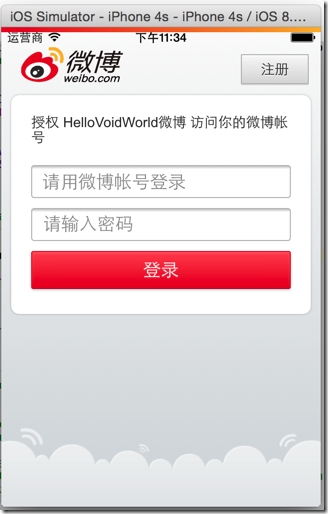
     // 创建UIWebView

     UIWebView *webView = [[UIWebView alloc] init];

     webView.frame = self.view.bounds;

     // 添加到主界面

     [self.view addSubview:webView];

     // 加载请求页面

     NSURL *url = [NSURL URLWithString:@"https://api.weibo.com/oauth2/authorize?client_id=3942775926&redirect_uri=http://www.cnblogs.com/hellovoidworld/"];

     NSURLRequest *request = [NSURLRequest requestWithURL:url];

     [webView loadRequest:request];

 }

 @end
 - (BOOL)application:(UIApplication *)application didFinishLaunchingWithOptions:(NSDictionary *)launchOptions {

     // Override point for customization after application launch.

     // 启动后显示状态栏

     UIApplication *app = [UIApplication sharedApplication];

     app.statusBarHidden = NO;

     // 设置window

     self.window = [[UIWindow alloc] init];

     self.window.frame = [UIScreen mainScreen].bounds;

     self.window.rootViewController = [[HVWOAuthViewController alloc] init];

     [self.window makeKeyAndVisible];

     return YES;

 }
 /** 截取web发送请求 */

 - (BOOL)webView:(UIWebView *)webView shouldStartLoadWithRequest:(NSURLRequest *)request navigationType:(UIWebViewNavigationType)navigationType {

     NSString *urlStr = request.URL.absoluteString;

     NSRange range = [urlStr rangeOfString:@"http://www.cnblogs.com/hellovoidworld/?code="];

     if (range.length > ) { // 如果是匹配的url,即发送的是带access_code的url

         // 截取access_code

         NSUInteger accessCodeLocation = range.length + range.location;

         NSString *accessCode = [urlStr substringFromIndex:accessCodeLocation];

         HVWLog(@"%@", accessCode);

         return NO; // 阻止发送,不需要跳转到重定向页面

     }

     return YES; // 其他情况照常发送

 }
 /** 根据access_code获取access_token */

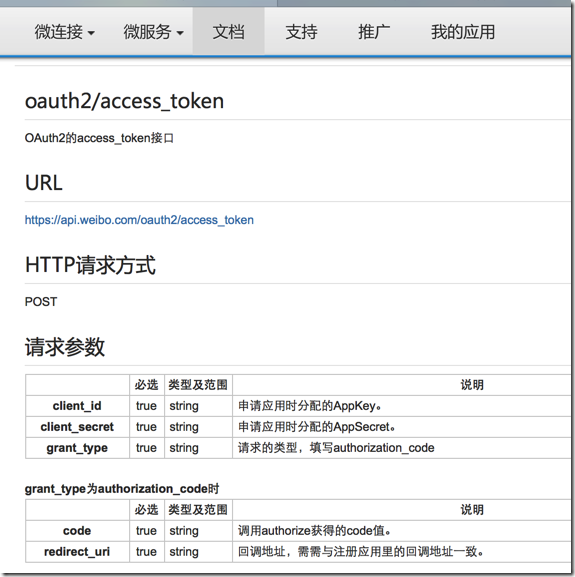
 - (void) accessTokenWithAccessCode:(NSString *) accessCode {

     // 创建AFN的http操作请求管理者

     AFHTTPRequestOperationManager *manager = [AFHTTPRequestOperationManager manager];

     // 参数设置

     NSMutableDictionary *param = [NSMutableDictionary dictionary];

     param[@"client_id"] = @"";

     param[@"client_secret"] = @"cc577953b2aa3aa8ea220fd15775ea35";

     param[@"grant_type"] = @"authorization_code";

     param[@"code"] = accessCode;

     param[@"redirect_uri"] = @"http://www.cnblogs.com/hellovoidworld/";

     // 发送请求

     [manager POST:@"https://api.weibo.com/oauth2/access_token" parameters:param success:^(AFHTTPRequestOperation *operation, NSDictionary *accountInfo) {

         [MBProgressHUD hideHUD];

         // 返回的是用户信息字典

         HVWLog(@"%@", accountInfo);

     } failure:^(AFHTTPRequestOperation *operation, NSError *error) {

         [MBProgressHUD hideHUD];

         HVWLog(@"请求access_token失败 ----> %@", error);

     }];

 }

 - (instancetype)init {

     self = [super init];

     if (!self) {

         return nil;

     }

     self.acceptableContentTypes = [NSSet setWithObjects:@"application/json", @"text/json", @"text/javascript", @"text/plain", nil];

     return self;

 }
"access_token" = "2.00A5GpAGGIUpSEff44478fe90yykBw";
"expires_in" = 181897;
"remind_in" = 181897;
uid = 5508976272;
// 存储用户信息,包括access_token到沙盒中
NSString *docPath = [NSSearchPathForDirectoriesInDomains(NSDocumentDirectory, NSUserDomainMask, YES) lastObject];
NSString *filePath = [docPath stringByAppendingPathComponent:@"accountInfo.plist"];
[iOS微博项目 - 2.2] - 在app中获取授权的更多相关文章
- iOS利用HealthKit框架从健康app中获取步数信息
微信和QQ的每日步数最近十分火爆,我就想为自己写的项目中添加一个显示每日步数的功能,上网一搜好像并有相关的详细资料,自己动手丰衣足食. 统计步数信息并不需要我们自己去实现,iOS自带的健康app已经为 ...
- iOS从健康app中获取步数信息
统计步数信息并不需要我们自己去实现,iOS自带的健康app已经为我们统计好了步数数据 我们只要使用HealthKit框架从健康app中获取这个数据信息就可以了 1.如下图所示 在Xcode中打开Hea ...
- [iOS微博项目 - 2.6] - 获取微博数据
github: https://github.com/hellovoidworld/HVWWeibo A.新浪获取微博API 1.读取微博API 2.“statuses/home_time ...
- [iOS微博项目 - 2.3] - 用户取消对app的授权
github: https://github.com/hellovoidworld/HVWWeibo A.用户取消对app的授权 用户可以在微博网站上取消对某个应用(app)的授权 1.打开& ...
- [iOS微博项目 - 2.0] - OAuth授权3步
A.概念 OAUTH协议为用户资源的授权提供了一个安全的.开放而又简易的标准.与以往的授权方式不同之处是OAUTH的授权不会使第三方触及到用户的帐号信息(如用户名与密码),即第三方无需使用用 ...
- 将unity3d项目嵌入到Android App中使用
创建一个新的AndroidStudio app项目. 1.添加库文件:拷贝unity安装目录下的库文件:Unity\Editor\Data\PlaybackEngines\AndroidPlayer\ ...
- [iOS微博项目 - 2.1] - 获得新浪授权接口
A.如何获得新浪的授权接口 登陆新浪的开放平台 注册新浪账号 创建应用 获得应用id和请求地址 查阅相关API 关联需要进行测试的账号 1.登陆开放平台 http://open.weibo.com ...
- app中获取应用名称,版本等信息的方法
在app中,我们有时候需要显示一些信息,例如名称,版本等等...如果用写死的方式可能不太好,我们可以动态的读取.应用的信息主要是在info.plist这个文件中,实际就是一个xml文件,以源文件的方式 ...
- [iOS微博项目 - 2.4] - 重新安排app启动步骤
github: https://github.com/hellovoidworld/HVWWeibo A.app启动步骤 1.加入了授权步骤之后,最先要判断app内是否已经登陆了账号 2.在程序启 ...
随机推荐
- core--进程
前面我们说了线程是一系列的指令,那么进程是什么呢?进程就是装下这些指令的容器.该容器除了线程,还包含资源等内容.一个进程至少要有一个线程.没有线程的进程就不叫进程 "进程和程序的区别:进程必 ...
- core--主线程
windows的线程是windows可以分配给cpu的最小单元,对window应用程序的管理,最小的管理单位就是线程.那什么是线程?线程其实什么都不是,只是一个概念,没有实体,又看不见.这个概念的定义 ...
- [ionic开源项目教程] - 手把手教你使用移动跨平台开发框架Ionic开发一个新闻阅读APP
前言 这是一个系列文章,从环境搭建开始讲解,包括网络数据请求,将持续更新到项目完结.实战开发中遇到的各种问题的解决方案,也都将毫无保留的分享给大家. 关注订阅号:TongeBlog ,查看移动端跨平台 ...
- 点分十进制IP校验、转换,掩码校验
/***************************************************************************** * 点分十进制IP校验.转换,掩码校验 * ...
- LeetCode Linked List Cycle II 单链表环2 (找循环起点)
题意:给一个单链表,若其有环,返回环的开始处指针,若无环返回NULL. 思路: (1)依然用两个指针的追赶来判断是否有环.在确定有环了之后,指针1跑的路程是指针2的一半,而且他们曾经跑过一段重叠的路( ...
- The Guide To Understanding mysqlreport
The Guide To Understanding mysqlreport This guide to understanding mysqlreport explains everything t ...
- 【Android】SDK工具学习 - bmgr
bmgr官方文档 我自己的理解就是bmgr也是一款命令行工具,主要操作Android设备中的Backup Manager(支持API8.0以上的ADT) 主要就是备份(Backup)和还原(Resto ...
- Heritrix源码分析(四) 各个类说明(转)
Heritrix的类的确很繁琐,往往继承了一层又一层,最多的继承好像有7层.下面就一个包一个包的说明每个类的作用,由于里面Heritrix组件分明,很多组件没用到的同时该组件的类我也没怎么接触,所以这 ...
- unity, surface shader access world position and localposition
一,surface shader中访问worldposition 在surface shader中访问世界坐标,只需在Input结构体中声明float3 worldPos即可,如下: struct ...
- Bootstrap学习之路(2)---导航组件
在bootstrap中,导航条的样式都依赖于.nav类,而样式又分为多种,如: 标签页的样式为:.nav-tabs <ul class="nav nav-tabs"> ...