
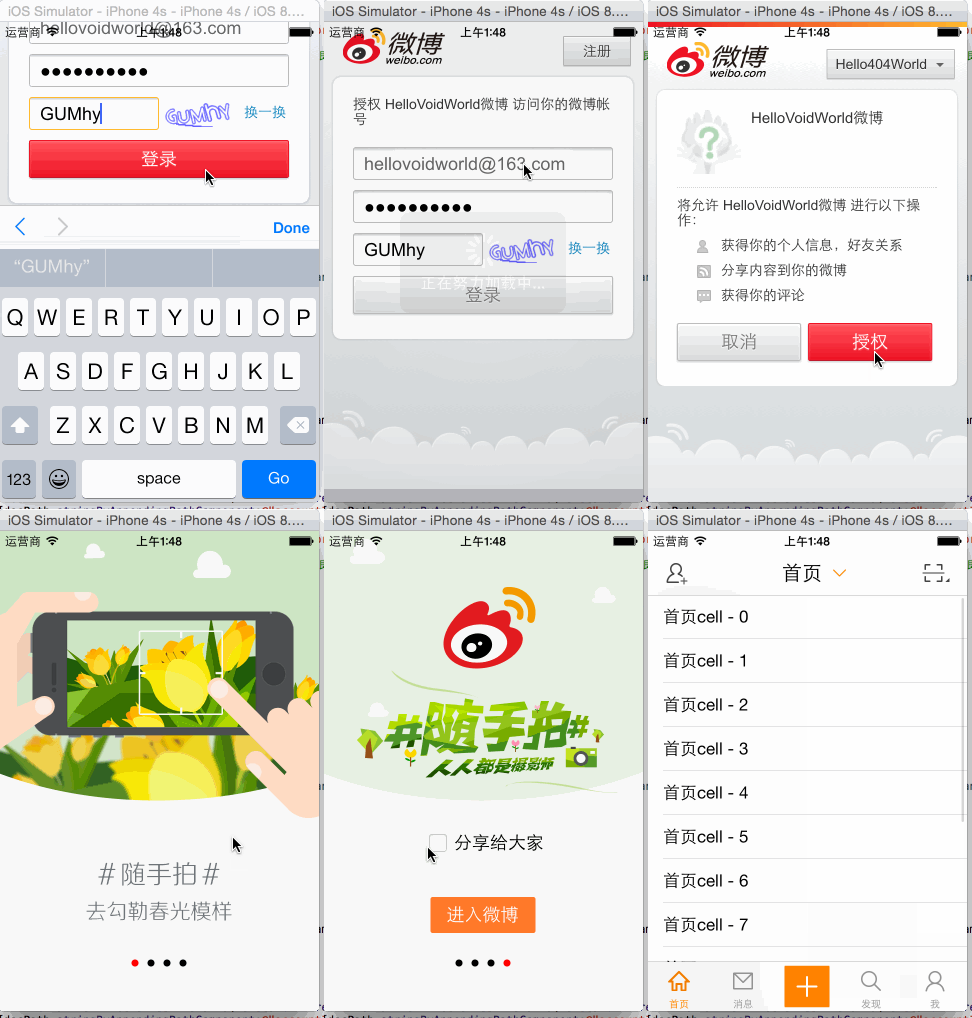
[iOS微博项目 - 2.4] - 重新安排app启动步骤

 - (BOOL)application:(UIApplication *)application didFinishLaunchingWithOptions:(NSDictionary *)launchOptions {

     // Override point for customization after application launch.

     // 启动后显示状态栏

     UIApplication *app = [UIApplication sharedApplication];

     app.statusBarHidden = NO;

     // 设置window

     self.window = [[UIWindow alloc] init];

     self.window.frame = [UIScreen mainScreen].bounds;

     [self.window makeKeyAndVisible];

     // 检查是否已有登陆账号

     NSString *docPath = [NSSearchPathForDirectoriesInDomains(NSDocumentDirectory, NSUserDomainMask, YES) lastObject];

     NSString *filePath = [docPath stringByAppendingPathComponent:@"accountInfo.plist"];

     NSDictionary *accountInfo = [NSDictionary dictionaryWithContentsOfFile:filePath];

     if (!accountInfo) { // 如果不存在登陆账号,要先进行授权

         self.window.rootViewController = [[HVWOAuthViewController alloc] init];

     } else {

         /** 新版本特性 */

         // app现在的版本

         // 由于使用的时Core Foundation的东西,需要桥接

         NSString *versionKey = (__bridge NSString*) kCFBundleVersionKey;

         NSDictionary *infoDic = [[NSBundle mainBundle] infoDictionary];

         NSString *currentVersion = [infoDic objectForKey:versionKey];

         // 上次使用的版本

         NSUserDefaults *defaults = [NSUserDefaults standardUserDefaults];

         NSString *lastVersion = [defaults stringForKey:versionKey];

         // 如果版本变动了,存储新的版本号并启动新版本特性图

         if (![lastVersion isEqualToString:currentVersion]) {

             // 存储

             [defaults setObject:currentVersion forKey:versionKey];

             [defaults synchronize];

             // 开启app显示新特性

             HVWNewFeatureViewController *newFeatureVC = [[HVWNewFeatureViewController alloc] init];

             self.window.rootViewController = newFeatureVC;

         } else {

             // 创建根控制器

             HVWTabBarViewController *tabVC = [[HVWTabBarViewController alloc] init];

             self.window.rootViewController = tabVC;

         }

     }

     return YES;

 }
 //  HVWOAuthViewController.m

 /** 根据access_code获取access_token */

 - (void) accessTokenWithAccessCode:(NSString *) accessCode {

     // 创建AFN的http操作请求管理者

     AFHTTPRequestOperationManager *manager = [AFHTTPRequestOperationManager manager];

     // 参数设置

     NSMutableDictionary *param = [NSMutableDictionary dictionary];

     param[@"client_id"] = @"";

     param[@"client_secret"] = @"cc577953b2aa3aa8ea220fd15775ea35";

     param[@"grant_type"] = @"authorization_code";

     param[@"code"] = accessCode;

     param[@"redirect_uri"] = @"http://www.cnblogs.com/hellovoidworld/";

     // 发送请求

     [manager POST:@"https://api.weibo.com/oauth2/access_token" parameters:param success:^(AFHTTPRequestOperation *operation, NSDictionary *accountInfo) {

         [MBProgressHUD hideHUD];

         // 返回的是用户信息字典

         // 存储用户信息,包括access_token到沙盒中

         NSString *docPath = [NSSearchPathForDirectoriesInDomains(NSDocumentDirectory, NSUserDomainMask, YES) lastObject];

         NSString *filePath = [docPath stringByAppendingPathComponent:@"accountInfo.plist"];

         [accountInfo writeToFile:filePath atomically:YES];

         /** 新版本特性 */

         // app现在的版本

         // 由于使用的时Core Foundation的东西,需要桥接

         NSString *versionKey = (__bridge NSString*) kCFBundleVersionKey;

         NSDictionary *infoDic = [[NSBundle mainBundle] infoDictionary];

         NSString *currentVersion = [infoDic objectForKey:versionKey];

         // 上次使用的版本

         NSUserDefaults *defaults = [NSUserDefaults standardUserDefaults];

         NSString *lastVersion = [defaults stringForKey:versionKey];

         UIWindow *window = [UIApplication sharedApplication].keyWindow;

         // 如果版本变动了,存储新的版本号并启动新版本特性图

         if (![lastVersion isEqualToString:currentVersion]) {

             // 存储

             [defaults setObject:currentVersion forKey:versionKey];

             [defaults synchronize];

             // 开启app显示新特性

             HVWNewFeatureViewController *newFeatureVC = [[HVWNewFeatureViewController alloc] init];

             window.rootViewController = newFeatureVC;

         } else {

             // 创建根控制器

             HVWTabBarViewController *tabVC = [[HVWTabBarViewController alloc] init];

             window.rootViewController = tabVC;

         }

     } failure:^(AFHTTPRequestOperation *operation, NSError *error) {

         [MBProgressHUD hideHUD];

         HVWLog(@"请求access_token失败 ----> %@", error);

     }];

 }
[iOS微博项目 - 2.4] - 重新安排app启动步骤的更多相关文章
- [iOS微博项目 - 3.0] - 手动刷新微博
github: https://github.com/hellovoidworld/HVWWeibo A.下拉刷新微博 1.需求 在“首页”界面,下拉到一定距离的时候刷新微博数据 刷新数据的时候使 ...
- [iOS微博项目 - 2.5] - 封装授权和用户信息读写业务
github: https://github.com/hellovoidworld/HVWWeibo A.封装授权业务 1.把app的授权信息移动到HVWWeibo-Prefix.pch中作为公共 ...
- [iOS微博项目 - 2.3] - 用户取消对app的授权
github: https://github.com/hellovoidworld/HVWWeibo A.用户取消对app的授权 用户可以在微博网站上取消对某个应用(app)的授权 1.打开& ...
- [iOS微博项目 - 2.2] - 在app中获取授权
github: https://github.com/hellovoidworld/HVWWeibo A.发送授权请求 1.使用UIWebView加载请求页面 自定义一个继承UIViewContr ...
- [iOS微博项目 - 2.6] - 获取微博数据
github: https://github.com/hellovoidworld/HVWWeibo A.新浪获取微博API 1.读取微博API 2.“statuses/home_time ...
- [iOS微博项目 - 2.0] - OAuth授权3步
A.概念 OAUTH协议为用户资源的授权提供了一个安全的.开放而又简易的标准.与以往的授权方式不同之处是OAUTH的授权不会使第三方触及到用户的帐号信息(如用户名与密码),即第三方无需使用用 ...
- [iOS微博项目 - 1.7] - 版本新特性
A.版本新特性 1.需求 第一次使用新版本的时候,不直接进入app,而是展示新特性界面 github: https://github.com/hellovoidworld/HVWWeibo ...
- [iOS微博项目 - 1.0] - 搭建基本框架
A.搭建基本环境 github: https://github.com/hellovoidworld/HVWWeibo 项目结构: 1.使用代码构建UI,不使用storyboard ...
- [iOS微博项目 - 4.0] - 自定义微博cell
github: https://github.com/hellovoidworld/HVWWeibo A.自定义微博cell基本结构 1.需求 创建自定义cell的雏形 cell包含:内容.工具条 内 ...
随机推荐
- CSS visibility与display 属性
所有主流浏览器都支持 visibility 属性. 注释:任何的版本的 Internet Explorer (包括 IE8)都不支持 "inherit" 和 "colla ...
- Android Studio插件
awesome-android-ui(UI范例库) https://github.com/wasabeef/awesome-android-ui/tree/master/pages LMBanners ...
- 51nod1189 阶乘分数
(x-n!)(y-n!)=n!2 ans=t[n]+1.t表示的是n!2的小于n!的约数个数.n!2=p1a1*p2a2*p3a3...t[n]=(a1+1)*(a2+1)...-1 /2; 2对于n ...
- Linux磁盘占用100%解决方法
/opt分区被web日志堆满了,导致一些服务无法正常运行,于是rm -fr掉这些日志(近11GB),但是服务仍没有恢复正常,用df -hT看,该分区占用还是100%: [root@anjing opt ...
- (转载)UITableView使用详解
在开发iphone的应用时基本上都要用到UITableView,这里讲解一下UITableView的使用方法及代理的调用情况 UITableView使用详解 - (void)viewDidLoad { ...
- iOS开发UITableView基本使用方法总结1
UITableView基本使用方法 1.首先,Controller需要实现两个delegate ,分别是UITableViewDelegate 和UITableViewDataSource 2.然后 ...
- (转)python 优先队列
#!/usr/bin/python from Queue import Queue from Queue import PriorityQueue a1='a1' a2='a2' a3='a3' a4 ...
- 【英语】Bingo口语笔记(29) - Run系列
- Hibernate-Criteria Queries
1.实例 接口org.hibernate.Criteria针对特殊持久层类进行查询,Sesion是Criteria的工厂: Criteria crit = sess.createCriteria(Ca ...
- RPC调用框架比较分析
什么是RPC: RPC(Remote Procedure Call Protocol)——远程过程调用协议,它是一种通过网络从远程计算机程序上请求服务,而不需要了解底层网络技术的协议. 简言之,RPC ...