
Android L2TP Client Setup
原文链接:http://www.softether.org/4-docs/2-howto/9.L2TPIPsec_Setup_Guide_for_SoftEther_VPN_Server/3.Android_L2TP_Client_Setup
Android L2TP Client Setup
This document describes how to connect to your SoftEther VPN Server by using the L2TP/IPsec VPN Client which is bundled with Android.
On this instruction, every screen-shots are taken on Android 4.x. Other versions of Android 4.x are similar to be configured, however there might be minor different on UIs. Some third-parties customizes the configuration screens of Android.
These screen-shots are in English version Android iOS. If you use other language, you can still configure it easily by referring the following instructions.
1. Initial configurations (only once at the first time)
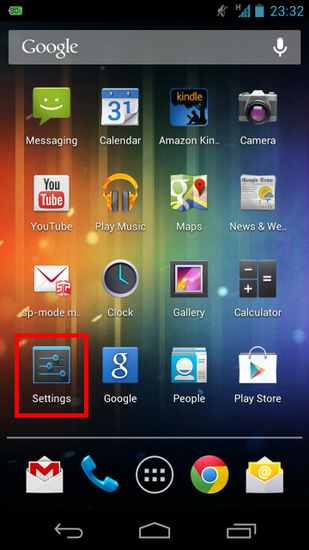
Start the "Settings" application on Android.
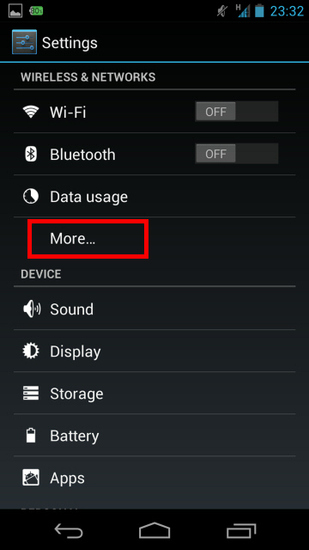
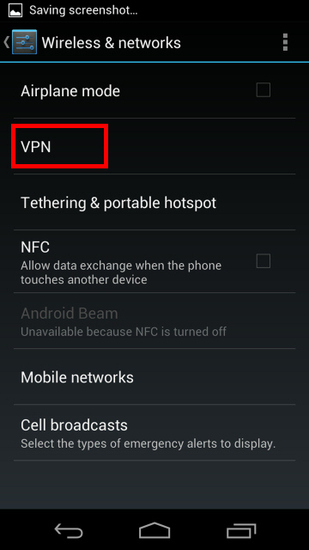
In the "Wireless & Networks" category, open "More..." and tap "VPN".
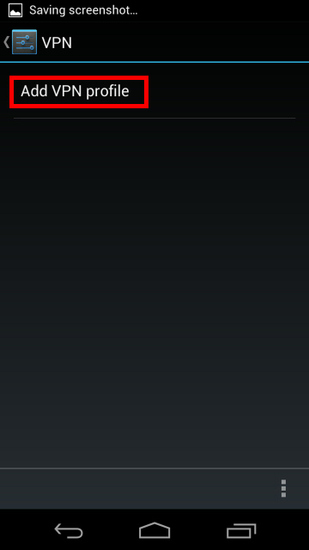
Click the "Add VPN profile" button to create a new VPN connection setting.
A new VPN connection setting editing screen will appear. Input something string on the "Name" field (e.g. "vpn" ), and choose "L2TP/IPSec PSK" in the "Type" field.
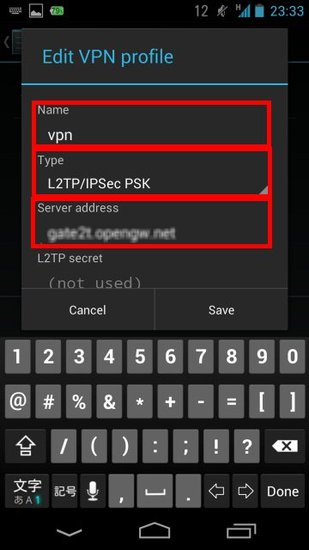
On this screen, you have to specify either hostname or IP address of the destination SoftEther VPN Server. You also have to enter the user-name, password and secret (pre-shared key) on the Android screen.
Scroll down the configuration screen, and tap the "Show advanced options" checkbox if appropriate.
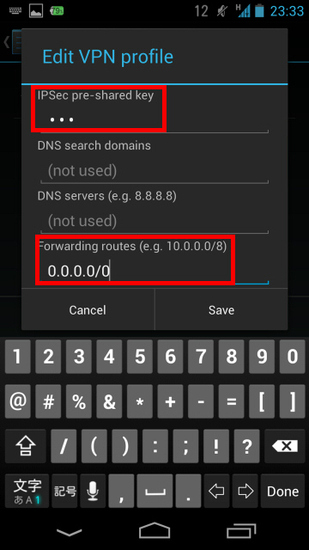
Enter the "IPSec pre-shared key" field.
Specify "0.0.0.0/0" (9-letters) on the "Forwarding routes" field. Make sure that you input the "Forwarding routes" field correctly. If not, you cannot communicate via VPN.
After all inputted, tap the "Save" button and save the VPN connection setting.
2. Connect a VPN
You can start a VPN connection by using a created VPN connection setting at any time. Open the VPN connection settings list and tap a setting, you will see the following screen.
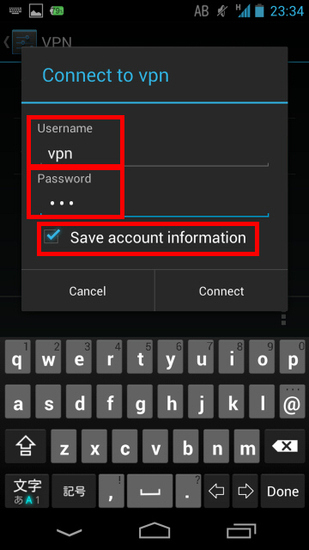
At the first time of using, you have to input "Username" and "Password" fields.
Tap "Connect" to start the VPN connection.
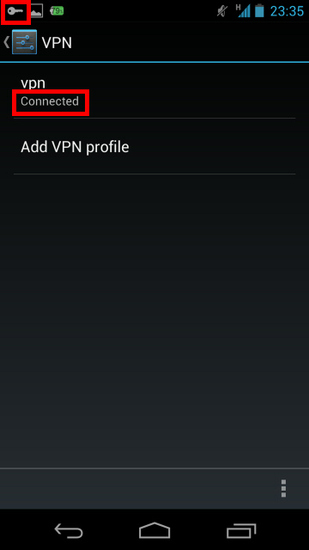
While VPN is established, you can see the status and connect time on the status screen. Your private IP address in VPN is also displayed. The "Connect to" IP address reports "1.0.0.1" , but it is not an unusual.
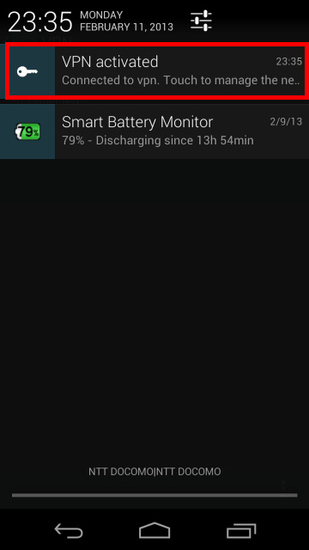
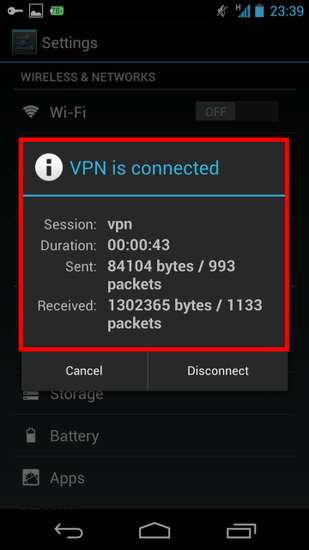
3. Enjoy VPN communication
While VPN is established, all communications will be relayed via the VPN Server. You can access to any local servers and workstation on the destination network.
Android L2TP Client Setup的更多相关文章
- Mac OS X L2TP Client Setup
原文链接:http://www.softether.org/4-docs/2-howto/9.L2TPIPsec_Setup_Guide_for_SoftEther_VPN_Server/5.Mac_ ...
- Windows L2TP Client Setup
原文链接:http://www.softether.org/4-docs/2-howto/9.L2TPIPsec_Setup_Guide_for_SoftEther_VPN_Server/4.Wind ...
- iPhone / iPad L2TP Client Setup
原文链接:http://www.softether.org/4-docs/2-howto/9.L2TPIPsec_Setup_Guide_for_SoftEther_VPN_Server/2.iPho ...
- Android源代码下载之《Android新闻client源代码》
介绍 Android新闻client源代码,功能上分为:新闻.关注.读报.微博.里面比較有特色的就是读报功能.真正安装报纸的排版进行读报.给人得感觉就像是在读真实的报纸.事实上即使首页的动态云标签很有 ...
- 开源:矿Android新闻client,快、小、支持离线阅读、操作简单、内容丰富,形式多样展示、的信息量、全功能 等待(离开码邮箱)
分享:矿Android新闻client.快.小.支持离线阅读.操作简单.内容丰富,形式多样展示.的信息量.全功能 等待(离开码邮箱) 历时30天我为了开发这个新闻clientAPP,下面简称觅闻 ht ...
- Android Netty Client
Android netty client Start a netty client on android Download netty Download url :https://netty.io/d ...
- Linux作为l2tp client 连接l2tp server
cat /etc/xl2tpd/xl2tpd.conf [global] debug tunnel = yes [lac name] lns = xxx.xxx.xxx.xxx pppoptfile ...
- android pbap client 蓝牙
一. 简介: 此功能具体使用的是bluetoothV2.1之后的Phone Book Access Profile功能,简称PBAP .目前MTK Android中只实现了server端的功能,并没 ...
- Android:解决client从server上获取数据乱码的方法
向server发送HTTP请求.接收到的JSON包为response,用String content = EntityUtils.toString(response.getEntity()," ...
随机推荐
- Python随笔--Pickle
遇到问题:不能文件名为pickle.py
- C++ 之sizeof运算符
sizeof运算符用来计算某个对象在内存中占用的字节数. 此运算符的使用形式为:sizeof(类型名)或sizeof(表达式). 计算结果是这个类型或者这个表达式结果在内存中占的字节数.
- Devexpress的DateEdit控件中DateTime与EditValue异同
相同: 两者值相同,改变一个值都会引起另一个值做出相应改变. 不同: 1:在界面上对控件的编辑框进行操作时,EditValueChanged事件先响应,DateTimeChanged事件后响应. 2: ...
- Linux相关问题总结
1.linux没有ifconfig命令 可以使用以下命令查询ip地址: ip addr show ifconfig命令在net-tools工具里,安装命令: yum install net-tools
- PAT A1046 Shortest Distance
PAT A1046 Shortest Distance 标签(空格分隔): PAT TIPS: 最后一个数据点可能会超时 #include <cstdio> #include <al ...
- 基于.NET平台常用的框架整理<转载>
转载来自:http://www.cnblogs.com/hgmyz/p/5313983.html 基于.NET平台常用的框架整理 自从学习.NET以来,优雅的编程风格,极度简单的可扩展性,足够强大 ...
- 搭建项目(Vue学习笔记一)
一.在搭建Vue项目之前首先要搞明白以下几个问题 1.Vue.js是什么 vue.js是一个脚本库. 2.webpack 模块打包机,分析项目结构,找到JavaScript模块以及其他的一些浏览器不能 ...
- input搜索框:根据历史记录自动填充后,去除默认黄色背景
如果是纯色背景,直接通过box-shadow覆盖即可: input:-webkit-autofill { color: #333!important; -webkit-text-fill-color: ...
- OpenGL之纹理贴图(Texture)
学习自: https://learnopengl-cn.github.io/01%20Getting%20started/06%20Textures/ 先上一波效果图: 实际上就是:画了一个矩形,然后 ...
- 胜利大逃亡,bfs,广度优先搜索
题目描述: Ignatius被魔王抓走了,有一天魔王出差去了,这可是Ignatius逃亡的好机会.魔王住在一个城堡里,城堡是一个A*B*C的立方体,可以被表示成A个B*C的矩阵,刚开始Ignatius ...