
iPhone / iPad L2TP Client Setup
原文链接:http://www.softether.org/4-docs/2-howto/9.L2TPIPsec_Setup_Guide_for_SoftEther_VPN_Server/2.iPhone_iPad_L2TP_Client_Setting
iPhone / iPad L2TP Client Setup
This document describes how to connect to your SoftEther VPN Server by using the L2TP/IPsec VPN Client which is bundled with iOS.
On this instruction, every screen-shots are taken on iOS 6. Other versions of iOS are similar to be configured, however there might be minor different on UIs.
These screen-shots are in English version of iOS. If you use other language, you can still configure it easily by referring the following instructions.
1. Initial configurations (only once at the first time)
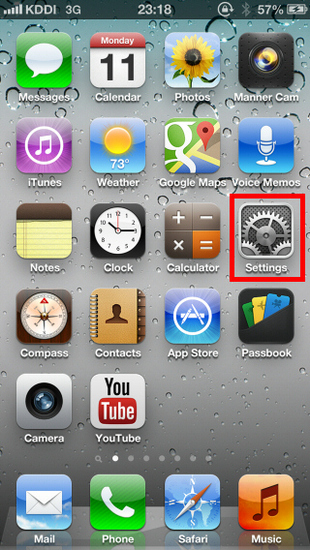
From the iOS main screen, start the "Settings" application.
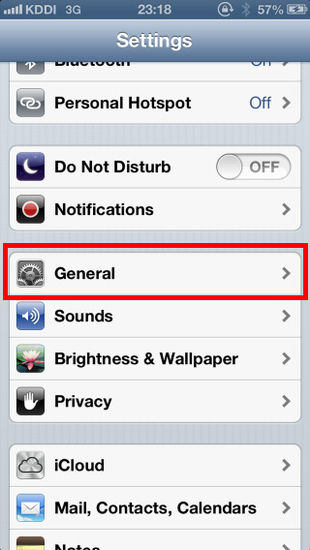
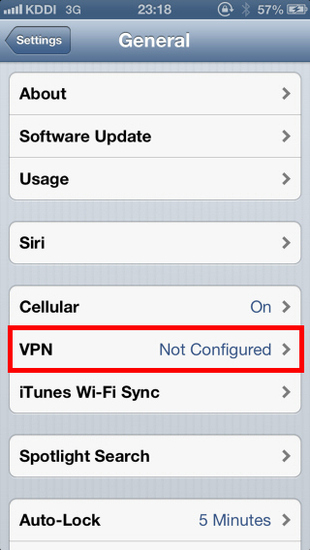
Open "VPN" in "General" , and tap "Add VPN Configuration..." .
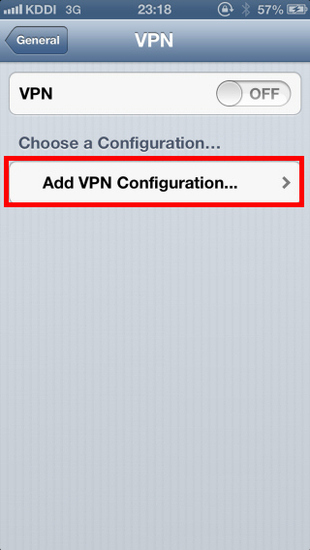
A new L2TP VPN connection setting will be created, and the configuration screen will appear.
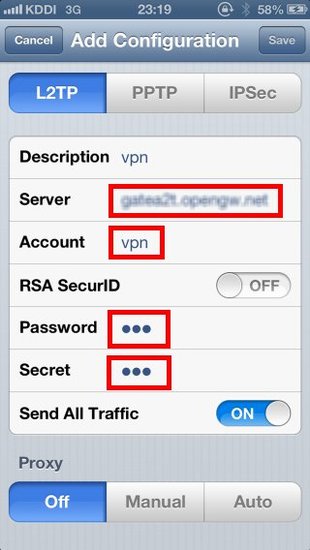
On this screen, you have to specify either hostname or IP address of the destination SoftEther VPN Server. You also have to enter the user-name, password and secret (pre-shared key) on the iOS screen.
2. Connect a VPN
You can start a VPN connection by using a created VPN connection setting at any time.
Tap the "OFF" button to initiate a VPN connection.
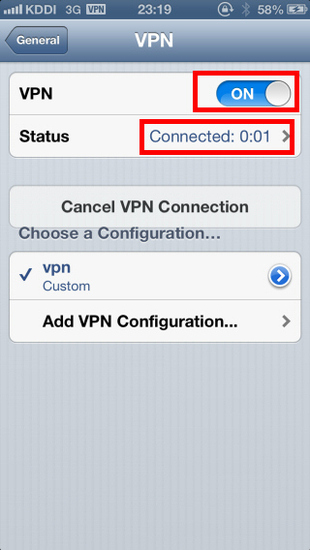
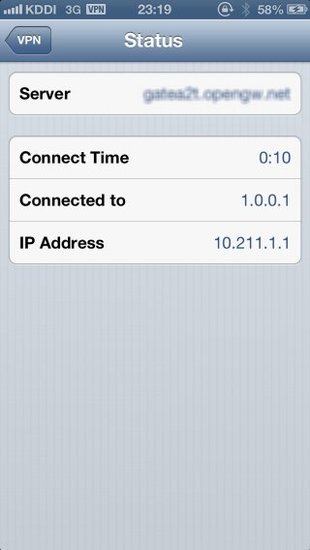
While VPN is established, you can see the status and connect time on the status screen. Your private IP address in VPN is also displayed. The "Connect to" IP address reports "1.0.0.1" , but it is not an unusual.
3. Enjoy VPN communication
While VPN is established, all communications will be relayed via the VPN Server. You can access to any local servers and workstation on the destination network.
iPhone / iPad L2TP Client Setup的更多相关文章
- Mac OS X L2TP Client Setup
原文链接:http://www.softether.org/4-docs/2-howto/9.L2TPIPsec_Setup_Guide_for_SoftEther_VPN_Server/5.Mac_ ...
- Windows L2TP Client Setup
原文链接:http://www.softether.org/4-docs/2-howto/9.L2TPIPsec_Setup_Guide_for_SoftEther_VPN_Server/4.Wind ...
- Android L2TP Client Setup
原文链接:http://www.softether.org/4-docs/2-howto/9.L2TPIPsec_Setup_Guide_for_SoftEther_VPN_Server/3.Andr ...
- iPhone/iPad/Android UI尺寸规范 UI尺寸规范,UI图标尺寸,UI界面尺寸,iPhone6尺寸,iPhone6 Plus尺寸,安卓尺寸,iOS尺寸
iPhone/iPad/Android UI尺寸规范 UI尺寸规范,UI图标尺寸,UI界面尺寸,iPhone6尺寸,iPhone6 Plus尺寸,安卓尺寸,iOS尺寸 iPhone界面尺寸 设备 分辨 ...
- Glyphish – 精心打造的 iPhone & iPad 应用程序图标
Glyphish 是一套精心打造的图标库,包含 iOS 工具栏.标签栏.导航条等等,Glyphish 图标也完美的用在 Android.Windows Mobile App 和移动网站的 UI 设计等 ...
- 通过Mac远程调试iPhone/iPad上的网页(转)
我们知道在 Mac/PC 上的浏览器都有 Web 检查器这类的工具(如最著名的 Firebug)对前端开发进行调试,而在 iPhone/iPad 由于限于屏幕的大小和触摸屏的使用习惯,直接对网页调试非 ...
- 体验应用程序在Mac/iPhone/iPad之间的Handoff
对于苹果新推出的Handoff功能,之前只体验了接电话的Handoff.一个电话打过来,iPhone/iPad/Mac同时响起,这时如果手上拿着东西在吃,就可以直接在Mac上接电话. 除此之外,还可以 ...
- iphone/ipad关于size, frame and bounds总结和UIScroll view学习笔记
1. iphone/ipad大小 Device Screen dimensions(in points) iphone and ipod 320 X 480 ipad 768 X 1024 2. UI ...
- HOWTO: Create native-looking iPhone/iPad applications from HTML, CSS and JavaScript
HOWTO: Create native-looking iPhone/iPad applications from HTML, CSS and JavaScript Though it's not ...
随机推荐
- 解决wso2 axis2server 跑不起
wso2ei-6.1.0 运行axis2server报下面找个错误 Server could not start due to class loading issue java.lang.NoSuch ...
- DevExpress ASP.NET Core Controls 2019发展蓝图(No.1)
本文主要为大家介绍DevExpress ASP.NET Core Controls2019年的官方发展蓝图,更多精彩内容欢迎持续收藏关注哦~ [DevExpress ASP.NET Controls ...
- Cocos2dx 代码中包含中文导致编译错误的问题解决方法
从网上下载一个cocos2dx的源码,是IOS版本的,我将其迁移到windows 7下 ,用VS2010编译,出现一堆的C2001错误: 1>d:\cocos2d-x-2.2.6\mygame\ ...
- Context Encoder论文及代码解读
经过秋招和毕业论文的折磨,提交完论文終稿的那一刻总算觉得有多余的时间来搞自己的事情. 研究论文做的是图像修复相关,这里对基于深度学习的图像修复方面的论文和代码进行整理,也算是研究生方向有一个比较好的结 ...
- windows10安装anaconda,配置tensorflow
1.安装anaconda 3.5.5 默认安装,注意,把添加到path勾选上,其他默认安装(能搜到这篇文章,相信大家都有过变成经验,这些环境变量的重要性就不要窝在多说了) 2.以管理员身份,打开ana ...
- Mysql 设置远程连接
一.问题分析 有时候使用数据库远程连接工具连接MySQL的时候总是连接不上,确认过账号密码正确,端口telnet端口又是通的. Navicat Premium报错如下: 1130 - Host '19 ...
- SQA计划与系统测试
(一)目的 本计划的目的是定义我们该小组所做的“爱上长大”项目的SQA任务和职责,在项目过程中应遵循的流程.规范和约定等,以确保软件质量得到维持. (二)范围 本计划应用于“爱上长大”项目开发的整个生 ...
- 在eclipse上集成安装阿里巴巴代码规约P3C插件
在eclipse上集成安装阿里巴巴代码规约P3C插件 参照网址: https://jingyan.baidu.com/article/2d5afd6923e78b85a3e28e5e.html 首先进 ...
- SpringMVC后台接受前台传值的方法
1.HttpRequestServlet 接收前台传值 @RequestMapping("/go5") public String hello5(HttpServletReques ...
- 报错【org.springframework.validation.BeanPropertyBindingResult】
报错内容:org.springframework.validation.BeanPropertyBindingResult: 1 errors Field error in object 'price ...