
Elasticsearch学习(1) Spring boot整合Elasticsearch
本文的Spring Boot版本为1.5.9,Elasticsearch版本为2.4.4,话不多说,直接上代码。
一、启动Elasticsearch
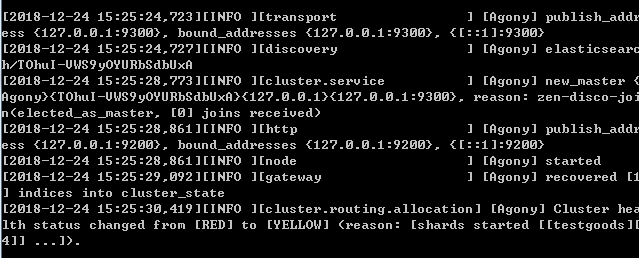
在官网上下载Elasticsearch后,打开bin目录下的elasticsearch.bat,出现下面的图,就证明成功启动了。
二、新建项目,添加依赖
在创建spring boot项目中,可以在nosql中选择添加Elasticsearch的依赖,完整的依赖如下:
<?xml version="1.0" encoding="UTF-8"?>

<project xmlns="http://maven.apache.org/POM/4.0.0" xmlns:xsi="http://www.w3.org/2001/XMLSchema-instance"

    xsi:schemaLocation="http://maven.apache.org/POM/4.0.0 http://maven.apache.org/xsd/maven-4.0.0.xsd">

    <modelVersion>4.0.0</modelVersion>

    <groupId>cmo.jf.cloud</groupId>

    <artifactId>resourceCente</artifactId>

    <version>1.0.0</version>

    <packaging>war</packaging>

    <name>Elasticsearch</name>

    <description>搜索引擎</description>

    <parent>

        <groupId>org.springframework.boot</groupId>

        <artifactId>spring-boot-starter-parent</artifactId>

        <version>1.5.9.RELEASE</version>

        <relativePath/> <!-- lookup parent from repository -->

    </parent>

    <properties>

        <project.build.sourceEncoding>UTF-8</project.build.sourceEncoding>

        <project.reporting.outputEncoding>UTF-8</project.reporting.outputEncoding>

        <java.version>1.8</java.version>

    </properties>

    <dependencies>

        <dependency>

            <groupId>org.springframework.boot</groupId>

            <artifactId>spring-boot-starter-data-elasticsearch</artifactId>

        </dependency>

        <dependency>

            <groupId>org.springframework.boot</groupId>

            <artifactId>spring-boot-starter-web</artifactId>

        </dependency>

        <dependency>

            <groupId>org.springframework.boot</groupId>

            <artifactId>spring-boot-starter-tomcat</artifactId>

            <scope>provided</scope>

        </dependency>

        <dependency>

            <groupId>org.springframework.boot</groupId>

            <artifactId>spring-boot-starter-test</artifactId>

            <scope>test</scope>

        </dependency>

    </dependencies>

    <build>

        <plugins>

            <plugin>

                <groupId>org.springframework.boot</groupId>

                <artifactId>spring-boot-maven-plugin</artifactId>

            </plugin>

        </plugins>

    </build>

</project>
需要注意的是:
1.spring boot2.X版本必须使用Elasticsearch 5.X版本
2.Elasticsearch 2.X的版本必须使用spring boot1.5版本
3.目前spring-boot-starter-data-elasticsearch还不支持Elasticsearch 6.X版本
如果出现版本不兼容,这会出现下面的错误:
NoNodeAvailableException[None of the configured nodes are available: [{#transport#-1}{729dgKKVSF-ti27v2_w68g}{127.0.0.1}{127.0.0.7:9300}]]
三、Elasticsearch的配置文件
和操作数据库一样,我们需要配置好配置文件,才能访问Elasticsearch,配置文件如下:
##端口号

server.port=8888

##es地址

spring.data.elasticsearch.cluster-nodes =127.0.0.1:9300
四、Elasticsearch的实体类
在Elasticsearch中,我们需要创建一个实体类作为索引,简单的理解就是在Elasticsearch中创建数据库和表。
利用@Document注解可以创建数据库和表。其中Document中的参数意义为:
indexName:索引名称 可以理解为数据库名 必须为小写不然会报org.elasticsearch.indices.InvalidIndexNameException异常
type:类型 可以理解为表名
代码如下:
import java.io.Serializable;

import org.springframework.data.elasticsearch.annotations.Document;

//indexName索引名称 可以理解为数据库名 必须为小写 不然会报org.elasticsearch.indices.InvalidIndexNameException异常

//type类型 可以理解为表名

@Document(indexName = "class",type = "user")

public class User implements Serializable {

        //定义成员属性

          private Integer id;

          private String name;

        private  Integer age;

        private String sex;

        public Integer getId() {

            return id;

        }

        public void setId(Integer id) {

            this.id = id;

        }

        public String getName() {

            return name;

        }

        public void setName(String name) {

            this.name = name;

        }

        public Integer getAge() {

            return age;

        }

        public void setAge(Integer age) {

            this.age = age;

        }

        public String getSex() {

            return sex;

        }

        public void setSex(String sex) {

            this.sex = sex;

        }

        public User(Integer id, String name, Integer age, String sex) {

            super();

            this.id = id;

            this.name = name;

            this.age = age;

            this.sex = sex;

        }

        public User() {

            super();

        }

}
五、创建一个数据访问层
同样,和其他的数据库访问操作一样,我们需要创建一个dao层来操作Elasticsearch,这个dao层类似于mongodb的操作,只需要继承ElasticsearchRepository接口就能实现。
import org.springframework.context.annotation.Configuration;

import org.springframework.data.elasticsearch.repository.ElasticsearchRepository;

import cmo.jf.cloud.bean.User;

@Configuration

public interface  UserMapper extends  ElasticsearchRepository<User,Long>{

}
六、创建controller层测试
import org.springframework.beans.factory.annotation.Autowired;

import org.springframework.web.bind.annotation.GetMapping;

import org.springframework.web.bind.annotation.RestController;

import cmo.jf.cloud.bean.User;

import cmo.jf.cloud.dao.UserMapper;

@RestController

public class UserController {

    @Autowired

    UserMapper userMapper;

     // 访问接口地址:localhost:8888/save

    //存储数据

    @GetMapping("save")

    public String save(){

        User user = new User(1,"张三",15,"男");

        userMapper.save(user);

        return "success";

    }

     //访问接口地址:localhost:8888/delete?id=1

    //根据ID删除数据

    @GetMapping("delete")

    public String delete(long id){

        userMapper.delete(id);

        return "success";

    }

    //访问接口地址:localhost:8888/getOne?id=1

    //根据ID查询数据

    @GetMapping("getOne")

    public User getOne(long id){

        User user = userMapper.findOne(id);

        return user;

    }

}
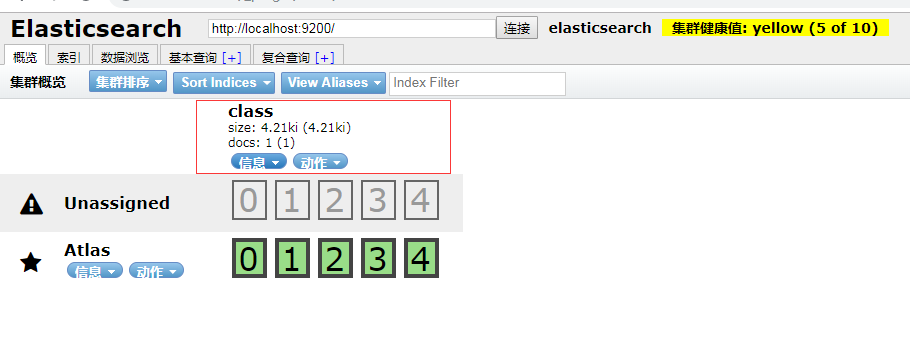
在添加几条数据后我们访问head插件---ES管理界面可以看到我们添加的数据库在页面上
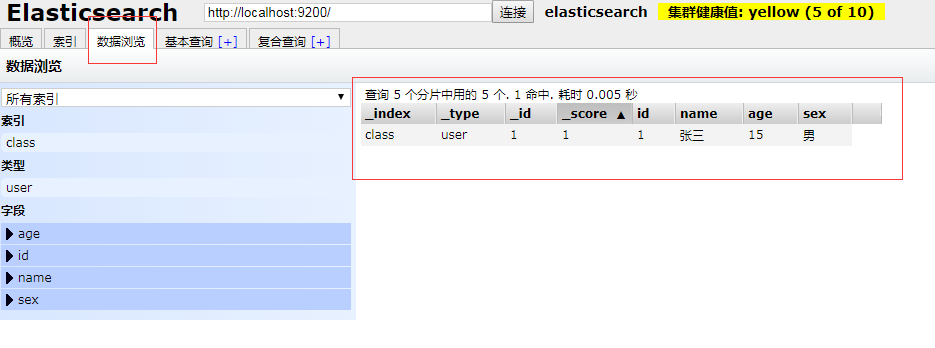
在数据浏览界面中可以看到我们添加的数据
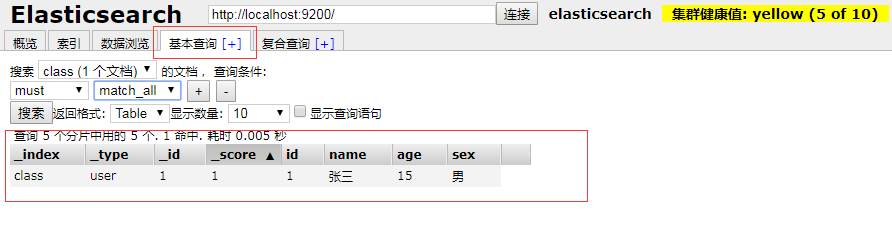
在基本查询中可以根据表名和条件,查询我们刚才插入的数据
七、项目中出现的错误
直接上错误代码:
Description:

Cannot determine embedded database driver class for database type NONE

Action:

If you want an embedded database please put a supported one on the classpath.

If you have database settings to be loaded from a particular profile you may need to active it (no profiles are currently active).
这个错误是由于打开了spring boot的自动配置数据,但是没有配置数据源,所以报错,解决的方案是直接关闭数据源自动配置,
只需要在启动类上加入:@SpringBootApplication(exclude = {DataSourceAutoConfiguration.class})即可
import org.springframework.boot.SpringApplication;

import org.springframework.boot.autoconfigure.SpringBootApplication;

import org.springframework.boot.autoconfigure.jdbc.DataSourceAutoConfiguration;

@SpringBootApplication(exclude = {DataSourceAutoConfiguration.class})

public class ElasticsearchApplication {

    public static void main(String[] args) {

        SpringApplication.run(ElasticsearchApplication.class, args);

    }

}
八、小结
这就是spring boot1.5整合ElasticSearch 2.X的操作,本文作为初级学习起来还是有帮助,但是ElasticSearch 中的一些高级操作如:同步数据库,分词器,高亮等都将在后面的文章中进行书写。ElasticSearch 6.X、ElasticSearch 5.X的API方式也和ElasticSearch 2.X不同,我也会放在后面进行讲解。
Elasticsearch学习(1) Spring boot整合Elasticsearch的更多相关文章
- Elasticsearch学习(3) spring boot整合Elasticsearch的原生方式
前面我们已经介绍了spring boot整合Elasticsearch的jpa方式,这种方式虽然简便,但是依旧无法解决我们较为复杂的业务,所以原生的实现方式学习能够解决这些问题,而原生的学习方式也是E ...
- Elasticsearch学习(4) spring boot整合Elasticsearch的聚合操作
之前已将spring boot原生方式介绍了,接下将结介绍的是Elasticsearch聚合操作.聚合操作一般来说是解决一下复杂的业务,比如mysql中的求和和分组,由于博主踩的坑比较多,所以博客可能 ...
- Spring Boot整合Elasticsearch
Spring Boot整合Elasticsearch Elasticsearch是一个全文搜索引擎,专门用于处理大型数据集.根据描述,自然而然使用它来存储和搜索应用程序日志.与Logstash和K ...
- 【spring boot】【elasticsearch】spring boot整合elasticsearch,启动报错Caused by: java.lang.IllegalStateException: availableProcessors is already set to [8], rejecting [8
spring boot整合elasticsearch, 启动报错: Caused by: java.lang.IllegalStateException: availableProcessors ], ...
- Spring Boot 项目学习 (四) Spring Boot整合Swagger2自动生成API文档
0 引言 在做服务端开发的时候,难免会涉及到API 接口文档的编写,可以经历过手写API 文档的过程,就会发现,一个自动生成API文档可以提高多少的效率. 以下列举几个手写API 文档的痛点: 文档需 ...
- Spring Boot 整合 Elasticsearch,实现 function score query 权重分查询
摘要: 原创出处 www.bysocket.com 「泥瓦匠BYSocket 」欢迎转载,保留摘要,谢谢! 『 预见未来最好的方式就是亲手创造未来 – <史蒂夫·乔布斯传> 』 运行环境: ...
- spring boot 整合 elasticsearch 5.x
spring boot与elasticsearch集成有两种方式.一种是直接使用elasticsearch.一种是使用data中间件. 本文只指针使用maven集成elasticsearch 5.x, ...
- Spring Boot 整合 elasticsearch
一.简介 我们的应用经常需要添加检索功能,开源的 ElasticSearch 是目前全文搜索引擎的 首选.他可以快速的存储.搜索和分析海量数据.Spring Boot通过整合Spring Data E ...
- Spring Boot整合ElasticSearch和Mysql 附案例源码
导读 前二天,写了一篇ElasticSearch7.8.1从入门到精通的(点我直达),但是还没有整合到SpringBoot中,下面演示将ElasticSearch和mysql整合到Spring Boo ...
随机推荐
- 纸牌游戏CardBattle的设计与开发
- WWW缓存方式
缓存方式 使用WWW.LoadFromCacheOrDownload接口.AssetBundles将保存在本地设备的Unity的缓存文件夹中.WebPlayer 有50MB的缓存上限,PC/Mac/A ...
- C++——堆、栈、静态存储区
栈 堆 静态存储区 生命周期 函数结束即释放 new,malloc开辟,delete,free释放 释放前,一直存在 最长,程序退出才释放 程序.局部变量 new,malloc申请的空间,用于 ...
- linux系统如何安装vmware Tools(下面以CentOS为例)
VMwareTools是VMware虚拟机中很重要的一个工具包,有些时候在虚拟机中安装完操作系统会缺少网卡驱动,不能上网,这时只要安装VMwareTools就可以解决问题,下面以CentOS为例,来说 ...
- Git回滚到历史节点(SourceTree篇)
转自:http://blog.csdn.net/u010416101/article/details/78142697.https://www.zhihu.com/question/48178380 ...
- StringUtils详解
public static void StringUtil(){ //null 和 ""操作~~~~~~~~~~~~~~~~~~~~~~~~~~~~~~~~~~~~~ //判断是否 ...
- Openssl CA.pl命令
一.简介 CA.pl是证书操作的友好接口,简化了一些相似的证书创建或管理操作 二.语法 CA.pl [-?] [-h] [-help] [-newcert] [-newreq][-newreq-nod ...
- code1169 传纸条
来自:http://www.cnblogs.com/DSChan/p/4862019.html 题目说找来回两条不相交路径,其实也可以等价为从(1,1)到(n,m)的两条不相交路径. 如果是只找一条, ...
- 快速求出n!的质因数的个数
一般做组合数的题目都要进行质因数的分解,我们一般是for循环对每个数进行质因数分解,大多数情况都不会超时,但极少数的情况下,题目会不允许这样的做法,所以我们需要学会一种更快的方法来求质因数. 我们一般 ...
- PropertiesConfiguration 修改配置文件的信息,不打乱顺序
需引入jar包 <!-- https://mvnrepository.com/artifact/commons-configuration/commons-configuration --> ...