
Spring Boot 整合 elasticsearch
一、简介
我们的应用经常需要添加检索功能,开源的 ElasticSearch 是目前全文搜索引擎的 首选。他可以快速的存储、搜索和分析海量数据。Spring Boot通过整合Spring Data ElasticSearch为我们提供了非常便捷的检索功能支持;
Elasticsearch是一个分布式搜索服务,提供Restful API,底层基于Lucene,采用 多shard(分片)的方式保证数据安全,并且提供自动resharding的功能,github 等大型的站点也是采用了ElasticSearch作为其搜索服务,
二、安装elasticsearch
我们采用 docker镜像安装的方式。
#下载镜像

docker pull elasticsearch

#启动镜像,elasticsearch 启动是会默认分配2G的内存 ,我们启动是设置小一点,防止我们内存不够启动失败

#9200是elasticsearch 默认的web通信接口,9300是分布式情况下,elasticsearch个节点通信的端口

docker run -e ES_JAVA_OPTS="-Xms256m -Xmx256m" -d -p 9200:9200 -p 9300:9300 --name es01 5c1e1ecfe33a
访问 127.0.0.1:9200 如下图,说明安装成功

三、elasticsearch的一些概念
- 以 员工文档 的形式存储为例:一个文档代表一个员工数据。存储数据到 ElasticSearch 的行为叫做索引 ,但在索引一个文档之前,需要确定将文档存 储在哪里。
- 一个 ElasticSearch 集群可以 包含多个索引 ,相应的每个索引可以包含多个类型。这些不同的类型存储着多个文档 ,每个文档又有 多个 属性 。
- 类似关系:
- 索引-数据库
- 类型-表
- 文档-表中的记录 – 属性-列
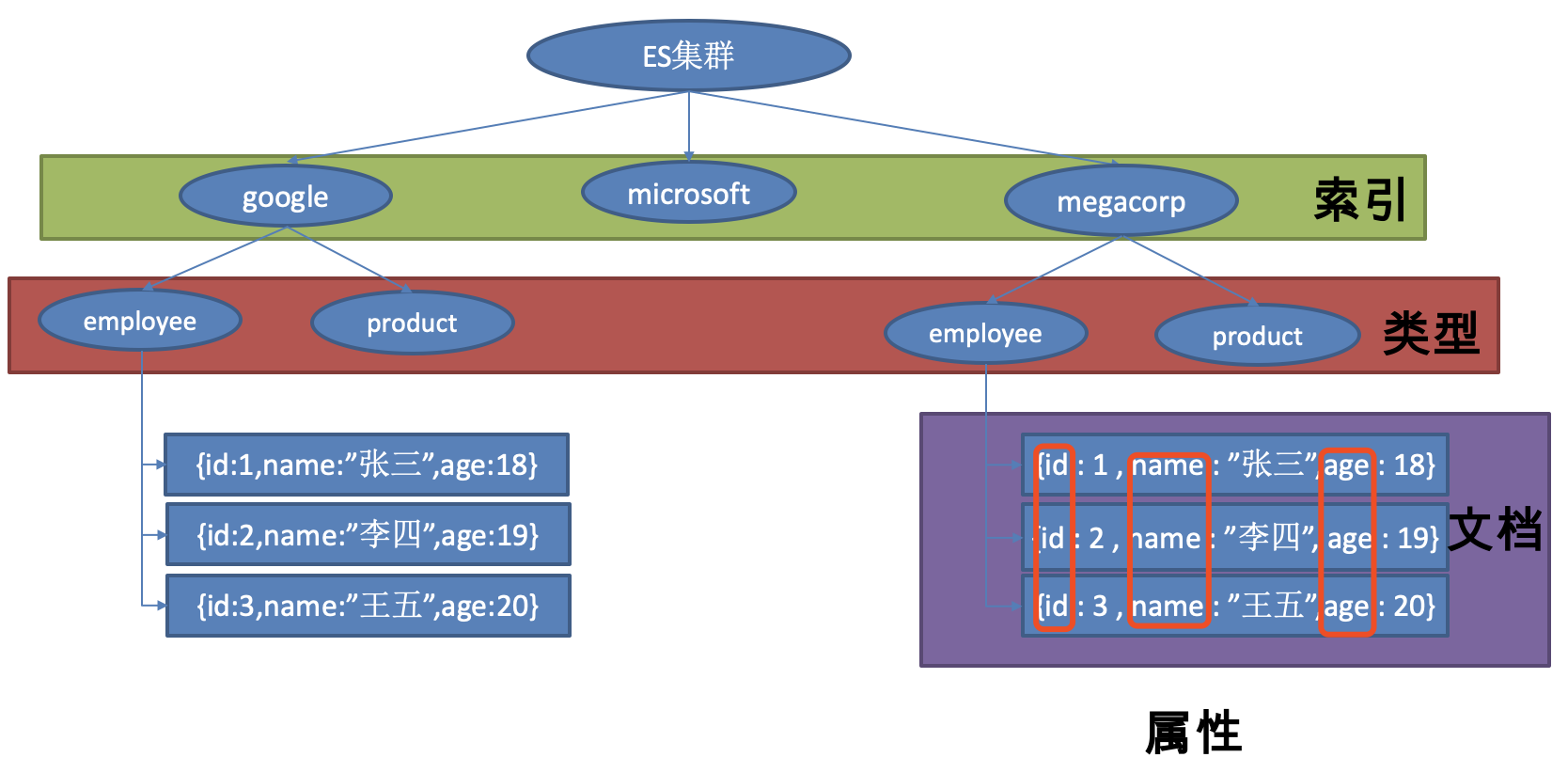
elasticsearch使用可以参早官方文档,在这里不在讲解。
四、整合 elasticsearch
创建项目 springboot-elasticsearch,引入web支持
SpringBoot 提供了两种方式操作elasticsearch,Jest 和 SpringData。
Jest 操作 elasticsearch
Jest是ElasticSearch的Java HTTP Rest客户端。
ElasticSearch已经有一个Java API,ElasticSearch也在内部使用它,但是Jest填补了空白,它是ElasticSearch Http Rest接口缺少的客户端。
1. pom.xml
<?xml version="1.0" encoding="UTF-8"?>

<project xmlns="http://maven.apache.org/POM/4.0.0" xmlns:xsi="http://www.w3.org/2001/XMLSchema-instance"

	xsi:schemaLocation="http://maven.apache.org/POM/4.0.0 http://maven.apache.org/xsd/maven-4.0.0.xsd">

	<modelVersion>4.0.0</modelVersion>

	<groupId>com.gf</groupId>

	<artifactId>springboot-elasticsearch</artifactId>

	<version>0.0.1-SNAPSHOT</version>

	<packaging>jar</packaging>

	<name>springboot-elasticsearch</name>

	<description>Demo project for Spring Boot</description>

	<parent>

		<groupId>org.springframework.boot</groupId>

		<artifactId>spring-boot-starter-parent</artifactId>

		<version>2.1.1.RELEASE</version>

		<relativePath/> <!-- lookup parent from repository -->

	</parent>

	<properties>

		<project.build.sourceEncoding>UTF-8</project.build.sourceEncoding>

		<project.reporting.outputEncoding>UTF-8</project.reporting.outputEncoding>

		<java.version>1.8</java.version>

	</properties>

	<dependencies>

		<dependency>

		<groupId>org.springframework.boot</groupId>

		<artifactId>spring-boot-starter-data-elasticsearch</artifactId>

	</dependency>

		<dependency>

			<groupId>io.searchbox</groupId>

			<artifactId>jest</artifactId>

			<version>5.3.3</version>

		</dependency>

		<dependency>

			<groupId>org.springframework.boot</groupId>

			<artifactId>spring-boot-starter-web</artifactId>

		</dependency>

		<dependency>

			<groupId>org.springframework.boot</groupId>

			<artifactId>spring-boot-starter-test</artifactId>

			<scope>test</scope>

		</dependency>

	</dependencies>

	<build>

		<plugins>

			<plugin>

				<groupId>org.springframework.boot</groupId>

				<artifactId>spring-boot-maven-plugin</artifactId>

			</plugin>

		</plugins>

	</build>

</project>
2. application.properties
spring.elasticsearch.jest.uris=http://127.0.0.1:9200
3. Article
package com.gf.entity;

import io.searchbox.annotations.JestId;

public class Article {

    @JestId

    private Integer id;

    private String author;

    private String title;

    private String content;

    public Integer getId() {

        return id;

    }

    public void setId(Integer id) {

        this.id = id;

    }

    public String getAuthor() {

        return author;

    }

    public void setAuthor(String author) {

        this.author = author;

    }

    public String getTitle() {

        return title;

    }

    public void setTitle(String title) {

        this.title = title;

    }

    public String getContent() {

        return content;

    }

    public void setContent(String content) {

        this.content = content;

    }

    @Override

    public String toString() {

        final StringBuilder sb = new StringBuilder( "{\"Article\":{" );

        sb.append( "\"id\":" )

                .append( id );

        sb.append( ",\"author\":\"" )

                .append( author ).append( '\"' );

        sb.append( ",\"title\":\"" )

                .append( title ).append( '\"' );

        sb.append( ",\"content\":\"" )

                .append( content ).append( '\"' );

        sb.append( "}}" );

        return sb.toString();

    }

}
4. springboot测试类
package com.gf;

import com.gf.entity.Article;

import io.searchbox.client.JestClient;

import io.searchbox.core.Index;

import io.searchbox.core.Search;

import io.searchbox.core.SearchResult;

import org.junit.Test;

import org.junit.runner.RunWith;

import org.springframework.beans.factory.annotation.Autowired;

import org.springframework.boot.test.context.SpringBootTest;

import org.springframework.test.context.junit4.SpringRunner;

import java.io.IOException;

@RunWith(SpringRunner.class)

@SpringBootTest

public class SpringbootElasticsearchApplicationTests {

	@Autowired

	JestClient jestClient;

	@Test

	public void createIndex() {

		//1. 给ES中索引(保存)一个文档

		Article article = new Article();

		article.setId( 1 );

		article.setTitle( "好消息" );

		article.setAuthor( "张三" );

		article.setContent( "Hello World" );

		//2. 构建一个索引

		Index index = new Index.Builder( article ).index( "gf" ).type( "news" ).build();

		try {

			//3. 执行

			jestClient.execute( index );

		} catch (IOException e) {

			e.printStackTrace();

		}

	}

	@Test

	public void search() {

		//查询表达式

		String query = "{\n" +

				"    \"query\" : {\n" +

				"        \"match\" : {\n" +

				"            \"content\" : \"hello\"\n" +

				"        }\n" +

				"    }\n" +

				"}";

		//构建搜索功能

		Search search = new Search.Builder( query ).addIndex( "gf" ).addType( "news" ).build();

		try {

			//执行

			SearchResult result = jestClient.execute( search );

			System.out.println(result.getJsonString());

		} catch (IOException e) {

			e.printStackTrace();

		}

	}

}
Jest的更多api ,可以参照github的文档:https://github.com/searchbox-io/Jest
SpringData 操作 elasticsearch
1. application.properties
spring.data.elasticsearch.cluster-name=elasticsearch

spring.data.elasticsearch.cluster-nodes=127.0.0.1:9300
2. Book
package com.gf.entity;

@Document( indexName = "gf" , type = "book")

public class Book {

    private Integer id;

    private String bookName;

    private String author;

    public Integer getId() {

        return id;

    }

    public void setId(Integer id) {

        this.id = id;

    }

    public String getBookName() {

        return bookName;

    }

    public void setBookName(String bookName) {

        this.bookName = bookName;

    }

    public String getAuthor() {

        return author;

    }

    public void setAuthor(String author) {

        this.author = author;

    }

    @Override

    public String toString() {

        final StringBuilder sb = new StringBuilder( "{\"Book\":{" );

        sb.append( "\"id\":" )

                .append( id );

        sb.append( ",\"bookName\":\"" )

                .append( bookName ).append( '\"' );

        sb.append( ",\"author\":\"" )

                .append( author ).append( '\"' );

        sb.append( "}}" );

        return sb.toString();

    }

}
3. BookRepository
package com.gf.repository;

import com.gf.entity.Book;

import org.springframework.data.elasticsearch.repository.ElasticsearchRepository;

import java.util.List;

public interface BookRepository extends ElasticsearchRepository<Book, Integer>{

    List<Book> findByBookNameLike(String bookName);

}
4. springboot 测试类
package com.gf;

import com.gf.entity.Article;

import com.gf.entity.Book;

import com.gf.repository.BookRepository;

import io.searchbox.client.JestClient;

import io.searchbox.core.Index;

import io.searchbox.core.Search;

import io.searchbox.core.SearchResult;

import org.junit.Test;

import org.junit.runner.RunWith;

import org.springframework.beans.factory.annotation.Autowired;

import org.springframework.boot.test.context.SpringBootTest;

import org.springframework.test.context.junit4.SpringRunner;

import java.io.IOException;

import java.util.List;

@RunWith(SpringRunner.class)

@SpringBootTest

public class SpringbootElasticsearchApplicationTests {

	@Autowired

	BookRepository bookRepository;

	@Test

	public void createIndex2(){

		Book book = new Book();

		book.setId(1);

		book.setBookName("西游记");

		book.setAuthor( "吴承恩" );

		bookRepository.index( book );

	}

	@Test

	public void useFind() {

		List<Book> list = bookRepository.findByBookNameLike( "游" );

		for (Book book : list) {

			System.out.println(book);

		}

	}

}
我们启动测试 ,发现报错 。

这个报错的原因是springData的版本与我elasticsearch的版本有冲突,下午是springData官方文档给出的适配表。
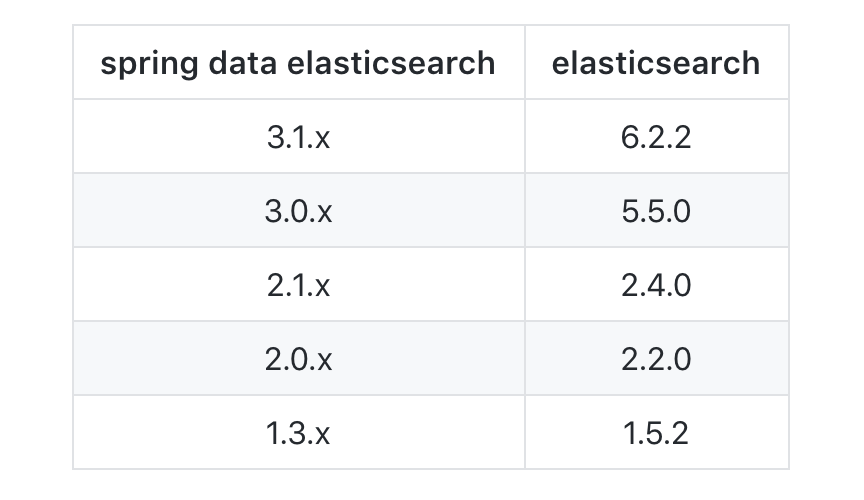
我们使用的springdata elasticsearch的 版本是3.1.3 ,对应的版本应该是6.2.2版本,而我们是的 elasticsearch 是 5.6.9,所以目前我们需要更换elasticsearch的版本为6.X
docker pull elasticsearch:6.5.1

docker run -e ES_JAVA_OPTS="-Xms256m -Xmx256m" -d -p 9200:9200 -p 9300:9300 --name es02 镜像ID
访问127.0.0.1:9200
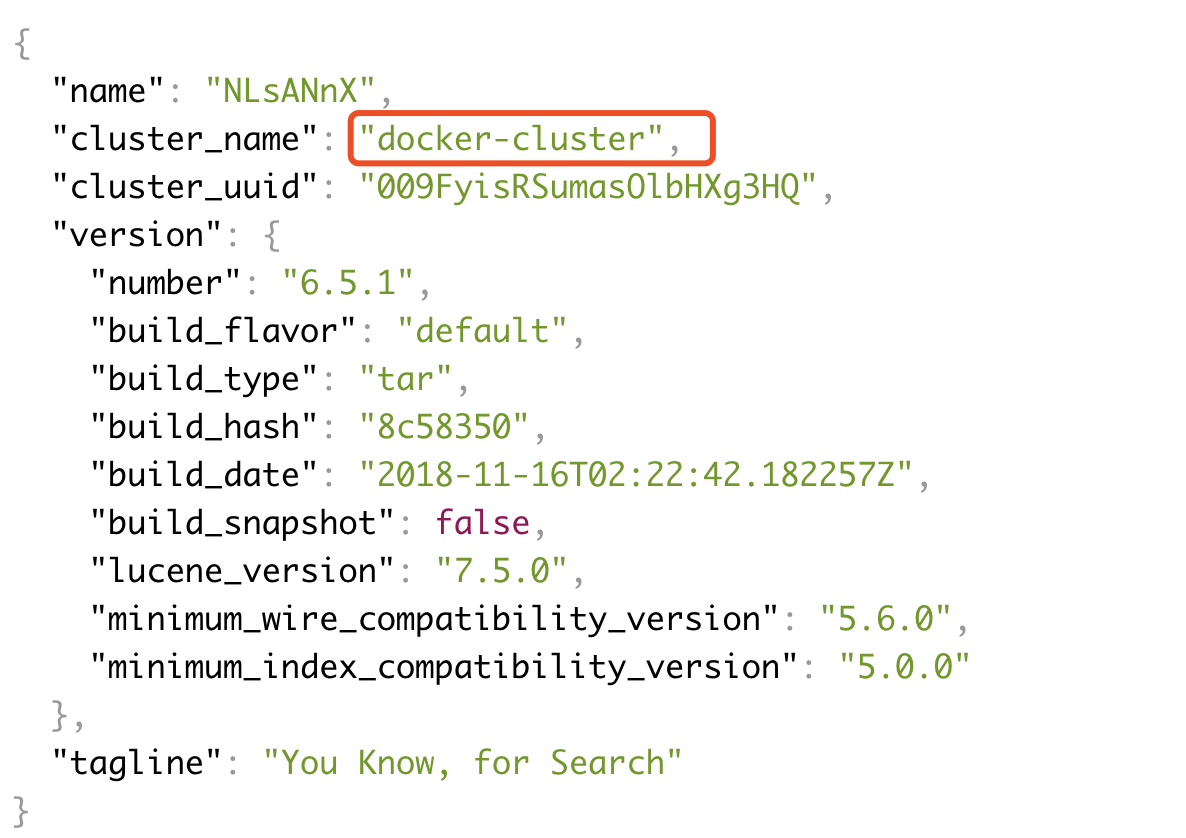
集群名为docker-cluster,所以我们要修改application.properties的配置了
spring.data.elasticsearch.cluster-name=docker-cluster

spring.data.elasticsearch.cluster-nodes=127.0.0.1:9300
我们再次进行测试,测试可以通过了 。我们访问http://127.0.0.1:9200/gf/book/1,可以得到我们存入的索引信息。

源码下载:https://github.com/gf-huanchupk/SpringBootLearning
欢迎扫码或微信搜索公众号《程序员果果》关注我,关注有惊喜~

Spring Boot 整合 elasticsearch的更多相关文章
- Spring Boot整合Elasticsearch
Spring Boot整合Elasticsearch Elasticsearch是一个全文搜索引擎,专门用于处理大型数据集.根据描述,自然而然使用它来存储和搜索应用程序日志.与Logstash和K ...
- 【spring boot】【elasticsearch】spring boot整合elasticsearch,启动报错Caused by: java.lang.IllegalStateException: availableProcessors is already set to [8], rejecting [8
spring boot整合elasticsearch, 启动报错: Caused by: java.lang.IllegalStateException: availableProcessors ], ...
- Elasticsearch学习(3) spring boot整合Elasticsearch的原生方式
前面我们已经介绍了spring boot整合Elasticsearch的jpa方式,这种方式虽然简便,但是依旧无法解决我们较为复杂的业务,所以原生的实现方式学习能够解决这些问题,而原生的学习方式也是E ...
- Spring Boot 整合 Elasticsearch,实现 function score query 权重分查询
摘要: 原创出处 www.bysocket.com 「泥瓦匠BYSocket 」欢迎转载,保留摘要,谢谢! 『 预见未来最好的方式就是亲手创造未来 – <史蒂夫·乔布斯传> 』 运行环境: ...
- spring boot 整合 elasticsearch 5.x
spring boot与elasticsearch集成有两种方式.一种是直接使用elasticsearch.一种是使用data中间件. 本文只指针使用maven集成elasticsearch 5.x, ...
- Elasticsearch学习(1) Spring boot整合Elasticsearch
本文的Spring Boot版本为1.5.9,Elasticsearch版本为2.4.4,话不多说,直接上代码. 一.启动Elasticsearch 在官网上下载Elasticsearch后,打开bi ...
- Spring Boot整合ElasticSearch和Mysql 附案例源码
导读 前二天,写了一篇ElasticSearch7.8.1从入门到精通的(点我直达),但是还没有整合到SpringBoot中,下面演示将ElasticSearch和mysql整合到Spring Boo ...
- Elasticsearch学习(4) spring boot整合Elasticsearch的聚合操作
之前已将spring boot原生方式介绍了,接下将结介绍的是Elasticsearch聚合操作.聚合操作一般来说是解决一下复杂的业务,比如mysql中的求和和分组,由于博主踩的坑比较多,所以博客可能 ...
- spring boot 整合elasticsearch
1.导入jar包 <properties> <project.build.sourceEncoding>UTF-8</project.build.sourceEncodi ...
随机推荐
- for循环语句/命名函数
for(1.表达式1;2.表达式2;3.表达式3){ 4.循环体语句; } 先执行1,在执行2表达式,如果2的表达式为false的话直接退出循环, 如果2的表达式结果为true,执行4,执行3,执行2 ...
- Linux服务器之间进行文件目录映射/挂载(总结)
Linux服务器之间进行文件目录映射/挂载(总结) 需要实现的功能为:将192.168.10.10服务器下的 /home/要映射的目录/ ,映射为192.168.10.90服务器下的 /home/被映 ...
- NFS部署文件共享
本章解了如何配置网络文件系统(Network File System,NFS)服务来简化Linux系统之间的文件共享工作,以及通过部署NFS服务在多台Linux系统之间挂载并使用资源.在管理设备挂载信 ...
- 查询Python版本
- Mesos源码分析(14): DockerContainerier运行一个Task
DockerContainerizer的实现在文件src/slave/containerizer/docker.cpp中 Future<bool> DockerContainerize ...
- MongoDB 错误汇总
错误1. ERROR: child process failed, exited with error number 100 可能原因: 1.没有正确关闭服务 2.服务已经启动 3.conf文件的参数 ...
- 作为小白,如何学习Web前端开发?
作为一个已经写码这么多年的人,我不会告诉你我最初的时候是自学的,因为刚开始自己学真的特别无聊枯燥,实在学不下去,所以就自己报了一个培训(上元教育)的地方,毕竟是交了钱的,本着不服气的精神,硬是把自己生 ...
- Java线程状态Jstack线程状态BLOCKED/TIMED_WAITING/WAITING解释
一.线程5种状态 新建状态(New) 新创建了一个线程对象. 就绪状态(Runnable) 线程对象创建后,其他线程调用了该对象的start()方法.该状态的线程位于可运行线程池中,变得可运行,等待获 ...
- #Java学习之路——第一部分总结
今天主要是Java的入门以及idea的安装说实话,没有什么有技术含量的东西,发的也全是皮毛,但是在数组部分有很多细节需要注意,在JDK环境变量配置的地方不光光只有windows 的环境配置,还要掌握补 ...
- [Swift]LeetCode517. 超级洗衣机 | Super Washing Machines
You have n super washing machines on a line. Initially, each washing machine has some dresses or is ...