
android--------自定义控件 之 基本实现篇
前面简单的讲述了Android中自定义控件中的几个方法,今天通过代码来实现一个简单的案例
自定义一个扇形图
自定义控件示例:
这里先介绍继承View的方式为例
public class CircularView extends View {

    /****

     * 有三个参数的构造函数中第三个参数是默认的Style,

     * 这里的默认的Style是指它在当前Application或Activity所用的Theme中的默认Style,且只有在明确调用的时候才会生效,

     */

    private final static String TAG = CircularView.class.getName();

    private Paint mPaint;

    private RectF oval;

    public CircularView(Context context) {

        super(context);

        init();

    }

    public CircularView(Context context, AttributeSet attrs) {

        super(context, attrs);

        init();

    }

    public CircularView(Context context, AttributeSet attrs, int defStyleAttr) {

        super(context, attrs, defStyleAttr);

        init();

    }

    public CircularView(Context context, AttributeSet attrs, int defStyleAttr, int defStyleRes) {

        super(context, attrs, defStyleAttr, defStyleRes);

        init();

    }

    private void init(){

        mPaint = new Paint();

        mPaint.setAntiAlias(true);

        oval = new RectF();

    }

    /****

     * 测量-Measure过程是计算视图大小

     *

     * @param widthMeasureSpec

     * @param heightMeasureSpec

     */

    @Override

    protected void onMeasure(int widthMeasureSpec, int heightMeasureSpec) {

        super.onMeasure(widthMeasureSpec, heightMeasureSpec);

        //根据提供的测量值(格式)提取模式(三个模式之一)

        //MeasureSpec有3种模式分别是UNSPECIFIED, EXACTLY和AT_MOST,

        int widthMode = MeasureSpec.getMode(widthMeasureSpec);  //取出宽度的测量模式

        int widthSize = MeasureSpec.getSize(widthMeasureSpec);//获取View的大小(宽度的确切数值)

        int heightMode = MeasureSpec.getMode(heightMeasureSpec);

        int heightSize = MeasureSpec.getSize(heightMeasureSpec);

        Log.i(TAG,"onMeasure---widthMode--->"+widthMode);

        switch (widthMode){

            case MeasureSpec.EXACTLY:

                break;

            case MeasureSpec.AT_MOST:

                break;

            case MeasureSpec.UNSPECIFIED:

              break;

        }

        Log.i(TAG,"onMeasure--widthSize--->"+ widthSize);

        Log.i(TAG,"onMeasure--heightMode-->"+ heightMode);

        Log.i(TAG,"onMeasure--heightSize-->"+heightSize);

    }

    /***

     * 确定View的大小(这个函数在视图大小发生改变时调用。)

     *

     * 宽度,高度,上一次宽度,上一次高度。

     * 只需关注 宽度(w), 高度(h) 即可,这两个参数就是View最终的大小。

     * @param w

     * @param h

     * @param oldw

     * @param oldh

     */

    @Override

    protected void onSizeChanged(int w, int h, int oldw, int oldh) {

        super.onSizeChanged(w, h, oldw, oldh);

        Log.i(TAG,"onSizeChanged");

    }

    /****

     * 布局-Layout过程用于设置视图在屏幕中显示的位置,onLayout一般只会在自定义ViewGroup中才会使用

     *

     * 确定布局的函数是onLayout,它用于确定子View的位置,在自定义ViewGroup中会用到,他调用的是子View的layout函数。

     *

     * @param changed

     * @param left

     * @param top

     * @param right

     * @param bottom

     */

    @Override

    protected void onLayout(boolean changed, int left, int top, int right, int bottom) {

        super.onLayout(changed, left, top, right, bottom);

        Log.i(TAG,"onLayout");

    }

    /***

     * 绘制-draw过程主要用于利用前两步得到的参数,将视图显示在屏幕上,到这里也就完成了整个的视图绘制工作

     * @param canvas

     */

    @Override

    protected void onDraw(Canvas canvas) {

        super.onDraw(canvas);

        mPaint.setColor(Color.BLACK);

        // FILL填充, STROKE描边,FILL_AND_STROKE填充和描边

        mPaint.setStyle(Paint.Style.FILL_AND_STROKE);

        int width = getWidth();//布局中自定义控件的宽度

        int height = getHeight();

        Log.i(TAG,"onDraw--->" + width + "--" + height);

        float radius = width /4;

        canvas.drawCircle(width/2,width/2,radius,mPaint);//画圆

        mPaint.setColor(getResources().getColor(R.color.colorAccent));

        //用于定义的圆弧的形状和大小的界限

        oval.set(width/2 - radius,width/2 - radius, width/2 + radius, width/2 + radius);

        //根据进度画圆弧

        canvas.drawArc(oval,270,120,true,mPaint);

    }

}
在布局中如何使用
<?xml version="1.0" encoding="utf-8"?>

<LinearLayout xmlns:android="http://schemas.android.com/apk/res/android"

    android:orientation="vertical" android:layout_width="match_parent"

    android:layout_height="match_parent">

    <com.zhangqie.customcontrol.demo1.CircularView

        android:layout_width="150dp"

        android:layout_height="150dp"

        android:layout_margin="2dp"

        />

    <com.zhangqie.customcontrol.demo1.CircularView

        android:layout_width="wrap_content"

        android:layout_height="wrap_content"

        android:background="@color/colorPrimaryDark"

        />

</LinearLayout>
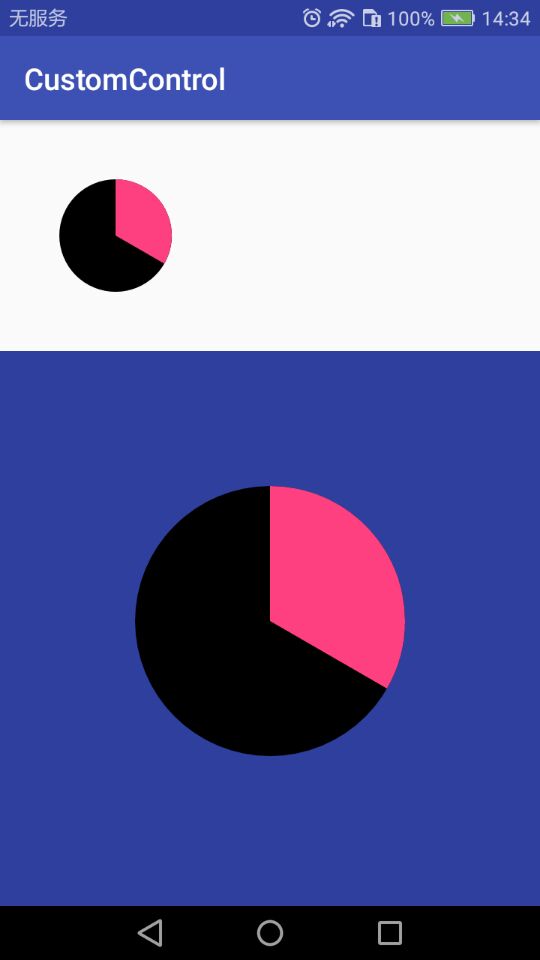
我用了两种模式,固定大小和自适应
效果如图:(自适应的默认居中了)
本篇主要介绍Android自定义控件的基本用法,后续中介绍如何自定义属性。
android--------自定义控件 之 基本实现篇的更多相关文章
- Android自定义控件系列之应用篇——圆形进度条
一.概述 在上一篇博文中,我们给大家介绍了Android自定义控件系列的基础篇.链接:http://www.cnblogs.com/jerehedu/p/4360066.html 这一篇博文中,我们将 ...
- Android自定义控件系列之基础篇
一.概述 在android开发中很多UI控件往往需要进行定制以满足应用的需要或达到更加的效果,接下来就通过一个系列来介绍自定义控件,这里更多是通过一些案例逐步去学习,本系列有一些典型的应用,掌握好了大 ...
- android 自定义控件(初篇)
android 自定义控件 在写UI当中很多时候会用到自定义的控件,其实自定义控件就像是定义一个类进行调用就OK了.有些相关的感念可以查看API 下面就用个简单的例子来说明自定义控件: public ...
- Android自定义控件之自定义ViewGroup实现标签云
前言: 前面几篇讲了自定义控件绘制原理Android自定义控件之基本原理(一),自定义属性Android自定义控件之自定义属性(二),自定义组合控件Android自定义控件之自定义组合控件(三),常言 ...
- Android自定义控件之自定义组合控件
前言: 前两篇介绍了自定义控件的基础原理Android自定义控件之基本原理(一).自定义属性Android自定义控件之自定义属性(二).今天重点介绍一下如何通过自定义组合控件来提高布局的复用,降低开发 ...
- Android自定义控件之自定义属性
前言: 上篇介绍了自定义控件的基本要求以及绘制的基本原理,本篇文章主要介绍如何给自定义控件自定义一些属性.本篇文章将继续以上篇文章自定义圆形百分比为例进行讲解.有关原理知识请参考Android自定义控 ...
- Android自定义控件之基本原理
前言: 在日常的Android开发中会经常和控件打交道,有时Android提供的控件未必能满足业务的需求,这个时候就需要我们实现自定义一些控件,今天先大致了解一下自定义控件的要求和实现的基本原理. 自 ...
- [转]Android自定义控件三部曲系列完全解析(动画, 绘图, 自定义View)
来源:http://blog.csdn.net/harvic880925/article/details/50995268 一.自定义控件三部曲之动画篇 1.<自定义控件三部曲之动画篇(一)—— ...
- Android自定义控件1
概述 Android已经为我们提供了大量的View供我们使用,但是可能有时候这些组件不能满足我们的需求,这时候就需要自定义控件了.自定义控件对于初学者总是感觉是一种复杂的技术.因为里面涉及到的知识点会 ...
- 一起来学习Android自定义控件1
概述 Android已经为我们提供了大量的View供我们使用,但是可能有时候这些组件不能满足我们的需求,这时候就需要自定义控件了.自定义控件对于初学者总是感觉是一种复杂的技术.因为里面涉及到的知识点会 ...
随机推荐
- Web操作web.config
1.引用System.Configuration.DLL 2.引用命名空间System.Configuration和System.Web.Configuration 3.上代码 // 使用指定的虚拟路 ...
- 修改sepolicy后编译出现‘Error while expanding policy’【转】
本文转载自:https://blog.csdn.net/yin1031468524/article/details/75644874 在系统中添加某个“*.te”后,可能会出现下面的错误: libse ...
- JQ插入节点方法
1.append() appendTo() prepend() prependTo() 2. before() insertBefore() after() insertAfter()
- P3338 [ZJOI2014]力
思路 颓柿子的题目 要求求这样的一个式子 \[ F_j=\sum_{i<j}\frac{q_iq_j}{(i-j)^2}-\sum_{i>j}\frac{q_iq_j}{(i-j)^2} ...
- 正则匹配-URL-域名
DNS规定,域名中的标号都由英文字母和数字组成,每一个标号不超过63个字符,也不区分大小写字母.标号中除连字符(-)外不能使用其他的标点符号.级别最低的域名写在最左边,而级别最高的域名写在最右边.由多 ...
- 测试常用的sql语句总结
测试中常用的sql语句,排名部分先后 1. 查询 SELECT * FROM 表名称 SELECT COUNT(DISTINCT column_name) FROM table_name 指定列的不同 ...
- SAP字段与表的对应关系
SAP字段与表的对应关系 MASTER DATA-主数据 Customer Master KNA1 Customer Basic Data KNB1 ...
- There is no Action mapped for namespace / and action name .解答
做struts2登陆检验的时候遇到了一个问题: 输入http://localhost/login_validation/的目的是想显示 文件夹下的文件列表,无奈,使用struts框架,web.xml设 ...
- C+++string类如何判断字符串为空
string类是C++STL类之一,有很丰富的接口,判断string为空是经常用到的操作. string类为空,实际也就是元素为0个. 可以按照如下方式判断: 1.string类有自己的成员函数emp ...
- 阿里巴巴数据库连接池 druid配置详解
一.背景 java程序很大一部分要操作数据库,为了提高性能操作数据库的时候,又不得不使用数据库连接池.数据库连接池有很多选择,c3p.dhcp.proxool等,druid作为一名后起之秀,凭借其出色 ...