
KINavigationController使用演示例子
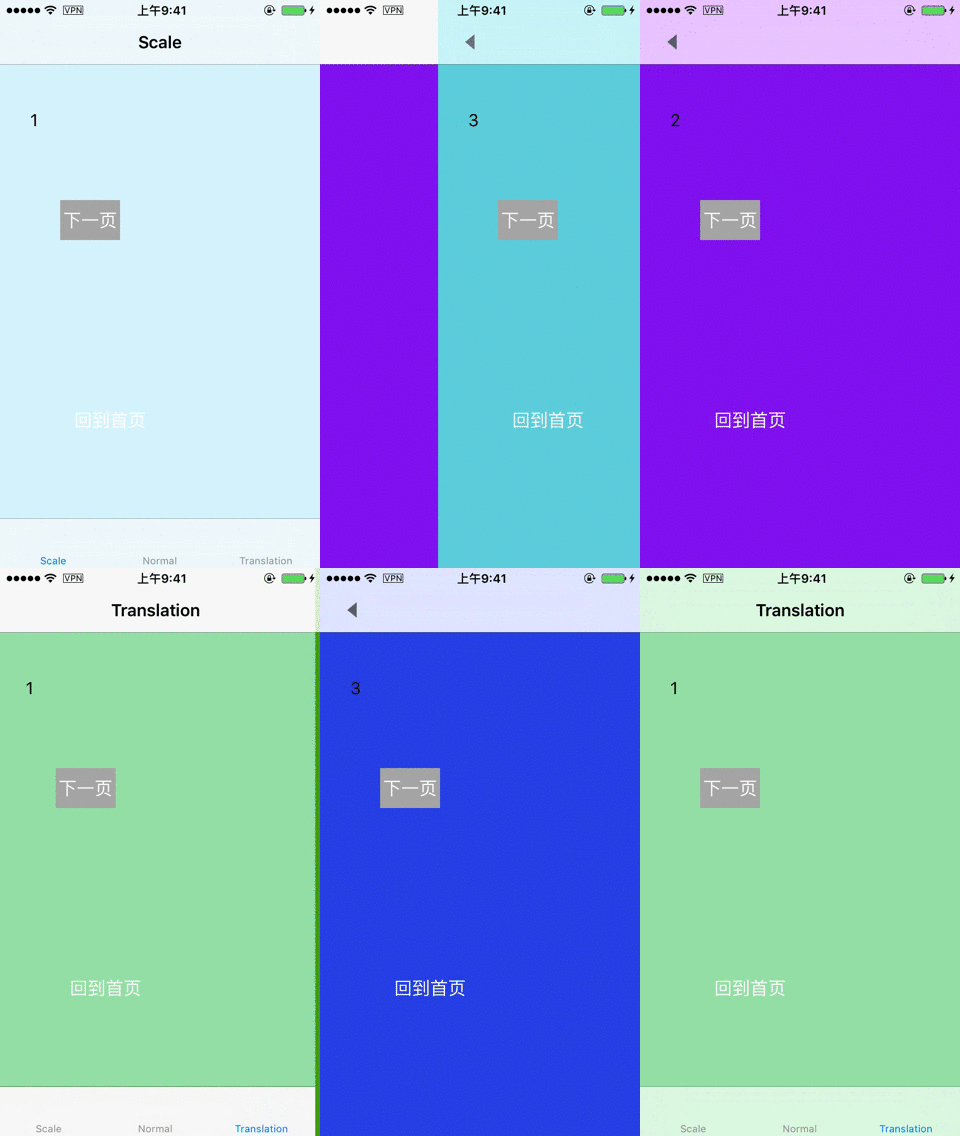
运行效果
实现思路
创建pan手势,添加到页面中,监听手势的动作。重写push的方法,在push之前截图保存到数组。重写pop的方法,在pop之前删除截图。pop的动画效果是利用截图的image添加到topView上,从视觉效果上实现缩放、平移的动画效果。以下是具体的实现思路:
1.创建Pan手势识别器
 delegate = self

        let panRecognizer = UIPanGestureRecognizer(target: self, action: #selector(paningGestureReceive(recoginzer:)))

        panRecognizer.delegate = self

        view.addGestureRecognizer(panRecognizer)

        //实现侧滑返回

        interactivePopGestureRecognizer?.delegate = self
2.实现手势的相应事件
//MARK: - Events

    @objc func paningGestureReceive(recoginzer:UIPanGestureRecognizer) {

        //如果只有一个控制器或者不允许全屏返回,return

        if self.viewControllers.count <= 1 || !canDragBack {

            return

        }

        let touchPoint = recoginzer.location(in: UIApplication.shared.keyWindow)

        switch recoginzer.state {

        case .began:

            isMoving = true

            startTouch = touchPoint

            if backgroundView == nil {

                let frame = TOP_VIEW?.frame

                backgroundView = UIView(frame: CGRect(x: 0, y: 0, width: (frame?.size.width)!, height: (frame?.size.height)!))

                TOP_VIEW?.superview?.insertSubview(backgroundView!, belowSubview: TOP_VIEW!)

                blackMask = UIView(frame: CGRect(x: 0, y: 0, width: (frame?.size.width)!, height: (frame?.size.height)!))

                blackMask?.backgroundColor = UIColor.black

                backgroundView?.addSubview(blackMask!)

            }

            backgroundView?.isHidden = false

            if lastScreenShotView != nil {

                lastScreenShotView?.removeFromSuperview()

            }

            let lastScreenShot = screenShotsList.lastObject as! UIImage

            lastScreenShotView = UIImageView(image: lastScreenShot)

            backgroundView?.insertSubview(lastScreenShotView!, belowSubview: blackMask!)

           break

        case .ended:

            //手势结束,判断是返回还是回到原位

            if touchPoint.x - (startTouch?.x)! > 50 {

                UIView.animate(withDuration: 0.3, animations: {

                    self.moveView(withX: self.kMAXWidth)

                }, completion: { (finished:Bool) in

                    self.popViewController(animated: false)

                    var frame = self.TOP_VIEW?.frame

                    frame?.origin.x = 0

                    self.TOP_VIEW?.frame = frame!

                    self.isMoving = false

                    self.backgroundView?.isHidden = true

                    // End paning,remove last screen shot

                    self.customAnimation.removeLastScreenShot()

                })

            } else {

                UIView.animate(withDuration: 0.3, animations: {

                    self.moveView(withX: 0)

                }, completion: { (finished:Bool) in

                    self.isMoving = false

                    self.backgroundView?.isHidden = true

                })

            }

           return //直接返回,不在往下执行

        case .cancelled:

            UIView.animate(withDuration: 0.3, animations: {

                self.moveView(withX: 0)

            }, completion: { (finished:Bool) in

                self.isMoving = false

                self.backgroundView?.isHidden = true

            })

            return

        default:

            break

        }

        if isMoving! {

            self.moveView(withX: touchPoint.x - (startTouch?.x)!)

        }

    }
3.创建截图需要的backgroundView和作为遮罩的blackMask,存放截图所需的数组
if backgroundView == nil {

                let frame = TOP_VIEW?.frame

                backgroundView = UIView(frame: CGRect(x: 0, y: 0, width: (frame?.size.width)!, height: (frame?.size.height)!))

                TOP_VIEW?.superview?.insertSubview(backgroundView!, belowSubview: TOP_VIEW!)

                blackMask = UIView(frame: CGRect(x: 0, y: 0, width: (frame?.size.width)!, height: (frame?.size.height)!))

                blackMask?.backgroundColor = UIColor.black

                backgroundView?.addSubview(blackMask!)

            }

            backgroundView?.isHidden = false

            if lastScreenShotView != nil {

                lastScreenShotView?.removeFromSuperview()

            }

            let lastScreenShot = screenShotsList.lastObject as! UIImage

            lastScreenShotView = UIImageView(image: lastScreenShot)

            backgroundView?.insertSubview(lastScreenShotView!, belowSubview: blackMask!)
4.在push前截图,并保存
override func pushViewController(_ viewController: UIViewController, animated: Bool) {

        if self.viewControllers.count >= 1 {

            let screenshot = getScreenshot()

            if screenshot != nil {

                screenShotsList.add(screenshot!)

            }

        }

        super.pushViewController(viewController, animated: animated)

    }
5.重写常用的pop方法,在pop前删除相应的截图
@discardableResult

    override func popViewController(animated: Bool) -> UIViewController? {

        screenShotsList.removeLastObject()

        return super.popViewController(animated: animated)

    }

    override func popToViewController(_ viewController: UIViewController, animated: Bool) -> [UIViewController]? {

        var removeCount = 0

        for i in stride(from: viewControllers.count-1, to: 0, by: -1) {

            if viewController == viewControllers[i] {

                break

            }

            screenShotsList.removeLastObject()

            removeCount = removeCount+1

        }

        customAnimation.removeCount = removeCount

        return super.popToViewController(viewController, animated: animated)

    }

    override func popToRootViewController(animated: Bool) -> [UIViewController]? {

        screenShotsList.removeAllObjects()

        customAnimation.removeAllScreenShot()

        return super.popToRootViewController(animated: animated)

    }
到此处能实现手势整体返回的效果,要实现点击返回按钮也能整体返回,需要自定义返回动画。实现协议UIViewControllerAnimatedTransitioning。
6.让navigationController遵守UINavigationControllerDelegate实现下面的方法,在方法里面可根据operation判断需要自定义的类型(pop/push)
 func navigationController(_ navigationController: UINavigationController,

 animationControllerFor operation: UINavigationControllerOperation,

 from fromVC: UIViewController,

  to toVC: UIViewController) -> UIViewControllerAnimatedTransitioning?
7.使用一个类实现UIViewControllerAnimatedTransitioning协议
func transitionDuration(using transitionContext: UIViewControllerContextTransitioning?) -> TimeInterval

//定义动画

func animateTransition(using transitionContext: UIViewControllerContextTransitioning)
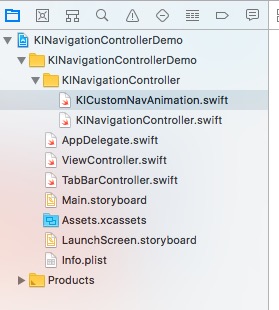
项目结构图
 KINavigationController使用演示例子
注:本文著作权归作者,由demo大师代发,拒绝转载,转载需要作者授权
KINavigationController使用演示例子的更多相关文章
- 三层架构的OPP实现的演示例子
例子:演示会员添加与删除 说明:因为是简单的例子,我们用在屏幕上打印"添加成功"和"删除成功"这几个字表示会员的添加与删除,仅仅为了演示如何实现三层的分离: 1 ...
- 百度webuploader 上传演示例子
前端代码 <%@ Page Language="C#" AutoEventWireup="true" CodeBehind="baiduWebU ...
- 实例演示Android异步加载图片
本文给大家演示异步加载图片的分析过程.让大家了解异步加载图片的好处,以及如何更新UI.首先给出main.xml布局文件:简单来说就是 LinearLayout 布局,其下放了2个TextView和5个 ...
- 实例演示Android异步加载图片(转)
本文给大家演示异步加载图片的分析过程.让大家了解异步加载图片的好处,以及如何更新UI.首先给出main.xml布局文件:简单来说就是 LinearLayout 布局,其下放了2个TextView和5个 ...
- Web三维技术:Flash Builder+away3d平台搭建(含演示视频)
转自:http://www.cnblogs.com/beer/archive/2011/07/08/2101492.html 前言:作为页面中实验设备的显示层,需要一个swf作为显示的UI.虽然可以用 ...
- 5、Cocos2dx 3.0小游戏开发的例子寻找测试三个简单的介绍和总结
繁重的劳动开发商,当转载请注明出处:http://blog.csdn.net/haomengzhu/article/details/27186557 測试例子简单介绍 Cocos2d-x 为我们提供了 ...
- 转 UNIGUI安装教程、使用例子
转 UNIGUI安装教程.使用例子 http://my.oschina.net/u/582827/blog/203429?p={{currentPage-1}} 转 uniGui安装教程.使用例子 发 ...
- 5、Cocos2dx 3.0游戏开发找小三之測试例子简单介绍及小结
重开发人员的劳动成果.转载的时候请务必注明出处:http://blog.csdn.net/haomengzhu/article/details/27186557 測试例子简单介绍 Cocos2d-x ...
- 微服务+DDD代码结构例子
这是一个基本的微服务+DDD演示例子: 基于 Spring Boot 1.5.6 , Spring Cloud Edgware.SR4 Version 微服务 + DDD,个人觉得应该是首先是从微服务 ...
随机推荐
- Centos7Yum安装PHP7.2
1.安装源 安装php72w,是需要配置额外的yum源地址的,否则会报错不能找到相关软件包. php高版本的yum源地址,有两部分,其中一部分是epel-release,另外一部分来自webtatic ...
- webloader上传图片详细教程/使用thinkphp5.0(原创)
这个插件对后端程序员相当友好,无论是JAVA还是PHP,抑或python,基本只需要一句代码就能完成上传并且预览的效果,先上效果图,让你们眼馋一下 废话不说,直接撸代码,前端代码如下: <htm ...
- jquery禁用select和取消禁用
$("#id").attr("disabled","disabled"); $("#id").removeAttr(&q ...
- basic paxos解析
basic paxos是我见过最难懂的算法,我最近一个月都在研究这个东西,自认有一些粗浅的心得,在这里写一下我对它的理解 为了降低理解难度,本文使用了大量的比喻,可能词不达意,见谅 basic pax ...
- selenium Select用法笔记
select_by value:参数为option中的value属性,例如:HTML代码中 <ignore_js_op> ,应该是value="volvo"这个值,所以 ...
- linux查看cpu内存信息
# 总核数 = 物理CPU个数 X 每颗物理CPU的核数 # 总逻辑CPU数 = 物理CPU个数 X 每颗物理CPU的核数 X 超线程数 # 查看物理CPU个数 cat /proc/cpuinfo| ...
- cvCalcOpticalFlowPyrLK的使用--基于高斯金字塔的稀疏光流特征集求解
void cvCalcOpticalFlowPyrLK( const CvArr* prev, const CvArr* curr, CvArr* prev_pyr, CvArr* curr_pyr, ...
- 洛谷——P1586 四方定理
P1586 四方定理 题目描述 四方定理是众所周知的:任意一个正整数nn,可以分解为不超过四个整数的平方和.例如:25=1^{2}+2^{2}+2^{2}+4^{2}25=12+22+22+42,当然 ...
- ASP.NET Core 2.2 基础知识(一) 依赖注入
依赖: 类A用到了类B,我们就说类A依赖类B.如果一个类没有任何地方使用到,那这个类基本上可以删掉了. public class Test { private MyDependency md = ne ...
- C++—揭秘大牛博客一些不同凡人的写法
天下之大,无奇不有,C++也是这样,今天小编来盘点几个有意思的代码,看看你认识几个?以后见到之后千万别装不认识. 一.基础篇——不一样的输出 1.cerr 输出 cout和cerr究竟有什么不同?这也 ...