
SpringBoot整合MybatisPlus3.X之逻辑删除(三)
pom.xml
<dependencies>
<dependency>
<groupId>org.springframework.boot</groupId>
<artifactId>spring-boot-starter</artifactId>
</dependency>
<dependency>
<groupId>com.baomidou</groupId>
<artifactId>mybatis-plus-boot-starter</artifactId>
<version>3.2.0</version>
</dependency>
<dependency>
<groupId>org.projectlombok</groupId>
<artifactId>lombok</artifactId>
</dependency>
<dependency>
<groupId>com.h2database</groupId>
<artifactId>h2</artifactId>
<scope>runtime</scope>
</dependency>
<!-- for testing -->
<dependency>
<groupId>org.springframework.boot</groupId>
<artifactId>spring-boot-starter-test</artifactId>
<scope>test</scope>
</dependency>
</dependencies>application.yml
# DataSource Config
spring:
datasource:
driver-class-name: org.h2.Driver
url: jdbc:h2:tcp://192.168.180.115:19200/~/mem/test
username: root
password: test
# Logger Config
logging:
level:
com.mp.logicdelete: debug
mybatis-plus:
# 扫描 mapper.xml
mapper-locations: classpath:/mapper/*Mapper.xml
global-config:
banner: false
db-config:
logic-delete-value: 1 #默认值1
logic-not-delete-value: 0 #默认值0启动类
@SpringBootApplication
@MapperScan("com.mq.logicdelete.mapper")
public class LogicdeleteApplication {
public static void main(String[] args) {
SpringApplication.run(LogicdeleteApplication.class, args);
}
}
实体类
@Data

public class User {

    private Integer id;

    private String name;

    private Integer age;

    private String email;

    @TableLogic

    private Integer isDelete;

}
dao层
public interface UserMapper extends BaseMapper<User> {
}
数据库脚本
DELETE FROM user;
INSERT INTO user (id, name, age, email) VALUES
(1, 'Jone', 18, 'test1@baomidou.com'),
(2, 'Jack', 20, 'test2@baomidou.com'),
(3, 'Tom', 28, 'test3@baomidou.com'),
(4, 'Sandy', 21, 'test4@baomidou.com'),
(5, 'Billie', 24, 'test5@baomidou.com');
DROP TABLE IF EXISTS user;
CREATE TABLE user
(
id BIGINT(20) NOT NULL COMMENT '主键ID',
name VARCHAR(30) NULL DEFAULT NULL COMMENT '姓名',
age INT(11) NULL DEFAULT NULL COMMENT '年龄',
email VARCHAR(50) NULL DEFAULT NULL COMMENT '邮箱',
is_delete INT(11) NOT NULL DEFAULT 0 COMMENT '是否删除',
PRIMARY KEY (id)
);测试类
@RunWith(SpringRunner.class)
@SpringBootTest
class LogicdeleteApplicationTests {
@Resource
private UserMapper userMapper;
@Test
public void testLogicDeleteById() {
userMapper.deleteById(1);
}
@Test
public void testLogicDeleteBatchIds() {
userMapper.deleteBatchIds(Arrays.asList(1, 2, 3));
}
@Test
public void testLogicDelete() {
userMapper.delete(new QueryWrapper<User>().eq("age", 2));
}
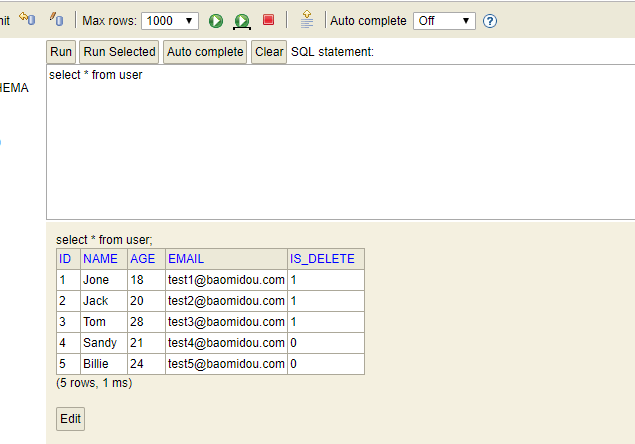
}测试结果,运行部分测试代码(其实底层的是update语句)
SpringBoot整合MybatisPlus3.X之逻辑删除(三)的更多相关文章
- springboot整合elasticJob实战(纯代码开发三种任务类型用法)以及分片系统,事件追踪详解
一 springboot整合 介绍就不多说了,只有这个框架是当当网开源的,支持分布式调度,分布式系统中非常合适(两个服务同时跑不会重复,并且可灵活配置分开分批处理数据,贼方便)! 这里主要还是用到zo ...
- SpringBoot整合MyBatis-Plus3.1详细教程
作者:Sans_ juejin.im/post/5cfa6e465188254ee433bc69 一.说明 Mybatis-Plus是一个Mybatis框架的增强插件,根据官方描述,MP只做增强不做改 ...
- springboot整合mybatis增删改查(三):mybatis逆向工程
上一篇已经把项目基本框架完善,接下来就是利用Mybatis Generator逆向工程进行mybatis的整合. 我们在创建项目开始的时候已经勾选web,mybatis,sql等,但是这些依赖还是不够 ...
- springboot整合es客户端操作elasticsearch(三)
继续上个随笔: 那么我们只需要修改controller中文件就可以完成相关操作 本次主要是对文档得操作: 更新文档: package com.cxy.elasticsearch.controller; ...
- SpringBoot整合MybatisPlus3.X之SQL执行分析插件(十四)
pom.xml <dependencies> <dependency> <groupId>org.springframework.boot</groupId& ...
- SpringBoot整合MybatisPlus3.X之乐观锁(十三)
主要适用场景 意图: 当要更新一条记录的时候,希望这条记录没有被别人更新 乐观锁实现方式: 取出记录时,获取当前version 更新时,带上这个version 执行更新时, set version = ...
- SpringBoot整合MybatisPlus3.X之自定义Mapper(十)
pom.xml <dependencies> <dependency> <groupId>org.springframework.boot</groupId& ...
- SpringBoot整合MybatisPlus3.X之SQL注入器(九)
pom.xml <dependencies> <dependency> <groupId>org.springframework.boot</groupId& ...
- SpringBoot整合MybatisPlus3.X之Wrapper(五)
官方文档说明: 以下出现的第一个入参boolean condition表示该条件是否加入最后生成的sql中 以下代码块内的多个方法均为从上往下补全个别boolean类型的入参,默认为true 以下出现 ...
随机推荐
- 数据分析--pandas的基本使用
一.pandas概述 1.pandas是一个强大的Python数据分析的工具包,是基于NumPy构建的. 2.pandas的主要功能 具备对其功能的数据结构DataFrame.Series 集成时间序 ...
- uptimerobot 监控
前言 由于搞了多个公共服务于多台vps,需要监控项目稳定性与服务器稳定性,考察了阿里云云监控与uptimerobot,最后选择了uptimerobot 教程 访问官网,注册账号 : https://u ...
- Cisco交换机基本使用命令
作者:小啊博 QQ:762641008 转载请声明URL:https://www.cnblogs.com/-bobo/ 一.进入命令行 switch> ...
- Shell之Xargs命令
目录 Shell之Xargs命令 参考 xargs命令简介 xargs命令格式 xargs实例说明 Shell之Xargs命令
- git将当前分支上修改的东西转移到新建分支
比如我在A分支做了一些修改,现在由于某种原因(如A分支已经合并到master)不能把A分支上修改的东西保留下来但是需要把A分支上修改的东西继续在新分支继续修改.那么现在我们可以有两种简单的做法完成这一 ...
- Flume 学习笔记之 Flume NG+Kafka整合
Flume NG集群+Kafka集群整合: 修改Flume配置文件(flume-kafka-server.conf),让Sink连上Kafka hadoop1: #set Agent name a1. ...
- bat脚本自动安装Jmeter&Jdk
一句话能解决的事情,绝对不要写一篇文章:一篇文章能解决的事情,绝对不要使用各种工具:一个工具能解决的事情,绝对不要跑东跑西…… 文章主要介绍脚本如何下载.安装.配置Jmeter&Jdk. 不多 ...
- .NET Core 3.0之深入源码理解ObjectPool(一)
写在前面 对象池是一种比较常用的提高系统性能的软件设计模式,它维护了一系列相关对象列表的容器对象,这些对象可以随时重复使用,对象池节省了频繁创建对象的开销. 它使用取用/归还的操作模式,并重复执行这些 ...
- javascript DOM节点
获得子节点方式: 1.将文本内容也当成节点 childNodes firstChild lastChild 2.获得标签为内容的节点 children firstElementChild lastEl ...
- 8.css背景
①Background-attachment背景图像是固定还是随着页面滚动.Scroll默认,fixed固定. ②Background-color背景颜色. ③Background-image把图像设 ...