
微软的分布式应用框架 Dapr
微服务架构已成为构建云原生应用程序的标准,微服务架构提供了令人信服的好处,包括可伸缩性,松散的服务耦合和独立部署,但是这种方法的成本很高,需要了解和熟练掌握分布式系统。为了使用所有开发人员能够使用任何语言和任何框架轻松地构建便携式微服务应用程序,无论是开发新项目还是迁移现有代码
Dapr 介绍
Github: https://github.com/dapr/dapr
Dapr是一种可移植的,事件驱动的,无服务器运行时,用于构建跨云和边缘的分布式应用程序。
Distributed Application Runtime. An event-driven, portable runtime for building microservices on cloud and edge.
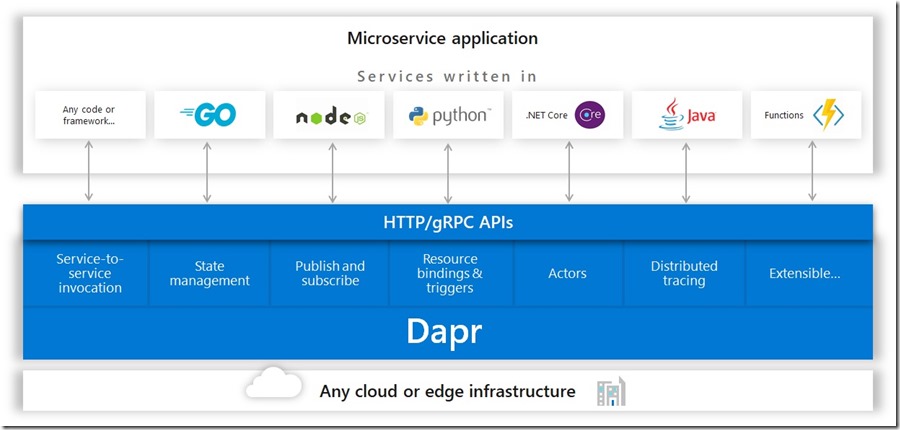
其中提到了多语言和多开发者框架,我认为这是他选择的通过通信共享信息,即 HTTP 和 GRPC 支持多语言等特性。微软想通过这个设定一个构建微服务应用的规则。从根本上确立你开发的每一个应用的独立性。赋能每个开发者,为了使Dapr对于不同的语言更加方便,它还包括针对Go,Java,JavaScript,.NET和Python的语言特定的SDK。这些SDK通过类型化的语言API(而不是调用http / gRPC API)公开了Dapr构建块中的功能,例如保存状态,发布事件或创建actor。这使开发人员可以使用他们选择的语言编写无状态和有状态功能以及参与者的组合。并且由于这些SDK共享Dapr运行时,您甚至可以获得跨语言的actor和功能支持!
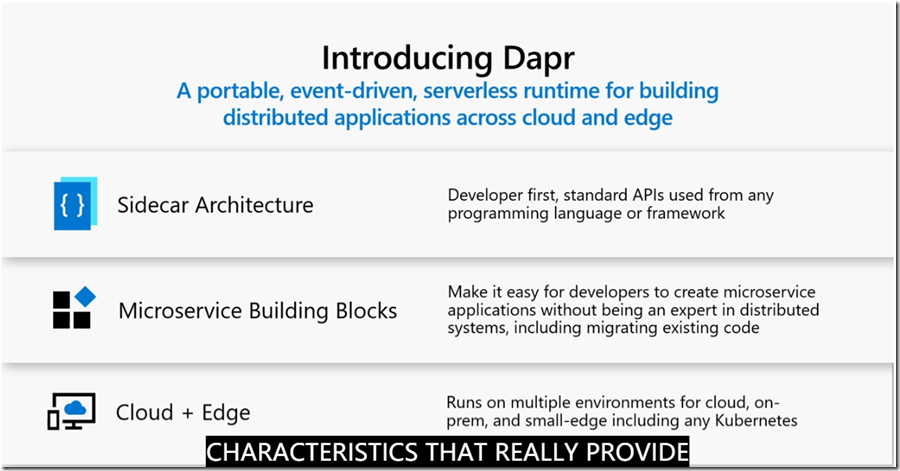
Dapr还可以与任何开发人员框架集成。例如,在Dapr .NET SDK中,您将找到ASP.NET Core集成,该集成带来了可响应其他服务的发布/订阅事件的状态路由控制器,从而使ASP.NET Core成为构建微服务Web应用程序的更好框架。
不过需要注意的是Dapr目前正处于Alpha阶段, 今天刚发布了0.2版本。在v1.0稳定版本发布之前,建议不要用于生产环境。
下面进行一个 QuickStart
环境
- Install Docker(微服务已经离不开容器化了)
- Install Dapr CLI
- Install .Net Core SDK 3.0
在Windows 上通过Powershell 安装:
powershell -Command "iwr -useb https://raw.githubusercontent.com/dapr/cli/master/install/install.ps1 | iex"
然后把 c:\dapr 添加到环境变量 PATH
运行dapr命令,检查输出是否正常
C:\workshop\Github\dotnet-sdk>dapr --help
__
____/ /___ _____ _____
/ __ / __ '/ __ \/ ___/
/ /_/ / /_/ / /_/ / /
\__,_/\__,_/ .___/_/
/_/
======================================================
A serverless runtime for hyperscale, distributed systems
Usage:
dapr [command]
Available Commands:
help Help about any command
init Setup dapr in Kubernetes or Standalone modes
list List all dapr instances
publish publish an event to multiple consumers
run Launches dapr and your app side by side
send invoke a dapr app with an optional payload
stop Stops a running dapr instance and its associated app
uninstall removes a dapr installation
Flags:
-h, --help help for dapr
--version version for dapr
Use "dapr [command] --help" for more information about a command.
执行初始化(会启动 docker 容器)
dapr init
Making the jump to hyperspace...
Downloading binaries and setting up components
Success! Dapr is up and running
下载.NET SDk代码
https://github.com/dapr/dotnet-sdk ,里面有.NET Core的多个示例代码:
| 示例 | 描述 |
| 1. Actor | Demonstrates creating virtual actors that encapsulate code and state. Also see docs in this repo for a tutorial. |
| 2. ASP.NET Core | Demonstrates ASP.NET Core integration with Dapr by create Controllers and Routes. |
| 3. gRPC client |
The gRPC client sample shows how to make Dapr calls to publish events, save state, get state and delete state using a gRPC client. |
我们一起来看下ASP.NET Core的Demo;
例子中主 我们使用 Dapr 的交互。Dapr通过 Runtime
- 提供 Dapr API 给多语言调用。
- 提供 状态管理 By state stores
/// <summary>
/// Sample showing Dapr integration with controller.
/// </summary>
[ApiController]
public class SampleController : ControllerBase
{
/// <summary>
/// Gets the account information as specified by the id.
/// </summary>
/// <param name="account">Account information for the id from Dapr state store.</param>
/// <returns>Account information.</returns>
[HttpGet("{account}")]
public ActionResult<Account> Get(StateEntry<Account> account)
{
if (account.Value is null)
{
return this.NotFound();
}
return account.Value;
}
/// <summary>
/// Method for depositing to account as psecified in transaction.
/// </summary>
/// <param name="transaction">Transaction info.</param>
/// <param name="stateClient">State client to interact with dapr runtime.</param>
/// <returns>A <see cref="Task{TResult}"/> representing the result of the asynchronous operation.</returns>
[Topic("deposit")]
[HttpPost("deposit")]
public async Task<ActionResult<Account>> Deposit(Transaction transaction, [FromServices] StateClient stateClient)
{
var state = await stateClient.GetStateEntryAsync<Account>(transaction.Id);
state.Value ??= new Account() { Id = transaction.Id, };
state.Value.Balance += transaction.Amount;
await state.SaveAsync();
return state.Value;
}
/// <summary>
/// Method for withdrawing from account as specified in transaction.
/// </summary>
/// <param name="transaction">Transaction info.</param>
/// <param name="stateClient">State client to interact with dapr runtime.</param>
/// <returns>A <see cref="Task{TResult}"/> representing the result of the asynchronous operation.</returns>
[Topic("withdraw")]
[HttpPost("withdraw")]
public async Task<ActionResult<Account>> Withdraw(Transaction transaction, [FromServices] StateClient stateClient)
{
var state = await stateClient.GetStateEntryAsync<Account>(transaction.Id);
if (state.Value == null)
{
return this.NotFound();
}
state.Value.Balance -= transaction.Amount;
await state.SaveAsync();
return state.Value;
}
}
这里重点是状态存储,即将state通过 StateClient 存储在Dapr中,我们通过状态转移在Dapr里实现了stateless。
Dapr 运行.NET 应用程序
演示Dapr的服务调用,在终端中切换到项目目录,然后使用dapr启动应用
C:\workshop\Github\dotnet-sdk\samples\AspNetCore\ControllerSample>dapr run --app-id routing --app-port 5000 dotnet run
Starting Dapr with id routing. HTTP Port: 61102. gRPC Port: 61103
You're up and running! Both Dapr and your app logs will appear here.
注意: 以上dapr run命令,通过app-id指定了应用的ID,通过app-port指定了应用的端口(webapi默认使用5000作为http端口),后跟dotnet run命名启动当前项目。可参考Dapr文档服务调用
后台运行的 CLI 命令,这里是前台打印的日志, 注意到 .NET App 在指定的 5000 端口运行,同时还有状态存储的 redis 在 6379 端口运行
== DAPR == time="2019-11-16T18:33:22+08:00" level=info msg="starting Dapr Runtime -- version 0.2.0 -- commit c75b11
1-dirty"
== DAPR == time="2019-11-16T18:33:22+08:00" level=info msg="log level set to: info"
== DAPR == time="2019-11-16T18:33:22+08:00" level=info msg="standalone mode configured"
== DAPR == time="2019-11-16T18:33:22+08:00" level=info msg="dapr id: routing"
== DAPR == time="2019-11-16T18:33:22+08:00" level=info msg="loaded component messagebus (pubsub.redis)"
== DAPR == time="2019-11-16T18:33:22+08:00" level=info msg="loaded component statestore (state.redis)"
== DAPR == time="2019-11-16T18:33:22+08:00" level=info msg="application protocol: http. waiting on port 5000"
== APP == info: Microsoft.Hosting.Lifetime[0]
== APP == Now listening on: http://localhost:5000
== APP == info: Microsoft.Hosting.Lifetime[0]
== APP == Application started. Press Ctrl+C to shut down.
== APP == info: Microsoft.Hosting.Lifetime[0]
== APP == Hosting environment: Development
== APP == info: Microsoft.Hosting.Lifetime[0]
== APP == Content root path: C:\workshop\Github\dotnet-sdk\samples\AspNetCore\ControllerSample
== DAPR == time="2019-11-16T18:33:31+08:00" level=info msg="application discovered on port 5000"
== DAPR == 2019-11-16 18:33:32.029764 I | redis: connecting to localhost:6379
== DAPR == 2019-11-16 18:33:32.036316 I | redis: connected to localhost:6379 (localAddr: [::1]:61164, remAddr:
[::1]:6379)
== DAPR == time="2019-11-16T18:33:32+08:00" level=info msg="actor runtime started. actor idle timeout: 1h0m0s.
actor scan interval: 30s"
== DAPR == time="2019-11-16T18:33:32+08:00" level=info msg="actors: starting connection attempt to placement se
rvice at localhost:6050"
== DAPR == time="2019-11-16T18:33:32+08:00" level=info msg="http server is running on port 61102"
== DAPR == time="2019-11-16T18:33:32+08:00" level=info msg="gRPC server is running on port 61103"
== DAPR == time="2019-11-16T18:33:32+08:00" level=info msg="local service entry announced"
== DAPR == time="2019-11-16T18:33:32+08:00" level=info msg="dapr initialized. Status: Running. Init Elapsed 917
6.5164ms"
== DAPR == time="2019-11-16T18:33:32+08:00" level=info msg="actors: established connection to placement service
at localhost:6050"
== DAPR == time="2019-11-16T18:33:32+08:00" level=info msg="actors: placement order received: lock"
== DAPR == time="2019-11-16T18:33:32+08:00" level=info msg="actors: placement order received: update"
== DAPR == time="2019-11-16T18:33:32+08:00" level=info msg="actors: placement tables updated"
== DAPR == time="2019-11-16T18:33:32+08:00" level=info msg="actors: placement order received: unlock"
== APP == info: System.Net.Http.HttpClient.state.LogicalHandler[100]
== APP == Start processing HTTP request GET http://localhost:61102/v1.0/state/17
== APP == info: System.Net.Http.HttpClient.state.ClientHandler[100]
== APP == Sending HTTP request GET http://localhost:61102/v1.0/state/17
== APP == info: System.Net.Http.HttpClient.state.ClientHandler[101]
== APP == Received HTTP response after 2228.2998000000002ms - OK
== APP == info: System.Net.Http.HttpClient.state.LogicalHandler[101]
== APP == End processing HTTP request after 2257.3405000000002ms - OK
== APP == info: System.Net.Http.HttpClient.state.LogicalHandler[100]
== APP == Start processing HTTP request POST http://localhost:61102/v1.0/state
== APP == info: System.Net.Http.HttpClient.state.ClientHandler[100]
== APP == Sending HTTP request POST http://localhost:61102/v1.0/state
== APP == info: System.Net.Http.HttpClient.state.ClientHandler[101]
== APP == Received HTTP response after 67.46000000000001ms - Created
== APP == info: System.Net.Http.HttpClient.state.LogicalHandler[101]
== APP == End processing HTTP request after 68.0343ms - Created
== APP == info: System.Net.Http.HttpClient.state.LogicalHandler[100]
== APP == Start processing HTTP request GET http://localhost:61102/v1.0/state/17
== APP == info: System.Net.Http.HttpClient.state.ClientHandler[100]
== APP == Sending HTTP request GET http://localhost:61102/v1.0/state/17
== APP == info: System.Net.Http.HttpClient.state.ClientHandler[101]
== APP == Received HTTP response after 5.8247ms - OK
== APP == info: System.Net.Http.HttpClient.state.LogicalHandler[101]
== APP == End processing HTTP request after 6.268400000000001ms - OK
== APP == info: System.Net.Http.HttpClient.state.LogicalHandler[100]
== APP == Start processing HTTP request POST http://localhost:61102/v1.0/state
== APP == info: System.Net.Http.HttpClient.state.ClientHandler[100]
== APP == Sending HTTP request POST http://localhost:61102/v1.0/state
== APP == info: System.Net.Http.HttpClient.state.ClientHandler[101]
== APP == Received HTTP response after 4.5181000000000004ms - Created
== APP == info: System.Net.Http.HttpClient.state.LogicalHandler[101]
== APP == End processing HTTP request after 4.6208ms - Created
== APP == info: System.Net.Http.HttpClient.state.LogicalHandler[100]
== APP == Start processing HTTP request GET http://localhost:61102/v1.0/state/17
== APP == info: System.Net.Http.HttpClient.state.ClientHandler[100]
== APP == Sending HTTP request GET http://localhost:61102/v1.0/state/17
== APP == info: System.Net.Http.HttpClient.state.ClientHandler[101]
== APP == Received HTTP response after 20.2967ms - OK
== APP == info: System.Net.Http.HttpClient.state.LogicalHandler[101]
== APP == End processing HTTP request after 20.691100000000002ms – OK
为了同时实现可移植性和与现有代码的轻松集成,Dapr通过http或gRPC提供了标准API。Dapr端口可从Dapr启动日志中获取,如以下日志表示Dapr公开的HTTP端口为61102(通过Dapr也可使用gRPC方式进行服务调用)
== DAPR == time="2019-11-16T18:33:32+08:00" level=info msg="http server is running on port 61102"
== DAPR == time="2019-11-16T18:33:32+08:00" level=info msg="gRPC server is running on port 61103"
我们可通过以下地址来调用示例方法,根据Dapr服务调用API规范,其代理调用规则为:
POST/GET/PUT/DELETE http://localhost:<Dapr端口>/v1.0/invoke/<id>/method/<method-name>:
直接调用:GET http://localhost:5000/17
通过Dapr服务调用: GET http://localhost:61102/v1.0/invoke/routing/method/17 注意: Dapr的服务调用是有dapr sidecar来实现的,在被调用的服务中无需注入任何与dapr相关的代码。
微软的分布式应用框架 Dapr的更多相关文章
- 微软的分布式应用框架 Dapr Helloworld
Dapr HelloWorld Dapr Distributed Application Runtime. An event-driven, portable runtime for building ...
- 微软分布式云计算框架Orleans(2):容灾与集群(1)
在上一篇:微软分布式云计算框架Orleans(1):Hello World,我们大概了解了Orleans如何运用,当然上一篇的例子可以说是简单且无效的,因为用了Orleans不可能只写一个Hello ...
- 阿里巴巴的分布式应用框架-dubbo负载均衡策略--- 一致哈希算法
dubbo是阿里巴巴公司开发的一个开源分布式应用框架,基于服务的发布者和订阅者,服务者启动服务向注册中心发布自己的服务:消费者(订阅者)启动服务器向注册中心订阅所需要的服务.注册中心将订阅的服务注册列 ...
- 微软的权限框架Asp.Net Identity
Asp.Net Identity 深度解析 之 注册登录的扩展 关于权限每个系统都有自己的解决方案,今天我们来讨论一下微软的权限框架Asp.Net Identity ,介绍如下 http://w ...
- 解析分布式应用框架Ray架构源码
摘要:Ray的定位是分布式应用框架,主要目标是使能分布式应用的开发和运行. Ray是UC Berkeley大学 RISE lab(前AMP lab) 2017年12月 开源的新一代分布式应用框架(刚发 ...
- MassTransit | .NET 分布式应用框架
引言 A free, open-source distributed application framework for .NET. 一个免费.开源的.NET 分布式应用框架. -- MassTran ...
- 微软开放.NET框架源代码和Mono
微软一直在朝着更加开放的方向努力.例如,公司首席执行官萨特亚纳德拉(Satya Nadella)在Windows 10预览发布会上声称微软喜欢Linux,这并不出人意料,但是对于一家将Linux视作威 ...
- 微软分布式云计算框架Orleans(1):Hello World
自从写了RabbitHub框架系列后的一段时间内一直在思索更加轻量简便,分布式高并发的框架(RabbitHub学习成本较高),无意间在网上级联看到了很多新框架:从helios到Akka.NET在到Or ...
- 分布式应用框架Akka快速入门
转自:http://blog.csdn.net/jmppok/article/details/17264495 本文结合网上一些资料,对他们进行整理,摘选和翻译而成,对Akka进行简要的说明.引用资料 ...
随机推荐
- bugku账号被盗了
首先访问这个网站. 点击一下 使用burp抓包 将false改为true试试,获得了新的返回包,包含了一个网站,访问这个网站,下载下发现是一个软件. 随便填写一个账号密码,并使用wireshark抓包 ...
- PHP7源码之array_unique函数分析
以下源码基于 PHP 7.3.8 array array_unique ( array $array [, int $sort_flags = SORT_STRING ] ) (PHP 4 >= ...
- wait,notify,notifyAll详细介绍
https://www.cnblogs.com/pangyang/articles/5916349.html
- FTPClient连续读取文件
最近在使用FTPClient连续读取ftp上的多个文件内容时,遇到了两个问题: 1. 在for循环中,FTPClient只能读取到第一个文件内容,读取第二个时遇到NPE问题. 2. 遇到程序锁死. 下 ...
- CVE 2019-0708漏洞复现防御修复
CVE-2019-0708 Windows再次被曝出一个破坏力巨大的高危远程漏洞CVE-2019-0708.攻击者一旦成功利用该漏洞,便可以在目标系统上执行任意代码,包括获取敏感信息.执行远程代码.发 ...
- IIS6.0使用冒号上传漏洞利用
利用条件: 1.iis版本为6.0 2.上传文件名不会重命名 利用: 上传一个jpg木马图片 名字为:cs.asp:.jpg 注意是: 默认windows是不允许文件字含:(冒号)的 所以需要抓包后 ...
- scrollWidth、clientWidth 和 offsetWidth
scrollWidth:对象的实际内容宽度,不包括边线宽度,会随对象中内容超过可视区而变大. clientWidth:对象内容的可视区的宽度,不包括边线宽度,会随对象显示大小的变化而变化. offse ...
- 处理 Could not find a 'KafkaClient' entry in the JAAS configuration. System property 'java.security.auth.login.config' is
场景 某监控进程需要访问多个集群的Kafka INFO - org.apache.kafka.common.KafkaException: Failed to construct kafka cons ...
- 微信支付 get_brand_wcpay_request fail,Undefined variable: openid
本文将为您描述微信H5支付,微信JSAPI支付返回支付签名验证失败的解决方法 微信JSAPI支付时报这个错误 查看错误详情 alert(JSON.stringify(res)) 微信商户平台相关设置: ...
- FastJson的使用心得
本文为早前整理,参考文献已找不到,如有侵权请与我联系,添加参考链接. 一丶基本使用 1.1主要API fastjson入口类是com.alibaba.fastjson.JSON,主要的API是JS ...