
微软的分布式应用框架 Dapr Helloworld
Dapr HelloWorld
Dapr
Distributed Application Runtime. An event-driven, portable runtime for building microservices on cloud and edge.
分布式应用运行时、事件驱动、为云和边缘构建微服务提供便携化运行时。
我现在也不是很懂。
dapr/dapr
Dapr is a portable, serverless, event-driven runtime that makes it easy for developers to build resilient, stateless and stateful microservices that run on the cloud and edge and embraces the diversity of languages and developer frameworks.
Dapr codifies the best practices for building microservice applications into open, independent, building blocks that enable you to build portable applications with the language and framework of your choice. Each building block is independent and you can use one, some, or all of them in your application.
比上面的介绍多了 stateless or stateful 的标签。学《计算理论》的时候接触过一些状态机。
”状态是万恶之源“
注意提到了多语言和多开发者框架,我认为这是他选择的通过通信共享信息,即 HTTP 和 GRPC 支持多语言等特性。微软想通过这个设定一个构建微服务应用的规则。从根本上确立你开发的每一个应用的独立性。
下面进行一个 QuickStart
环境
- Install Docker(微服务已经离不开容器化了)
- Install Dapr
- Node.js version 8 or greater(这个 Helloworld 是 node 应用)
On MacOS
Install the latest darwin Dapr CLI to /usr/local/bin
curl -fsSL https://raw.githubusercontent.com/dapr/cli/master/install/install.sh | /bin/bash
有条件可以加速
执行初始化(会启动 docker 容器)
$ dapr init

⌛  Making the jump to hyperspace...

Downloading binaries and setting up components

✅  Success! Dapr is up and running

$ docker ps

CONTAINER ID        IMAGE                COMMAND                  CREATED             STATUS              PORTS                        NAMES

b3a5600e672f        redis                "docker-entrypoint.s…"   44 hours ago        Up 44 hours         0.0.0.0:6379->6379/tcp       xenodochial_hofstadter

e5010ba0c33f        daprio/dapr          "./placement"            44 hours ago        Up 44 hours         0.0.0.0:50005->50005/tcp     dapr_placement
HelloWorld
Application Architecture
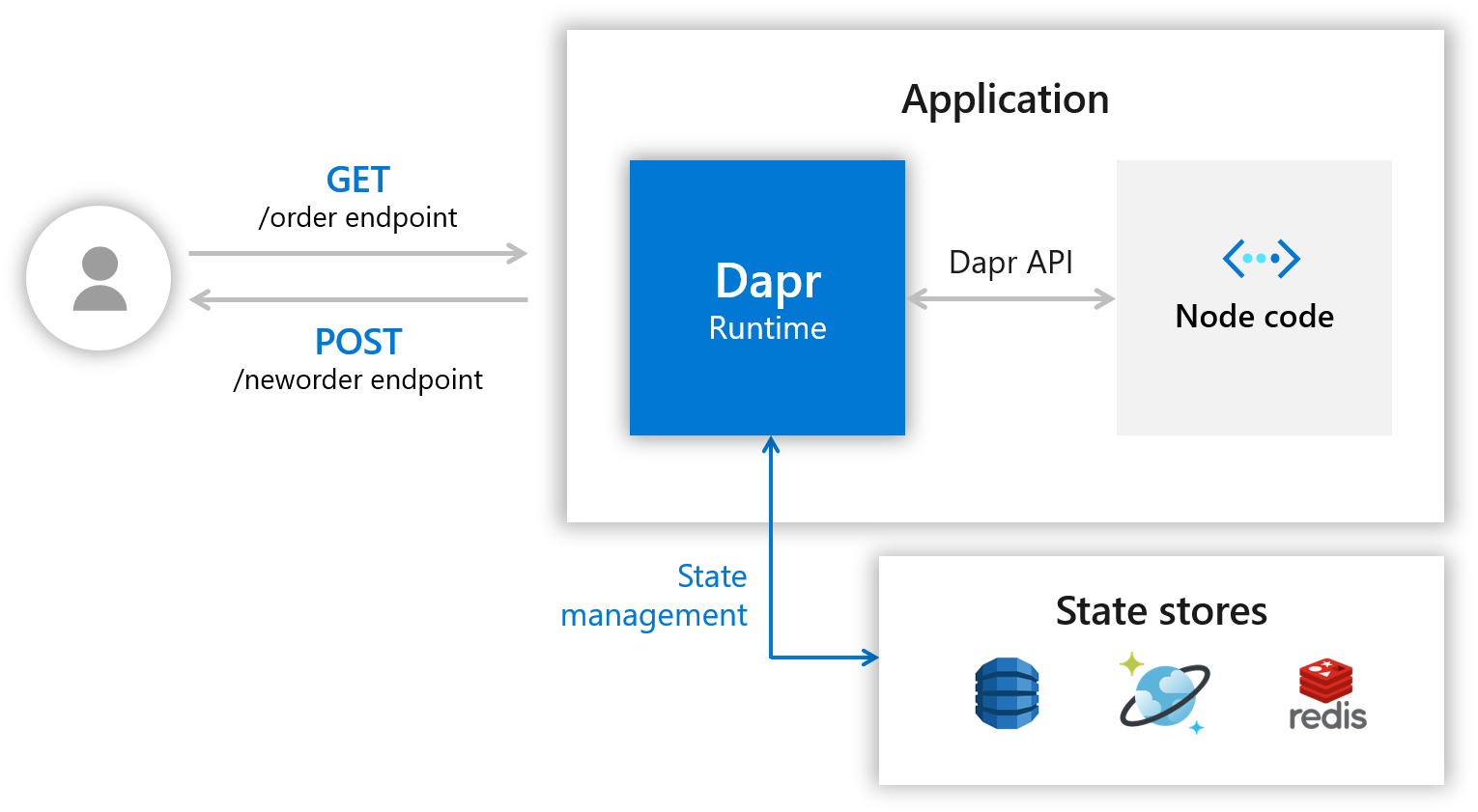
能够看到暴露两个 endpoint 是 HTTP 访问,一个创建一个查询。
主要看我们使用 Dapr 的交互。在图中它作为 Runtime
- 提供 Dapr API 给多语言调用。
- 提供 状态管理 By state stores
Download Code
下载并进入相应文件夹
git clone https://github.com/dapr/samples.git

cd samples/1.hello-world
Cat app.js
// $ cat app.js

// ------------------------------------------------------------

// Copyright (c) Microsoft Corporation.

// Licensed under the MIT License.

// ------------------------------------------------------------

const express = require('express');

const bodyParser = require('body-parser');

require('isomorphic-fetch');

const app = express();

app.use(bodyParser.json());

const daprPort = process.env.DAPR_HTTP_PORT || 3500;

const stateUrl = `http://localhost:${daprPort}/v1.0/state`;

const port = 3000;

app.get('/order', (_req, res) => {

    fetch(`${stateUrl}/order`)

        .then((response) => {

            return response.json();

        }).then((orders) => {

            res.send(orders);

        });

});

app.post('/neworder', (req, res) => {

    const data = req.body.data;

    const orderId = data.orderId;

    console.log("Got a new order! Order ID: " + orderId);

    const state = [{

        key: "order",

        value: data

    }];

    fetch(stateUrl, {

        method: "POST",

        body: JSON.stringify(state),

        headers: {

            "Content-Type": "application/json"

        }

    }).then((response) => {

        console.log((response.ok) ? "Successfully persisted state" : "Failed to persist state");

    });

    res.status(200).send();

});

app.listen(port, () => console.log(`Node App listening on port ${port}!`));
这是一些路由和 handlers
注意 14-16 行
const daprPort = process.env.DAPR_HTTP_PORT || 3500;

const stateUrl = `http://localhost:${daprPort}/v1.0/state`;

const port = 3000;
3500 是 Dapr 的环境端口,如果你安装时有改动,需要考虑。stateurl 就是 Dapr 提供的 URL 了
Handlers
/neworder
app.post('/neworder', (req, res) => {

    const data = req.body.data;

    const orderId = data.orderId;

    console.log("Got a new order! Order ID: " + orderId);

    const state = [{

        key: "order",

        value: data

    }];

    fetch(stateUrl, {

        method: "POST",

        body: JSON.stringify(state),

        headers: {

            "Content-Type": "application/json"

        }

    }).then((response) => {

        console.log((response.ok) ? "Successfully persisted state" : "Failed to persist state");

    });

    res.status(200).send();

});
这里重点是状态存储,即将 state 通过 stateurl 存储在 Dapr 中。
/order
我们并不是直接通过 res.json 作为 Response 来进行已经持久化的数据的使用,而是通过暴露一个 GET endpoint 通过访问它来验证持久化是否成功。
app.get('/order', (_req, res) => {

    fetch(`${stateUrl}/order`)

        .then((response) => {

            return response.json();

        }).then((orders) => {

            res.send(orders);

        });

});
现在我们通过状态转移在 Dapr 里实现了 stateless,同样我们也可以在加上一个 local cache 并通过一个新的 endpoint 访问来使 Node application 变成 stateful
Dapr Run Node.js App
npm install:通过当前目录下的package.json, 会安装express和body-parser,在 app.js 7-8行我们可以看到这两项。dapr run --app-id mynode --app-port 3000 --port 3500 node app.js
$ dapr run --app-id mynode --app-port 3000 --port 3500 node app.js

ℹ️  Starting Dapr with id mynode. HTTP Port: 3500. gRPC Port: 55099

✅  You're up and running! Both Dapr and your app logs will appear here.
应该是有后台运行的 CLI 命令,这里是前台打印的日志
== DAPR == time="2019-11-06T10:37:41+08:00" level=info msg="starting Dapr Runtime -- version 0.1.0 -- commit 4358565-dirty"

== DAPR == time="2019-11-06T10:37:41+08:00" level=info msg="log level set to: info"

== DAPR == time="2019-11-06T10:37:41+08:00" level=info msg="standalone mode configured"

== DAPR == time="2019-11-06T10:37:41+08:00" level=info msg="dapr id: mynode"

== DAPR == time="2019-11-06T10:37:41+08:00" level=info msg="loaded component messagebus (pubsub.redis)"

== DAPR == time="2019-11-06T10:37:41+08:00" level=info msg="loaded component statestore (state.redis)"

== DAPR == time="2019-11-06T10:37:41+08:00" level=info msg="application protocol: http. waiting on port 3000"

== APP == Node App listening on port 3000!

== DAPR == time="2019-11-06T10:37:42+08:00" level=info msg="application discovered on port 3000"

== DAPR == 2019/11/06 10:37:42 redis: connecting to localhost:6379

== DAPR == 2019/11/06 10:37:42 redis: connected to localhost:6379 (localAddr: [::1]:55130, remAddr: [::1]:6379)

== DAPR == time="2019-11-06T10:37:42+08:00" level=info msg="actor runtime started. actor idle timeout: 1h0m0s. actor scan interval: 30s"

== DAPR == time="2019-11-06T10:37:42+08:00" level=info msg="actors: starting connection attempt to placement service at localhost:50005"

== DAPR == time="2019-11-06T10:37:42+08:00" level=info msg="http server is running on port 3500"

== DAPR == time="2019-11-06T10:37:42+08:00" level=info msg="gRPC server is running on port 55099"

== DAPR == time="2019-11-06T10:37:42+08:00" level=info msg="local service entry announced"

== DAPR == time="2019-11-06T10:37:42+08:00" level=info msg="dapr initialized. Status: Running. Init Elapsed 945.8297490000001ms"

== DAPR == time="2019-11-06T10:37:42+08:00" level=info msg="actors: established connection to placement service at localhost:50005"

== DAPR == time="2019-11-06T10:37:42+08:00" level=info msg="actors: placement order received: lock"

== DAPR == time="2019-11-06T10:37:42+08:00" level=info msg="actors: placement order received: update"

== DAPR == time="2019-11-06T10:37:42+08:00" level=info msg="actors: placement tables updated"

== DAPR == time="2019-11-06T10:37:42+08:00" level=info msg="actors: placement order received: unlock"
⚠️:注意到 Node App 在指定的 3000 端口运行,同时还有状态存储的 redis 在 6379 端口运行
Post and Get
接下来注意,文中的端口是 app.js 里默认的 3500
Post
Curl
curl -XPOST -d @sample.json http://localhost:3500/v1.0/invoke/mynode/method/neworder
Vscode
如果你用 vscode ,使用这个插件 Rest Client Plugin
然后打开目录下的 sample.http , 可以看到 send request 的选项
sample.http
POST http://localhost:3500/v1.0/invoke/mynode/method/neworder

{

  "data": {

    "orderId": "42"

  }

}
Postman
如图: http://localhost:3500/v1.0/invoke/mynode/method/neworder 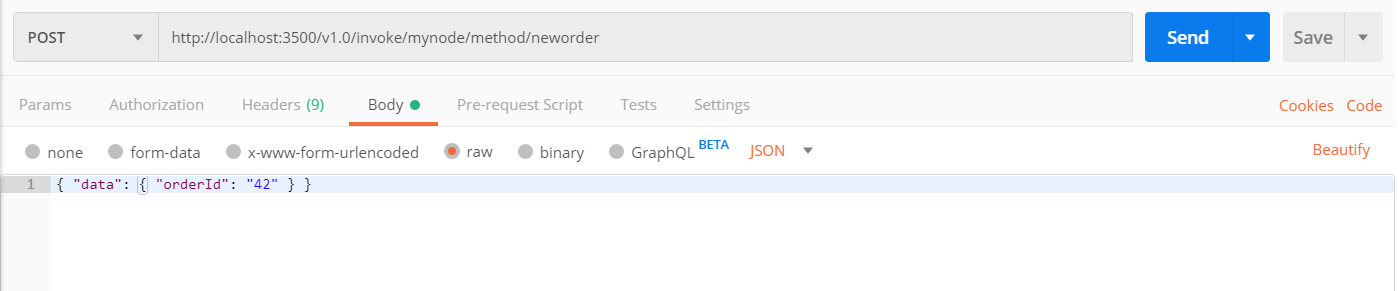
Result Update
你可以在你启动的终端中看到新的日志
== APP == Got a new order! Order ID: 42

== APP == Successfully persisted state
Get
Curl
curl http://localhost:3500/v1.0/invoke/mynode/method/order
Vscode
GET http://localhost:3500/v1.0/invoke/mynode/method/order
Postman
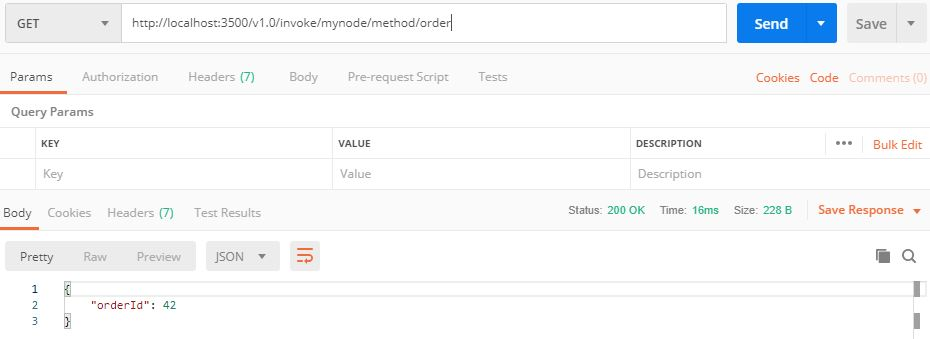
Terminate
ctrl + c 或者 dapr stop --app-id mynode
^C

ℹ️  terminated signal received: shutting down

✅  Exited Dapr successfully

✅  Exited App successfully
Feature
- 具有可插入提供程序和至少一次语义的事件驱动的Pub-Sub系统
- 使用可插入提供程序的输入和输出绑定
- 具有可插拔数据存储的状态管理
- 一致的服务到服务发现和调用
- 选择加入状态模型:强大/最终一致性,首次写入/最后写入获胜
- 跨平台虚拟演员
- 限速
- 使用OpenTelemetry的内置分布式跟踪
- 使用专用的Operator和CRD在Kubernetes上本地运行
- 通过HTTP和gRPC支持所有编程语言
- 来自Azure,AWS,GCP的多云,开放式组件(绑定,发布-订阅,状态)
- 作为过程或容器化在任何地方运行
- 轻量级(58MB二进制,4MB物理内存)
- 作为辅助工具运行-无需特殊的SDK或库
- 专用的CLI-易于调试的开发人员友好体验
- Java,Dotnet,Go,Javascript和Python的客户端
Refer
- https://github.com/dapr/dapr
- https://github.com/dapr/docs/blob/master/getting-started/environment-setup.md#environment-setup
- https://github.com/dapr/docs/tree/master/howto
- https://github.com/dapr/samples
- https://github.com/dapr/samples/tree/master/1.hello-world
微软的分布式应用框架 Dapr Helloworld的更多相关文章
- 微软的分布式应用框架 Dapr
微服务架构已成为构建云原生应用程序的标准,微服务架构提供了令人信服的好处,包括可伸缩性,松散的服务耦合和独立部署,但是这种方法的成本很高,需要了解和熟练掌握分布式系统.为了使用所有开发人员能够使用任何 ...
- 微软分布式云计算框架Orleans(2):容灾与集群(1)
在上一篇:微软分布式云计算框架Orleans(1):Hello World,我们大概了解了Orleans如何运用,当然上一篇的例子可以说是简单且无效的,因为用了Orleans不可能只写一个Hello ...
- 阿里巴巴的分布式应用框架-dubbo负载均衡策略--- 一致哈希算法
dubbo是阿里巴巴公司开发的一个开源分布式应用框架,基于服务的发布者和订阅者,服务者启动服务向注册中心发布自己的服务:消费者(订阅者)启动服务器向注册中心订阅所需要的服务.注册中心将订阅的服务注册列 ...
- 微软的权限框架Asp.Net Identity
Asp.Net Identity 深度解析 之 注册登录的扩展 关于权限每个系统都有自己的解决方案,今天我们来讨论一下微软的权限框架Asp.Net Identity ,介绍如下 http://w ...
- 使用Strust2框架写HelloWorld
使用Strust2框架写HelloWorld 一.创建JavaWeb项目 二.搭建Stust2 FrameWork开发环境 三步完成Struts2 FrameWork开发环境的搭建 1.加入搭建Str ...
- 跟着刚哥学习Spring框架--创建HelloWorld项目(一)
1.Spring框架简介 Spring是一个开源框架,Spring是在2003年兴起的一个轻量级的开源框架,由Rod johnson创建.主要对JavaBean的生命周期进行管理的轻量级框架,Spri ...
- 解析分布式应用框架Ray架构源码
摘要:Ray的定位是分布式应用框架,主要目标是使能分布式应用的开发和运行. Ray是UC Berkeley大学 RISE lab(前AMP lab) 2017年12月 开源的新一代分布式应用框架(刚发 ...
- 动手写一个简单的Web框架(HelloWorld的实现)
动手写一个简单的Web框架(HelloWorld的实现) 关于python的wsgi问题可以看这篇博客 我就不具体阐述了,简单来说,wsgi标准需要我们提供一个可以被调用的python程序,可以实函数 ...
- MassTransit | .NET 分布式应用框架
引言 A free, open-source distributed application framework for .NET. 一个免费.开源的.NET 分布式应用框架. -- MassTran ...
随机推荐
- centos7 Apache开启URL重写组件并配置.htaccess实现伪静态
第一.修改httpd.conf文件 A - 在etc/httpd/conf/目录下的httpd.conf 文件,找到: LoadModule rewrite_module modules/mod_re ...
- Flask基础(17)-->防止 CSRF 攻击
CSRF CSRF全拼为Cross Site Request Forgery,译为跨站请求伪造. CSRF指攻击者盗用了你的身份,以你的名义发送恶意请求. 包括:以你名义发送邮件,发消息,盗取你的账号 ...
- CSS3 box-shadow阴影
box-shadow: color x-offset v-offset blur spred color: 阴影的颜色 x-offset: 阴影水平距离; 0: 左右阴影平分:正值:阴影在对象的右侧: ...
- linux分析利刃之sar命令详解
一.sar的概述 在我使用的众多linux分析工具中,sar是一个非常全面的一个分析工具,可以比较瑞士军刀,对文件的读写,系统调用的使用情况,磁盘IO,CPU相关使用情况,内存使用情况,进程活动等都可 ...
- 夯实Java基础系列16:一文读懂Java IO流和常见面试题
本系列文章将整理到我在GitHub上的<Java面试指南>仓库,更多精彩内容请到我的仓库里查看 https://github.com/h2pl/Java-Tutorial 喜欢的话麻烦点下 ...
- python句柄部分操作
```python3# 通过窗口类名.窗口标题获取控件句柄hwnd = win32gui.FindWindow("ClassName", "TitleName" ...
- 栈二:包含min函数的栈
/** * 题目:包含min函数的栈 * 描述: 定义栈的数据结构,请在该类型中实现一个能够得到栈最小元素的min函数. * 注:用data来保存数据,用另一个栈min保存依次入栈最小的数 * ...
- Java基础学习(八) - 多线程
理解线程 进程是指一个内存中运行的应用程序,系统运行一个程序即是一个进程从创建,运行,结束的过程. 线程是进程中的一个执行单元,负责当前进程中程序的执行,一个进程中至少有一个线程. 多线程的特点是并发 ...
- Linux配置python
文章出处 https://www.cnblogs.com/yhongji/p/9383857.html 我这里使用的时centos7-mini,centos系统本身默认安装有python2.x,版本 ...
- unittest生成测试报告
1.先导入HTMLTestRunner模块 2.实例一脚本如下 #coding=utf-8 import unittest import HTMLTestRunner #封装批量执行用例 def al ...