
Httpd服务入门知识-Httpd服务常见配置案例之配置持久连接
Httpd服务入门知识-Httpd服务常见配置案例之配置持久连接
作者:尹正杰
版权声明:原创作品,谢绝转载!否则将追究法律责任。
一.查看默认的持久连接时间
[root@node101.yinzhengjie.org.cn ~]# egrep -v "^ *#|^$" /etc/httpd/conf/httpd.conf

ServerRoot "/etc/httpd"

Listen

Include conf.modules.d/*.conf

User apache

Group apache

ServerAdmin root@localhost

<Directory />

    AllowOverride none

    Require all denied

</Directory>

DocumentRoot "/var/www/html"

<Directory "/var/www">

    AllowOverride None

    Require all granted

</Directory>

<Directory "/var/www/html">

    Options Indexes FollowSymLinks

    AllowOverride None

    Require all granted

</Directory>

<IfModule dir_module>

    DirectoryIndex index.html

</IfModule>

<Files ".ht*">

    Require all denied

</Files>

ErrorLog "logs/error_log"

LogLevel warn

<IfModule log_config_module>

    LogFormat "%h %l %u %t \"%r\" %>s %b \"%{Referer}i\" \"%{User-Agent}i\"" combined

    LogFormat "%h %l %u %t \"%r\" %>s %b" common

    <IfModule logio_module>

      LogFormat "%h %l %u %t \"%r\" %>s %b \"%{Referer}i\" \"%{User-Agent}i\" %I %O" combinedio

    </IfModule>

    CustomLog "logs/access_log" combined

</IfModule>

<IfModule alias_module>

    ScriptAlias /cgi-bin/ "/var/www/cgi-bin/"

</IfModule>

<Directory "/var/www/cgi-bin">

    AllowOverride None

    Options None

    Require all granted

</Directory>

<IfModule mime_module>

    TypesConfig /etc/mime.types

    AddType application/x-compress .Z

    AddType application/x-gzip .gz .tgz

    AddType text/html .shtml

    AddOutputFilter INCLUDES .shtml

</IfModule>

AddDefaultCharset UTF-8

<IfModule mime_magic_module>

    MIMEMagicFile conf/magic

</IfModule>

EnableSendfile on

IncludeOptional conf.d/*.conf

[root@node101.yinzhengjie.org.cn ~]#
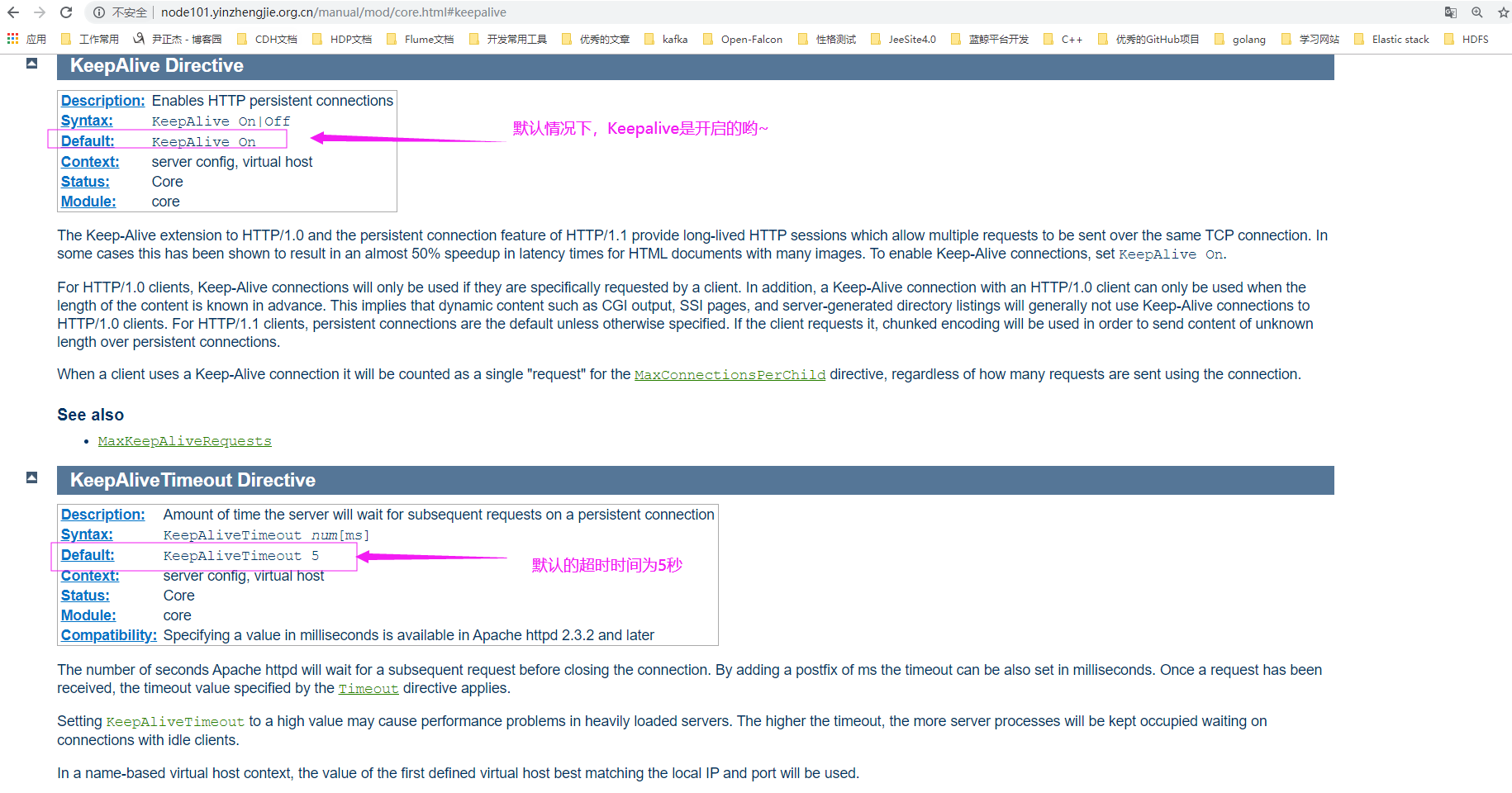
[root@node101.yinzhengjie.org.cn ~]# egrep -v "^ *#|^$" /etc/httpd/conf/httpd.conf #查看默认的主配置文件,该配置文件并没有显示指定持久连接配置参数,官方文档中却指出了默认是开启的,如下图所示。
Persistent Connection:
  连接建立,每个资源获取完成后不会断开连接,而是继续等待其它的请求完成,如下图所示,默认开启持久连接。


断开条件:
  时间限制:以秒为单位, 默认5s,httpd-2.4支持毫秒级,如果指定为毫秒值需要显式指定时间单位,如"KeepAliveTimeout 300ms"。


副作用:
  对并发访问量大的服务器,持久连接会使有些请求得不到响应


折中方案:
  使用较短的持久连接时间
二..自定义持久连接时间
1>.自定义配置文件
[root@node101.yinzhengjie.org.cn ~]# cat /etc/httpd/conf.d/keepalive.conf

KeepAlive On

KeepAliveTimeout

[root@node101.yinzhengjie.org.cn ~]#

[root@node101.yinzhengjie.org.cn ~]# httpd -t

Syntax OK

[root@node101.yinzhengjie.org.cn ~]#

[root@node101.yinzhengjie.org.cn ~]# systemctl reload httpd

[root@node101.yinzhengjie.org.cn ~]#

[root@node101.yinzhengjie.org.cn ~]# ss -ntl

State       Recv-Q Send-Q        Local Address:Port                       Peer Address:Port

LISTEN                                   *:                                    *:*

LISTEN                                   *:                                    *:*

LISTEN                                  :::                                   :::*

[root@node101.yinzhengjie.org.cn ~]#

[root@node101.yinzhengjie.org.cn ~]#
2>.测试
[root@node101.yinzhengjie.org.cn ~]# telnet 172.30.1.101 80      #注意,连接成功后,若在咱们规定的20秒内没有和httpd服务端发送消息,则服务端的持久连接自动就断开啦~

Trying 172.30.1.101...

Connected to 172.30.1.101.

Escape character is '^]'.

Connection closed by foreign host.

[root@node101.yinzhengjie.org.cn ~]#

[root@node101.yinzhengjie.org.cn ~]# telnet 172.30.1.101

Trying 172.30.1.101...

Connected to 172.30.1.101.

Escape character is '^]'.

GET /index.html HTTP/1.1    #此处我们使用GET方法,请求的资源为"/index.html",指定HTTP协议的版本号为"HTTP/1.1"

HOST: 1.1.1.1           #此处配置的是headers信息中的HOST信息,并没有配置其它参数,后面紧接着是一个换行符

                   #紧接着我们需要连续输入2个换行符,下面的请求方式一样。

HTTP/1.1  OK

Date: Sat,  Dec  :: GMT

Server: Apache/2.4. (CentOS)

Last-Modified: Sat,  Dec  :: GMT

ETag: "25-599131e54e9d8"

Accept-Ranges: bytes

Content-Length:

Content-Type: text/html; charset=UTF-

https://www.cnblogs.com/yinzhengjie/

GET /info.html HTTP/1.1

HOST: 2.2.2.2

HTTP/1.1  OK

Date: Sat,  Dec  :: GMT

Server: Apache/2.4. (CentOS)

Last-Modified: Sat,  Dec  :: GMT

ETag: "1f-59917e0ae7f18"

Accept-Ranges: bytes

Content-Length:

Content-Type: text/html; charset=UTF-

<h1>尹正杰到此一游</h1>

GET /student.html HTTP/1.1

HOST: 3.3.3.3

HTTP/1.1  OK

Date: Sat,  Dec  :: GMT

Server: Apache/2.4. (CentOS)

Last-Modified: Sat,  Dec  :: GMT

ETag: "13-59917e2931d98"

Accept-Ranges: bytes

Content-Length:

Content-Type: text/html; charset=UTF-

<h1>尹正杰</h1>

Connection closed by foreign host.

[root@node101.yinzhengjie.org.cn ~]#
Httpd服务入门知识-Httpd服务常见配置案例之配置持久连接的更多相关文章
- Httpd服务入门知识-Httpd服务常见配置案例之虚拟主机
Httpd服务入门知识-Httpd服务常见配置案例之虚拟主机 作者:尹正杰 版权声明:原创作品,谢绝转载!否则将追究法律责任. 一.虚拟主机实现方案 1>.Apache httpd 有三种实现虚 ...
- Httpd服务入门知识-Httpd服务常见配置案例之Apache的工作做状态status页面
Httpd服务入门知识-Httpd服务常见配置案例之Apache的工作做状态status页面 作者:尹正杰 版权声明:原创作品,谢绝转载!否则将追究法律责任. 一.status功能概述 status页 ...
- Httpd服务入门知识-Httpd服务常见配置案例之ServerSignature指令选项
Httpd服务入门知识-Httpd服务常见配置案例之ServerSignature指令选项 作者:尹正杰 版权声明:原创作品,谢绝转载!否则将追究法律责任. 一.ServerSignature指令概述 ...
- Httpd服务入门知识-Httpd服务常见配置案例之实现用户家目录的http共享
Httpd服务入门知识-Httpd服务常见配置案例之实现用户家目录的http共享 作者:尹正杰 版权声明:原创作品,谢绝转载!否则将追究法律责任. 一.实现用户家目录的http共享前提 在配置家目录共 ...
- Httpd服务入门知识-Httpd服务常见配置案例之定义路径别名
Httpd服务入门知识-Httpd服务常见配置案例之定义路径别名 作者:尹正杰 版权声明:原创作品,谢绝转载!否则将追究法律责任. 一.创建测试数据 [root@node101.yinzhengj ...
- Httpd服务入门知识-Httpd服务常见配置案例之设定默认字符集
Httpd服务入门知识-Httpd服务常见配置案例之设定默认字符集 作者:尹正杰 版权声明:原创作品,谢绝转载!否则将追究法律责任. 一.查看生产环境中使用的字符集案例 1>.查看腾讯设置的默认 ...
- Httpd服务入门知识-Httpd服务常见配置案例之日志设定
Httpd服务入门知识-Httpd服务常见配置案例之日志设定 作者:尹正杰 版权声明:原创作品,谢绝转载!否则将追究法律责任. 一.日志类型 [root@node101.yinzhengjie.org ...
- Httpd服务入门知识-Httpd服务常见配置案例之基于客户端来源地址实现访问控制
Httpd服务入门知识-Httpd服务常见配置案例之基于客户端来源地址实现访问控制 作者:尹正杰 版权声明:原创作品,谢绝转载!否则将追究法律责任. 一.Options 1>.OPTIONS指 ...
- Httpd服务入门知识-Httpd服务常见配置案例之基于用户账号实现访问控制
Httpd服务入门知识-Httpd服务常见配置案例之基于用户账号实现访问控制 作者:尹正杰 版权声明:原创作品,谢绝转载!否则将追究法律责任. 一.基于用户的访问控制概述 认证质询: WWW-Auth ...
- Httpd服务入门知识-Httpd服务常见配置案例之定义站点主页面及错误页面配置
Httpd服务入门知识-Httpd服务常见配置案例之定义站点主页面及错误页面配置 作者:尹正杰 版权声明:原创作品,谢绝转载!否则将追究法律责任. 一.定义站点主页面 [root@node101.yi ...
随机推荐
- React - 入门:前导、环境、目录、原理
前导介绍: facebook.2013开源.官网:https://reactjs.org/ 版本v16之后,对其底层的核心算法进行了重构,引入了底层的新引擎React Fiber(16版本以后的rea ...
- Hadoop集群上搭建Ranger
There are two types of people in the world. I hate both of them. Hadoop集群上搭建Ranger 在搭建Ranger工程之前,需要完 ...
- spark 调优(官方文档)
1.序列化 对象在进行网络传输或进行持久化时需要进行序列化,如果采用序列化慢或者消耗大量字节的序列化格式,则会拖慢计算. spark 提供了两种序列化类库 1). Java serialization ...
- pandas 获取不符合条件的dataframe
pandas 获取不符合条件的dataframe 或将其过滤掉: df[df["col"].str.contains('this'|'that')==False] >> ...
- Javascript的闭包(上)
了解了预编译和作用域的相关知识以后我们来看一下开发中常见的工具——闭包.还是来看一个实例. function a(){ function b() { ; console.log(aa); } ; re ...
- python提取批量文件内的指定内容
目标文件夹: 文件内容: 实现代码: # -*- coding:utf-8 -*- # __author__ :kusy # __content__:get ssr info from html fi ...
- sql 语言--- DML,DDL,DQL,DCL,TCL,CCL
结构化查询语言(Structured Query Language)简称SQL 是一种特殊目的的编程语言,是一种数据库查询和程序设计语言,用于存取数据以及查询.更新和管理 ...
- Effective.Java第12-22条
12. 始终重写toString()方法 如果不重写toString()方法,打印的时候是 类名+@+哈希码的无符号十六进制.我们查看 Object的toString()方法如下: public S ...
- TeamViewer14试用版到期-怎么解决
Teamviewer14提示试用期已到期怎么办? 问题分析: 出现这种问题,是因为在安装是选择了[公司/商务用途]或者[以上都是]这两个选项中的一个 解决方法: 1.退出TeamViewer远程软件, ...
- java中什么是接口
一.什么是接口 接口就是一个规范,类似于硬件上面的接口,在电脑主板上的PCI插槽的规范就类似于Java接口,只要是遵循PCI接口的卡,不过是什么牌子的都可以插入到PCI插槽中.所以接口就是一个规范.接 ...