
android 44 SQLiteOpenHelper
java
package com.sxt.day06_10;

import java.util.ArrayList;

import com.sxt.day06_10.entity.StudentBean;

import android.os.Bundle;

import android.app.Activity;

import android.content.Context;

import android.view.Menu;

import android.view.View;

import android.view.ViewGroup;

import android.widget.BaseAdapter;

import android.widget.ListView;

import android.widget.TextView;

public class MainActivity extends Activity {

    StudentDBHelper mDao;

    ListView mlvStudent;

    ArrayList<StudentBean> mStudents;

    StudentAdapter mAdapter;

    @Override

    protected void onCreate(Bundle savedInstanceState) {

        super.onCreate(savedInstanceState);

        setContentView(R.layout.activity_main);

        mDao=new StudentDBHelper(this);

        initData();

        initView();

    }

    private void initView() {

        mlvStudent=(ListView) findViewById(R.id.lvStudent);

        mAdapter=new StudentAdapter(mStudents, this, mDao);

        mlvStudent.setAdapter(mAdapter);

    }

    private void initData() {

        mStudents=mDao.queryAll();

    }

    class StudentAdapter extends BaseAdapter{

        ArrayList<StudentBean> students;

        Context context;

        StudentDBHelper dao;

        public StudentAdapter(ArrayList<StudentBean> students, Context context,//Context是Activity的父类

                StudentDBHelper dao) {

            super();

            this.students = students;

            this.context = context;

            this.dao = dao;

        }

        public void remove(int position){//列表的删除

            dao.deleteRecord(students.get(position).getId());

            students.remove(position);

            notifyDataSetChanged();

        }

        public void add(StudentBean bean){//列表的增加

            students.add(bean);

            notifyDataSetChanged();

            dao.insertRecored(bean);

        }

        public void update(int position,StudentBean bean){

            students.set(position, bean);

            notifyDataSetChanged();

            dao.updateRecord(bean);

        }

        @Override

        public int getCount() {

            return students.size();

        }

        @Override

        public Object getItem(int position) {

            // TODO Auto-generated method stub

            return null;

        }

        @Override

        public long getItemId(int position) {

            // TODO Auto-generated method stub

            return 0;

        }

        @Override

        public View getView(int position, View convertView, ViewGroup parent) {

            ViewHolder holder=null;

            if(convertView==null){

                //缓存第一屏的所有convertView(比如10个)

                convertView=View.inflate(context, R.layout.item_student, null);

                holder=new ViewHolder();

                holder.tvName=(TextView) convertView.findViewById(R.id.tvName);

                holder.tvSex=(TextView) convertView.findViewById(R.id.tvSex);

                holder.tvBirthday=(TextView) convertView.findViewById(R.id.tvBirthday);

                holder.tvHeight=(TextView) convertView.findViewById(R.id.tvHeight);

                convertView.setTag(holder);

            }else{

                //滚屏的时候获取缓存的所有convertView(比如10个)

                holder=(ViewHolder) convertView.getTag();

            }

            //修改成新的

            StudentBean bean=students.get(position);

            holder.tvName.setText(bean.getName());

            holder.tvSex.setText(bean.getSex());

            holder.tvBirthday.setText(bean.getBirthday());

            holder.tvHeight.setText(bean.getHeight()+"");

            return convertView;

        }

        class ViewHolder{

            TextView tvName,tvSex,tvBirthday,tvHeight;

        }

    }

}
package com.sxt.day06_10;

import java.util.ArrayList;

import com.sxt.day06_10.entity.StudentBean;

import android.content.ContentValues;

import android.content.Context;

import android.database.Cursor;

import android.database.sqlite.SQLiteDatabase;

import android.database.sqlite.SQLiteDatabase.CursorFactory;

import android.database.sqlite.SQLiteOpenHelper;

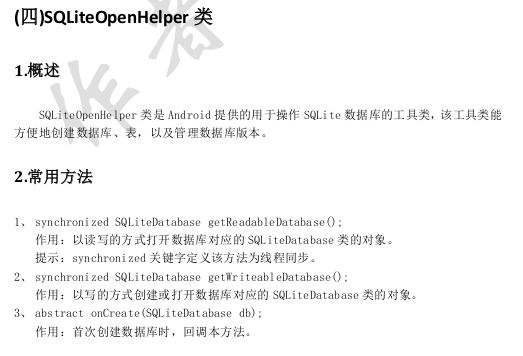
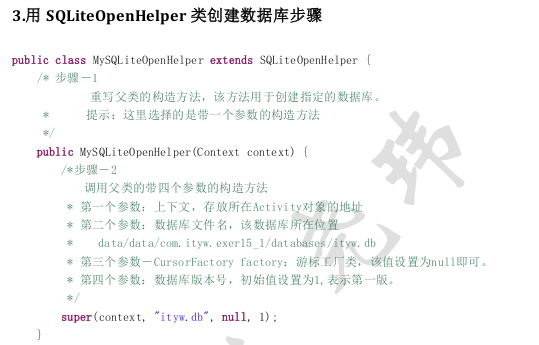
public class StudentDBHelper extends SQLiteOpenHelper {

    private static final String DB_NAME="students.db";

    static final String TABLE_NAME="student";

    static final String ID="_id";

    static final String NAME="name";

    static final String SEX="sex";

    static final String BIRTHDAY="birthday";

    static final String HEIGHT="height";

    public StudentDBHelper(Context context) {

        super(context, DB_NAME, null, 1);

    }

    @Override

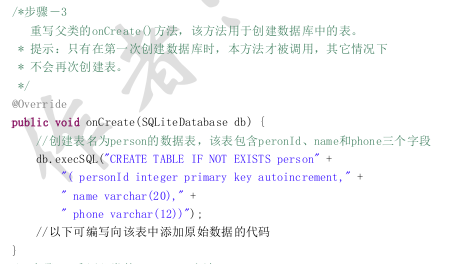
    public void onCreate(SQLiteDatabase db) {

        String sql="create table if not exists "+TABLE_NAME+"("

            +ID+" integer primary key autoincrement,"

            +NAME+" varchar(50),"

            +SEX+" varchar(2),"

            +BIRTHDAY+" datetext,"

            +HEIGHT+" real)";

        db.execSQL(sql);

        insertRecords(db);

    }

    private void insertRecords(SQLiteDatabase db) {

        ContentValues values=new ContentValues();

        values.put(NAME, "张飞");

        values.put(SEX, "男");

        values.put(BIRTHDAY, "1990-5-5");

        values.put(HEIGHT, 1.99);

        db.insert(TABLE_NAME, null, values);

        values=new ContentValues();

        values.put(NAME, "王菲");

        values.put(SEX, "女");

        values.put(BIRTHDAY, "1990-8-5");

        values.put(HEIGHT, 1.69);

        db.insert(TABLE_NAME, null, values);

        values=new ContentValues();

        values.put(NAME, "刘亦菲");

        values.put(SEX, "女");

        values.put(BIRTHDAY, "1991-5-5");

        values.put(HEIGHT, 1.7);

        db.insert(TABLE_NAME, null, values);

        values=new ContentValues();

        values.put(NAME, "李菲");

        values.put(SEX, "女");

        values.put(BIRTHDAY, "1992-5-5");

        values.put(HEIGHT, 1.72);

        db.insert(TABLE_NAME, null, values);

        values=new ContentValues();

        values.put(NAME, "田菲");

        values.put(SEX, "男");

        values.put(BIRTHDAY, "1993-5-5");

        values.put(HEIGHT, 1.78);

        db.insert(TABLE_NAME, null, values);

    }

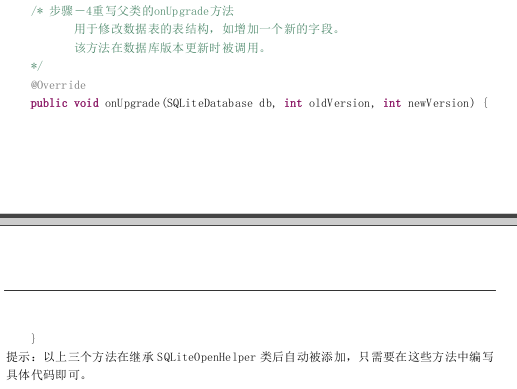
    @Override

    public void onUpgrade(SQLiteDatabase db, int oldVersion, int newVersion) {

        // TODO Auto-generated method stub

    }

    /**

     * 向表中增加一条记录

     * @param bean

     * @return

     */

    public int insertRecored(StudentBean bean){

        ContentValues values=new ContentValues();

        values.put(NAME, bean.getName());

        values.put(SEX, bean.getSex());

        values.put(BIRTHDAY, bean.getBirthday());

        values.put(HEIGHT, bean.getHeight());

        SQLiteDatabase db = getWritableDatabase();//getWritableDatabase()是SQLiteOpenHelper的方法

        long count = db.insert(TABLE_NAME, null, values);

        return (int) count;//插入的行数

    }

    /**

     * 删除指定id的记录

     * @param id

     * @return

     */

    public int deleteRecord(int id){

        SQLiteDatabase db = getWritableDatabase();

        int count = db.delete(TABLE_NAME, ID+"=?", new String[]{""+id});

        return count;//删除的行号

    }

    public int updateRecord(StudentBean bean){

        ContentValues values=new ContentValues();

        values.put(NAME, bean.getName());

        values.put(SEX, bean.getSex());

        values.put(BIRTHDAY, bean.getBirthday());

        values.put(HEIGHT, bean.getHeight());

        SQLiteDatabase db = getWritableDatabase();

        int count = db.update(TABLE_NAME, values, ID+"=?", new String[]{bean.getId()+""});//ID+"=?"是条件,new String[]{bean.getId()+""是填充占位符?

        return count;

    }

    public ArrayList<StudentBean> queryAll(){

        SQLiteDatabase db = getReadableDatabase();

        Cursor c = db.query(TABLE_NAME, null, null, null, null, null, null);//全查询,没有条件

        ArrayList<StudentBean> students=new ArrayList<StudentBean>();

        while(c.moveToNext()){

            int id=c.getInt(0);

            String name=c.getString(c.getColumnIndex(NAME));

            String sex=c.getString(c.getColumnIndex(SEX));

            String birthday=c.getString(c.getColumnIndex(BIRTHDAY));

            double height=c.getDouble(c.getColumnIndex(HEIGHT));

            StudentBean bean=new StudentBean(id, name, sex, birthday, height);

            students.add(bean);

        }

        return students;

    }

    public StudentBean queryRecord(int id){

        SQLiteDatabase db = getReadableDatabase();

        Cursor c = db.query(TABLE_NAME, null, ID+"=?", new String[]{""+id}, null,null,null);

        if(c.moveToNext()){

            String name=c.getString(c.getColumnIndex(NAME));

            String sex=c.getString(c.getColumnIndex(SEX));

            String birthday=c.getString(c.getColumnIndex(BIRTHDAY));

            double height=c.getDouble(c.getColumnIndex(HEIGHT));

            StudentBean bean=new StudentBean(id, name, sex, birthday, height);

            return bean;

        }

        return null;

    }

}
main.xml
<RelativeLayout xmlns:android="http://schemas.android.com/apk/res/android"

    android:layout_width="match_parent"

    android:layout_height="match_parent">

    <ListView

        android:id="@+id/lvStudent"

        android:layout_width="match_parent"

        android:layout_height="match_parent"

        android:dividerHeight="5dp"/>

</RelativeLayout>
item_student.xml
<?xml version="1.0" encoding="utf-8"?>

<RelativeLayout xmlns:android="http://schemas.android.com/apk/res/android"

    android:layout_width="match_parent"

    android:layout_height="wrap_content" >

    <TextView

        android:id="@+id/tvName"

        android:layout_width="wrap_content"

        android:layout_height="wrap_content"

        android:textSize="18sp"

        android:text="张飞"

        android:layout_marginLeft="5dp"/>

    <TextView

        android:id="@+id/tvSex"

        android:layout_alignParentRight="true"

        android:layout_width="wrap_content"

        android:layout_height="wrap_content"

        android:textSize="18sp"

        android:text="男"

        android:layout_marginLeft="5dp"/>

   <TextView

        android:id="@+id/tvBirthday"

        android:layout_below="@id/tvName"

        android:layout_alignParentLeft="true"

        android:layout_width="wrap_content"

        android:layout_height="wrap_content"

        android:textSize="18sp"

        android:text="1990-5-5"

        android:layout_marginLeft="5dp"/>

    <TextView

        android:id="@+id/tvHeight"

        android:layout_below="@id/tvSex"

        android:layout_alignParentRight="true"

        android:layout_width="wrap_content"

        android:layout_height="wrap_content"

        android:textSize="18sp"

        android:text="1.99米"

        android:layout_marginLeft="5dp"/>

</RelativeLayout>
android 44 SQLiteOpenHelper的更多相关文章
- Xamarin.Android之SQLiteOpenHelper
一.前言 在手机中进行网络连接不仅是耗时也是耗电的,而耗电却是致命的.所以我们就需要数据库帮助我们存储离线数据,以便在用户未使用网络的情况下也可以能够使用应用的部分功能,而在需要网络连接的功能上采用提 ...
- Android笔记——SQLiteOpenHelper类
public 抽象类 SQLiteOpenHelper 继承关系 Java.lang.Object android.database.sqlite.SQLiteOpenHelper 类概要 这是一个辅 ...
- Xamarin.Android 使用 SQLiteOpenHelper 进行数据库操作
一.前言 在手机中进行网络连接不仅是耗时也是耗电的,而耗电却是致命的.所以我们就需要数据库帮助我们存储离线数据,以便在用户未使用网络的情况下也可以能够使用应用的部分功能,而在需要网络连接的功能上采用提 ...
- Android:SQLiteOpenHelper类(SQLlite数据库操作)详细解析
前言 SQLite数据库操作在Android开发中非常常用 今天我将带大家全面了解关于SQLite数据库的操作(增.删.查.改) 目录 1. SQLite数据库介绍 SQLite是Android内置的 ...
- Android中SQLiteOpenHelper类的onUpgrade方法浅谈
public abstract void onUpgrade(SQLiteDatabase db,int oldVersion,int new Version) 这个方法在实现时需要重写. onUpg ...
- Android 数据库 SQLiteOpenHelper
public class DbOpenHelper extends SQLiteOpenHelper { private static String name = "test.db" ...
- Xamarin.Android开发实践(十四)
Xamarin.Android之ListView和Adapter 一.前言 如今不管任何应用都能够看到列表的存在,而本章我们将学习如何使用Xamarin去实现它,以及如何使用适配器和自定义适配器(本文 ...
- Android代码速查,写给新手的朋友们[转]
原文地址:http://www.open-open.com/lib/view/open1397286499090.html 0 android 创建按钮 Button button = new But ...
- Xamarin.Android开发实践(十三)
Xamarin.Android之SQLite.NET ORM 一.前言 通过<Xamarin.Android之SQLiteOpenHelper>和<Xamarin.Android之C ...
随机推荐
- 移动端消除click事件的延迟效果
https://github.com/Plaputta/jquery.event.special.fastclick 用fastclick事件,类似zepto的tap事件,若想去除连点效果,可在外层显 ...
- 监视/etc/passwd文件是否正常
帮助监视/etc/passwd文件是否正常(P90 练习6.7) 1)找出有UID0的所有项 2)找出有重复UID的所有项 3)找出有重复登录名的所有项 4)找出没有口令的所有项 5)找出没有作废日期 ...
- UIActionViewController 详解 iOS8
iOS8推出了几个新的“controller”,主要是把类似之前的UIAlertView变成了UIAlertController,这不经意的改变,貌似把我之前理解的“controller”一下子推翻了 ...
- DELPHI TMS Advanced Charts 3.8.0.3 Full Source D6-XE6 控件分享
仅供大家学习使用,请大家支持正版!! TMS Advanced Charts 3.8.0.3 Full Source D6-XE6 该控件用来画图标,压缩包里还有FOR INTRAWEB的版本 链接: ...
- [BZOJ 3218] A + B Problem 【可持久化线段树 + 网络流】
题目连接:BZOJ - 3218 题目分析 题目要求将 n 个点染成黑色或白色,那么我们可以转化为一个最小割模型. 我们规定一个点 i 最后属于 S 集表示染成黑色,属于 T 集表示染成白色,那么对于 ...
- linux哪个版本好
我给出的意见:目前主流和常用的Linux版本主要有:1.Redhat 版本5.5和6.0最新:培训.学习.应用.知名度最高的Linux发行版本,对硬件兼容性来说也比较不错,版本更新很快,对新硬件和新技 ...
- jstat命令(Java Virtual Machine Statistics Monitoring Tool)
1.介绍 Jstat用于监控基于HotSpot的JVM,对其堆的使用情况进行实时的命令行的统计,使用jstat我们可以对指定的JVM做如下监控: - 类的加载及卸载情况 - 查看新生代.老生代及持久代 ...
- 【POJ】2117 Electricity
无向图求割点和连通块. /* POJ2117 */ #include <iostream> #include <vector> #include <algorithm&g ...
- QQ游戏百万人同时在线服务器架构实现
转载自:http://morton5555.blog.163.com/blog/static/976407162012013112545710/# QQ游戏于前几日终于突破了百万人同时在线的关口,向着 ...
- Spark(Hive) SQL中UDF的使用(Python)
相对于使用MapReduce或者Spark Application的方式进行数据分析,使用Hive SQL或Spark SQL能为我们省去不少的代码工作量,而Hive SQL或Spark SQL本身内 ...