
【OpenGL】纹理(Texture)
纹理是一个2D图片(也有1D和3D),它用来添加物体的细节;这就像有一张绘有砖块的图片贴到你的3D的房子上,你的房子看起来就有了一个砖墙。因为我们可以在一张图片上插入足够多的细节,这样物体就会拥有很多细节而不会增加额外的顶点。
为了能够把纹理映射到三角形上,我们需要说明三角形的每个顶点各自对应纹理的哪个部分。这样每个顶点就会有一个纹理坐标(texture coordinate),它指明从纹理图像的哪个地方采样。之后在所有的其他的像素上进行像素插值。
纹理坐标与顶点坐标不同。纹理坐标的范围为(0,0)-(1,1) 分别代指左下角和右上角。
过程
1. 初始化OpenGL环境
2. 设置顶点&纹理坐标数组
GLfloat vertices[] = {

// Positions                    // Texture Coords

0.5f, 0.5f,  0.0f, 1.0f, -1.0f, // Top Right

0.5f, -0.5f,  0.0f, 1.0f, 0.0f, // Bottom Right

-0.5f, -0.5f,  1.0f, 0.0f, 0.0f, // Bottom Left

-0.5f, 0.5f,  0.0f, 0.0f, -1.0f  // Top Left
3. 创建并载入着色器
顶点着色器:
#version 330 core

layout (location = 0) in vec3 position;

layout (location = 1) in vec2 texCoord;

out vec2 TexCoord;

void main()

{

    gl_Position = vec4(position, 1.0f);

    TexCoord = texCoord;

}
像素着色器:
#version 330 core

in vec3 ourColor;

in vec2 TexCoord;

out vec4 color;

uniform sampler2D ourTexture;

void main()

{

    color = texture(ourTexture, TexCoord);

}
4. 设置VAO、VBO、EBO
GLuint indices[] = {  // Note that we start from 0!

		0, 1, 3, // First Triangle

		1, 2, 3  // Second Triangle

	};

	GLuint VBO, VAO, EBO;

	glGenVertexArrays(1, &VAO);

	glGenBuffers(1, &VBO);

	glGenBuffers(1, &EBO);

	glBindVertexArray(VAO);

	glBindBuffer(GL_ARRAY_BUFFER, VBO);

	glBufferData(GL_ARRAY_BUFFER, sizeof(vertices), vertices, GL_STATIC_DRAW);

	glBindBuffer(GL_ELEMENT_ARRAY_BUFFER, EBO);

	glBufferData(GL_ELEMENT_ARRAY_BUFFER, sizeof(indices), indices, GL_STATIC_DRAW);

	// Position attribute

	glVertexAttribPointer(0, 3, GL_FLOAT, GL_FALSE, 5 * sizeof(GLfloat), (GLvoid*)0);

	glEnableVertexAttribArray(0);

	// TexCoord attribute

	glVertexAttribPointer(1, 2, GL_FLOAT, GL_FALSE, 5 * sizeof(GLfloat), (GLvoid*)(3 * sizeof(GLfloat)));

	glEnableVertexAttribArray(1);

	glBindVertexArray(0); // Unbind VAO
5. 创建并载入纹理 (这里载入图片使用SOIL库,推荐使用FreeImage)
// Load and create a texture

	GLuint texture;

	glGenTextures(1, &texture);

	glBindTexture(GL_TEXTURE_2D, texture); // All upcoming GL_TEXTURE_2D operations now have effect on this texture object

	// Set the texture wrapping parameters

	glTexParameteri(GL_TEXTURE_2D, GL_TEXTURE_WRAP_S, GL_REPEAT);	// Set texture wrapping to GL_REPEAT (usually basic wrapping method)

	glTexParameteri(GL_TEXTURE_2D, GL_TEXTURE_WRAP_T, GL_REPEAT);

	// Set texture filtering parameters

	glTexParameteri(GL_TEXTURE_2D, GL_TEXTURE_MIN_FILTER, GL_LINEAR);

	glTexParameteri(GL_TEXTURE_2D, GL_TEXTURE_MAG_FILTER, GL_LINEAR);

	// Load image, create texture and generate mipmaps

	int width, height;

	unsigned char* image = SOIL_load_image("image.jpg", &width, &height, 0, SOIL_LOAD_RGB);

	glTexImage2D(GL_TEXTURE_2D, 0, GL_RGB, width, height, 0, GL_RGB, GL_UNSIGNED_BYTE, image);

	glGenerateMipmap(GL_TEXTURE_2D);

	SOIL_free_image_data(image);

	glBindTexture(GL_TEXTURE_2D, 0); // Unbind texture when done, so we won't accidentily mess up our texture.
6. 绘制及善后工作
	while (!glfwWindowShouldClose(window))

	{

		// Check if any events have been activiated (key pressed, mouse moved etc.) and call corresponding response functions

		glfwPollEvents();

		// Render

		// Clear the colorbuffer

		glClearColor(0.2f, 0.3f, 0.3f, 1.0f);

		glClear(GL_COLOR_BUFFER_BIT);

		// Bind Texture

		glBindTexture(GL_TEXTURE_2D, texture);

		// Activate shader

		ourShader.Use();

		// Draw container

		glBindVertexArray(VAO);

		glDrawElements(GL_TRIANGLES, 6, GL_UNSIGNED_INT, 0);

		glBindVertexArray(0);

		// Swap the screen buffers

		glfwSwapBuffers(window);

	}

	// Properly de-allocate all resources once they've outlived their purpose

	glDeleteVertexArrays(1, &VAO);

	glDeleteBuffers(1, &VBO);

	glDeleteBuffers(1, &EBO);

	// Terminate GLFW, clearing any resources allocated by GLFW.

	glfwTerminate();
效果
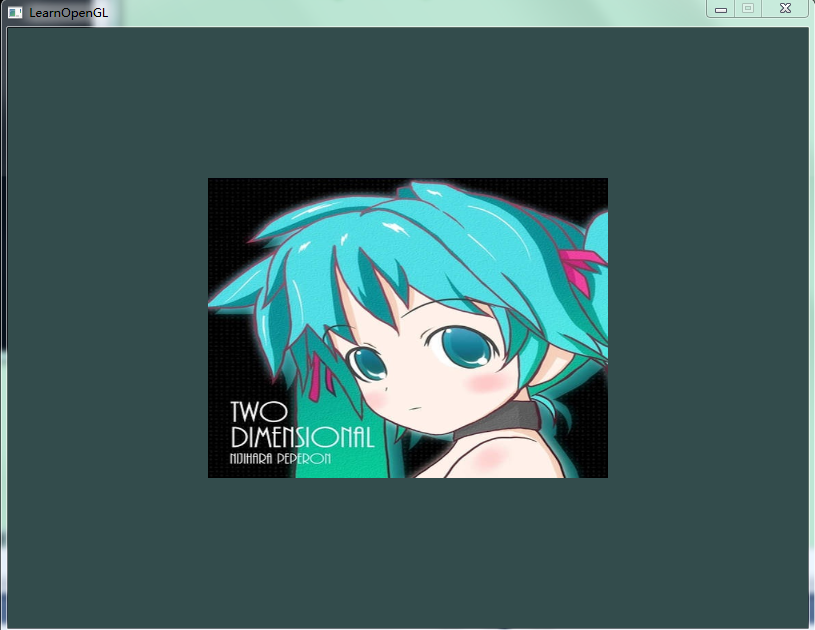
参考:http://bullteacher.com/7-textures.html
【OpenGL】纹理(Texture)的更多相关文章
- Unity 用户手册用户指南二维纹理 (Texture 2D)
http://www.58player.com/blog-2327-953.html 二维纹理 (Texture 2D) 纹理 (Textures) 使您的 网格 (Meshes).粒子 (Parti ...
- OpenGL 纹理贴图
前一节实例代码中有个贴图操作. 今天就简单说明一下纹理贴图... 为了使用纹理贴图.我们首先需要启用纹理贴图功能. 我们可以在Renderer实现的onSurfaceCreated中定义启用: // ...
- openGL 纹理05
纹理(Texture) 为了能够把纹理映射(Map)到三角形上,我们需要指定三角形的每个顶点各自对应纹理的哪个部分. 这样每个顶点就会关联着一个纹理坐标(Texture Coordinate) 用来标 ...
- OpenGL: 纹理采样 texture sample
Sampler (GLSL) Sampler通常是在Fragment shader(片元着色器)内定义的,这是一个uniform类型的变量,即处理不同的片元时这个变量是一致不变的.一个sampler和 ...
- OpenGL纹理
如果不用头文件,把所有东西堆在同一个cpp文件中,会出现“超出GPU内存的错误!” 1 //我们自己的着色器类 #ifndef SHADER_H #define SHADER_H #include & ...
- [OpenGL]纹理贴图实现 总结
实现步骤 第一步:设置所需要的OpenGL环境 设置上下文环境 删除已经存在的渲染的缓存 设置颜色缓存 设置帧缓存 清除缓存 设置窗口大小 开启功能 编译shander 使用program 获取sha ...
- 二维纹理 Texture 2D
Textures bring your Meshes, Particles, and interfaces to life! They are image or movie files that yo ...
- Qt5.6.0+OpenGL 纹理贴图首战告捷
重要的话写在前面~~通过今晚的实验,知道了EBO是不能随便release的~~~一直不要release就可以了,否则vao会失效 Display.h #ifndef DISPLAYWIDGET_H # ...
- three.js学习:纹理Texture之平面纹理
index.html <!DOCTYPE html> <html lang="en"> <head> <meta charset=&quo ...
随机推荐
- springboot 整合 redis 共享Session-spring-session-data-redis
参考:https://www.cnblogs.com/ityouknow/p/5748830.html 如何使用 1.引入 spring-boot-starter-redis <dependen ...
- HTML5 实现获取 gzip 压缩数据,并进行解压,同时解决汉字乱码,相关 pako.js
1, 下载 pako.js => http://nodeca.github.io/pako/#Deflate.prototype.onData 2, 首先需要了解一下 XMLHttpReques ...
- [Python]实践:实现探测Web服务质量
来源:Python 自动化运维 技术与最佳实践 HTTP服务是最流行的互联网应用之一,服务质量的好坏关系到用户体验以及网站的运营服务水平,最常用的有两个标准:1.服务的可用性,比是否处于正常提供服务状 ...
- 快速掌握和使用Flyway
什么是Flyway? 转载:https://blog.waterstrong.me/flyway-in-practice/ Flyway is an open-source database migr ...
- 【平台兼容性】jeecg3.7 兼容weblogic 部署改造方案
MyEclipse 配置 WebLogic 10.3.3请参考: https://my.oschina.net/aini3884/blog/895689 常见问题: 1. problem: cvc-e ...
- iOS app bundle id
每个app的bundle id是唯一的,不同开发者账号不能申请相同的bundle id,例如开发者账号B想用开发者A的bundle id,只能是开发者A将这个bundle id先删除,B才可以注册,否 ...
- C#--构造函数的理解
说白了构造函数就是用来初始化类的数据成员{因为C#语言具有类型安全的特质-->不能使用没有初始化的变量)} 在这里引用一下别人的总结,我觉得挺好的: 构造函数是一种特殊的成员函数,它主要用于为对 ...
- ELK实时日志分析平台环境部署--完整记录(转)
在日常运维工作中,对于系统和业务日志的处理尤为重要.今天,在这里分享一下自己部署的ELK(+Redis)-开源实时日志分析平台的记录过程(仅依据本人的实际操作为例说明,如有误述,敬请指出)~ ==== ...
- ADO数据库操作方式
微软公司的ADO (ActiveX Data Objects) 是一个用于存取数据源的COM组件.它提供了编程语言和统一数据访问方式OLE DB的一个中间层.允许开发人员编写访问数据的代码而不用关心数 ...
- java程序发布成exe等
1.使用工具jartoexe http://www.regexlab.com/zh/jar2exe/free.htm http://www.jar2exe.com/ 2.exe4j.JSmooth等 ...