
支持辉光效果的Label
支持辉光效果的Label
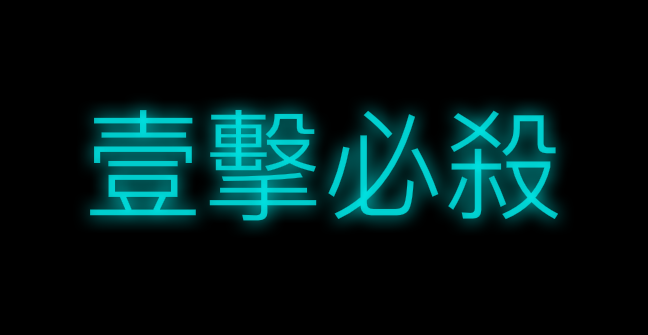
效果
源码
https://github.com/YouXianMing/UI-Component-Collection 中的 FBGlowLabel
//

//  FBGlowLabel.h

//

//  Created by YouXianMing on 16/8/3.

//  Copyright © 2016年 YouXianMing. All rights reserved.

//

//  https://github.com/lyokato/fbglowlabel

//

#import <UIKit/UIKit.h>

@interface FBGlowLabel : UILabel

/**

 *  Glow size, default is 0.f.

 */

@property (nonatomic) CGFloat glowSize;

/**

 *  Glow color, default is clear color.

 */

@property (nonatomic, strong) UIColor *glowColor;

/**

 *  Inner glow size, default is 0.f.

 */

@property (nonatomic) CGFloat innerGlowSize;

/**

 *  Inner glow color, default is clear color.

 */

@property (nonatomic, strong) UIColor *innerGlowColor;

@end
//

//  FBGlowLabel.m

//

//  Created by YouXianMing on 16/8/3.

//  Copyright © 2016年 YouXianMing. All rights reserved.

//

#import "FBGlowLabel.h"

@implementation FBGlowLabel

- (id)initWithFrame:(CGRect)frame {

    if (self = [super initWithFrame:frame]) {

        [self setup];

    }

    return self;

}

- (id)initWithCoder:(NSCoder *)coder {

    if (self = [super initWithCoder:coder]) {

        [self setup];

    }

    return self;

}

- (void)setup {

    self.glowSize       = 0.0f;

    self.glowColor      = [UIColor clearColor];

    self.innerGlowSize  = 0.0f;

    self.innerGlowColor = [UIColor clearColor];

}

- (void)drawTextInRectForIOS7:(CGRect)rect {

    CGContextRef ctx = UIGraphicsGetCurrentContext();

    UIGraphicsBeginImageContextWithOptions(rect.size, NO, 0.0);

    [super drawTextInRect:rect];

    UIImage *textImage = UIGraphicsGetImageFromCurrentImageContext();

    UIGraphicsEndImageContext();

    CGContextSaveGState(ctx);

    if (_glowSize > ) {

        CGContextSetShadow(ctx, CGSizeZero, _glowSize);

        CGContextSetShadowWithColor(ctx, CGSizeZero, _glowSize, _glowColor.CGColor);

    }

    [textImage drawAtPoint:rect.origin];

    CGContextRestoreGState(ctx);

    if (_innerGlowSize > ) {

        UIGraphicsBeginImageContextWithOptions(rect.size, NO, 0.0);

        CGContextRef ctx2 = UIGraphicsGetCurrentContext();

        CGContextSaveGState(ctx2);

        CGContextSetFillColorWithColor(ctx2, [UIColor blackColor].CGColor);

        CGContextFillRect(ctx2, rect);

        CGContextTranslateCTM(ctx2, 0.0, rect.size.height);

        CGContextScaleCTM(ctx2, 1.0, -1.0);

        CGContextClipToMask(ctx2, rect, textImage.CGImage);

        CGContextClearRect(ctx2, rect);

        CGContextRestoreGState(ctx2);

        UIImage *inverted = UIGraphicsGetImageFromCurrentImageContext();

        CGContextClearRect(ctx2, rect);

        CGContextSaveGState(ctx2);

        CGContextSetFillColorWithColor(ctx2, _innerGlowColor.CGColor);

        CGContextSetShadowWithColor(ctx2, CGSizeZero, _innerGlowSize, _innerGlowColor.CGColor);

        [inverted drawAtPoint:CGPointZero];

        CGContextTranslateCTM(ctx2, 0.0, rect.size.height);

        CGContextScaleCTM(ctx2, 1.0, -1.0);

        CGContextClipToMask(ctx2, rect, inverted.CGImage);

        CGContextClearRect(ctx2, rect);

        CGContextRestoreGState(ctx2);

        UIImage *innerShadow = UIGraphicsGetImageFromCurrentImageContext();

        UIGraphicsEndImageContext();

        [innerShadow drawAtPoint:rect.origin];

    }

}

- (void)drawTextInRectForIOS6:(CGRect)rect {

    CGContextRef ctx = UIGraphicsGetCurrentContext();

    CGContextSaveGState(ctx);

    if (self.glowSize > ) {

        CGContextSetShadow(ctx, CGSizeZero, _glowSize);

        CGContextSetShadowWithColor(ctx, CGSizeZero, _glowSize, _glowColor.CGColor);

    }

    [super drawTextInRect:rect];

    CGContextRestoreGState(ctx);

    if (_innerGlowSize > ) {

        UIGraphicsBeginImageContextWithOptions(rect.size, NO, 0.0);

        CGContextRef ctx2 = UIGraphicsGetCurrentContext();

        [super drawTextInRect:rect];

        UIImage *textImage = UIGraphicsGetImageFromCurrentImageContext();

        CGContextClearRect(ctx2, rect);

        CGContextSaveGState(ctx2);

        CGContextSetFillColorWithColor(ctx2, [UIColor blackColor].CGColor);

        CGContextFillRect(ctx2, rect);

        CGContextTranslateCTM(ctx2, 0.0, rect.size.height);

        CGContextScaleCTM(ctx2, 1.0, -1.0);

        CGContextClipToMask(ctx2, rect, textImage.CGImage);

        CGContextClearRect(ctx2, rect);

        CGContextRestoreGState(ctx2);

        UIImage *inverted = UIGraphicsGetImageFromCurrentImageContext();

        CGContextClearRect(ctx2, rect);

        CGContextSaveGState(ctx2);

        CGContextSetFillColorWithColor(ctx2, _innerGlowColor.CGColor);

        CGContextSetShadowWithColor(ctx2, CGSizeZero, _innerGlowSize, _innerGlowColor.CGColor);

        [inverted drawAtPoint:CGPointZero];

        CGContextTranslateCTM(ctx2, 0.0, rect.size.height);

        CGContextScaleCTM(ctx2, 1.0, -1.0);

        CGContextClipToMask(ctx2, rect, inverted.CGImage);

        CGContextClearRect(ctx2, rect);

        CGContextRestoreGState(ctx2);

        UIImage *innerShadow = UIGraphicsGetImageFromCurrentImageContext();

        UIGraphicsEndImageContext();

        [innerShadow drawAtPoint:rect.origin];

    }

}

- (void)drawTextInRect:(CGRect)rect {

    if (self.text == nil || self.text.length == ) {

        return;

    }

    if ([[[UIDevice currentDevice] systemVersion] compare:@"7.0" options:NSNumericSearch] != NSOrderedAscending) {

        [self drawTextInRectForIOS7:rect];

    } else {

        [self drawTextInRectForIOS6:rect];

    }

}

@end
//

//  ViewController.m

//  FBGlowLabel

//

//  Created by YouXianMing on 16/8/3.

//  Copyright © 2016年 YouXianMing. All rights reserved.

//

#import "ViewController.h"

#import "FBGlowLabel.h"

@interface ViewController ()

@end

@implementation ViewController

- (void)viewDidLoad {

    [super viewDidLoad];

    self.view.backgroundColor = [UIColor blackColor];

    FBGlowLabel *glowLabel    = [[FBGlowLabel alloc] initWithFrame:self.view.bounds];

    [self.view addSubview:glowLabel];

    glowLabel.text            = @"壹擊必殺";

    glowLabel.textAlignment   = NSTextAlignmentCenter;

    glowLabel.backgroundColor = [UIColor clearColor];

    glowLabel.font            = [UIFont fontWithName:@"Heiti SC" size:.f];

    glowLabel.textColor       = [[UIColor cyanColor] colorWithAlphaComponent:0.95f];

    glowLabel.glowSize       = ;

    glowLabel.glowColor      = [UIColor cyanColor];

    glowLabel.innerGlowSize  = ;

    glowLabel.innerGlowColor = [[UIColor blackColor] colorWithAlphaComponent:0.25f];

}

@end
支持辉光效果的Label的更多相关文章
- 使用CALayer制作View的辉光效果
使用CALayer制作View的辉光效果 实现以下的辉光效果: 思路是这样子的: 1. 创建好需要实现辉光效果的View 2. 对这个View进行截图 3. 将这个截图重新添加进View中 4. 对这 ...
- GraphicsLab Project之辉光(Glare,Glow)效果 【转】
作者:i_dovelemon 日期:2016 / 07 / 02 来源:CSDN 主题:Render to Texture, Post process, Glare, Glow, Multi-pass ...
- Shimmer辉光动画效果
Shimmer辉光动画效果 效果 源码 https://github.com/facebook/Shimmer https://github.com/YouXianMing/Animations // ...
- 辉光UIView的category
辉光UIView的category 本人视频教程系类 iOS中CALayer的使用 效果如下: 源码: UIView+GlowView.h 与 UIView+GlowView.m // // UI ...
- 辉光的UIView
辉光的UIView 辉光UIView使用了一个UIView的一个category,名为UIView+Glow,请自行到github上查找. 源码如下: // // RootViewController ...
- 闹钟AlarmAndMusic 和支持播放音乐效果《IT蓝豹》
闹钟AlarmAndMusic 和支持播放音乐效果的,上下滑动调整时间和页面旋转风车效果,由于制作的gif有些问题,效果不明显,欢迎下载使用看看真实的效果.本例子主要由AlertActivity和Al ...
- CSS3实现文字扫光效果
本篇文章由:http://xinpure.com/css3-text-light-sweep-effect/ CSS3 实现的文字扫光效果,几乎可以和 Flash 相媲美了 效果解析 我们分析一下实现 ...
- WPF 实现跑马灯效果的Label控件,数据绑定方式实现
原文:WPF 实现跑马灯效果的Label控件,数据绑定方式实现 项目中需要使用数据绑定的方式实现跑马灯效果的Label,故重构了Label控件:具体代码如下 using System; using S ...
- pixijs shader贴图扫光效果
pixijs shader贴图扫光效果 直接贴代码 const app = new PIXI.Application({ transparent: true }); document.body.app ...
随机推荐
- JS模块化编程(一):CommonJS,AMD/CMD
前言 模块化是什么? 为什么采用模块化? 场景: 一个html,因不同的业务需求开发,会不断的引入js文件.另外,a.js和b.js中的变量或函数必须是全局的,才能暴露给使用方. <script ...
- 事务ACID特性
所谓事务,它是一个操作序列,这些操作要么都执行,要么都不执行,它是一个不可分割的工作单位.例如,银行转帐工作:从一个帐号扣款并使另一个帐号增款,这两个操作要么都执行,要么都不执行. 数据库事务必须具备 ...
- Hive的安装和使用
1.Hive1.1 在hadoop生态圈中属于数据仓库的角色.他能够管理hadoop中的数据,同时可以查询hadoop中的数据. 本质上讲,hive是一个SQL解析引擎.Hive可以把SQL查询转换为 ...
- python控制selenium点击登录按钮时报错 unknown error: Element is not clickable at point
利用python控制selenium进行一个网页的登录时报错: C:\Users\Desktop\selenium\chrome>python chrome.py selenium.common ...
- 【Java】 大话数据结构(8) 串的模式匹配算法(朴素、KMP、改进算法)
本文根据<大话数据结构>一书,实现了Java版的串的朴素模式匹配算法.KMP模式匹配算法.KMP模式匹配算法的改进算法. 1.朴素的模式匹配算法 为主串和子串分别定义指针i,j. (1)当 ...
- 使用IDEA搭建spring
从前使用eclipse开发,集成jar包,现在使用maven来管理 一: 1.框架 2.pom 需要spring core与spring context. <?xml version=" ...
- 怎么去除移动端点击a标签链接时的背景色
在手机端点击链接时会发现有一个背景色,有时候需要改变这个颜色,或者去除这个颜色,有时候a标签做成按钮时这个颜色的存在会很丑,像这样: 可以通过 -webkit-tap-highlight-color: ...
- 2015 ACM Amman Collegiate Programming Contest 题解
[题目链接] A - Who Is The Winner 模拟. #include <bits/stdc++.h> using namespace std; int T; int n; s ...
- PocketMoney
PocketMoney( Money.pas/cpp/c)Description学校为了表彰tsoi的优异成绩, m个领导每人都决定给tsoi的一些人发一些小红包.于是n个Tsoier排成一排,等待着 ...
- Codeforces Round 542 (Div. 2)
layout: post title: Codeforces Round 542 (Div. 2) author: "luowentaoaa" catalog: true tags ...