
从零开始学spring cloud(五) -------- 将服务注册到Eureka上
一、开发前准备工作:
官方文档地址:https://cloud.spring.io/spring-cloud-static/spring-cloud-netflix/2.1.0.RELEASE/multi/multi_spring-cloud-eureka-server.html
不同的spring cloud版本的接口地址也是不一样的,可以通过(https://spring.io/projects/spring-cloud-netflix#learn)进行不同版本的文档选择
1.添加Eureka依赖:
To include Eureka Server in your project, use the starter with a group ID of org.springframework.cloud and an artifact ID of spring-cloud-starter-netflix-eureka-server. See the Spring Cloud Project page for details on setting up your build system with the current Spring Cloud Release Train.
        <dependency>

            <groupId>org.springframework.cloud</groupId>

            <artifactId>spring-cloud-starter-netflix-eureka-server</artifactId>

        </dependency>
2.运行Eureka Server
 @SpringBootApplication

 @EnableEurekaServer

 public class EurekaApplication {

     public static void main(String[] args) {

         SpringApplication.run(EurekaApplication.class, args);

     }

 }
2.项目实现:
pom文件:
 <?xml version="1.0" encoding="UTF-8"?>

 <project xmlns="http://maven.apache.org/POM/4.0.0" xmlns:xsi="http://www.w3.org/2001/XMLSchema-instance"

          xsi:schemaLocation="http://maven.apache.org/POM/4.0.0 http://maven.apache.org/xsd/maven-4.0.0.xsd">

     <modelVersion>4.0.0</modelVersion>

     <parent>

         <groupId>com.zwjk.cloud</groupId>

         <artifactId>microservice-spring-cloud</artifactId>

         <version>0.0.1-SNAPSHOT</version>

     </parent>

     <artifactId>microservice-doscovey-eureka</artifactId>

     <version>0.0.1-SNAPSHOT</version>

     <name>microservice-doscovey-eureka</name>

     <description>Demo project for Spring Boot</description>

     <properties>

         <project.build.sourceEncoding>UTF-8</project.build.sourceEncoding>

     </properties>

     <dependencies>

         <dependency>

             <groupId>org.springframework.cloud</groupId>

             <artifactId>spring-cloud-starter-netflix-eureka-server</artifactId>

         </dependency>

     </dependencies>

 </project>
application.yml
server:

  port: 8761

eureka:

  client:

    register-with-eureka: false

    fetch-registry: false

    service-url:

      defaultZone: http://localhost:8761/eureka
EurekaApplication.java
 package com.zwjk.cloud;

 import org.springframework.boot.SpringApplication;

 import org.springframework.boot.autoconfigure.SpringBootApplication;

 import org.springframework.cloud.netflix.eureka.server.EnableEurekaServer;

 @SpringBootApplication

 @EnableEurekaServer

 public class EurekaApplication {

     public static void main(String[] args) {

         SpringApplication.run(EurekaApplication.class, args);

     }

 }
启动项目:
http://localhost:8761/

打开地址后,直接就进入了页面。缺少账号密码验证,
如何在控制台增加账号密码控制呢?
首先,需要在pom文件中,增加权限认证的依赖:
<dependency>
    <groupId>org.springframework.boot</groupId>
    <artifactId>spring-boot-starter-security</artifactId>
</dependency>
接着修改 application.yml
spring:

  security:

    user:

      name: user

      password: password123

server:

  port: 8761

eureka:

  client:

    register-with-eureka: false

    fetch-registry: false

    service-url:

      defaultZone: http://user:password123@localhost:8761/eureka
同时启动类里面也需要加入一下修改,不然,其他服务来Eureka中注册是,会出现权限认证失败的问题
修改后的启动类如下:
package com.zwjk.cloud;

import org.springframework.boot.SpringApplication;

import org.springframework.boot.autoconfigure.SpringBootApplication;

import org.springframework.cloud.netflix.eureka.server.EnableEurekaServer;

import org.springframework.security.config.annotation.web.builders.HttpSecurity;

import org.springframework.security.config.annotation.web.configuration.EnableWebSecurity;

import org.springframework.security.config.annotation.web.configuration.WebSecurityConfigurerAdapter;

@SpringBootApplication

@EnableEurekaServer

public class EurekaApplication {

    public static void main(String[] args) {

        SpringApplication.run(EurekaApplication.class, args);

    }

    @EnableWebSecurity

    static class WebSecurityConfig extends WebSecurityConfigurerAdapter {

        @Override

        protected void configure(HttpSecurity http) throws Exception {

            //Howard 2019-03-20,错误的做法:

            //http.csrf().disable();//这样会直接取消验证账号密码了

            //Howard 2019-03-20,注意 正确的做法是这样:

            http.csrf().disable().authorizeRequests()

                .anyRequest()

                .authenticated()

                .and()

                .httpBasic();

        }

    }

}
启动项目,然后通过浏览器访问http://localhost:8761/
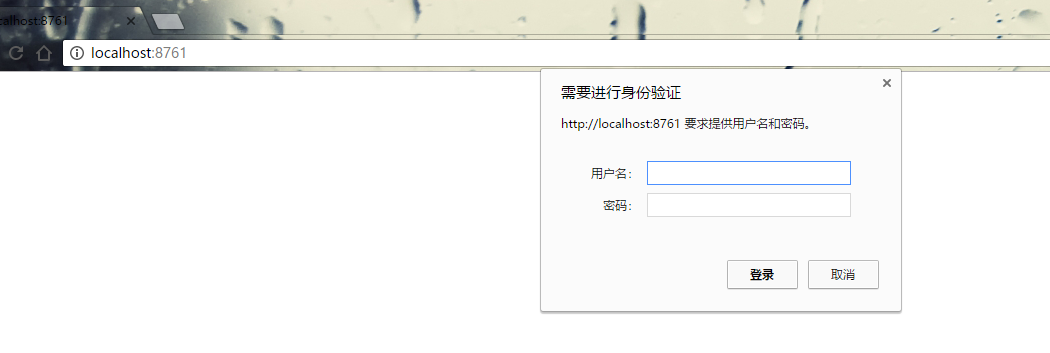
输入密码后,进入Eureka管理后台界面。
二、将服务注册到Eureka上
1.user服务注册到Eureka上,
首先,需要使用Eureka Client将服务注册到Eureka上,需要添加如下的依赖
        <dependency>

            <groupId>org.springframework.cloud</groupId>

            <artifactId>spring-cloud-starter-netflix-eureka-client</artifactId>

        </dependency>
修改配置文件,将Eureka的服务地址及认证,添加到配置文件中
eureka:

  client:

    healthcheck:

      enabled: true

    serviceUrl:

      defaultZone: http://user:password123@localhost:8761/eureka

  instance:

    prefer-ip-address: true

    instance-id: ${spring.application.name}:${spring.application.instance_id:${server.port}}

    metadata-map:

      zone: ABC      # eureka可以理解的元数据

      lilizhou: BBC  # 不会影响客户端行为

    lease-renewal-interval-in-seconds: 5
这个时候,启动user服务,会发现启动失败,
提示健康检查的错误,是因为还需要添加一个依赖
<dependency>
    <groupId>org.springframework.boot</groupId>
    <artifactId>spring-boot-starter-actuator</artifactId>
</dependency>
重启项目,访问Eureka控制台,

会看到服务已经注册到Eureka上,服务的名字配置文件中applocation.name Status 是Eureka.instance.instance-id
下面我们将movie也注册到Eureka上
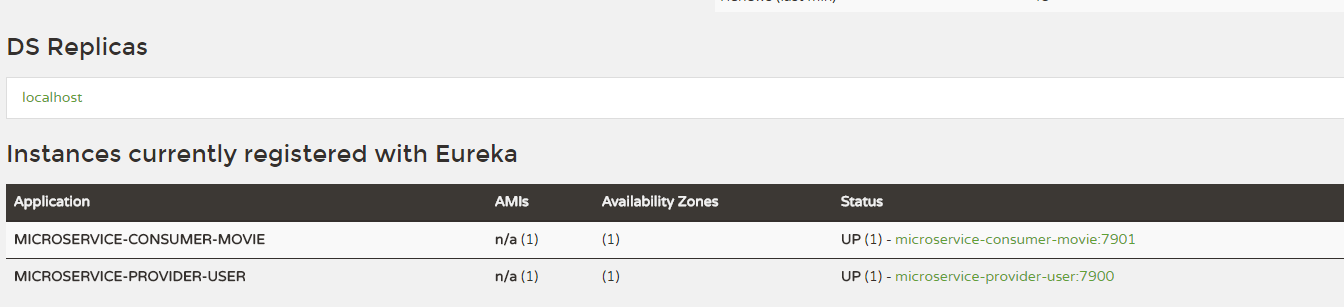
到此,已经将服务都注册到Eureka上了
从零开始学spring cloud(五) -------- 将服务注册到Eureka上的更多相关文章
- Spring Cloud之微服务注册到Eureka Server集群
在Spring Cloud之服务注册中心搭建Eureka Server服务注册中⼼ - 池塘里洗澡的鸭子 - 博客园 (cnblogs.com)中已经搭建好了Eureka Server集群,本文就利用 ...
- Spring Cloud之微服务注册到Eureka Server集群后访问改造
上篇Spring Cloud之服务注册中心搭建Eureka Server服务注册中⼼ - 池塘里洗澡的鸭子 - 博客园 (cnblogs.com)已经已经成功将两个微服务注册到集群中,那么能正常能与注 ...
- Spring Cloud Consul 实现服务注册和发现
Spring Cloud 是一个基于 Spring Boot 实现的云应用开发工具,它为基于 JVM 的云应用开发中涉及的配置管理.服务发现.断路器.智能路由.微代理.控制总线.全局锁.决策竞选.分布 ...
- Spring Cloud Alibaba | Nacos服务注册与发现
目录 Spring Cloud Alibaba | Nacos服务注册与发现 1. 服务提供者 1.1 pom.xml项目依赖 1.2 配置文件application.yml 1.3 启动类Produ ...
- 从零开始学spring cloud(十一) -------- hystrix监控
一.官方文档阅读 服务启动后,可以通过/health和hystrix.stream查看效果,实际上,访问上述两个地址,会出现404,这是因为spring boot版本的问题, 我在这里使用的sprin ...
- Spring Cloud Consul使用——服务注册与发现(注册中心)
整理自该文章 一.Consul 服务端接下来我们开发 Consul 的服务端,创建一个 spring-cloud-consul-producer 项目 1.添加依赖包 <dependencies ...
- Spring Cloud Alibaba 的服务注册与发现
Spring Cloud Alibaba 服务发现例子 一.需求 1.提供者完成的功能 2.消费者完成的功能 3.可以附加的额外配置 二.实现步骤 1.总的依赖引入 2.服务提供者和发现者,引入服务发 ...
- 从零开始学spring cloud(二) -------- 开始使用Spring Cloud实战微服务
1.准备工作 2.服务提供者与服务消费者 3.服务发现与服务注册 服务发现: 服务注册表: 服务注册表是一个记录当前可用服务实例的网络信息的数据库,是服务发现机制的核心.服务注册表提供查询API和管理 ...
- 从零开始学spring cloud(六) -------- Ribbon
一.Ribbon介绍 Ribbon就是客户端侧负责均衡实现的一种方式,那么Ribbon是什么呢? Ribbon是Netflix发布的云中间层服务开源项目,其主要功能是提供客户端侧负载均衡算法.Ribb ...
随机推荐
- Python【每日一问】12
问:请解释线程.进程.协程 答: [定义] 进程 进程:一个运行的程序(代码)就是一个进程,进程是系统资源分配的最小单位.进程拥有自己独立的内存空间,多个进程间资源不共享 线程 线程:调度执行的最小单 ...
- Centos7修改默认网卡名(改为eth0)以及网卡启动报错RTNETLINK answers: File exists处理
安装好centos7版本的系统后,发现默认的网卡名字有点怪,为了便于管理,可以手动修改.下面对centos7版本下网卡重命名操作做一记录:1)编辑网卡信息[root@linux-node2~]# cd ...
- Ehcart整合百度地图
最近上班有些时间,学习了一下Ehcart的知识,自己制作了一份Ehcart整合百度地图的示例代码. GItHub地址:https://github.com/TianYanFd/tianjin-powe ...
- 4DAY权限管理-2018-04-27
0xff001 基本权限UGO 1.描述 文件权限设置,可以赋予莫个用户或组能够以何种方式 访问某个文件 2.权限对象U\G\O(属主\属组\其他人) 例如:[root@localhost ~]# ...
- day2.jmeter简单压测,下载文件,Charles手机抓包准备
一.压测 压测衡量一个系统的好坏:1.tps每秒钟处理的事物数,2.qps响应时间 添加聚合报告,更改线程组,运行接口请求 **添加压力机 1.首先确保都在同一网段 2.其他电脑要先启动jmeter- ...
- com.android.build.api.transformException报错的解决方法
最近遇到一个问题:工程需要依赖模块1和模块2,但是模块1和模块2都使用了opencv,但opencv的版本不同,如果同时依赖两个模块,就会报错重复定义...如果模块2依赖模块1,工程再依赖模块2,也会 ...
- java类的生命周期
https://www.cnblogs.com/aspirant/p/7200523.html 验证的内容:文件格式,字节码,符号引用,元数据 准备:给静态变量分配内存设置初始值(0) 初始化才是真正 ...
- leetcode每日刷题计划-简单篇day5
刷题成习惯以后感觉挺好的 Num 27 移除元素 Remove Element 跟那个排序去掉相同的一样,len标记然后新的不重复的直接放到len class Solution { public: i ...
- Django return
return HttpResponse("OK") 返回一个字符串 return redirect("/index/") 返回URL return render ...
- 没有upcast 也不会发生多态
class A{ public: virtual void f(){ cout << "A::f()"<<endl;} }; class B:public ...