
Responsive Design in 3 Steps
Responsive web design is no doubt a big thing now. If you still not familiar with responsive design, check out the list of responsive sites that I recently posted. To newbies, responsive designmight sound a bit complicated, but it is actually simpler than you think. To help you quickly get started with responsive design, I've put together a quick tutorial. I promise you can learn about the basic logic of responsive design and media queries in 3 steps (assuming you have the basic CSS knowledge).
Step 1. Meta Tag (view demo)
Most mobile browsers scale HTML pages to a wide viewport width so it fits on the screen. You can use the viewport meta tag to reset this. The viewport tag below tells the browser to use the device width as the viewport width and disable the initial scale. Include this meta tag in the <head>.
<meta name="viewport" content="width=device-width, initial-scale=1.0">
Internet Explorer 8 or older doesn't support media query. You can use media-queries.jsor respond.js to add media query support in IE.
<!--[if lt IE 9]>

	<script src="http://css3-mediaqueries-js.googlecode.com/svn/trunk/css3-mediaqueries.js"></script>

<![endif]-->
Step 2. HTML Structure
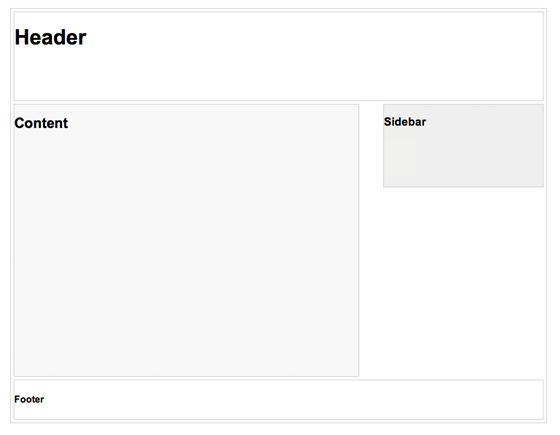
In this example, I have a basic page layout with a header, content container, sidebar, and a footer. The header has a fixed height 180px, content container is 600px wide and sidebar is 300px wide.
Step 3. Media Queries
CSS3 media query is the trick for responsive design. It is like writing if conditions to tell the browser how to render the page for specified viewport width.
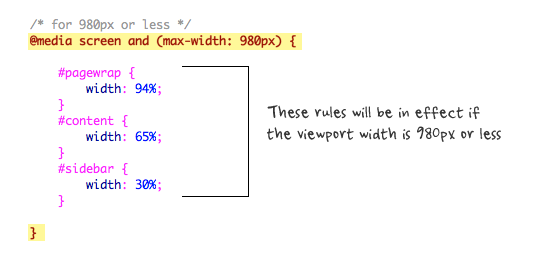
The following set of rules will be in effect if the viewport width is 980px or less. Basically, I set all the container width from pixel value to percentage value so the containers will become fluid.
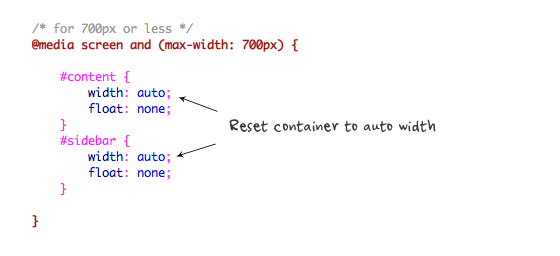
Then for viewport 700px or less, specify the #content and #sidebar to auto width and remove the float so they will display as full width.
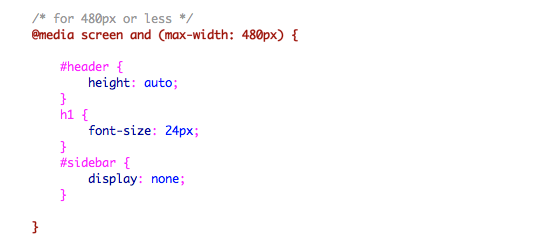
For 480px or less (mobile screen), reset the #header height to auto, change the h1 font size to 24px and hide the #sidebar.
You can write as many media query as you like. I've only shown 3 media queries in my demo. The purpose of the media queries is to apply different CSS rules to achieve different layouts for specified viewport width. The media queries can be in the same stylesheet or in a separate file.
Conclusion
This tutorial is intended to show you the basics of responsive design. If you want more in-depth tutorial, check out my previous tutorial: Responsive Design With Media Queries.
Responsive Design in 3 Steps的更多相关文章
- 企业级的响应式设计(Responsive design at enterprise level)译
导言 响应式设计是现在人们谈论的热点,但如何部署,特别是在有多种设备的大型项目中如何组织响应式设计,响应式设计和可伸缩性(Scalable)有什么区别?这都是需要解决的难题. 优化用户经验——Opti ...
- responsive design
http://www.chinaz.com/manage/2011/1121/221607.shtml http://alistapart.com/article/responsive-web-des ...
- Responsive Design响应式网站设计心得笔记
这个词已经喊了很久了,一直都是小打小闹,没正经的做过大的响应式全站,这次终于有机会了.网站刚上线半个月,就要改版为响应式设计,支持手机/PC等各类终端显示浏览.今天把首页做好,并测试无误,这里把一些应 ...
- Understanding Responsive Web Design: Cross-browser Compatibility
http://www.sitepoint.com/understanding-responsive-web-design-cross-browser-compatibility/ In the las ...
- 转:15 Best Responsive Web Design Testing Tools
Responsive Web Design is regarded as being the approach which suggests that web design and developme ...
- Responsive web design 学习笔记
Advanced Styling with Responsive Design 此笔记为Coursera同名课程笔记. Week1 什么是响应式设计? 响应式设计: It is designing y ...
- iPhone 6 Screen Size and Web Design Tips
Apple updated its iPhone a bit ago making the form factor much bigger. The iPhone 6 screen size is b ...
- Ace - Responsive Admin Template
Ace简介: Ace 是一个轻量.功能丰富.HTML5.响应式.支持手机及平板电脑上浏览的管理后台模板,基于CSS框架Bootstrap制作,Bootstrap版本更新至 3.0,Ace – Resp ...
- 项目新的需求,网页的自适应交付/响应式交付 Responsive/Adaptive Delivery
网页为什么要做自适应交付,皆因现在移动设备大行其道,现在是移动互联网时代,以IOS及Android为首的各种移动终端已经遍地开花. 当人家用380px的iphone打开你的网页时,你总不能显示个102 ...
随机推荐
- 【Android进阶】Application对象的详解
1:Application是什么? Application和Activity,Service一样,是android框架的一个系统组件,当android程序启动时系统会创建一个 application对 ...
- phpword这个问题的产生中国扭曲
采用phpword经word模板生成word当文件,乱码的问题.矿php和所有的数据库使用urf8编码格公式.解决的办法是,到场/phpword/template.php档,守则 $replace ...
- Android应用程序绑定服务(bindService)的过程源码分析
Android应用程序组件Service与Activity一样,既能够在新的进程中启动,也能够在应用程序进程内部启动:前面我们已经分析了在新的进程中启动Service的过程,本文将要介绍在应用程序内部 ...
- Action、Category、Data、Extras知识具体解释
开头 Intent作为联系各Activity之间的纽带,其作用并不仅仅仅仅限于简单的数据传递.通过其自带的属性,事实上能够方便的完毕非常多较为复杂的操作.比如直接调用拨号功能.直接自己主动调用合适的程 ...
- 第十二章——SQLServer统计信息(3)——发现过期统计信息并处理
原文:第十二章--SQLServer统计信息(3)--发现过期统计信息并处理 前言: 统计信息是关于谓词中的数据分布的主要信息源,如果不知道具体的数据分布,优化器不能获得预估的数据集,从而不能统计需要 ...
- or1200下Raw-OS学习(例子篇)
没有图我说个~毛(J)线(B)~对吧??? 直接上一个以前做过的项目来说说怎么去从一个前后台的程序过度到利用操作系统去管理的你代码吧~以前想过直接用事件驱动的框架去编写代码的,无奈这方面的资料实在太少 ...
- hibernate在地图的方法之一协会
[Hibernate]之关于多对一单向关联映射 在项目的开发中多对一的单向关联映射是最常见的关联映射! 这个着重具体解说一下! 比如,我们如今一个组(Group)和人(Person) id name ...
- 新建WindowsPhone项目时提示未将对象引用设置到对象的实例
问题: 安装好新系统之后(只有Windows8 专业版和企业版支持hyper-v),然后安装vs2012,再安装Wp8 Sdk,安装完毕后新建Windows Phone项目,会提示未将对象引用设置到对 ...
- Git协作流程(转)
Git 作为一个源码管理系统,不可避免涉及到多人协作. 协作必须有一个规范的流程,让大家有效地合作,使得项目井井有条地发展下去."协作流程"在英语里,叫做"workflo ...
- Initialising Memories
The file_name and memory_nameare memory_start and memory_finish are optional, it missed out they def ...