
Spring Cloud 入门 之 Feign 篇(三)
原文地址:Spring Cloud 入门 之 Feign 篇(三)
博客地址:http://www.extlight.com
一、前言
在上一篇文章《Spring Cloud 入门 之 Ribbon 篇(二)》 中介绍了 Ribbon 使用负载均衡调用微服务,但存在一个问题:消费端每个请求方法中都需要拼接请求服务的 URL 地址,存在硬编码问题且不符合面向对象编程思想。如果服务名称发生变化,消费端也需要跟着修改。
本篇文章将介绍 Feign 来解决上边的问题。
二、简单介绍
Feign 是一个声明式的 Web Service 客户端。使用 Feign 能让编写 Web Service 客户端更加简单,同时支持与Eureka、Ribbon 组合使用以支持负载均衡。
Spring Cloud 对 Feign 进行了封装,使其支持了 Spring MVC 标准注解和 HttpMessageConverters。
Feign 的使用方法是定义一个接口,然后在其上边添加 @FeignClient 注解。
三、实战演练
本次测试案例基于之前发表的文章中介绍的案例进行演示,不清楚的读者请先转移至 《Spring Cloud 入门 之 Ribbon 篇(二)》 进行浏览。
3.1 添加依赖
在 common-api 和 order-server 项目中添加依赖:
<!-- feign -->

<dependency>

	<groupId>org.springframework.cloud</groupId>

	<artifactId>spring-cloud-starter-openfeign</artifactId>

</dependency>
3.2 定义新接口
在 common-api 中项目中新建一个接口:
@FeignClient(value="GOODS")

public interface GoodsServiceClient {

	@RequestMapping("/goods/goodsInfo/{goodsId}")

	public Result goodsInfo(@PathVariable("goodsId") String goodsId);

}
使用 @FeignClient 注解指定调用的微服务名称,封装了调用 USER-API 的过程,作为消费方调用模板。
注意:Feign 接口的定义最好与对外开发的 controller 中的方法定义一致,此处的定义与 goods-server 项目中 controller 类定义的方法一致。
3.3 修改调用
在 order-server 项目中,使用 GoodsServiceClient 获取商品信息:
@Service

public class OrderServiceImpl implements OrderService{

//	@Autowired

//	private RestTemplate restTemplate;

	@Autowired

	private GoodsServiceClient goodsServiceClient;

	@Override

	public void placeOrder(Order order) throws Exception{

		//Result result = this.restTemplate.getForObject("http://GOODS/goods/goodsInfo/" + order.getGoodsId(), Result.class);

		Result result = this.goodsServiceClient.goodsInfo(order.getGoodsId());

		if (result != null && result.getCode() == 200) {

			System.out.println("=====下订单====");

			System.out.println(result.getData());

		}

	}

}
直接使用 Feign 封装模板调用服务方,免去麻烦的 URL 拼接问题,从而实现面向对象编程。
3.4 启动 Feign 功能
在启动类上添加 @EnableEeignClients 注解:
@EnableFeignClients(basePackages = {"com.extlight.springcloud"})

@EnableEurekaClient

@SpringBootApplication

public class OrderServerApplication {

	public static void main(String[] args) {

		SpringApplication.run(OrderServerApplication.class, args);

	}

}
由于 order-server 项目中引用了 common-api 中的 GoodsServiceClient,不同属一个项目,为了实例化对象,因此需要在 @EnableFeignClients 注解中添加需要扫描的包路径。
使用 Postman 请求订单系统,请求结果如下图:
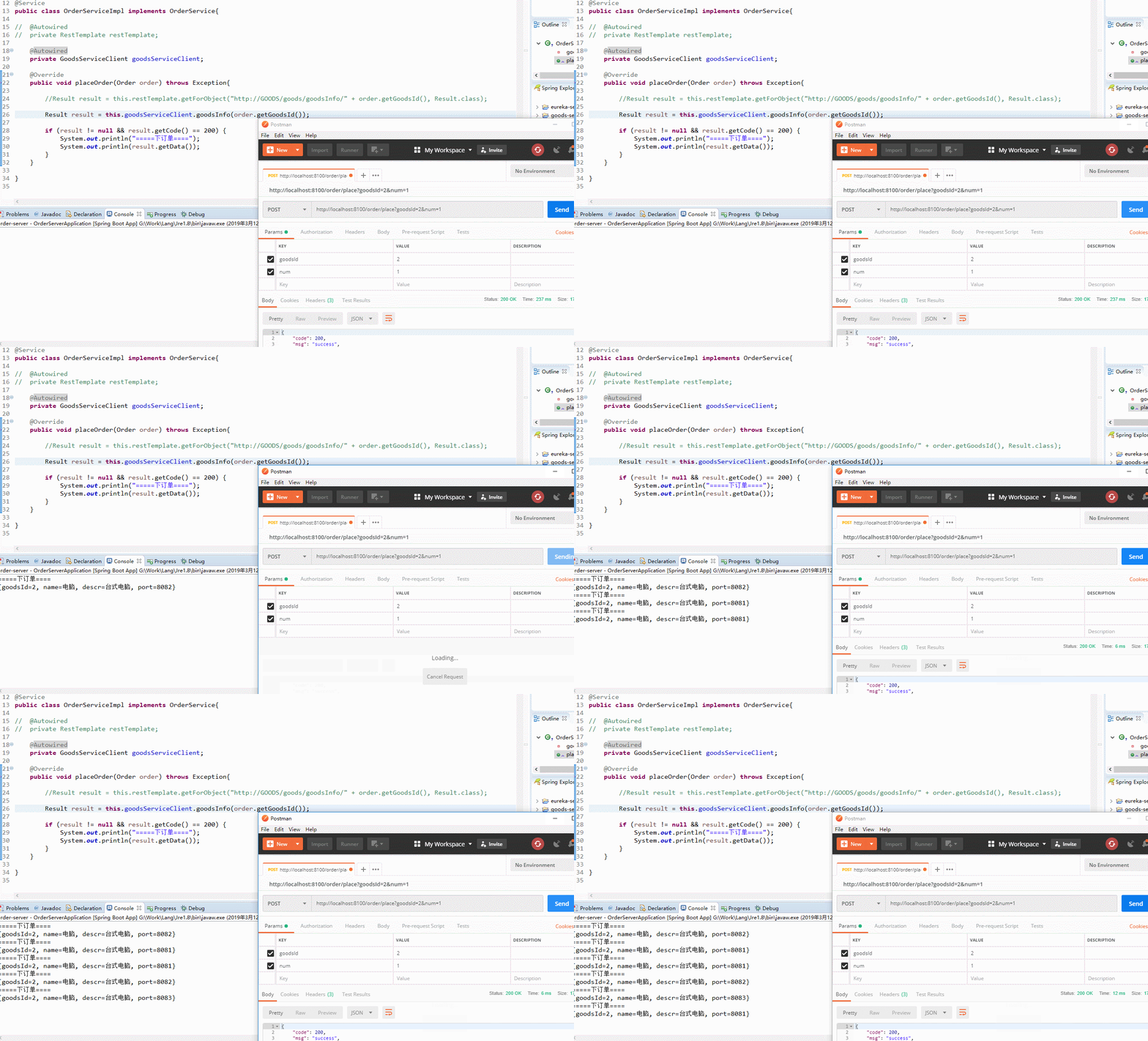
请求成功,由于 Feign 封装了 Ribbon,也就实现了负载均衡的功能。
四、案例源码
Spring Cloud 入门 之 Feign 篇(三)的更多相关文章
- Spring Cloud 入门 之 Hystrix 篇(四)
原文地址:Spring Cloud 入门 之 Hystrix 篇(四) 博客地址:http://www.extlight.com 一.前言 在微服务应用中,服务存在一定的依赖关系,如果某个目标服务调用 ...
- Spring Cloud 入门 之 Config 篇(六)
原文地址:Spring Cloud 入门 之 Config 篇(六) 博客地址:http://www.extlight.com 一.前言 随着业务的扩展,为了方便开发和维护项目,我们通常会将大项目拆分 ...
- Spring Cloud 入门 之 Zuul 篇(五)
原文地址:Spring Cloud 入门 之 Zuul 篇(五) 博客地址:http://www.extlight.com 一.前言 随着业务的扩展,微服务会不对增加,相应的其对外开放的 API 接口 ...
- Spring Cloud 入门 之 Ribbon 篇(二)
原文地址:Spring Cloud 入门 之 Ribbon 篇(二) 博客地址:http://www.extlight.com 一.前言 上一篇<Spring Cloud 入门 之 Eureka ...
- Spring Cloud 入门 之 Eureka 篇(一)
原文地址:Spring Cloud 入门 之 Eureka 篇(一) 博客地址:http://www.extlight.com 一.前言 Spring Cloud 是一系列框架的有序集合.它利用 Sp ...
- <Spring Cloud>入门四 Feign
1.Feign 之前使用的是Ribbon+RestTemplate调用,通过的是微服务的名字进行调用,实现负载均衡 但是为了满足接口编程,提供了Feign 2.实现 2.1引入坐标 在 ms-comm ...
- Spring Cloud 入门教程(六): 用声明式REST客户端Feign调用远端HTTP服务
首先简单解释一下什么是声明式实现? 要做一件事, 需要知道三个要素,where, what, how.即在哪里( where)用什么办法(how)做什么(what).什么时候做(when)我们纳入ho ...
- Spring Cloud 入门教程(三): 配置自动刷新
之前讲的配置管理, 只有在应用启动时会读取到GIT的内容, 之后只要应用不重启,GIT中文件的修改,应用无法感知, 即使重启Config Server也不行. 比如上一单元(Spring Cloud ...
- Spring Cloud 入门教程(八): 断路器指标数据监控Hystrix Dashboard 和 Turbine
1. Hystrix Dashboard (断路器:hystrix 仪表盘) Hystrix一个很重要的功能是,可以通过HystrixCommand收集相关数据指标. Hystrix Dashboa ...
随机推荐
- 【转】移除HTML5 input在type="number"时的上下小箭头
在chrome下: input::-webkit-outer-spin-button, input::-webkit-inner-spin-button{ -webkit-appearance ...
- 开源软件架构总结之——Asterisk(DSL、组件、多线程)
Asterisk 1是基于GPLv2协议发布的一款开源电话应用平台.简单地说,这是一个服务端程序,用于处理电话的拨出.接入以及自定义流程. 一个人使用电话A呼叫另一个使用电话B的人.在此场景下,连接到 ...
- SPOJ UMR 10A 计算几何
DES:顺时针给出构成凸多边形的点.然后有Q个询问任意给出两个点的编号,询问由这两个点的连线将多边形分成的两部分面积较小的部分面积大小. 比赛时直接每次连线后求多边形求面积超时了.正确解法是求出利用叉 ...
- POJ 3579 median 二分搜索,中位数 难度:3
Median Time Limit: 1000MS Memory Limit: 65536K Total Submissions: 3866 Accepted: 1130 Descriptio ...
- Using XmlHttpRequest 写JSON网页
代码如下-----xmlhttprequest.responseJSON: <!DOCTYPE html> <html> <head> <meta chars ...
- poj 1330 Nearest Common Ancestors(LCA 基于二分搜索+st&rmq的LCA)
Nearest Common Ancestors Time Limit: 1000MS Memory Limit: 10000K Total Submissions: 30147 Accept ...
- git 添加review的相关操作
git主机上涉及到的操作: 185 git branch 186 git pull 187 git branch 188 git checkout -b wangcheng 189 git log 1 ...
- 在 Ubuntu 14.04 Chrome中安装Flash Player(转)
在 Ubuntu 14.04 中安装 Pepper Flash Player For Chromium 一个 Pepper Flash Player For Chromium 的安装器已经被 Ubu ...
- WLAN 802.11 a/b/g PHY Specification and EDVT Measurement V
Receive Minimum Input Level (Sensitivity) 测试方法: Receiver Adjacent Channel Rejection (ACR) -For IEEE8 ...
- php 无限极分类问题