
[leetcode]6. ZigZag Conversion字符串Z形排列
The string "PAYPALISHIRING" is written in a zigzag pattern on a given number of rows like this: (you may want to display this pattern in a fixed font for better legibility)
P   A   H   N

A P L S I I G

Y   I   R
And then read line by line: "PAHNAPLSIIGYIR"
Write the code that will take a string and make this conversion given a number of rows:
string convert(string s, int numRows);
Example 1:
Input: s = "PAYPALISHIRING", numRows = 3

Output: "PAHNAPLSIIGYIR"
Example 2:
Input: s = "PAYPALISHIRING", numRows = 4

Output: "PINALSIGYAHRPI"


Explanation:

P     I      N

A   L S   I  G

Y A   H  R

P     I
Solution1:
Step1: new StringBuilder[]. For each row, allocate a new StringBuilder to save characters in such row.
Pay attention! StringBuilder is treated like variable-length arrays. So StringBuilder[] is like array of array
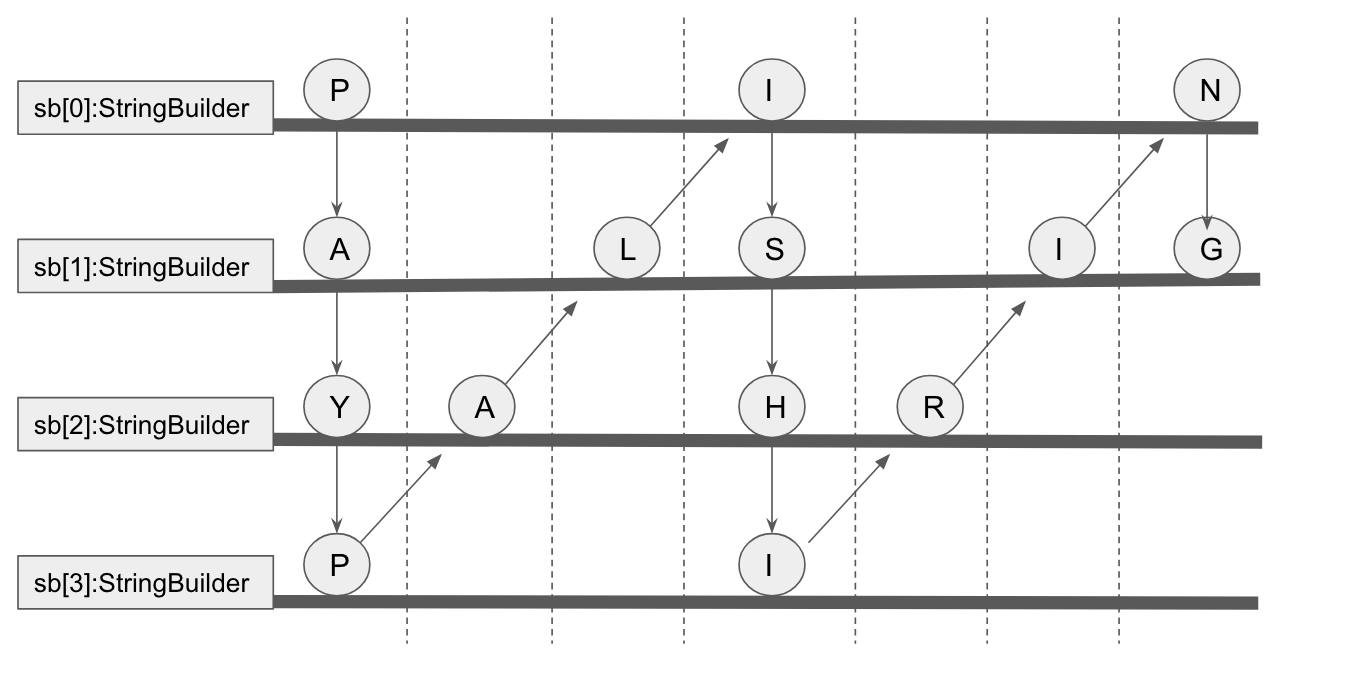
Step2: we can observe that for 1st and last row, chars will be added into sb[0] and sb[numRows-1], seperately.
for sloping slide, chars will be added in sb[numRows -2 ] ... sb[1]
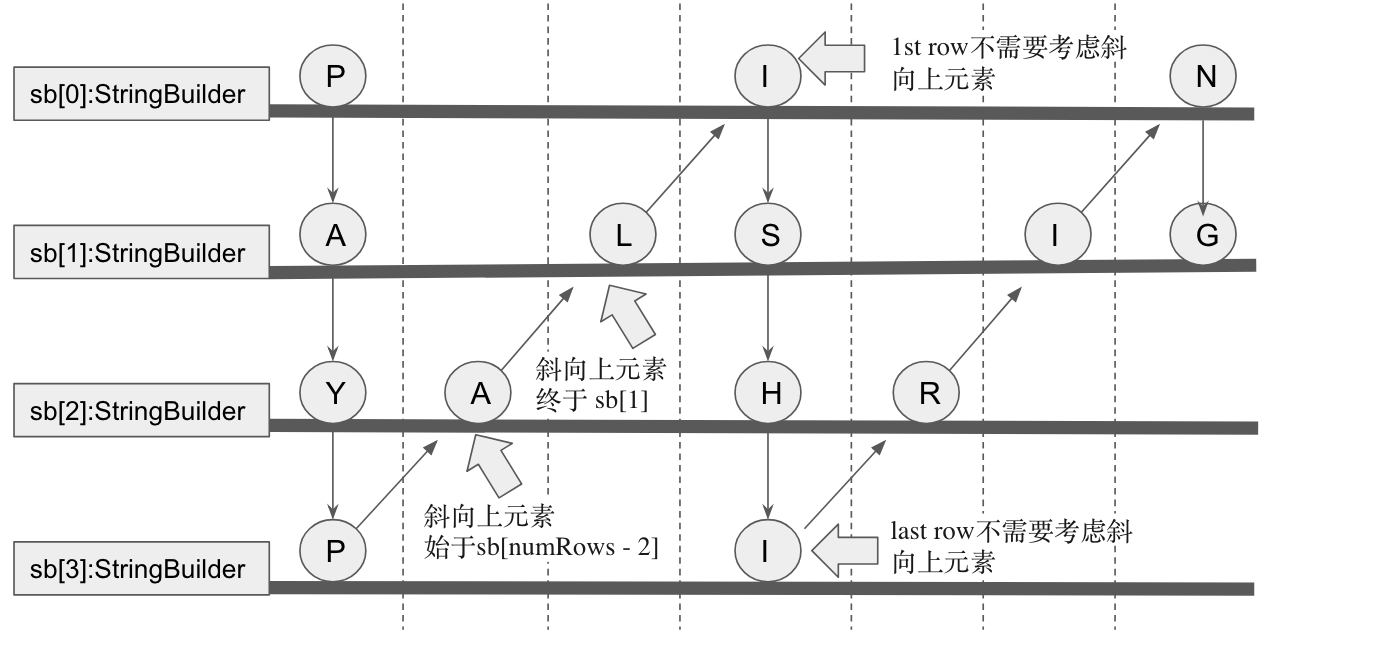
Step3: convert each row's StringBuilder into result String

code:
 /*

 Time Complexity: O(n)

 Space Complexity: O(n)

 */

 class Solution {

    public String convert(String s, int numRows) {

         char[] c = s.toCharArray();

         int len = c.length;

         StringBuilder[] sb = new StringBuilder[numRows];

         // 要按row来进行遍历,每一个row先allocate一个StringBuilder

         for (int i = 0; i < sb.length; i++) {

             sb[i] = new StringBuilder();

         }


         int idx = 0; //用来扫String s

         while (idx < len) {

             for (int i = 0; i < numRows && idx < len; i++) {

                 sb[i].append(c[idx++]);

             }

             // sloping side

             for (int i = numRows - 2; i >= 1 && idx < len; i--) {

                 sb[i].append(c[idx++]);

             }

         }

         //从sb[0]开始,将sb[1], sb[2], sb[3]... append到一个StringBuilder

         for (int i = 1; i < sb.length; i++) {

             sb[0].append(sb[i]);

         }

         return sb[0].toString();

     }

 }
[leetcode]6. ZigZag Conversion字符串Z形排列的更多相关文章
- LeetCode 6. ZigZag Conversion & 字符串
ZigZag Conversion 看了三遍题目才懂,都有点怀疑自己是不是够聪明... 就是排成这个样子啦,然后从左往右逐行读取返回. 这题看起来很简单,做起来,应该也很简单. 通过位置计算行数: P ...
- Leetcode 6 ZigZag Conversion 字符串处理
题意:将字符串排成Z字形. PAHNAPLSIIGYIR 如果是5的话,是这样排的 P I AP YR H L G N SI A I 于是,少年少女们,自己去找规律吧 提示:每个Z ...
- leetcode:ZigZag Conversion 曲线转换
Question: The string "PAYPALISHIRING" is written in a zigzag pattern on a given number of ...
- 【LeetCode】ZigZag Conversion(Z 字形变换)
这道题是LeetCode里的第6道题. 题目要求: 将一个给定字符串根据给定的行数,以从上往下.从左到右进行 Z 字形排列. 比如输入字符串为 "LEETCODEISHIRING" ...
- leetcode题解||ZigZag Conversion问题
problem: The string "PAYPALISHIRING" is written in a zigzag pattern on a given number of r ...
- LeetCode(60)-ZigZag Conversion
题目: The string "PAYPALISHIRING" is written in a zigzag pattern on a given number of rows l ...
- [LeetCode] 6. ZigZag Conversion (Medium)
原题链接 把字符串按照 ↓↗↓……的顺序,排列成一个 Z 形,返回 从左到右,按行读得的字符串. 思路: 建立一个二维数组来按行保存字符串. 按照 ↓↗↓……的方向进行对每一行加入字符. 太慢了这个解 ...
- Java [leetcode 6] ZigZag Conversion
问题描述: The string "PAYPALISHIRING" is written in a zigzag pattern on a given number of rows ...
- LeetCode题解——ZigZag Conversion
题目: 把一个字符串按照Z型排列后打印出来,例如 "PAYPALISHIRING" 重新排列后为3行,即 P A H N A P L S I I G Y I R 那么输出为&quo ...
随机推荐
- requestmapping等相关知识
@responseBody注解的使用 1. @responseBody注解的作用是将controller的方法返回的对象通过适当的转换器转换为指定的格式之后,写入到response对象的body区 ...
- Javascript 香蕉分段吃(数组分隔)
Javascript 香蕉分段吃(数组分隔) function chunk(arr, size) { var newArr =[]; for(var i = 0; i < arr.length; ...
- day052 django第三天 url和视图
一.基本格式 from django.conf.urls import url from . import views #循环urlpatterns,找到对应的函数执行,匹配上一个路径就找到对应的函数 ...
- 服务器tcp连接timewait过多优化及详细分析
[背景说明] 在7层负载均衡上,查询网络状态发现timewait太多,于是开始准备优化事宜 整体的拓扑结构,前面是lvs做dr模式的4层负载均衡,后端使用(nginx.or haproxy)做7层负载 ...
- OS&SYS&Shuti模块
#sys.argv 主要针对脚本可以读取参数 Shuti模块 import shutil f1=open('笔记',encoding='utf-8') f2=open('笔记2','w',enco ...
- 读书笔记——《redis入门指南(第2版)》第四章 进阶——4.1-5
.1事务 redis中事务是一组命令的集合. 事务同命令一样都是redis的最小执行单位,Redis保证一个事务中的命令要么都执行,要么都不执行.如果redisClient在发送EXEC命令前掉线,则 ...
- 02-模拟Junit4功能
package com.day2; import java.lang.annotation.ElementType; import java.lang.annotation.Retention; im ...
- HTML/CSS基础知识(三)
浏览器内核 浏览器内核是浏览器的核心,也称“渲染引擎”,用来解释网页语法并渲染到网页上.浏览器内核决定了浏览器该如何显示网页内容以及页面的格式信息.不同的浏览器内核对网页的语法解释也不同,因此网页开发 ...
- centos 设置中文环境
方法1: [hl@localhost ~]$ LANG=zh_CN.UTF-8 #只对当前shell有效,临时设置 [hl@localhost ~]$ ll 总用量 drwxrwxr-x. hl hl ...
- 格式化hdfs后,hadoop集群启动hdfs,namenode启动成功,datanode未启动
集群格式化hdfs后,在主节点运行启动hdfs后,发现namenode启动了,而datanode没有启动,在其他节点上jps后没有datanode进程!原因: 当我们使用hdfs namenode - ...