
Spring Cloud系列(三) 应用监控与管理Actuator
应用监控与管理Actuator
前言:要想使用Spring Cloud ,Spring Boot 提供的spring-boot-starter-actuator模块是必须了解的,这篇文章就先介绍一下actuator的使用。
由于我们把一个复杂高耦合的单体系统拆分成了多个小型服务,所以部署应用的数量在不断增长,造成维护复杂度大大提升。所以我们需要一套自动化的监控运维机制,这套运维机制可以不间断的获取每个服务应用的各种指标,并根据这些指标信息来制定监控预警规则。
Spring Boot提供了一个依赖模块:spring-boot-starter-actuator,这个模块可以自动为Spring Boot创建的应用构建一系列的用于监控的端点,而且Spring Cloud还在这个基础上进行了扩展,当然在不满足我们业务需求时也需要对这个模块进行扩展。
接下来创建一个Spring Boot项目命名actuator,勾选Actuator依赖
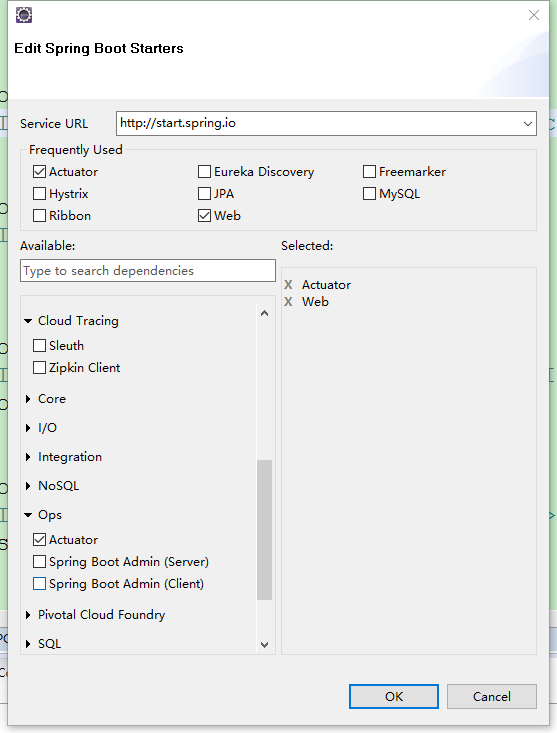
或者在你现有的Spring Boot项目里添加依赖
 <dependency>

     <groupId>org.springframework.boot</groupId>

     <artifactId>spring-boot-starter-actuator</artifactId>

 </dependency>
项目创建完毕后的pom文件:
         <parent>

         <groupId>org.springframework.boot</groupId>

         <artifactId>spring-boot-starter-parent</artifactId>

         <version>2.0.2.RELEASE</version>

         <relativePath/> <!-- lookup parent from repository -->

     </parent>

     <properties>

         <project.build.sourceEncoding>UTF-8</project.build.sourceEncoding>

         <project.reporting.outputEncoding>UTF-8</project.reporting.outputEncoding>

         <java.version>1.8</java.version>

     </properties>

     <dependencies>

         <dependency>

             <groupId>org.springframework.boot</groupId>

             <artifactId>spring-boot-starter-actuator</artifactId>

         </dependency>

         <dependency>

             <groupId>org.springframework.boot</groupId>

             <artifactId>spring-boot-starter-web</artifactId>

         </dependency>

         <dependency>

             <groupId>org.springframework.boot</groupId>

             <artifactId>spring-boot-starter-tomcat</artifactId>

             <scope>provided</scope>

         </dependency>

         <dependency>

             <groupId>org.springframework.boot</groupId>

             <artifactId>spring-boot-starter-test</artifactId>

             <scope>test</scope>

         </dependency>

     </dependencies>

     <build>

         <plugins>

             <plugin>

                 <groupId>org.springframework.boot</groupId>

                 <artifactId>spring-boot-maven-plugin</artifactId>

             </plugin>

         </plugins>

     </build>
说一下我的版本:jdk1.8、Spring Boot 2.0.2。
接下来就可以启动应用了,发现控制台打印如下信息:

/actuator/health和/actuator/info以及/actuator这三个就是actuator提供的端点,注意以前的版本是没有/actuator前缀的,2.0以后的版本都加了/actuator前缀,而且看官方文档actuator提供了如下端点:
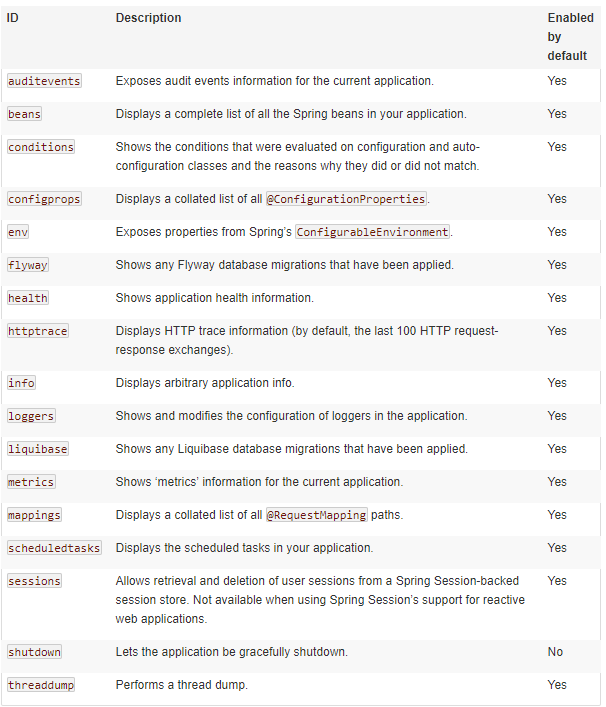
我们只有health和info端点是因为actuator默认只暴露了health和info端点,我们可以选择全部暴露或者指定暴露部分端点,修改application.yml
 management:

   endpoints:

     web:

       exposure:

         include: "*" #暴露所有端点 默认是info,health
重新启动应用,控制台打印发生了变化,其余的端点也被暴露出来了:

下面是对部分常用端点的简要说明
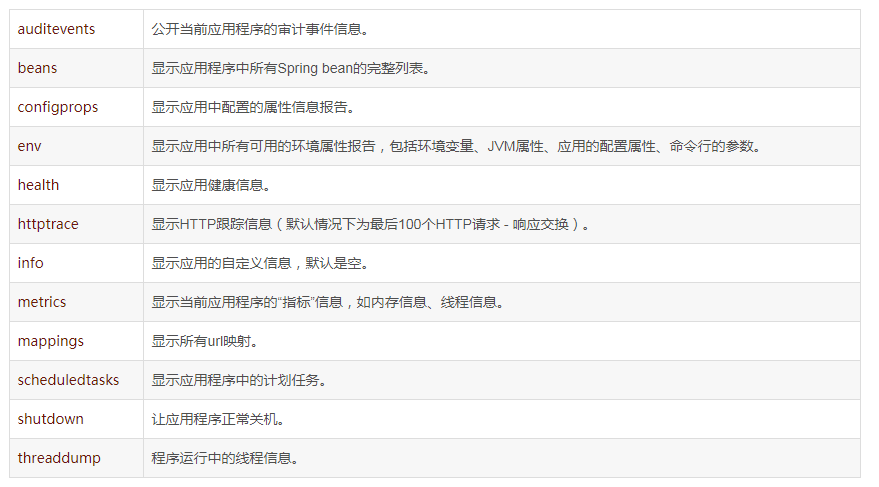
详细说明请查看actuator-api文档actuator-api,注意这是Spring Boot2.0.2的文档,其余版本请去官网自行查找。
开启和关闭端点
使用management.endpoint.<id>.enabled来修改端点的开启关闭状态,如以关闭health端点为例
management.endpoint.health.enabled=false
如果希望端点启用选择加入而不是选择退出,请将management.endpoints.enabled-by-default属性设置为false并设置想选择加入端点的enabled=true重新加入。以下示例启用info端点并禁用所有其他端点:
 management.endpoints.enabled-by-default = false

 management.endpoint.info.enabled = true
修改路径
1、修改前缀:现在所有端点的前缀默认是/actuator,如果想修改的话用management.endpoints.web.base-path属性。
2、修改路径:如果想修改端点的路径,可以用management.endpoints.web.path-mapping属性。
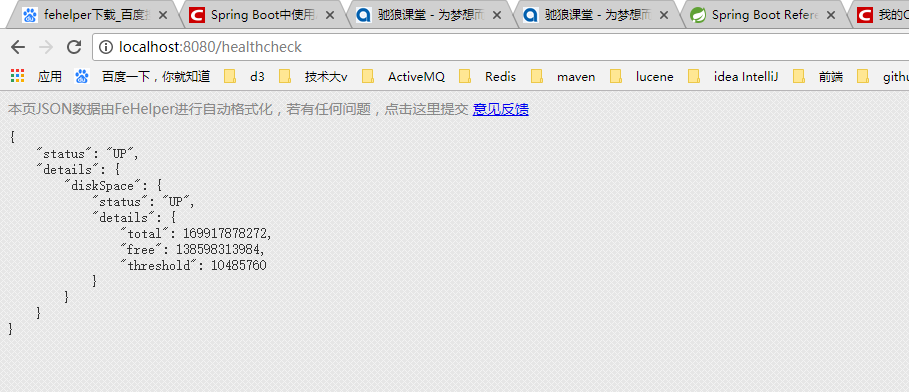
比如我们想把/autuator/health修改为/healthcheck。
management.endpoints.web.base-path=/

management.endpoints.web.path-mapping.health=healthcheck
重启项目后所有端点都去掉了/actuator前缀,并且health端点的路径变成了healthcheck
当然,如果你想修改端点的端口,也是可以的,可以通过以下属性修改
management.server.port = 8081
如果您不想通过HTTP公开端点,则可以将管理端口设置为-1
management.server.port = -1
关于shutdown端点
shutdown端点可以用来远程关闭应用,此端点默认是关闭的,如果使用的话,需要开启,使用以下属性
management.endpoint.shutdown.enabled = true
你就可以在应用启动后远程通过调用/actuator/shutdown来关闭应用,注意只能POST请求调用。
关于health端点
我们尝试访问/actuator/health端点,返回
{"status":"UP"}
只有status一个属性,查看官方文档health端点的management.endpoint.health.show-details属性默认不展示细节,我们可以修改一下
management:

  endpoints:

    web:

      exposure:

        include: "*" #暴露所有端点 默认是info和health

  endpoint:

    health:

      show-details: always #默认是never
重新启动再次请求,会发现多了一个磁盘空间的状态信息,返回
{"status":"UP","details":{"diskSpace":{"status":"UP","details":{"total":169917878272,"free":138603999232,"threshold":10485760}}}}
health端点默认自带了一些常用资源的健康指标检测器,只要你引入了以下依赖就会自动添加到health里
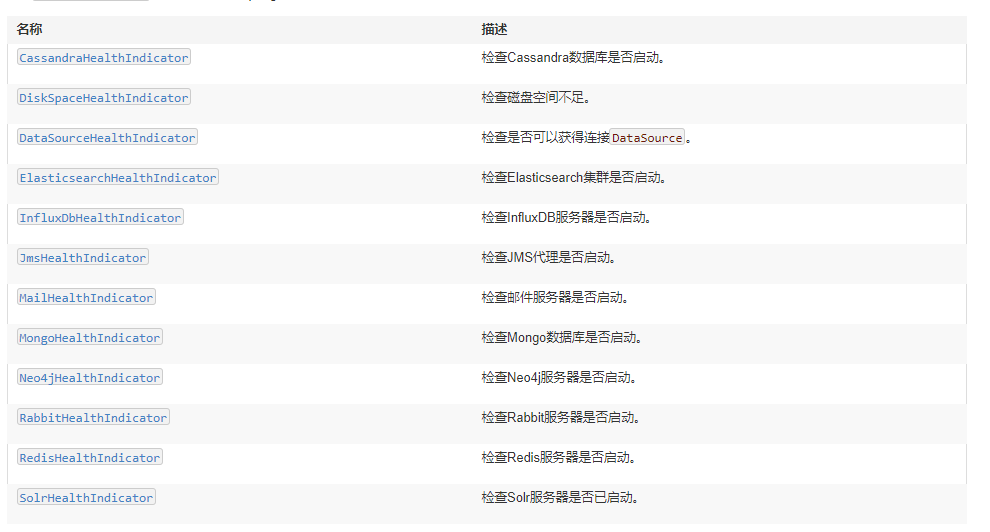
我们也可以自己扩展一个健康指标检测器
 /**

  * 1.实现HealthIndicator接口

  * 2.类名要求 xxxHealthIndicator xxx将会是你自定义得健康指标名称

  * 3.@Component注入到容器内

  * 4.重写health()方法

  * @author Administrator

  *

  */

 @Component

 public class MyAppHealthIndicator implements HealthIndicator{

     @Override

     public Health health() {

         if(check()!=0){

             return Health.up().build();

         }

         return Health.down().withDetail("error", "出错了").build();

     }

     private int check(){

         // 检测是否健康的自定义逻辑

         return 0;

     }

 }
然后重启应用发现多了自定义的健康指标
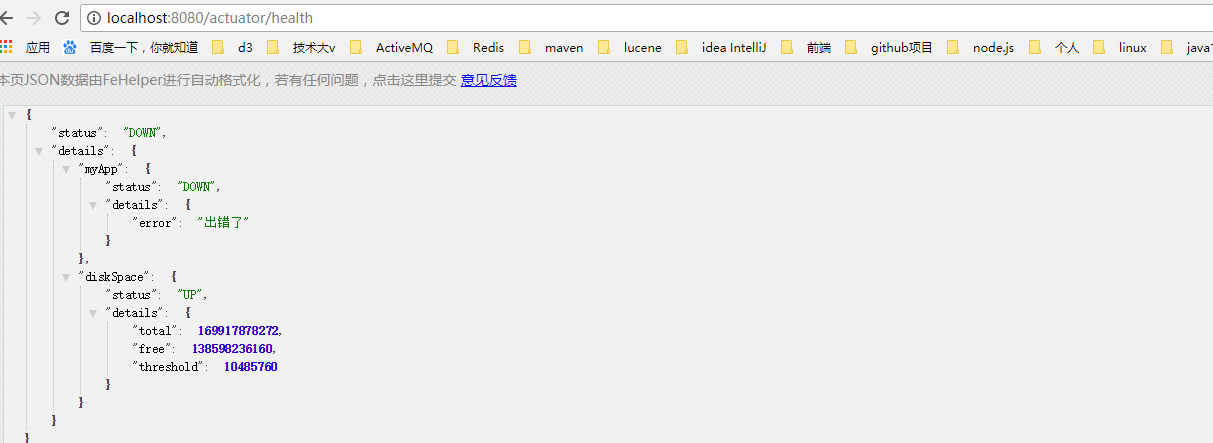
关于info端点
info端点默认是空的,我们可以在application配置文件中配置info前缀的属性来完善
 info:

     app:

       version: 1.1

       name: aut   #/actuator/info 自定义的info端点 否则是空的
访问/actuator/info
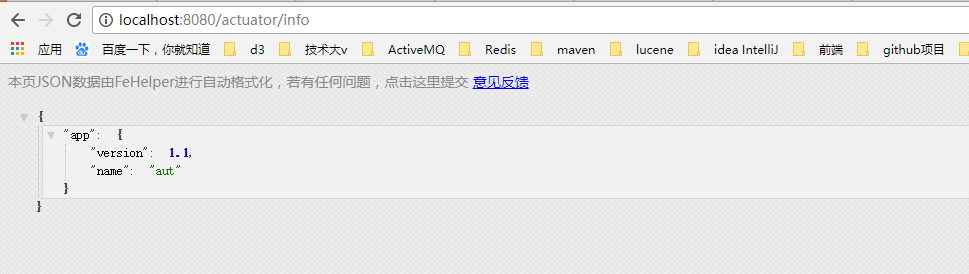
我们也可以用info端点描述Git版本信息,在application.yml或者application.properties同级目录创建git.properties,添加属性git.branch=master,再次重启访问/actuator/info。
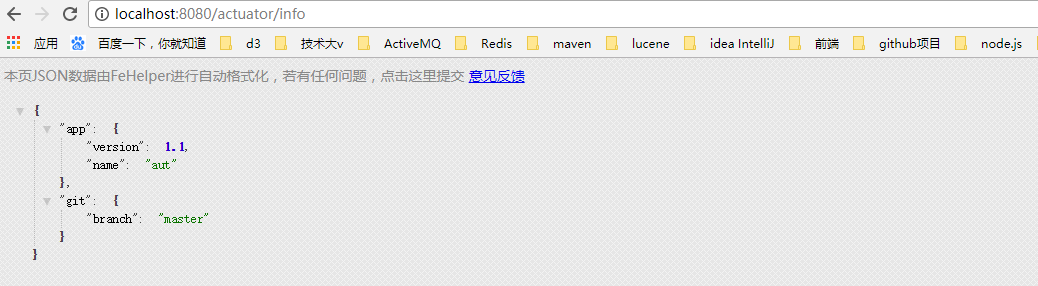
git.属性名是来自于GitProperties类,eclipse中使用ctrl+shift+t输入GitProperties就可以查看了,前提是你下载了源码,当然你也可以引入git的插件,具体我就不介绍了,想了解的可以看下这篇文章http://blog.didispace.com/spring-boot-actuator-info-git/,总的来说info端点用途并不大。
---------------------
原文:https://blog.csdn.net/WYA1993/article/details/80540981
版权声明:本文为博主原创文章,转载请附上博文链接!
Spring Cloud系列(三) 应用监控与管理Actuator的更多相关文章
- Spring Cloud 系列之 Sleuth 链路追踪(三)
本篇文章为系列文章,未读前几集的同学请猛戳这里: Spring Cloud 系列之 Sleuth 链路追踪(一) Spring Cloud 系列之 Sleuth 链路追踪(二) 本篇文章讲解 Sleu ...
- Spring Cloud 系列之 Config 配置中心(三)
本篇文章为系列文章,未读前几集的同学请猛戳这里: Spring Cloud 系列之 Config 配置中心(一) Spring Cloud 系列之 Config 配置中心(二) 本篇文章讲解 Conf ...
- spring cloud 系列第5篇 —— hystrix+turbine 服务的熔断与监控 (F版本)
源码Gitub地址:https://github.com/heibaiying/spring-samples-for-all 一.hystrix 简介 1.1 熔断器 在分布式系统中,由于服务之间相互 ...
- Spring Cloud 系列之 Apollo 配置中心(三)
本篇文章为系列文章,未读前几集的同学请猛戳这里: Spring Cloud 系列之 Apollo 配置中心(一) Spring Cloud 系列之 Apollo 配置中心(二) 本篇文章讲解 Apol ...
- Spring Cloud系列(三):Eureka源码解析之服务端
一.自动装配 1.根据自动装配原理(详见:Spring Boot系列(二):Spring Boot自动装配原理解析),找到spring-cloud-starter-netflix-eureka-ser ...
- Spring Cloud 系列之 Gateway 服务网关(三)
本篇文章为系列文章,未读第一集的同学请猛戳这里: Spring Cloud 系列之 Gateway 服务网关(一) Spring Cloud 系列之 Gateway 服务网关(二) 本篇文章讲解 Ga ...
- spring cloud系列教程第一篇-介绍
spring cloud系列教程第一篇-介绍 前言: 现在Java招聘中最常见的是会微服务开发,微服务已经在国内火了几年了,而且也成了趋势了.那么,微服务只是指spring boot吗?当然不是了,微 ...
- spring cloud系列教程第四篇-Eureka基础知识
通过前三篇文章学习,我们搭建好了两个微服务工程.即:order80和payment8001这两个服务.有了这两个基础的框架之后,我们将要开始往里面添加东西了.还记得分布式架构的几个维度吗?我们要通过一 ...
- Spring Cloud系列(二) 介绍
Spring Cloud系列(一) 介绍 Spring Cloud是基于Spring Boot实现的微服务架构开发工具.它为微服务架构中涉及的配置管理.服务治理.断路器.智能路由.微代理.控制总线.全 ...
随机推荐
- iOS:在UITextField中加入图标
//最左側加图片是下面代码 右側相似 UIImageView *imgView = [[UIImageView alloc] initWithImage:[UIImage imageNamed:@&q ...
- oc55--ARC单个对象的内存管理
// Person.h #import <Foundation/Foundation.h> @interface Person : NSObject @end // Person.m #i ...
- android 添加一个按键键值【转】
本文转载自:http://blog.csdn.net/u012719256/article/details/52526046 1.frameworks/base/data/keyboards/Gene ...
- UESTC--1252--24点游戏(dfs)
24点游戏 Time Limit: 1000MS Memory Limit: 65535KB 64bit IO Format: %lld & %llu Submit Status ...
- Python 30 网络编程介绍
1.目标:编写一个C/S架构的软件 C/S:Client --------------- 基于网络 ------------------- Server B/S:Browser ---------- ...
- Spark2.2,IDEA,Maven开发环境搭建附测试
前言: 停滞了一段时间,现在要沉下心来学习点东西,出点货了. 本文没有JavaJDK ScalaSDK和 IDEA的安装过程,网络上会有很多文章介绍这个内容,因此这里就不再赘述. 一.在IDEA上安装 ...
- [转载]Android平台第三方应用分享到微信开发
一.申请APPID 微信公共平台和微博分享一样,也需要申请一个ID,来作为调起微信.分享到微信的唯一标识. 申请微信APPID可以到微信平台http://open.weixin.qq.com/app/ ...
- KindEditor文本编辑框的实现
效果图: kindeditor 是一个插件 下载地址: https://files-cdn.cnblogs.com/files/lxnlxn/kindeditor.zip 解压后将其放在项目的js文件 ...
- RecyclerView的基础用法
为了让RecyclerView可以在所有的Android版本中都能使用,Android开发团队将RecyclerView定义在support.v7包当中.在使用该控件时需要打开当前Modile的bui ...
- ASP.NET刷新页面的六种方法
第一: private void Button1_Click( object sender, System.EventArgs e ) { Response.Redirect( Requ ...