
iOS - (两个APP之间的跳转)
一个程序若要跳到另一个程序。需要在目标程序的plist文件里面修改:
打开info.plist,添加一项URL types
展开URL types,再展开Item0,将Item0下的URL identifier修改为URL Scheme
展开URL Scheme,将Item0的内容修改为 SecondApp(此为跳转的key)
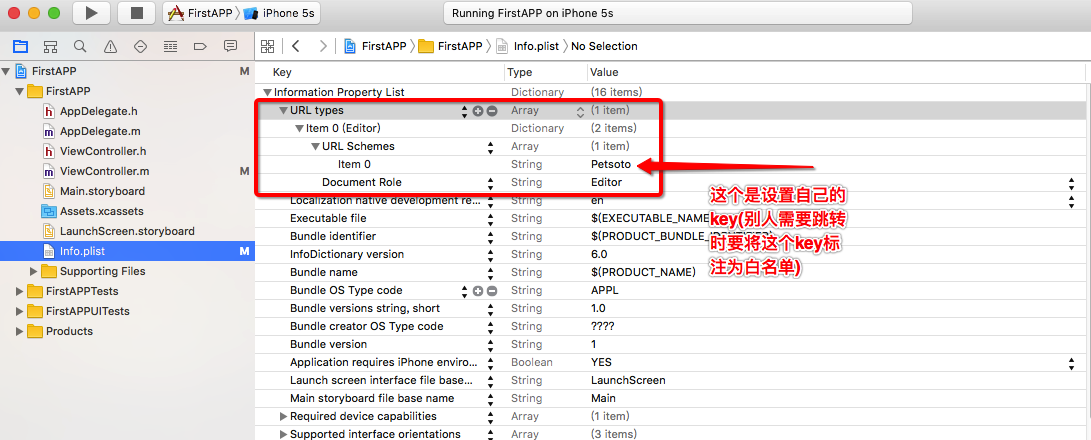
话不多说,下面开始讲解步骤:
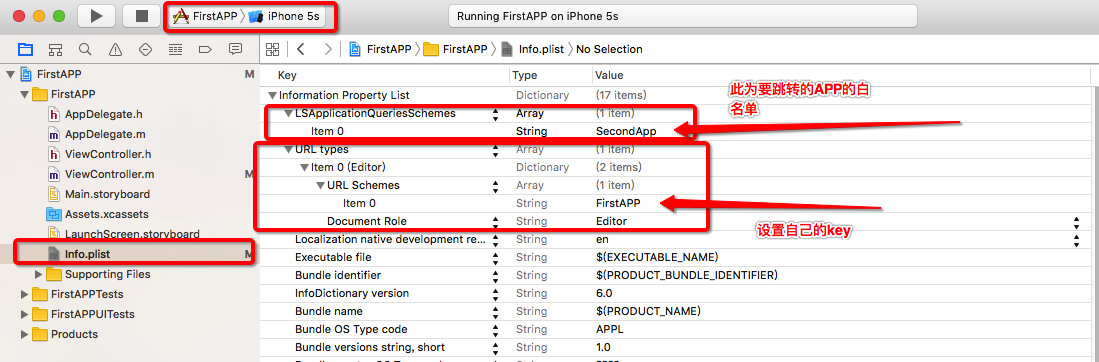
首先创建两个工程,第一个 FirstAPP , 第二个 SecondAPP
第一个 First APP 的 info.plist 需要设置 key(url) 与 白名单
接下来我们再对第二个 SecondAPP 工程来做相应的处理
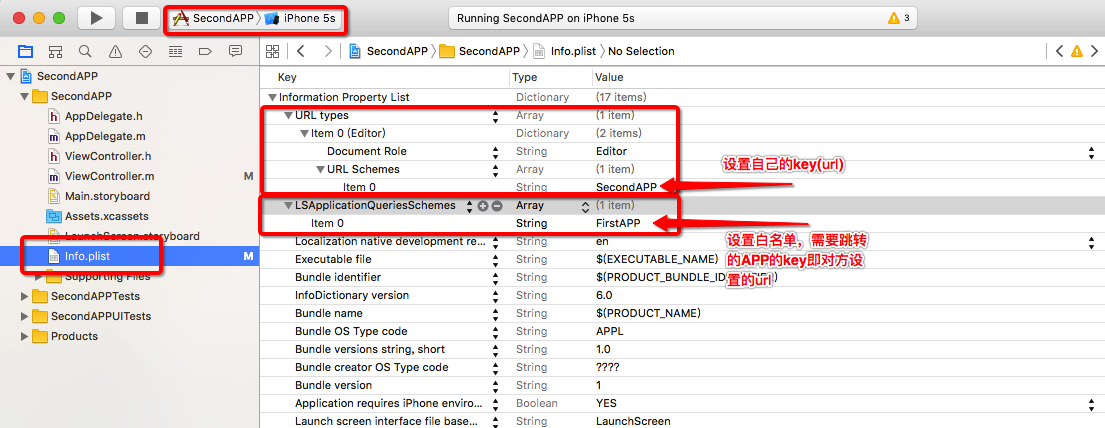
将这两个工程设置好了之后,接下来上代码
第一个 FirstApp工程
//
// ViewController.m
// FirstAPP
//
// Created by luorende on 16/8/25.
// Copyright © 2016年 luorende. All rights reserved.
//
#import "ViewController.h"
@interface ViewController ()
@end
@implementation ViewController
- (void)viewDidLoad {
[super viewDidLoad];
UIButton * button = [UIButton buttonWithType:UIButtonTypeCustom];
button.frame = CGRectMake(100, 100, 200, 50);
button.backgroundColor = [UIColor darkGrayColor];
[button setTitle:@"跳转到SecondApp" forState:UIControlStateNormal];
button.titleLabel.font = [UIFont systemFontOfSize:20];
[button addTarget:self action:@selector(clickButton:) forControlEvents:UIControlEventTouchUpInside];
[self.view addSubview:button];
}
//跳转到SecondApp
-(void)clickButton:(UIButton *)button{
NSLog(@"执行了点击事件");
//之前配置的白名单,就是需要跳转对方App的key,即对方设置的url
NSString * UrlStr = @"SecondApp://xxxxx";
NSURL * url = [NSURL URLWithString:UrlStr];
// 在这里可以先做个判断
if ([[UIApplication sharedApplication]canOpenURL:url]) {
[[UIApplication sharedApplication] openURL:url];
}else{
NSLog(@"应用程序未安装");
}
}
//跳转到AppStore
-(void)abc{
[[UIApplication sharedApplication]openURL:[NSURL URLWithString:@""]];
[[UIApplication sharedApplication]openURL:[NSURL URLWithString:@""]];
}
第二个工程 SecondAPP 里的代码
//
// ViewController.m
// SecondAPP
//
// Created by luorende on 16/8/26.
// Copyright © 2016年 luorende. All rights reserved.
//
#import "ViewController.h"
@interface ViewController ()
@end
@implementation ViewController
- (void)viewDidLoad {
[super viewDidLoad];
// Do any additional setup after loading the view, typically from a nib.
UIButton * button = [UIButton buttonWithType:UIButtonTypeCustom];
button.frame = CGRectMake(100, 100, 200, 100);
button.backgroundColor = [UIColor darkGrayColor];
[button setTitle:@"SecondApp,跳转到另一个APP" forState:UIControlStateNormal];
button.titleLabel.font = [UIFont systemFontOfSize:20];
[button addTarget:self action:@selector(clickButton:) forControlEvents:UIControlEventTouchUpInside];
[self.view addSubview:button];
}
-(void)clickButton:(UIButton *)button{
NSLog(@"执行了点击事件");
NSString * UrlStr = @"FirstAPP://xxxxx";
NSURL * url = [NSURL URLWithString:UrlStr];
if ([[UIApplication sharedApplication]canOpenURL:url]) {
[[UIApplication sharedApplication] openURL:url];
}else{
NSLog(@"应用程序未安装");
// 程序未成功跳转,我们还可以做一个提示
UIAlertView *alertView = [[UIAlertView alloc]initWithTitle:@"应用程序未安装"message:@"确定下载<xxxx>应用吗?" delegate:self cancelButtonTitle:@"取消" otherButtonTitles:@"确定",nil];
alertView.alertViewStyle = UIAlertViewStyleDefault;
[alertView show];
}
注: 另外说明一下
例如:相互跳转的时候双方都要设置URL与白名单 ,若是 FirstAPP 不设置URL types 项(自己注册自己URL)
则实现的功能是:FirstAPP 可以跳转到 SecondAPP ,但SecondAPP无法跳转过来

当然双方只设置 LSApplicationQueriesSchemes 项也是不行的,会提示应用程序未安装 (白名单)

简单说来 就是需要有一个要设置 URL

自己设置了的话,就是说已经有了URL,别人不注册, 使用设置白名单后也能跳转
总结:谁要跳,谁就要设置谁为白名单。 白名单要与跳到App设置的域名URL 要保持一致 另外代码部分的URL也要以域名URL打头即可
iOS - (两个APP之间的跳转)的更多相关文章
- ios两个app之间跳转,传值的实现
两个APP之间的跳转是通过[[UIApplication sharedApplication] openURL:url]这种方式来实现的. 1.首先设置第一个APP的url地址 2.接着设置第二个AP ...
- iOS中两个APP之间的跳转和通信
app间的跳转 一:在第一个app首先要做下面这些操作: 1.在info.plist文件中的Information Property List下添加一项:URL types. 2.点开URL type ...
- 两个App之间的跳转 并传值
两个App之间的传值最主要的是方法是 Intent intent = getPackageManager().getLaunchIntentForPackage("com.example.a ...
- iOS 两个App之间调起通信
前言 假设需求是这样的:由一个app1跳转到app2之后,app2完成某项任务之后,怎么把app2的完成信息传到app1(自己的程序是app1),传的是什么类型的数据,怎么进行解析? 逻辑 本文章使用 ...
- iOS 两个页面之间的跳转
-------->-------->-------->-------->-------->-------->--------> 以上完成页面one跳到页面 ...
- iOS APP之间到跳转,以及热门应用,手机自带到应用跳转
应用之间的跳转 在第一个APP中,做如下操作:1.在info.plist文件中的"信息属性列表"下添加一项:"URL类型"; 2.点开"URL类型&q ...
- 两个APP之间怎么调用《IT蓝豹》
两个app之间怎么调用? (1):通过显示Intent 启动 首先:配置好B app 的action,即AndroidManifest.xml中声明 <intent-filter> ...
- 通过AIDL在两个APP之间Service通信
一.项目介绍 [知识准备] ①Android Interface definition language(aidl,android接口定义语言),其目的实现跨进程的调用.进程是程序在os中执行的载体, ...
- iOS开发-应用之间的跳转及通信
Update 2016-08-12: 在Github的Demo上增加Mac自定义Url Scheme,可以在Safari上输入特定协议头打开应用,并传递参数) 简介 我们接下来将要实现应用程序之间的跳 ...
随机推荐
- jQuery系列:N种方法大总结
jquery自定义属性,区分prop()和attr() jQueryObject.prop( propertyName [, value ] ):为添加,获取属性(property),并非attrib ...
- ci调用application/views下的css,js,图片资源出现You don't have permission to access CodeIgniter on this server解决
原因是view文件下面有个.htaccess文件,里面写的是 Deny from all //拒绝所有请求 自己本地测试的话,就直接去掉,放到服务器就指定application/views文件 ...
- 撑起大规模PHP网站的开源工具
撑起大规模PHP网站的开源工具 百万级PHP站点Poppen.de的架构 在 2011年11月27日 那天写的 已经有 3957 次阅读了 感谢 参考或原文 服务器君一共花费了54.510 ...
- checkbox 全選、取消全選、反選
在寫一個全選.取消全選.反選的功能時. 未來元素[type='checkbox'],在使用了jquery-1.11.1.min.js版本的jquery時: 功能版本1: 存在的問題,當使用了attr時 ...
- MyEclipse安装插件的几种方式(适用于Eclipse或MyEclipse其他版本)
MyEclipse2014安装插件的几种方式(适用于Eclipse或MyEclipse其他版本) 2014-04-28 21:09 MyEclipse 阿超 19171 views 众所周知M ...
- Ubuntu Nginx下配置网站ssl实现https访问
最近在看 HTTP权威指南 看到介绍了HTTPS的ssl,自己就动手测试了下,将步骤记录下 HTTPS简介 什么是HTTPS?百科是这样解释的.HTTPS(全称:Hyper Text Trans ...
- 【Android测试】【第一节】ADB——初识和用法
◆版权声明:本文出自胖喵~的博客,转载必须注明出处. 转载请注明出处:http://www.cnblogs.com/by-dream/p/4630046.html 写在前面的话 感觉自己进入Andr ...
- 【Java 基础篇】【第三课】表达式、控制结构
这两天再看敏捷开发流程,我这个算是敏捷博客吗? 哈哈o(∩_∩)o package a.b; public class Three { static void Expression() { Syste ...
- MongoDB常用操作总结
====================================MGDB的操作====================================== 0.创建数据库时使用(use 数据库 ...
- Linux最常用命令及快捷键整理
最近在学Linux系统命令,在阿里云买了一台linux服务器.为方便自己也方便他人,整理了Linux常用命令及快捷键. 用命令: 文件和目录: # cd /home ...