
【Oracle】往Oracle11g的某表插入近千万条记录,耗时略超一小时
和MySql的对比下,两者有数量级的差距。
表ddl:
CREATE TABLE tb04
(
"ID" ,) not null primary key,
"NAME" NVARCHAR2() not null,
"AGE" ,)  not null ,
"CREATEDTIME" ) not null
)
代码如下:
package com.hy;

import java.sql.Connection;
import java.sql.DriverManager;
import java.sql.SQLException;
import java.sql.Statement;
import java.text.SimpleDateFormat;
import java.util.ArrayList;
import java.util.Calendar;
import java.util.Date;
import java.util.List;

/**
 * 数据库连接参数
 * @author horn1
 *
 */
class DbParam{
    final String Driver = "oracle.jdbc.driver.OracleDriver";
    final String DbUrl = "jdbc:oracle:thin:@127.0.0.1:1521:orcl";
    final String User = "ufo";
    final String Pswd = "1234";
}

class TypeField{
    String type;
    String field;
}
/**
 *      多表批量插入器
 * @author horn1
 *
 */
public class MultiTbBatchInserter {
    private final int BatchSize=150;// 经有限测试,150已经趋近本机最值

    // 有三个表需要插入,如果是多个表,扩充数组即可
    // PK:主键 CH:文字 DT:Datetime,还可以根据需要扩充代号,在getInsertSql函数中则根据代号来设置值
    private final String[][] tableArray= {
            {"tb04:10000000","PK:ID","CH:NAME","CH:AGE","DT:CREATEDTIME"},
            //{"tb02:1000000","PK:ID","CH:SN","CH:NAME","CH:AGE","DT:CREATEDTIME"},
            //{"tb03:1000000","PK:ID","CH:SN","CH:NAME","CH:AGE","CH:Address","DT:CREATEDTIME"},
            };

    /**
     * 批量插值
     */
    public void batchInsert() {
        DbParam dbParam=new DbParam();
        Connection conn = null;
        Statement stmt = null;

        try{
            Class.forName(dbParam.Driver).newInstance();
            conn = DriverManager.getConnection(dbParam.DbUrl, dbParam.User, dbParam.Pswd);
            stmt = conn.createStatement();
            System.out.println("Begin to access "+dbParam.DbUrl+" as "+dbParam.User+"...");

            for(String[] innerArr:tableArray) {
                String tableName=innerArr[0].split(":")[0];
                int count=Integer.parseInt(innerArr[0].split(":")[1]);
                System.out.println("准备向表"+tableName+"插入"+count+"条记录.");

                // 插值前先清空
                truncateTable(tableName,conn,stmt);

                // 真正插入数据
                insertTestDataTo(tableName,count,innerArr,conn,stmt);
            }
        } catch (Exception e) {
            System.out.print(e.getMessage());
        } finally {
            try {
                stmt.close();
                conn.close();
            } catch (SQLException e) {
                System.out.print("Can't close stmt/conn because of " + e.getMessage());
            }
        }
    }

    /**
     * 以当前时间为基准减去数十秒
     * @param n
     * @return
     */
    private static String getDatetimeBefore(int n) {
        try {
            Calendar now = Calendar.getInstance();
            now.add(Calendar.SECOND,-n*10);//日期减去n*10秒

            Date newDate=now.getTime();

            SimpleDateFormat sdf=new SimpleDateFormat("yyyy-MM-dd HH:mm:ss");
            String retval = sdf.format(newDate);
            return retval;
        }
        catch(Exception ex) {
            ex.printStackTrace();
            return null;
        }
    }

    /**
     * 清空一个表的数据,注意此功能有破坏性,不可恢复,注意备份好数据
     * @param tableName
     * @param conn
     * @param stmt
     * @throws SQLException
     */
    private void truncateTable(String tableName,Connection conn,Statement stmt) throws SQLException{
        String sql="truncate table "+tableName;
        stmt.execute(sql);
        System.out.println("truncated table:"+tableName);
    }

    /**
     * 向一个表插入数据
     * @param tableName
     * @param count
     * @param innerArr
     * @param conn
     * @param stmt
     * @throws SQLException
     */
    private void insertTestDataTo(String tableName,int count,String[] innerArr,Connection conn,Statement stmt) throws SQLException{
        // 得到字段名和字段类型
        List<TypeField> typefields=new ArrayList<TypeField>();
        for(int i=1;i<innerArr.length;i++) {
            String temp=innerArr[i];
            String[] arrTmp=temp.split(":");

            TypeField tf=new TypeField();
            tf.type=arrTmp[0];
            tf.field=arrTmp[1];
            typefields.add(tf);
        }

        List<String> fields=new ArrayList<String>();
        List<String> values=new ArrayList<String>();
        int index=0;
        for(TypeField tf:typefields) {
            fields.add(tf.field);
            values.add("''{"+index+"}''");
            index++;
        }

        index=0;
        int times=count/BatchSize;
        for(int i=0;i<times;i++) {
            StringBuilder sb=new StringBuilder();
            sb.append("INSERT ALL ");

            for(int j=0;j<BatchSize;j++) {
                index=i*BatchSize+j;
                sb.append(getInsertSql(tableName,typefields,index));
            }

            sb.append(" select * from dual");
            String sql = sb.toString();
            //System.out.println("sql="+sql);
            stmt.executeUpdate(sql);
            System.out.println("#"+i+" "+BatchSize+" records inserted to "+tableName);
        }
    }

    /**
     * 得到批量插入语句
     * @param tableName
     * @param typefields
     * @param index
     * @return
     */
    private String getInsertSql(String tableName,List<TypeField> typefields,int index) {
        String currTime=getDatetimeBefore(index);

        StringBuilder sb=new StringBuilder();
        sb.append(" INTO "+tableName+"(");
        List<String> fields=new ArrayList<String>();
        for(TypeField tf:typefields) {
            fields.add(tf.field);
        }
        sb.append(String.join(",",fields));

        sb.append(") values(");
        List<String> values=new ArrayList<String>();
        for(TypeField tf:typefields) {
            if(tf.type.equals("PK")) {
                values.add("'"+String.valueOf(index)+"'");
            }else if(tf.type.equals("CH")) {
                values.add("'0'");
            }else if(tf.type.equals("DT")) {
                values.add("to_date('"+currTime+"','yyyy-MM-dd HH24:mi:ss')");
            }
        }
        sb.append(String.join(",",values));
        sb.append(")");

        String insertSql=sb.toString();
        return insertSql;
    }

    /**
     * 将秒转化为日时分秒
     * @param secondCount
     * @return
     */
    private static String sec2DHMS(long secondCount) {
        String retval = null;

        long days = secondCount / (60 * 60 * 24);
        long hours = (secondCount % (60 * 60 * 24)) / (60 * 60);
        long minutes = (secondCount % (60 * 60)) / 60;
        long seconds = secondCount % 60;

        String strSeconds="";
        if(seconds!=0) {
            strSeconds=seconds + "s";
        }

        if (days > 0) {
            retval = days + "d" + hours + "h" + minutes + "m" + strSeconds;
        } else if (hours > 0) {
            retval = hours + "h" + minutes + "m" + strSeconds;
        } else if (minutes > 0) {
            retval = minutes + "m" + strSeconds;
        } else {
            retval = strSeconds;
        }

        return retval;
    }

    public static void main(String[] args) {
        MultiTbBatchInserter mi=new MultiTbBatchInserter();
        long startTime = System.currentTimeMillis();
        mi.batchInsert();
        long endTime = System.currentTimeMillis();

        System.out.println("Time elapsed:" + sec2DHMS((endTime - startTime)/1000) );
    }
}
输出:
#66658 150 records inserted to tb04
#66659 150 records inserted to tb04
#66660 150 records inserted to tb04
#66661 150 records inserted to tb04
#66662 150 records inserted to tb04
#66663 150 records inserted to tb04
#66664 150 records inserted to tb04
#66665 150 records inserted to tb04
Time elapsed:1h2m15s
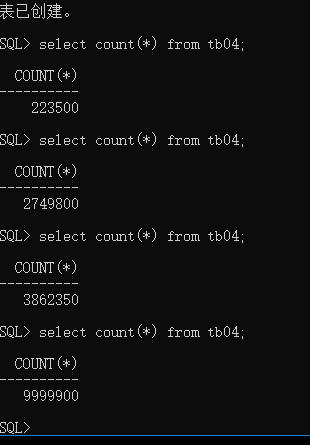
数据库记录:
--END-- 2019年11月9日19:19:33
【Oracle】往Oracle11g的某表插入近千万条记录,耗时略超一小时的更多相关文章
- oracle通过sql随机取表中的10条记录
oracle通过sql随机取表中的10条记录: SELECT * FROM (SELECT * FROM T_USER ORDER BY DBMS_RANDOM.RANDOM()) WHERE Row ...
- [MyBatis]再次向MySql一张表插入一千万条数据 批量插入 用时5m24s
本例代码下载:https://files.cnblogs.com/files/xiandedanteng/InsertMillionComparison20191012.rar 环境依然和原来一样. ...
- 【java】[sql]使用Java程序向MySql数据库插入一千万条记录,各种方式的比较,最后发现insert批量插入方式对效率提升最明显
我的数据库环境是mysql Ver 14.14 Distrib 5.6.45, for Linux (x86_64) using EditLine wrapper 这个数据库是安装在T440p的虚拟机 ...
- MSSQL SELECT(刚刚)新插入到表中的那条记录
假设对表 TXxxxxxxx 表新插入一条记录,然后要 SELECT 出刚刚插入的这条记录.可使用 SCOPE_IDENEITY(); 处理.具体代码参考如下: INSERT INTO TXxxxxx ...
- [MyBatis]五分钟向MySql数据库插入一千万条数据 批量插入 用时5分左右
本例代码下载:https://files.cnblogs.com/files/xiandedanteng/InsertMillionComparison20191012.rar 我的数据库环境是mys ...
- 关于Delphi cxGrid主从表中从表只能编辑第一条记录的问题
在Delphi cxGrid主从表中从表只能编辑第一条记录,这个问题是由于设置主从关联字段错误造成的. 从表DBtableView2的keyfieldnames,DetailKeyFieldNames ...
- 如何在十分钟内插入1亿条记录到Oracle数据库?
这里提供一种方法,使用 APPEND 提示,使得十分钟内插入上亿数据成为可能. -- Create table create table TMP_TEST_CHAS_LEE ( f01 VARCHAR ...
- Oracle数据库delete删除普通堆表千万条记录
Oracle数据库delete删除普通堆表千万条历史记录. 直接删除的影响: 1.可能由于undo表空间不足从而导致最终删除失败的问题: 2.可能导致undo表空间过度使用,影响到其他用户正常操作. ...
- Oracle查询出最最近一次的一条记录
需求:从一个表中查询数据,得到的数据为最新的一条记录. -------------建立测试表 --drop table TB ),dtDate date) -------------插入测试数据 ,' ...
随机推荐
- 协议形式化安全分析 Scyther 并非所有协议可以照抄就搬
1.Scyther 形式化分析工具可以对协议进行形式化描述,验证协议的机密性和可认证性是否存在安全威胁.在攻击时支持会话轮数无限次执行,同时支持在强安全模型和Delov-Yao模型.在对要形式化分析的 ...
- K8S 1.12大特性最快最深度解析:Kubernetes CSI Snapshot(上)
背景 许多存储系统提供了创建存储卷“快照”(snapshot)的能力,以防止数据丢失.快照可以替代传统的备份系统来备份和还原主要数据和关键数据.快照能够快速备份数据(例如,创建GCE PD快照仅需 ...
- javascript方法注释
参考资源 文章标题:Javascript注释规范 文章地址:https://blog.csdn.net/lianlin21212411/article/details/78530913 /** * @ ...
- 第五次个人作业---Alpha2项目测试
这个课程属于哪个课程 <课程的链接> 作业的要求 <作业要求的链接> 团队名称 <团队名称:六扇门编程团队> 作业的目标 从一个普通用户的角度,在测试其他团队项目的 ...
- sql网址
w3school版 https://www.w3school.com.cn/sql/index.asp 菜鸟教程版 https://www.runoob.com/sql/sql-tutorial.ht ...
- Vim热键总结
最近学习linux环境,总结一下Vim的常用热键~~~
- 牛客网暑期ACM多校训练营(第三场)H Diff-prime Pairs (贡献)
牛客网暑期ACM多校训练营(第三场)H Diff-prime Pairs (贡献) 链接:https://ac.nowcoder.com/acm/contest/141/H来源:牛客网 Eddy ha ...
- 轻院校赛-zzuli 2266: number【用每位的二进制的幂的和来进行hash(映射)处理】
zzuli 2266: number 大致题意: 给定n,问有多少数对<x, y>满足: x, y∈[1, n], x < y x, y中出现的[0, 9] ...
- idea远程debug调试阿里云ECS
1.首先远程服务器的代码跟本地项目代码应该完全一致,否则会出现debug混乱现象,亲测. 2.config如图: ①命名可以省略②复制这个地址③输入远程ip和自定义且未被占用的端口号xxxx 3.开放 ...
- vue2 父链,子组件索引及父子通信的props对象写法