
GeoServer中WMS、WFS的请求规范(转载)
1.背景
1.1WMS简介
Web地图服务(WMS)利用具有地理空间位置信息的数据制作地图。其中将地图定义为地理数据可视的表现。这个规范定义了三个操作:GetCapabitities返回服务级元数据,它是对服务信息内容和要求参数的一种描述; GetMap返回一个地图影像,其地理空间参考和大小参数是明确定义了的;GetFeatureInfo(可选)返回显示在地图上的某些特殊要素的信息。
GeoServer官网上对其WMS规范的描述地址为http://docs.geoserver.org/stable/en/user/services/wms/index.html。
1.2WFS简介
Web要素服务(WFS)返回的是要素级的GML编码,并提供对要素的增加、修改、删除等事务操作,是对Web地图服务的进一步深入。OGC Web要素服务允许客户端从多个Web要素服务中取得使用地理标记语言(GML)编码的地理空间数据,这个远东定义了五个操作:GetCapabilites返回Web要素服务性能描述文档(用XML描述);DescribeFeatureType返回描述可以提供服务的任何要素结构的XML文档;GetFeature为一个获取要素实例的请求提供服务;Transaction为事务请求提供服务;LockFeature处理在一个事务期间对一个或多个要素类型实例上锁的请求。
GeoServer官网上对其WFS规范的描述地址为http://docs.geoserver.org/stable/en/user/services/wfs/index.html。
2.WMS请求规范详解
2.1GetCapabitities(返回服务级元数据)
URL例子:
http://localhost:8680/geoserver/wms?service=wms&version=1.1.1&request=GetCapabilities。
参数意义:

返回结果:
其返回结果为一个描述性XML文档,包含了以下三个要素:

2.2GetMap(获取影像)
URL例子:
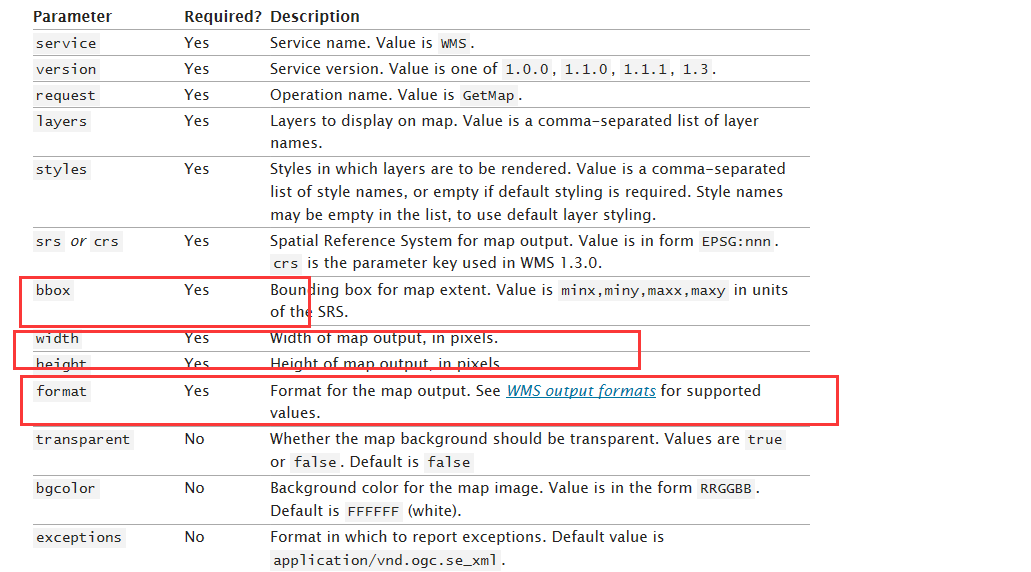
参数意义:
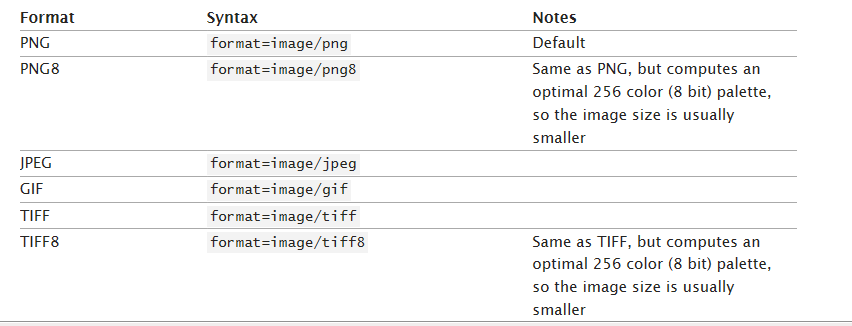
这里对返回的格式(format)有如下选择:
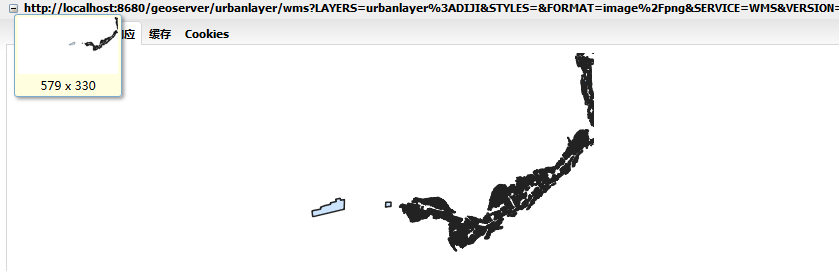
返回结果:
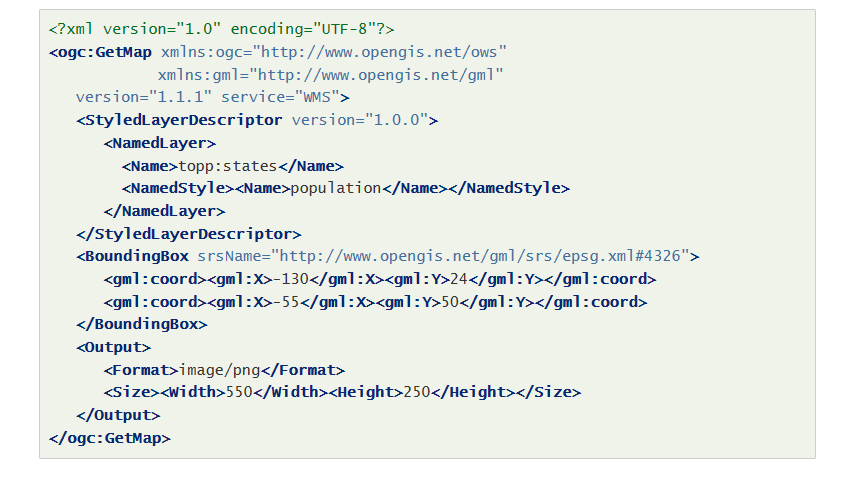
注意:此请求同样支持XML格式请求,如下:
2.3GetFeatureInfo(返回要素信息)
URL例子:
参数意义:
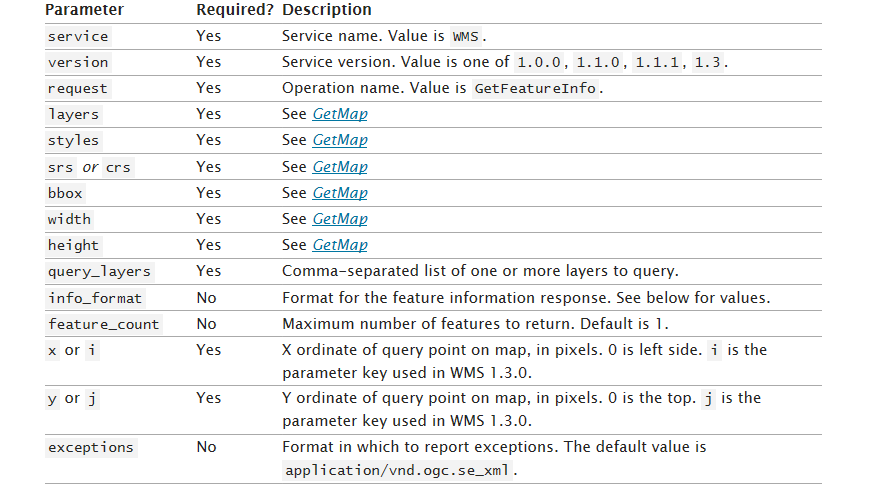
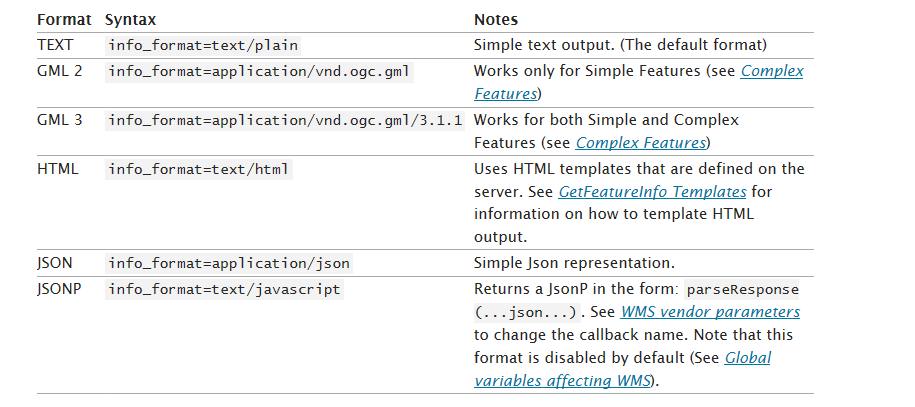
这里对返回的文本格式(info_format)有如下选择:
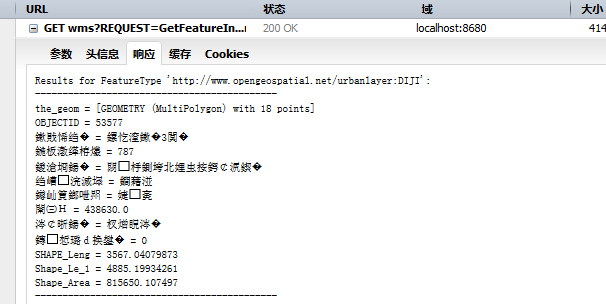
返回结果(忽略中文乱码):
3.WFS请求规范
3.1GetCapabilities(返回服务描述文档)
URL例子:
http://localhost:8680/geoserver/wfs?service=wfs&version=1.1.0&request=GetCapabilities。
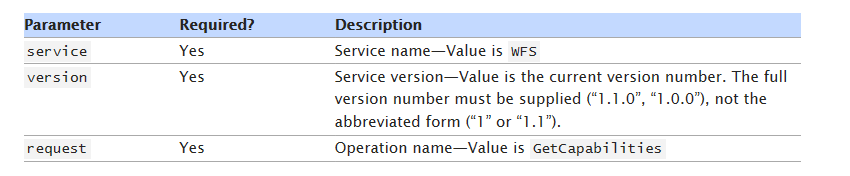
参数意义:
返回结果:
返回的结果为描述性XML,包含以下五个主要部分:

3.2DescribeFeatureType(返回图层描述信息)
URL例子:
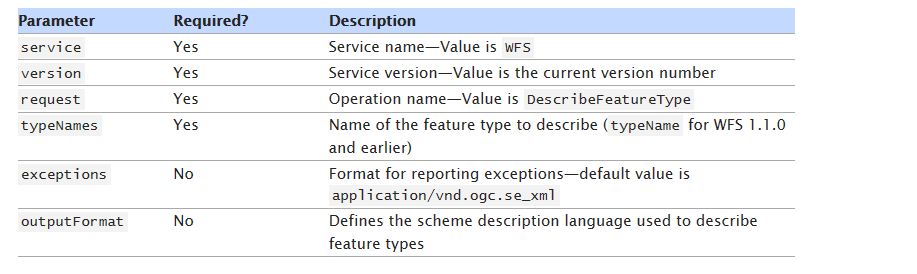
参数意义:
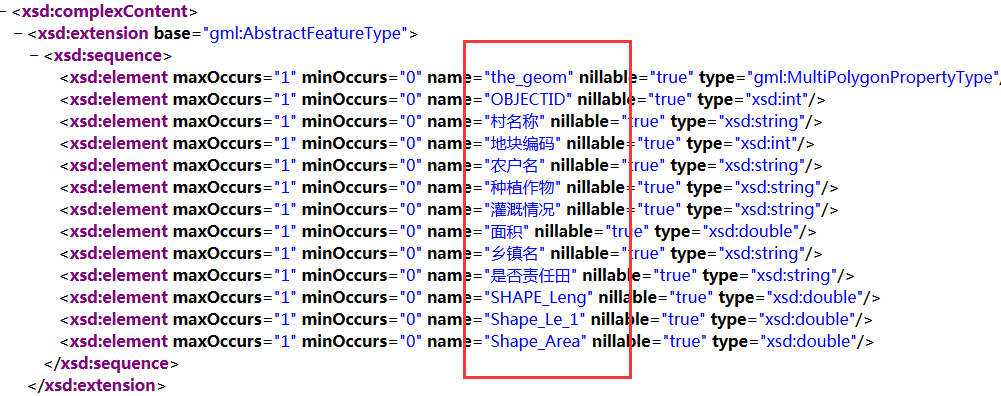
返回结果:
3.3GetFeature(获取图层要素)
3.3.1GET查询
这里首先给出一个例子:
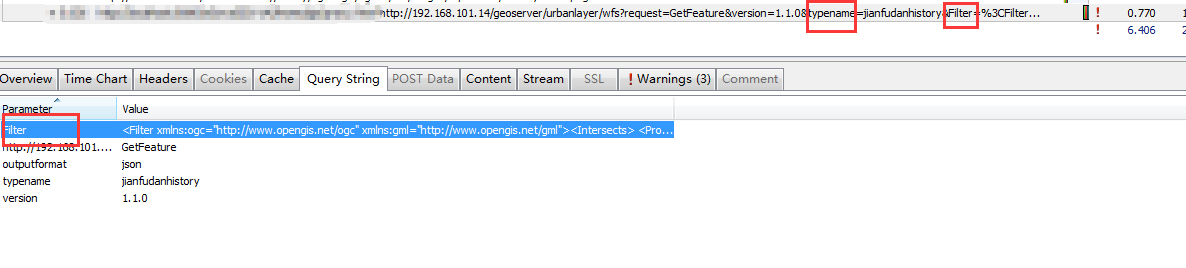
此请求常见的参数有:typeNames,featureID,propertyName,Filter, count, sortBy。其中Filter参数最为重要,主要负责进行选择过滤。关于Filter的具体描述可参考:http://docs.geoserver.org/stable/en/user/filter/function.html。
返回结果为:
{"type":"FeatureCollection","features":[{"type":"Feature","id":"jianfudan.322","geometry":{"type":"MultiPolygon","coordinates":[[[[30.276436000822056,120.20021],[30.275750000822033,120.20021],[30.22768400082126,120.22562],[30.245537000821543,120.17343000000001],[30.276436000822056,120.20021]]]]},"geometry_name":"the_geom","properties":{"limitid":71,"displayorder":null,"regionid":3,"validfromdate":"2016-05-15Z","validtodate":"2016-06-14Z","validflag":1,"media":null,"shape_length":null,"shape_area":null,"graphicid":322,"regionname":"江干区","eventtypes":null,"otherrequest":null,"limitname":"上报区域71"}},{"type":"Feature","id":"jianfudan.318","geometry":{"type":"MultiPolygon","coordinates":[[[[30.26407600082185,120.19668600000001],[30.26407600082185,120.196434],[30.262875000821833,120.20785],[30.24708200082157,120.203896],[30.255150000821704,120.187164],[30.26407600082185,120.19668600000001]]]]},"geometry_name":"the_geom","properties":{"limitid":72,"displayorder":null,"regionid":3,"validfromdate":"2016-05-04Z","validtodate":"2016-06-03Z","validflag":1,"media":"http://172.18.6.197:8081/MediaRoot/null/20160505/72/84989ee1-9bab-4640-8f24-4a7381f1c4e8/机票预订.png","shape_length":null,"shape_area":null,"graphicid":318,"regionname":"江干区","eventtypes":"乱搭乱建,暴露垃圾,积存垃圾渣土,路面不洁,河道不洁(含沟渠、湖面)","otherrequest":"测试","limitname":"上报区域72"}}],"crs":{"type":"EPSG","properties":{"code":"4490"}}}
3.3.1.1点查询Filter
<Filter xmlns:ogc="http://www.opengis.net/ogc" xmlns:gml="http://www.opengis.net/gml">
<Intersects>
<PropertyName>the_geom</PropertyName>
<gml:Envelope srsName="EPSG:4326">
<gml:lowerCorner>120.15336460382575 30.2743621901609</gml:lowerCorner>
<gml:upperCorner>120.167097513982 30.28809510031715</gml:upperCorner>
</gml:Envelope>
</Intersects>
</Filter>
3.3.1.2自定义多边形查询Filter
<Filter xmlns:ogc="http://www.opengis.net/ogc" xmlns:gml="http://www.opengis.net/gml">
<Intersects>
<PropertyName>the_geom</PropertyName>
<gml:MultiPolygon srsName="EPSG:4326">
<gml:polygonMember>
<gml:Polygon>
<gml:outerBoundaryIs>
<gml:LinearRing>
<gml:coordinates xmlns:gml="http://www.opengis.net/gml" decimal="." cs="," ts="">
120.15677,30.2557 120.15677,30.26351 120.16833,30.26351 120.16833,30.2557 120.15677,30.2557
</gml:coordinates>
</gml:LinearRing>
</gml:outerBoundaryIs>
</gml:Polygon>
</gml:polygonMember>
</gml:MultiPolygon>
</Intersects>
</Filter>
3.3.2Post查询
因为GET请求的数据量大小在4kb以内,所以Post为更常用的方法。以下为一个具体的例子:

其中直接发送的为一个XML文件,其Filter中可以填写的内容和GET中的Filter一样。
具体内容如下:
<?xml version='1.0' encoding='GBK'?><wfs:GetFeature service='WFS' version='1.0.0' outputFormat='JSON'
xmlns:wfs='http://www.opengis.net/wfs'
xmlns:ogc='http://www.opengis.net/ogc'
xmlns:gml='http://www.opengis.net/gml' xmlns:xsi='http://www.w3.org/2001/XMLSchema-instance' xsi:schemaLocation='http://www.opengis.net/wfs http://schemas.opengis.net/wfs/1.0.0/WFS-basic.xsd'>
<wfs:Query typeName='cell'>
<wfs:PropertyName>the_geom</wfs:PropertyName>
<wfs:PropertyName>test1</wfs:PropertyName>
<ogc:Filter>
<Or>
<PropertyIsEqualTo><PropertyName>test1</PropertyName><Literal>valuetest1</Literal></PropertyIsEqualTo>
<PropertyIsEqualTo><PropertyName>test2</PropertyName><Literal>valuetest2</Literal></PropertyIsEqualTo>
</Or>
</ogc:Filter>
</wfs:Query>
</wfs:GetFeature>
3.4 Transaction(编辑要素)
该方法支持对要素的增删改。这里直接给出Post请求中发送的XML组织格式:
3.4.1添加要素
<wfs:Transaction service="WFS" version="1.0.0"
outputFormat="GML2"
xmlns:opengis="http://www.cetusOpengis.com"
xmlns:wfs="http://www.opengis.net/wfs"
xmlns:ogc="http://www.opengis.net/ogc"
xmlns:gml="http://www.opengis.net/gml"
xmlns:xsi="http://www.w3.org/2001/XMLSchema-instance"
xsi:schemaLocation="http://www.opengis.net/wfs http://schemas.opengis.net/wfs/1.0.0/WFS-basic.xsd">
<wfs:Insert handle="someprj1">
<opengis:someprj>
<opengis:the_geom>
<gml:Point srsName="http://www.opengis.net/gml/srs/epsg.xml#3395" >
<gml:coordinates decimal="." cs="," ts="">13404701.212,3850391.781</gml:coordinates>
</gml:Point>
</opengis:the_geom>
<opengis:ssds>13</opengis:ssds>
<opengis:qqybh>12</opengis:qqybh>
<opengis:status>0</opengis:status>
</opengis:someprj>
</wfs:Insert>
</wfs:Transaction>
3.4.2修改要素
<wfs:Transaction service="WFS" version="1.0.0"
outputFormat="GML2"
xmlns:opengis="http://www.cetusOpengis.com"
xmlns:wfs="http://www.opengis.net/wfs"
xmlns:ogc="http://www.opengis.net/ogc"
xmlns:gml="http://www.opengis.net/gml"
xmlns:xsi="http://www.w3.org/2001/XMLSchema-instance"
xsi:schemaLocation="http://www.opengis.net/wfs http://schemas.opengis.net/wfs/1.0.0/WFS-basic.xsd">
<wfs:Update typeName="opengis:qqyproject">
<wfs:Property>
<wfs:Name>qqybh</wfs:Name>
<wfs:Value>12</wfs:Value>
</wfs:Property>
<ogc:Filter>
<ogc:PropertyIsEqualTo>
<ogc:PropertyName>qqybh</ogc:PropertyName>
<ogc:Literal>0</ogc:Literal>
</ogc:PropertyIsEqualTo>
</ogc:Filter>
</wfs:Update>
</wfs:Transaction>
3.4.3删除要素
<wfs:Transaction service="WFS" version="1.0.0"
outputFormat="GML2"
xmlns:opengis="http://www.cetusOpengis.com"
xmlns:wfs="http://www.opengis.net/wfs"
xmlns:ogc="http://www.opengis.net/ogc"
xmlns:gml="http://www.opengis.net/gml"
xmlns:xsi="http://www.w3.org/2001/XMLSchema-instance"
xsi:schemaLocation="http://www.opengis.net/wfs http://schemas.opengis.net/wfs/1.0.0/WFS-basic.xsd">
<wfs:Delete typeName="opengis:qqyproject">
<ogc:Filter>
<ogc:PropertyIsLessThan>
<ogc:PropertyName>qqybh</ogc:PropertyName>
<ogc:Literal>12</ogc:Literal>
</ogc:PropertyIsLessThan>
<ogc:PropertyIsGreaterThan>
<ogc:PropertyName>qqybh</ogc:PropertyName>
<ogc:Literal>0</ogc:Literal>
</ogc:PropertyIsGreaterThan>
</ogc:Filter>
</wfs:Delete>
</wfs:Transaction>
4.总结
a.动态出图可以使用WMS中的GetMap请求。
b.矢量查询可以使用WFS中的GetFeature请求。
c.要素编辑可以使用WFS中的Transaction请求。
--------------------------------------------------------------------------------------------------------------------------------
注:本文转载于博客园李晓晖个人博客Naa(http://www.cnblogs.com/naaoveGIS/),感谢原文作者!
GeoServer中WMS、WFS的请求规范(转载)的更多相关文章
- geoserver中WMS服务详细说明
官方geoserver中WMS服务中几种操作的API的详细说明地址: http://docs.geoserver.org/stable/en/user/services/wms/reference.h ...
- GeoServer中WMS、WFS的请求规范
文章版权由作者李晓晖和博客园共有,若转载请于明显处标明出处:http://www.cnblogs.com/naaoveGIS/ 1.背景 1.1WMS简介 Web地图服务(WMS)利用具有地理空间位置 ...
- GeoServer中使用样式化图层描述符(sld)给WMS加注记
现有一个shp格式的道路注记文件,用点来表示注记的位置,属性表中保存每个点对应的字,在QGIS中打开如下图所示 它的属性表如下 现需要把道路数据和它的注记发布为WMS服务,通过GeoServer直接发 ...
- gis笔记 wms wfs等OGC标准
WFS 和WMS的区别 WFS是基于地理要素级别的数据共享和数据操作,WFS规范定义了若干基于地理要素(Feature)级别的数据操作接口,并以 HTTP 作为分布式计算平台.通过 WFS服务,客户端 ...
- 简析Geoserver中获取图层列表以及各图层描述信息的三种方法
文章版权由作者李晓晖和博客园共有,若转载请于明显处标明出处:http://www.cnblogs.com/naaoveGIS/. 1.背景 实际项目中需要获取到Geoserver中的图层组织以及各图层 ...
- GeoServer中GeoWebCache(GWC)的使用
本文介绍GeoWebCache的使用方法,包括如何切缓存,访问缓存wms/wmts服务,如何复用栅格缓存等. 文章大部分内容转载自https://www.cnblogs.com/naaoveGIS/p ...
- GeoServer中利用SLD配图之矢量图层配图
文章版权由作者李晓晖和博客园共有,若转载请于明显处标明出处:http://www.cnblogs.com/naaoveGIS/. 1 背景 我们在ArcMap中可以直接通过symbol功能对图层进行定 ...
- Web Api 中Get 和 Post 请求的多种情况分析
转自:http://www.cnblogs.com/babycool/p/3922738.html 来看看对于一般前台页面发起的get和post请求,我们在Web API中要如何来处理. 这里我使用J ...
- openlayers 3加载GeoServer发布的wfs类型服务
转:https://blog.csdn.net/u013323965/article/details/52449502 问题产生: openlayer3加载WFS存在跨域问题,需要用json ...
随机推荐
- 牛客 Wannafly挑战赛27 D 绿魔法师
传送门 \(\color{green}{solution}\) 分析下,在\(1e5+1\)内,一个数的约数个数最多为\(2^{6}\)个,所以我们可以考虑枚举约数 复杂度\(O(N^{2^{6 \t ...
- [蓝桥杯][2016年第七届真题]路径之谜(dfs)
题目描述 小明冒充X星球的骑士,进入了一个奇怪的城堡. 城堡里边什么都没有,只有方形石头铺成的地面. 假设城堡地面是 n x n 个方格.[如图1.png]所示. 按习俗,骑士要从西北角走到东南角. ...
- 1. JavaScript学习笔记——JS基础
1. JavaScript基础 1.1 语法 严格区分大小写 标识符,第一个字符可以是 $,建议使用小驼峰法, 保留字.关键字.true.false.null不能作为标识符 JavaScript是用U ...
- python web开发小结
书籍 <python基础教程> <流畅的python> web框架 flask django tornado ORM sqlalchemy orator 消息队列 celery ...
- 学习java虚拟机笔记
虚拟机jvm 包括 类加载机制 ,运行时数据区域 运行时数据区域包括 ,程序计数器,虚拟机栈和本地方法栈,堆,方法区. 程序计数器是一块较小的内存控件, 用来指定当前字线程执行节码的行数 ,每个程序计 ...
- Robot Framework的安装、更新与卸载
Robot Framework的安装.更新与卸载 一,安装RF前的准备 一般就三种执行环境 Python, Jython (JVM) 和 IronPython (.NET): 安装python: #T ...
- 基于CommonKADS方法论实现知识库系统
说明:本文是Knowledge-based systems with thecommonKADS method文章的翻译. 一.知识库系统的背景 1. 什么是知识库系统(KBS) 知识库系统是人工智能 ...
- blender
Blender 是一款开源的跨平台全能三维动画制作软件,提供从建模.动画.材质.渲染.到音频处理.视频剪辑等一系列动画短片制作解决方案. 教程 https://www.bilibili.com/vid ...
- SQL Cookbook—查询、排序
涉及到的问题1.在select语句中使用条件逻辑2.限制返回的行数3.从表中随机返回n条记录4.将空值转换为实际值5.对字母和数字混合的数据排序6.处理排序空值7.根据数据项的键排序–8.从一个表中查 ...
- C#使用System.xml.linq来生成XML文件
直接看代码: /* * <?xml version="1.0" encoding="utf-8"?> * <Files Path=" ...