
二、MyBatis-HelloWorld
环境准备
1.创建数据库表
create table tbl_employee (

    id int(11) primary key AUTO_INCREMENT comment "ID",

    last_name varchar(20) default null comment "姓名",

    email varchar(20) default null comment "邮件",

    gender varchar(1) default null comment "性别"

)
2.准备依赖的jar包
- log4j.jar
- mybatis-3.4.1.jar
- mysql-connector-java-5.1.37-bin.jar
如果是maven项目,加入以下依赖:
<!-- 1.mybatis必须依赖包 -->

<dependency>

  <groupId>org.mybatis</groupId>

  <artifactId>mybatis</artifactId>

  <version>3.4.1</version>

</dependency>

<!-- 2.mysql数据库连接驱动 -->

<dependency>

  <groupId>mysql</groupId>

  <artifactId>mysql-connector-java</artifactId>

  <version>5.1.26</version>

</dependency>

<!-- 3.日志-->

<dependency>

  <groupId>log4j</groupId>

  <artifactId>log4j</artifactId>

  <version>1.2.17</version>

</dependency>
3.创建项目:MyBatis_01_HelloWorld
项目结构如下:

Employee.java源码如下:
package com.atguigu.mybatis.bean;

public class Employee {

    private Integer id;

    private String lastName;

    private String email;

    private String gender;

    public Integer getId() {

        return id;

    }

    public void setId(Integer id) {

        this.id = id;

    }

    public String getLastName() {

        return lastName;

    }

    public void setLastName(String lastName) {

        this.lastName = lastName;

    }

    public String getEmail() {

        return email;

    }

    public void setEmail(String email) {

        this.email = email;

    }

    public String getGender() {

        return gender;

    }

    public void setGender(String gender) {

        this.gender = gender;

    }

    @Override

    public String toString() {

        return "Employee [id=" + id + ", lastName=" + lastName + ", email="

                + email + ", gender=" + gender + "]";

    }

}
EmployeeMapper.java源码如下:
package com.atguigu.mybatis.dao;

import com.atguigu.mybatis.bean.Employee;

/**

 * mybatis接口式編程

 * @author kancy

 */

public interface EmployeeMapper {

    public Employee getEmpById(Integer id);

}
配置文件,在下面添加。
4.加入配置文件(Mybatis全局配置文件,Mybatis SQL Mapper映射配置文件,log4j配置文件)
1) Mybatis全局配置文件:mybatis-config.xml
<?xml version="1.0" encoding="UTF-8" ?>

<!DOCTYPE configuration

 PUBLIC "-//mybatis.org//DTD Config 3.0//EN"

 "http://mybatis.org/dtd/mybatis-3-config.dtd">

<configuration>

    <environments default="development">

        <environment id="development">

            <transactionManager type="JDBC" />

            <dataSource type="POOLED">

                <property name="driver" value="com.mysql.jdbc.Driver" />

                <property name="url" value="jdbc:mysql://localhost:3306/mybatis" />

                <property name="username" value="root" />

                <property name="password" value="123456" />

            </dataSource>

        </environment>

    </environments>

    <!-- 将我们写好的sql映射文件(EmployeeMapper.xml)一定要注册到全局配置文件(mybatis-config.xml)中 -->

    <mappers>

        <mapper resource="mappers/EmployeeMapper.xml" />

    </mappers>

</configuration>
2) sql mapper映射文件:EmployeeMapper.xml
<?xml version="1.0" encoding="UTF-8" ?>

<!DOCTYPE mapper

 PUBLIC "-//mybatis.org//DTD Mapper 3.0//EN"

 "http://mybatis.org/dtd/mybatis-3-mapper.dtd">

<mapper namespace="com.atguigu.mybatis.dao.EmployeeMapper">

<!--

namespace:名称空间;指定为接口的全类名

id:唯一标识

resultType:返回值类型

#{id}:从传递过来的参数中取出id值

 -->

    <select id="getEmpById" resultType="com.atguigu.mybatis.bean.Employee">

        select id,last_name lastName,email,gender from tbl_employee where id = #{id}

    </select>

</mapper>
3) log4j日志配置文件:log4j.xml
<?xml version="1.0" encoding="UTF-8" ?>

<!DOCTYPE log4j:configuration SYSTEM "log4j.dtd">

<log4j:configuration xmlns:log4j="http://jakarta.apache.org/log4j/">

    <appender name="STDOUT" class="org.apache.log4j.ConsoleAppender">

        <param name="Encoding" value="UTF-8" />

        <layout class="org.apache.log4j.PatternLayout">

            <param name="ConversionPattern" value="%-5p %d{MM-dd HH:mm:ss,SSS} %m  (%F:%L) \n" />

        </layout>

    </appender>

    <logger name="java.sql">

        <level value="debug" />

    </logger>

    <logger name="org.apache.ibatis">

        <level value="info" />

    </logger>

    <root>

        <level value="debug" />

        <appender-ref ref="STDOUT" />

    </root>

</log4j:configuration>
5.编写测试
1)硬编码编程的调用方式
public SqlSessionFactory getSqlSessionFactory() throws IOException {

    String resource = "mybatis-config.xml";

    InputStream inputStream = Resources.getResourceAsStream(resource);

    return new SqlSessionFactoryBuilder().build(inputStream);

}

/**

 * 1、根据xml配置文件(全局配置文件)创建一个SqlSessionFactory对象 有数据源一些运行环境信息

 * 2、sql映射文件;配置了每一个sql,以及sql的封装规则等。

 * 3、将sql映射文件注册在全局配置文件中

 * 4、写代码:

 *         1)、根据全局配置文件得到SqlSessionFactory;

 *         2)、使用sqlSession工厂,获取到sqlSession对象使用他来执行增删改查

 *             一个sqlSession就是代表和数据库的一次会话,用完关闭

 *         3)、使用sql的唯一标志来告诉MyBatis执行哪个sql。sql都是保存在sql映射文件中的。

 * @throws IOException

 */

@Test

public void test01() throws IOException {

    // 2、获取sqlSession实例,能直接执行已经映射的sql语句

    // sql的唯一标识:statement Unique identifier matching the statement to use.

    // 执行sql要用的参数:parameter A parameter object to pass to the statement.

    SqlSessionFactory sqlSessionFactory = getSqlSessionFactory();

    SqlSession openSession = sqlSessionFactory.openSession();

    try {

        Employee employee = openSession.selectOne(

                "com.atguigu.mybatis.dao.EmployeeMapper.getEmpById", 1);

        System.out.println(employee);

    } finally {

        openSession.close();

    }

}
2)接口式编程的调用方式
public SqlSessionFactory getSqlSessionFactory() throws IOException {

    String resource = "mybatis-config.xml";

    InputStream inputStream = Resources.getResourceAsStream(resource);

    return new SqlSessionFactoryBuilder().build(inputStream);

}

@Test

public void test02() throws IOException {

    // 1、获取sqlSessionFactory对象

    SqlSessionFactory sqlSessionFactory = getSqlSessionFactory();

    // 2、获取sqlSession对象

    SqlSession openSession = sqlSessionFactory.openSession();

    try {

        // 3、获取接口的实现类对象

        //会为接口自动的创建一个代理对象,代理对象去执行增删改查方法

        EmployeeMapper mapper = openSession.getMapper(EmployeeMapper.class);

        Employee employee = mapper.getEmpById(1);

        System.out.println(mapper.getClass());

        System.out.println(employee);

    } finally {

        openSession.close();

    }

}
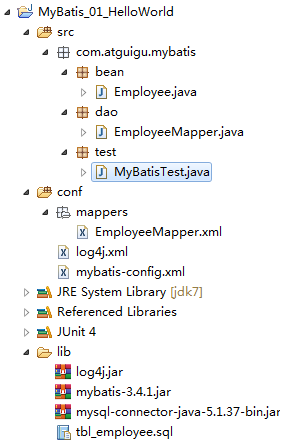
6.整体项目结构如下:
7.总结
1)mybatis根据全局配置文件来创建SqlSessionFactory工厂对象,再通过工厂对象创建SqlSession会话对象(一次会话,一次连接),SqlSession再sql方法Id获取对应的sql语句并且执行改语句,sql语句配置在SQL Mapper映射文件中,每一个SQL都会有一个唯一ID。
2)SqlSession 的实例和connection一样 不是线程安全的,因此是不能被共享的。SqlSession每次 使用完成后需要正确关闭,这个关闭操作是必须的。SqlSession可以直接调用方法的id进行数据库操作,但是我们一般还是推荐使用SqlSession获取到Dao接口的代理类,执行代理对象的方法,可以更安全的进行类型检查操作。
二、MyBatis-HelloWorld的更多相关文章
- [J2EE]MyBatis HelloWorld
一.MyBatis简单介绍 iBatis是apche的一个开源项目.2010年迁移到google code后改名为MyBatis,2013年前已到github.MyBatis是一个基于java的持久层 ...
- Maven 工程下 Spring MVC 站点配置 (二) Mybatis数据操作
详细的Spring MVC框架搭配在这个连接中: Maven 工程下 Spring MVC 站点配置 (一) Maven 工程下 Spring MVC 站点配置 (二) Mybatis数据操作 这篇主 ...
- (转)MyBatis框架的学习(二)——MyBatis架构与入门
http://blog.csdn.net/yerenyuan_pku/article/details/71699515 MyBatis框架的架构 MyBatis框架的架构如下图: 下面作简要概述: S ...
- Mybaits 源码解析 (一)----- 搭建一个mybatis框架(MyBatis HelloWorld)
源码分析之前先搭一个mybatis的demo,这个在看源码的时候能起到了很大的作用,因为在看源码的时候,会恍然大悟,为什么要这么配置,为什么要这么写.(老鸟可以跳过这篇) 开发环境的准备 创建mave ...
- 01、MyBatis HelloWorld
1. MyBatis简介 1)MyBatis 是支持定制化 SQL.存储过程以及高级映射的优秀的持久层框架 2)MyBatis 避免了几乎所有的 JDBC 代码和手动设置参数以及获取结果集 3)MyB ...
- 二 mybatis 动态sql
动态sql应用 一 .什么是动态sql 1.where条件 动态查询 根据姓名或年龄或地址查询 UserMapper.xml 1 <select id="findUser" ...
- Mybatis学习笔记(二) —— mybatis入门程序
一.mybatis下载 mybaits的代码由github.com管理,下载地址:https://github.com/mybatis/mybatis-3/releases 下载完后的目录结构: 二. ...
- SSM(二)MyBatis多表联查
这篇文章写了以下几个简单的例子,用来说明MyBatis多标联查基本语法 1.sql片段的用法 2.一对多查询 3.多条sql的一对多查询 4.多对一查询 5.多条sql一对多查询 6.多对多查询 这里 ...
- Netty学习(二)-Helloworld Netty
这一节我们来讲解Netty,使用Netty之前我们先了解一下Netty能做什么,无为而学,岂不是白费力气! 1.使用Netty能够做什么 开发异步.非阻塞的TCP网络应用程序: 开发异步.非阻塞的UD ...
- mybatis深入理解(二)-----Mybatis数据源与连接池
对于ORM框架而言,数据源的组织是一个非常重要的一部分,这直接影响到框架的性能问题.本文将通过对MyBatis框架的数据源结构进行详尽的分析,并且深入解析MyBatis的连接池.本文首先会讲述MyBa ...
随机推荐
- zepto-touch.js插件
/* Zepto v1.2.0 - zepto event ajax form ie - zeptojs.com/license */(function(global, factory) { if ( ...
- 模拟赛DAY1 T2腐草为萤
2.腐草为萤(dzy.cpp/c) [题目背景] 纤弱的淤泥中妖冶颓废在季夏第三月最幼嫩的新叶连凋零都不屑何必生离死别——银临<腐草为萤> [问题描述] 扶苏给了你一棵树,这棵树上长满了幼 ...
- Vue实现音乐播放器(六):jsonp的应用+抓取轮播图数据
用jsonp来获取数据 通过封装方法来获取 在src文件夹下的api文件夹里面去封装一些获取相关部分组件的数据的方法 在api文件夹下的recommend.js中 配置一下公共参数 请求的真实的u ...
- python进行数据库迁移的时候显示(TypeError: __init__() missing 1 required positional argument: 'on_delete')
进行数据库迁移的时候,显示 TypeError: __init__() missing 1 required positional argument: 'on_delete' 图示: 出现原因: 在 ...
- python-笔记-内置函数
###内置函数 print(all([1,2,3,4]))判断可迭代的对象里面的值是否都为真 print(any([0,1,2,3,4]))判断可迭代的对象里面的值是否有一个为真 print(id(l ...
- Java各类型占字节数
byte 1字节short 2字节int 4字节long 8字节float 4字节double 8字节char 2字节boolean 1字节 其中,换算关系: 1GB=1024MB 1MB=1024K ...
- sql时间类型相关
1.现在时间 NOW() 示例: select * from users where date<now() 2.时间相减 INTERVAL ' DAY 示例: ' DAY 3.timestamp ...
- 挣值管理(PV、EV、AC、SV、CV、SPI、CPI)
挣值管理法中的PV.EV.AC.SV.CV.SPI.CPI这些英文简写相信把大家都搞得晕头转向的.在挣值管理法中,需要记忆理解的有三个参数:PV.AC.EV. PV:计划值,在即定时间点前计划完成活动 ...
- mooc-IDEA 项目/文件之间跳转--002
二.IntelliJ IDEA -项目之间跳转 1.Next Project Window :跳转到下一个项目 [ ctrl+alt+) ] 2.Previous Project Window:跳转到 ...
- from 表单回车自动提交
自动提交的情况 1 表单只有单个输入框 2 type=‘submit 这里注意button默认type为submit 解决方法 1 添加一个隐藏的输入框 2 form添加属性 onsubmit=&q ...