
React Native商城项目实战11 - 个人中心头部内容
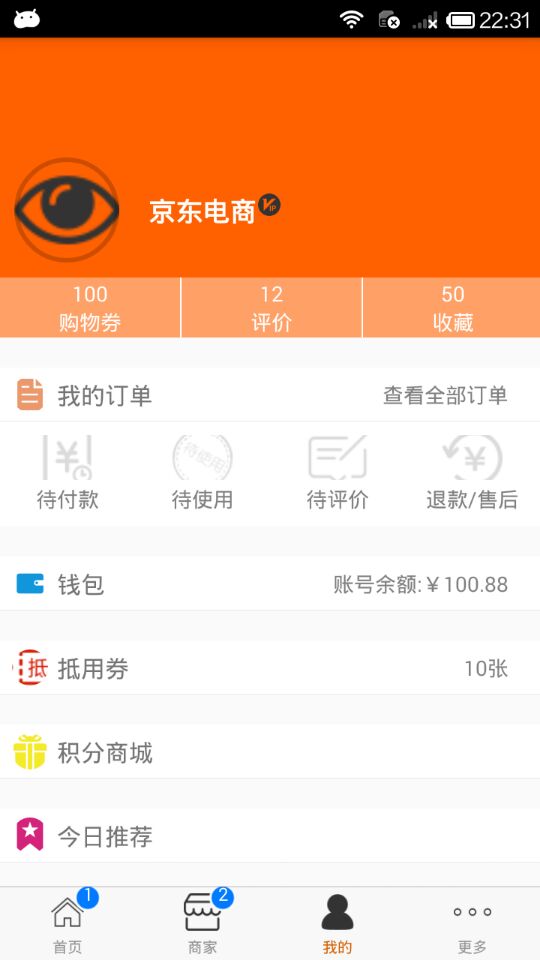
1.创建MineHeaderView.js

/**

 * 个人中心头部内容

 */

import React, { Component } from 'react';

import {

    AppRegistry,

    StyleSheet,

    Text,

    View,

    Image,

    TouchableOpacity

} from 'react-native';

// 导入系统类

var Dimensions = require('Dimensions');

var screenW = Dimensions.get('window').width;

// ES5

var HeaderView = React.createClass({

    render() {

        return (

            <View style={styles.container}>

                {this.renderTopView()}

                {this.renderBottomView()}

            </View>

        );

    },

    renderTopView(){

        return(

            <View style={styles.topViewStyle}>

                <Image source={{uri:'see'}} style={styles.leftIconStyle} />

                <View style={styles.conterViewStyle}>

                    <Text style={{fontSize:18,color:'white',fontWeight:'bold'}}>京东电商</Text>

                    <Image source={{uri:'avatar_vip'}} style={{width:17,height:17}} />

                </View>

                <Image source={{uri:'icon_cell_rightArrow'}} style={{width:8,height:13,marginRight:8}} />

            </View>

        )

    },

    renderBottomView(){

        return(

            <View style={styles.bottomViewStyle}>

                {this.renderBottomItem()}

            </View>

        )

    },

    renderBottomItem(){

        // 组件数组

        var items = [];

        // 数据

        var dataArr = [{'number':'100', 'title':'购物券'},{'number':'12', 'title':'评价'},{'number':'50', 'title':'收藏'}];

        // 遍历创建组件转入数组

        for (var i=0;i<dataArr.length;i++){

            var data = dataArr[i];

            items.push(

                <TouchableOpacity key={i}>

                    <View style={styles.bottomInnerViewStyle}>

                        <Text style={{color:'white'}}>{data.number}</Text>

                        <Text style={{color:'white'}}>{data.title}</Text>

                    </View>

                </TouchableOpacity>

            );

        }

        return items;

    },

});

const styles = StyleSheet.create({

    container: {

        height:200,

        backgroundColor:'rgb(255,96,0)'

    },

    topViewStyle:{

        flexDirection:'row',

        marginTop:80,

        alignItems:'center',

        justifyContent:'space-around'

    },

    leftIconStyle:{

        width:70,

        height:70,

        borderRadius:35,

        borderWidth:3,

        borderColor:'rgba(0,0,0,0.2)',

    },

    conterViewStyle:{

        flexDirection:'row',

        width:screenW * 0.6,

    },

    bottomViewStyle:{

        flexDirection:'row',

        position:'absolute',

        bottom:0,

    },

    bottomInnerViewStyle:{

        width:(screenW/3)+1,

        height:40,

        backgroundColor:'rgba(255,255,255,0.4)',

        justifyContent:'center',

        alignItems:'center',

        borderRightWidth:1,

        borderRightColor:'white'

    }

});

// 输出

module.exports = HeaderView;
2.Mine.js使用这个组件
/**

 * 我的

 */

import React, { Component } from 'react';

import {

    AppRegistry,

    StyleSheet,

    Text,

    View,

    ScrollView

} from 'react-native';

/*======导入外部组件类======*/

var MyCell = require('./CommonMyCell');

var MiddleView = require('./MineMiddleView');

var HeaderView = require('./MineHeaderView');

// ES5

var Mine = React.createClass({

    render() {

        return (

            <ScrollView style={styles.scrollViewStyle}>

                <HeaderView />

                <View style={{marginTop:20}}>

                    <MyCell

                        leftIconName="collect"

                        leftTitle="我的订单"

                        rightTitle="查看全部订单"

                    />

                    <MiddleView />

                </View>

                <View style={{marginTop:20}}>

                    <MyCell

                        leftIconName="draft"

                        leftTitle="钱包"

                        rightTitle="账号余额:¥100.88"

                    />

                </View>

                <View style={{marginTop:20}}>

                    <MyCell

                        leftIconName="voucher"

                        leftTitle="抵用券"

                        rightTitle="10张"

                    />

                </View>

                <View style={{marginTop:20}}>

                    <MyCell

                        leftIconName="mall"

                        leftTitle="积分商城"

                        rightTitle=""

                    />

                </View>

                <View style={{marginTop:20}}>

                    <MyCell

                        leftIconName="recommend"

                        leftTitle="今日推荐"

                        rightTitle=""

                    />

                </View>

            </ScrollView>

        );

    }

});

const styles = StyleSheet.create({

    scrollViewStyle:{

    }

});

// 输出

module.exports = Mine;
3.效果图
React Native商城项目实战11 - 个人中心头部内容的更多相关文章
- React Native商城项目实战10 - 个人中心中间内容设置
1.新建一个MineMiddleView.js,专门用于构建中间的内容 /** * 个人中心中间内容设置 */ import React, { Component } from 'react'; im ...
- React Native商城项目实战09 - 个人中心自定义cell
1.新建组件CommonMyCell.js /** * 个人中心自定义cell */ import React, { Component } from 'react'; import { AppReg ...
- React Native商城项目实战12 - 首页头部内容
1.HomeTopView为首页头部内容,HomeTopListView为HomeTopView子视图. 2.HomeTopView.js /** * 首页头部内容 */ import React, ...
- React Native商城项目实战04 - 封装TabNavigator.Item的创建
1.Main.js /** * 主页面 */ import React, { Component } from 'react'; import { StyleSheet, Text, View, Im ...
- React Native商城项目实战02 - 主要框架部分(tabBar)
1.安装插件,cd到项目根目录下执行: $ npm i react-native-tab-navigator --save 2.主框架文件Main.js /** * 主页面 */ import Rea ...
- React Native商城项目实战01 - 初始化设置
1.创建项目 $ react-native init BuyDemo 2.导入图片资源 安卓:把文件夹放到/android/app/src/main/res/目录下,如图: iOS: Xcode打开工 ...
- React Native商城项目实战07 - 设置“More”界面导航条
1.More/More.js /** * 更多 */ import React, { Component } from 'react'; import { AppRegistry, StyleShee ...
- React Native商城项目实战05 - 设置首页的导航条
1.Home.js /** * 首页 */ import React, { Component } from 'react'; import { AppRegistry, StyleSheet, Te ...
- React Native商城项目实战06 - 设置安卓中的启动页
1.Main 目录下新建LaunchImage.js: /** * 启动页 */ import React, { Component } from 'react'; import { AppRegis ...
随机推荐
- Spark-Core RDD转换算子-双Value型交互
1.union(otherDataSet) 作用:求并集. 对源 RDD 和参数 RDD 求并集后返回一个新的 RDD scala> val rdd1 = sc.parallelize(1 to ...
- 关系型数据库为什么喜欢使用B+树作为索引结构? (转)
问题1. 数据库为什么要设计索引? 图书馆存了1000W本图书,要从中找到<架构师之路>,一本本查,要查到什么时候去? 于是,图书管理员设计了一套规则: (1)一楼放历史类,二楼放文学类, ...
- Enlarge GCD(素数筛)
题意 删去最少的数,使gcd变大 题解 只要保留相同素数因子最多的数即可. 素数筛. C++代码 #include<bits/stdc++.h> using namespace std; ...
- java中关键字final,finally,finalize的区别
-final:作为修饰符关键字,有三种用法: 1,如果一个类被声明为final,则意味着它不能被继承. 2,将变量声明为final,则表示它是一个常量,也就是保证它在使用过程中不被修改,被final修 ...
- python学习笔记(4)
第六章 字符串操作 1.字符串处理 (1)字符串字 spam='Say hi to Bob\' s mother 面量 python中输入字符串:以单引号开始和结束 (2)双引号:字符串可以用双引号开 ...
- 如何让form2中的数据源,显示在form1的dataGridView控件中呢????
定义一个static的静态变量,即可全局访问
- Java基础学习(2)
Java基础学习(二) 面向对象 对象:客观存在的事物 面向对象:人具体关注的事物的某些信息 类:是模子,确定对象会拥有的特征(属性)和行为(方法) 对象的属性:对象具有的各种特征 对象的方法:对象能 ...
- Codeforces1221D. Make The Fence Great Again(dp)
题目链接:传送门 思路: 仔细想一下可以发现:每个位置最多就增加2个高度. 所以就可以有状态: f[i][j]表示保证前i个篱笆都是great时,第i个篱笆增加j的高度所需要的最小花费(1 <= ...
- 2019 计蒜之道 初赛 第二场 B. 百度AI小课堂-上升子序列(简单) ( 实现)
题目背景 91029102 年 99 月 22 日,百度在 X 市 XX 中学举办的第一场 AI 知识小课堂大获好评!同学们对矩阵的掌握非常棒. 今天的 AI 知识小课堂的第二场开讲啦.本场 AI ...
- Manacher || P4555 [国家集训队]最长双回文串 || BZOJ 2565: 最长双回文串
题面:P4555 [国家集训队]最长双回文串 题解:就.就考察马拉车的理解 在原始马拉车的基础上多维护个P[i].Q[i]数组,分别表示以i结尾最长回文子串的长度和以i开头的最长回文子串的长度 然后就 ...