
Lerning Entity Framework 6 ------ Complex types
Complex types are classes that map to a subset of columns of a table.They don't contains key. They are the Value Objects. For example, you have a entity named Company:
public class Company

{

    public int CompanyId { get; set; }

    public string CompanyName { get; set; }

    public string Street { get; set; }

    public string City { get; set; }

    public string Zip { get; set; }

}
You can Mondify it like this:
public class Company

{

    public Company()

    {

        this.Address = new Address();

    }

    public int CompanyId { get; set; }

    public string CompanyName { get; set; }

    public Address Address { get; set; }

}

public class Address

{

    public string Street { get; set; }

    public string City { get; set; }

    public string Zip { get; set; }

}
This structure can made the entity's meaning clearer than before. and the class Address can be used as a common value object for many classes. Now we complete all codes:
public class Company

{

    public Company()

    {

        this.Address = new Address();

    }

    public int CompanyId { get; set; }

    [MaxLength(100)]

    public string CompanyName { get; set; }

    public Address Address { get; set; }

}

public class Person

{

    public Person()

    {

        this.Address = new Address();

    }

    public int PersonId { get; set; }

    [MaxLength(50)]

    public string PersonName { get; set; }

    public Address Address { get; set; }

}

public class Address

{

    [MaxLength(100)]

    public string Street { get; set; }

    [MaxLength(50)]

    public string City { get; set; }

    [MaxLength(10)]

    public string Zip { get; set; }

}

public class MyContext:DbContext

{

    public MyContext() : base("name=Test")

    {

    }

    public DbSet<Company> Companies { get; set; }

    public DbSet<Person> People { get; set; }

}
Then, execute following commands in NuGet command line:
- Enable-Migrations
- Add-Migration Init
- Update-Database
Now, The table people and companies'structures like this:
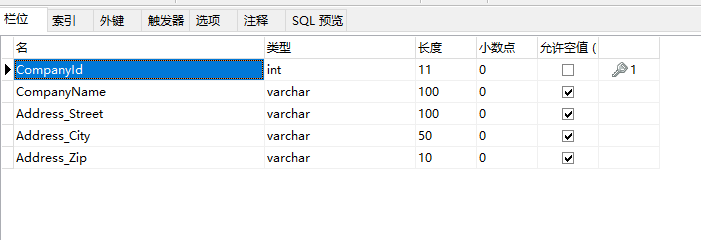
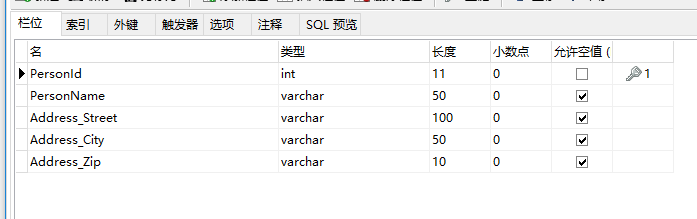
Let's have a test:
static void Main(string[] args)

{

    Address address = new Address

    {

        City = "BeiJing",

        Street = "ChangAn Street",

        Zip = "119"

    };

    Company company = new Company

    {

        CompanyName = "TianAnMen",

        Address = address

    };

    Person person = new Person

    {

        PersonName = "伟人",

        Address = address

    };

    using (MyContext db = new MyContext())

    {

        db.Companies.Add(company);

        db.People.Add(person);

        db.SaveChanges();

    }

}
You can provide the configuration for complex types. We can do so by providing a configuration class . The only difference is that we use a different base class, ComplexTypeConfiguration, not EntityTypeConfiguration.
That's all.
Lerning Entity Framework 6 ------ Complex types的更多相关文章
- Lerning Entity Framework 6 ------ Defining Relationships
There are three types of relationships in database. They are: One-to-Many One-to-One Many-to-Many Th ...
- Lerning Entity Framework 6 ------ Handling concurrency With SQL Server Database
The default Way to handle concurrency of Entity Framework is using optimistic concurrency. When two ...
- Lerning Entity Framework 6 ------ Working with in-memory data
Sometimes, you need to find some data in an existing context instead of the database. By befault, En ...
- Lerning Entity Framework 6 ------ Inserting, Querying, Updating, and Deleting Data
Creating Entities First of all, Let's create some entities to have a test. Create a project Add foll ...
- Lerning Entity Framework 6 ------ Defining the Database Structure
There are three ways to define the database structure by Entity Framework API. They are: Attributes ...
- Lerning Entity Framework 6 ------ Introduction to TPH
Sometimes, you have created two models. They have the same parent class like this: public class Pers ...
- Entity Framework Core Query Types
This feature was added in EF Core 2.1 Query types are non-entity types (classes) that form part of t ...
- Lerning Entity Framework 6 ------ Using a commandInterceptor
Sometimes, We want to check the original sql statements. creating a commandInterceptor is a good way ...
- Lerning Entity Framework 6 ------ A demo of using Entity framework with MySql
Create a new project named MySqlTest Install following packages by right-clicking on the References ...
随机推荐
- JS StartMove源码-简单运动框架
这几天学习js运动应用课程时,开始接触一个小例子:“仿Flash的图片轮换播放器”,其中使用的StartMove简单运动框架我觉得挺好用的.这个源码也简单,理解其原理,自己敲即便也就熟悉了. 用的时候 ...
- 网络请求Adapter添加数据
一般在开发中我们都需要在listview中添加数据显示在界面上 1.首先我们会在布局中写一个listview <FrameLayout xmlns:android="http://sc ...
- JavaScript onclick传递对象参数(easyui传递一行数据时)错误:uncaught SyntaxError: Unexpected identifier
JavaScript onclick传递对象参数(easyui传递一行数据时)错误:uncaught SyntaxError: Unexpected identifier 博主遇到的是用onclick ...
- viewstate?
用于存放数据,可永久保存,存放在页面的隐藏控件里 支持string,integer,array,boolean,ArrayList,hashtable类型,使用viewstate会增加页面h ...
- [leetcode]20. Valid Parentheses有效括号序列
Given a string containing just the characters '(', ')', '{', '}', '[' and ']', determine if the inpu ...
- 【.Net】 大文件可使用的文本分组统计工具(附带源码,原创)
本工具可实现的效果: 1.读取大文件(大于1GB) 2.根据分隔符分割后的列分组 3.速度快. 4.处理过程中,可以随时停止处理,操作不卡死. 5.有对当前内存的实时监测,避免过多占用内存,影响系统运 ...
- Python开发——函数【作用域】
变量的查找是由内向外的 # 全局变量 name = 'yuan' # 定义函数 def change1(): print(name) # yuan # 调用函数 change1() print(nam ...
- python历史与基本类型
前言 我自学的方式主要是看文档,看视频,第一次做写博客这么神圣的事情,内心是忐忑的,写的东西比较杂,路过的小伙伴不要嘲笑我,主要是记录一日所学,顺便锻炼一下语言组织能力吧,anyway,这些都不重要, ...
- 小程序css--view标签下英文不换行,中文会自动换行
英文且没有空格不会自动换行,中文或者有空格的英文会自动换行 这种情况在css中添加 : word-break: break-all;\ 就可以解决
- eclipse启动时出现无法创建java虚拟机
最 近一直在用eclipse开发android程序,今天不知怎么的启动eclipse时就会出现Failed to create java virtual machine,无法打开eclipse程序,折 ...