
Lerning Entity Framework 6 ------ Introduction to TPH
Sometimes, you have created two models. They have the same parent class like this:
public class Person

{

    public int PersonId { get; set; }

    public string PersonName { get; set; }

}

public class InsidePerson : Person

{

    public string Title { get; set; }

    public string Department { get; set; }

}

public class OutsidePerson : Person

{

    public string CompanyName { get; set; }

}
After you execute the command Update-Database in nuget command line, Entity Framework will create one table named people:
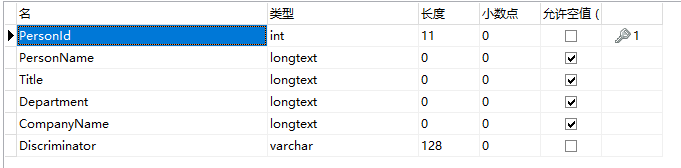
The Discriminator column is created for discriminating what model dose current row represent. this model creating type is called TPH(Table per Hierarchy Inheritance). Let's do a test. Add some codes in main function:
static void Main(string[] args)

{

    using (MyDbContext db = new MyDbContext())

    {

        Person insidePerson1 = new InsidePerson()

        {

            PersonName = "InsidePerson1",

            Title = "Manager",

            Department = "development"

        };

        db.People.Add(insidePerson1);

        InsidePerson insidePerson2 = new InsidePerson()

        {

            PersonName = "InsidePerson2",

            Title = "Manager",

            Department = "development"

        };

        db.People.Add(insidePerson2);

        InsidePerson insidePerson3 = new InsidePerson()

        {

            PersonName = "InsidePerson3",

            Title = "Manager",

            Department = "development"

        };

        db.InsidePeople.Add(insidePerson3);

        Person outsidePerson1 = new OutsidePerson()

        {

            PersonName = "outsidePerson1",

            CompanyName = "Tencent"

        };

        db.People.Add(outsidePerson1);

        db.SaveChanges();

    }

}
Let's look at the database:

If you don't like the discriminator column which entity framework auto create, you can define your column by adding these codes in OnModelCreating function of DbContext class:
protected override void OnModelCreating(DbModelBuilder modelBuilder)

{

    base.OnModelCreating(modelBuilder);

    modelBuilder.Entity<Person>()

        .Map<InsidePerson>(p => p.Requires("PersonType").HasValue(1))

        .Map<OutsidePerson>(p => p.Requires("PersonType").HasValue(2));

}
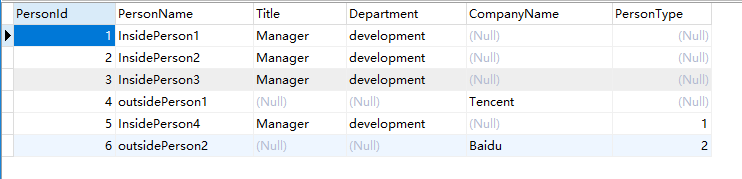
Then, execute the command Add-Migration AddPesonTypeColumn2PeopleTable and Update-Database in nuget command line. Now, look at the database again:

We can find the Entity Framework can't insert any value into PersonType column of existed rows. It's a little sad. Now, We insert some new data by coding:
static void Main(string[] args)

{

    using (MyDbContext db = new MyDbContext())

    {

        Person insidePerson4 = new InsidePerson()

        {

            PersonName = "InsidePerson4",

            Title = "Manager",

            Department = "development"

        };

        db.People.Add(insidePerson4);

        Person outsidePerson2 = new OutsidePerson()

        {

            PersonName = "outsidePerson2",

            CompanyName = "Baidu"

        };

        db.People.Add(outsidePerson2);

        db.SaveChanges();

    }

}
Look at the databas again:
That's all.
Lerning Entity Framework 6 ------ Introduction to TPH的更多相关文章
- Lerning Entity Framework 6 ------ Introduction to TPT
Sometimes, you've created a table for example named Person. Just then, you want to add some extra in ...
- Lerning Entity Framework 6 ------ Defining Relationships
There are three types of relationships in database. They are: One-to-Many One-to-One Many-to-Many Th ...
- Lerning Entity Framework 6 ------ Handling concurrency With SQL Server Database
The default Way to handle concurrency of Entity Framework is using optimistic concurrency. When two ...
- Lerning Entity Framework 6 ------ Working with in-memory data
Sometimes, you need to find some data in an existing context instead of the database. By befault, En ...
- Lerning Entity Framework 6 ------ Inserting, Querying, Updating, and Deleting Data
Creating Entities First of all, Let's create some entities to have a test. Create a project Add foll ...
- Lerning Entity Framework 6 ------ Defining the Database Structure
There are three ways to define the database structure by Entity Framework API. They are: Attributes ...
- Lerning Entity Framework 6 ------ Complex types
Complex types are classes that map to a subset of columns of a table.They don't contains key. They a ...
- Lerning Entity Framework 6 ------ Using a commandInterceptor
Sometimes, We want to check the original sql statements. creating a commandInterceptor is a good way ...
- Lerning Entity Framework 6 ------ A demo of using Entity framework with MySql
Create a new project named MySqlTest Install following packages by right-clicking on the References ...
随机推荐
- Java SE学习【二】——面向对象
面向对象的学习也进行了一段时间,这段时间学了,类和对象:属性:方法:封装:继承:多态:接口.也算是有一些自己的理解,不愧是贴近人类思维的思想,老师讲时我常常会想到以前的一些事物和其交相印证,其中最常想 ...
- 解疑网络监控卡壳 视觉体验400ms延时
http://security.zol.com.cn/413/4130220.html 我的眼睛可以轻松判断出400ms延时误差,你可以吗?很多用户都反映手机移动监控.PC远程监控视频会卡顿,抛开设备 ...
- 如何在Android平台上使用USB Audio设备
http://blog.csdn.net/kevinx_xu/article/details/12951131 需求:USB Headset插上去后,声音要从本地CODEC切换到USB Headset ...
- hibernate配置文件 连接数据库
http://jingyan.baidu.com/album/0320e2c1d4dd0b1b87507b38.html?picindex=12
- sql心跳
因为interactive_timeout决定的是交互连接的时间长短,而wait_timeout决定的是非交互连接的时间长短. 问:为什么需要设置interactive_timeout wait_t ...
- python学习 day1 (3月1日)
01 cpu 内存 硬盘 操作系统 CPU:中央处理器,相当于人大脑. 飞机 内存:临时存储数据. 8g,16g, 高铁 1,成本高. 2,断电即消失. 硬盘:长期存储大量的数据. 1T 512G等等 ...
- android开发笔记(2)
我之前完成了SDK的安装,这次需要在eclipse中导入相关的控件. 一.下载ADT 在之前下载的网站上下载相关的ADT的压缩包. 二.在eclipse中进行导入 在eclipse中的Help-> ...
- Codeforces 1098 简要题解
文章目录 前言 A题 B题 C题 D题 E题 传送门 前言 没错因为蒟蒻太菜了这场的最后一道题也咕掉了,只有AAA至EEE的题解233 A题 传送门 题意简述:给出一棵带点权的树,根节点深度为111, ...
- 2018.11.05 NOIP模拟 列队(差分约束)
传送门 直接建边跑差分约束就可以了. 代码
- 2018.11.01 NOIP训练 树的排列(树形dp)
传送门 跟这道题差不多. 只不过是让权值小的儿子做权值大的儿子的父亲而已. 代码