
Lerning Entity Framework 6 ------ Defining Relationships
There are three types of relationships in database. They are:
- One-to-Many
- One-to-One
- Many-to-Many
The One-to-Many relationship
Write some codes first:
class Company

{

    public int CompanyId { get; set; }

    [MaxLength(50)]

    public string CompanyName { get; set; }

    public virtual ICollection<Employee> Employees { get; set; }

}

class Employee

{

    public int EmployeeId { get; set; }

    [MaxLength(50)]

    public string EmployeeName { get; set; }

    public virtual int CompanyId { get; set; }

}

class MyContext:DbContext

{

    public MyContext():base("name=Test")

    {

    }

    public DbSet<Company> Companies { get; set; }

    public DbSet<Employee> Employees { get; set; }

}
We use the virtual keyword when define the navigation property. This keyword can enable us to use lazy loading. It' means Entity Framework will load the data to Employees property of Company automatic only when we attempt to access it.
After execute command Update-Database in Nuget command line, take a look at database:

The column Companyid is created as the foreign key automatic.
Let's have a test:
static void Main(string[] args)

{

    Company company1 = new Company

    {

        CompanyName = "Baidu",

        Employees = new List<Employee>()

        {

            new Employee

            {

                EmployeeName = "Joey",

            },

            new Employee

            {

                EmployeeName = "Ross",

            }

        }

    };

    AddCompany(company1);

}

private static void AddCompany(Company company)

{

    using (MyContext db = new MyContext())

    {

        db.Companies.Add(company);

        db.SaveChanges();

    }

}
After Run the program, there have been some data:
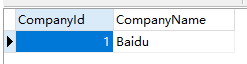
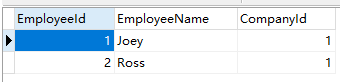
Now, Let's try to delete the company:
static void Main(string[] args)

{

    DeleteCompany(1);

}

private static void DeleteCompany(int companyId)

{

    using (MyContext db = new MyContext())

    {

        Company company = db.Companies.Find(companyId);

        if (company != null)

        {

            db.Companies.Remove(company);

            db.SaveChanges();

        }

    }

}
After run the program, you'll find the employee data is deleted also. Cascade deletion is the default way. if you don't want Cascade deletion, you can configurate it by The DbModelBuilder API or Configuration Classes:
class CompanyMap : EntityTypeConfiguration<Company>

{

    public CompanyMap()

    {

        HasMany(c => c.Employees)

            .WithRequired()

            .HasForeignKey(c=>c.CompanyId)

            .WillCascadeOnDelete(false);

    }

}
If you don't need to access proerty CompanyId in class Employee, you'd better remove it from the class Employee. Then Entity Framework will create a foreign key named Company_CompanyId automatic. Of cause, you can define it flexible by using The DbModelBuilder API or Configuration Classes.
The Many-to-Many relationship
Write some codes first:
class Company

{

    public int CompanyId { get; set; }

    [MaxLength(50)]

    public string CompanyName { get; set; }

    public virtual ICollection<Person> Employees { get; set; }

}

class Person

{

    public int PersonId { get; set; }

    [MaxLength(50)]

    public string PersonName { get; set; }

    public virtual ICollection<Company> companies { get; set; }

}

class MyContext:DbContext

{

    public MyContext():base("name=Test")

    {

    }

    public DbSet<Company> Companies { get; set; }

    public DbSet<Person> People { get; set; }

}
After execute the command Upate-Database, take a look at the database:
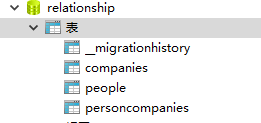
Entity Framework has created a junction table named personcompanies. it's contains two columns: personId and companyId.
Of cause, you also can define the columns's name by coding, for example:
class PersonMap:EntityTypeConfiguration<Person>

{

    public PersonMap()

    {

        HasMany(p => p.companies)

            .WithMany(c => c.Employees)

            .Map(m =>

            {

                m.MapLeftKey("PersonId");

                m.MapRightKey("CompanyId");

            });

    }

}
Add it to Configurations of modelBuilder:
// OnModelCreating is a fucntion of DbContext

protected override void OnModelCreating(DbModelBuilder modelBuilder)

{

    base.OnModelCreating(modelBuilder);

    modelBuilder.Configurations.Add(new PersonMap());

}
The One-to-One relationship
Coding first:
class Person

{

    public int PersonId { get; set; }

    [MaxLength(50)]

    public string PersonName { get; set; }

    public virtual ICollection<Company> companies { get; set; }

    public virtual Student Student{ get; set; }

}

class Student

{

    [Key]

    public int PersonId { get; set; }

    [MaxLength(200)]

    public string SchoolName { get; set; }

    public virtual Person Person { get; set; }

}

class StudentMap:EntityTypeConfiguration<Student>

{

    public StudentMap()

    {

        HasRequired(s => s.Person)

            .WithOptional(s => s.Student);

    }

}
A student must be a person, but a person dosn't must be student, so, the codes like this:
HasRequired(s => s.Person).WithOptional(s => s.Student);
There is another way to create One-to-One relationship. Please see: Lerning Entity Framework 6 ------ Introduction to TPT.
That's all.
Lerning Entity Framework 6 ------ Defining Relationships的更多相关文章
- Lerning Entity Framework 6 ------ Defining the Database Structure
There are three ways to define the database structure by Entity Framework API. They are: Attributes ...
- Lerning Entity Framework 6 ------ Handling concurrency With SQL Server Database
The default Way to handle concurrency of Entity Framework is using optimistic concurrency. When two ...
- Lerning Entity Framework 6 ------ Working with in-memory data
Sometimes, you need to find some data in an existing context instead of the database. By befault, En ...
- Lerning Entity Framework 6 ------ Inserting, Querying, Updating, and Deleting Data
Creating Entities First of all, Let's create some entities to have a test. Create a project Add foll ...
- Lerning Entity Framework 6 ------ Introduction to TPH
Sometimes, you have created two models. They have the same parent class like this: public class Pers ...
- Lerning Entity Framework 6 ------ Complex types
Complex types are classes that map to a subset of columns of a table.They don't contains key. They a ...
- Lerning Entity Framework 6 ------ Using a commandInterceptor
Sometimes, We want to check the original sql statements. creating a commandInterceptor is a good way ...
- Lerning Entity Framework 6 ------ A demo of using Entity framework with MySql
Create a new project named MySqlTest Install following packages by right-clicking on the References ...
- Lerning Entity Framework 6 ------ Joins and Left outer Joins
Joins allow developers to combine data from multiple tables into a sigle query. Let's have a look at ...
随机推荐
- 关于js的function.来自百度知道的回答,学习了.
在js中,创建一个函数对象的语法是var myFunction = new Function(arg1,…,agrN, body);其中,该函数对象的N个参数放在 函数主体参数body的前面,即函数主 ...
- mybatis-mysql类型映射
JDBC Type Java Type CHAR String VARCHAR String LONGVARCHAR String NUMERIC java.math.BigDecimal DECIM ...
- 2018.12.15 poj3415 Common Substrings(后缀自动机)
传送门 后缀自动机基础题. 给两个字符串,让你求长度不小于kkk的公共子串的数量. 这题可以用后缀自动机解决废话 考虑对其中一个字串建出后缀自动机,然后用另一个在上面跑,注意到如果一个状态有贡献的话, ...
- 2018.11.06 bzoj1912: [Apio2010]patrol 巡逻(树形dp)
传送门 一道挺妙的题啊. 对于K==1K==1K==1的直接求树的直径. 对于K==2K==2K==2的先求一次直径,然后考虑到如果两条边加进去形成的两个环重叠就会有负的贡献. 因此把之前那条直径上的 ...
- kmp算法笔记
https://blog.csdn.net/v_july_v/article/details/7041827#comments 链接讲得很详细,画几个重点方便以后忘了捡 next[]数组从第i位递推算 ...
- 类型转化&WCF不同binding的区别
需要使用队列时并且涉及多线程时使用ConcurrentQueue 这个性内比自己使用Queue并且配合lock要好很多 calcFactory = new ChannelFactory<ICal ...
- 介绍用C#和VS2015开发基于Unity架构的2D、3D游戏的技术
[Unity]13.3 Realtime GI示例 摘要: 分类:Unity.C#.VS2015 创建日期:2016-04-19 一.简介 使用简单示例而不是使用实际示例的好处是能让你快速理解光照贴图 ...
- Javascript 需要注意的细节
1.使用 === 代替 ==JavaScript 使用2种不同的等值运算符:===|!== 和 ==|!=,在比较操作中使用前者是最佳实践.“如果两边的操作数具有相同的类型和值,===返回true,! ...
- 大压力下Redis参数调整要点
调整以下参数,可以大幅度改善Redis集群的稳定性: 为何大压力下要这样调整? 最重要的原因之一Redis的主从复制,两者复制共享同一线程,虽然是异步复制的,但因为是单线程,所以也十分有限.如果主从间 ...
- C++类、继承、多态、虚函数
一个比较好的虚函数例子 /****************************/ /* 作者:骆天 */ /* 时间:2018/1/26 */ /* 代码:多态的理解 */ /********** ...