
Spark2.2(三十九):如何根据appName监控spark任务,当任务不存在则启动(任务存在当超过多久没有活动状态则kill,等待下次启动)
业务需求
实现一个根据spark任务的appName来监控任务是否存在,及任务是否卡死的监控。
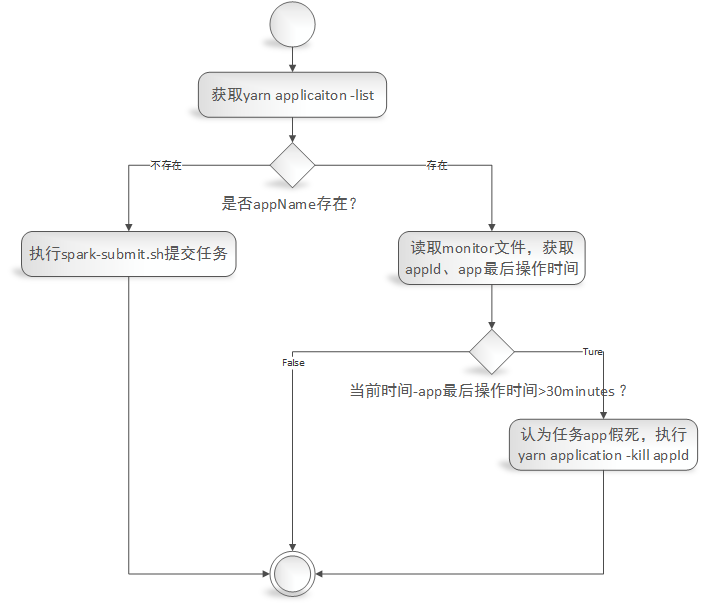
1)给定一个appName,根据appName从yarn application -list中验证任务是否存在,不存在则调用spark-submit.sh脚本来启动任务;
2)如果任务存在yarn application -list中,则读取‘监控文件(监控文件内容包括:appId,最新活动时间)’,从监控文件中读取出最后活动的日期,计算当前日期与app的最后活动日期相差时间为X,如果X大于30minutes(认为任务处于假死状态[再发布环境发现有的任务DAG抛出OOM,导致app的executor和driver依然存在,当时不执行任务调度,程序卡死。具体错误详情请参考《https://issues.apache.org/jira/browse/SPARK-26452》]),则执行yarn application -kill appId(杀掉任务),等待下次监控脚本执行时重启任务。
监控实现
脚本
#/bin/sh

#LANG=zh_CN.utf8

#export LANG

export SPARK_KAFKA_VERSION=0.10

export LANG=zh_CN.UTF-

# export env variable

if [ -f ~/.bash_profile ];

then

   source ~/.bash_profile

fi

source /etc/profile

myAppName='myBatchTopic'               #这里指定需要监控的spark任务的appName,注意:这名字重复了会导致监控失败。

apps=''

for app in `yarn application -list`

do

  apps=${app},$apps

done

apps=${apps%?}

if [[ $apps =~ $myAppName ]];

then

  echo "appName($myAppName) exists in yarn application list"

  #)运行 hadop fs -cat /目录/appName,读取其中最后更新日期;(如果文件不存在,则跳过等待文件生成。)

  monitorInfo=$(hadoop fs -cat /user/dx/streaming/monitor/${myAppName})

  LD_IFS="$IFS"

  IFS=","

  array=($monitorInfo)

  IFS="$OLD_IFS"

  appId=${array[]}

  monitorLastDate=${array[]}

  echo "loading mintor information 'appId:$appId,monitorLastUpdateDate:$monitorLastDate'"

  current_date=$(date "+%Y-%m-%d %H:%M:%S")

  echo "loading current date '$current_date'"

  #)与当前日期对比:

  # 如果距离当前日期相差小于30min,则不做处理;

  # 如果大于30min则kill job,根据上边yarn application -list中能获取对应的appId,运行yarn application -kill appId

  t1=`date -d "$current_date" +%s`

  t2=`date -d "$monitorLastDate" +%s`

  diff_minute=$(($(($t1-$t2))/))

  echo "current date($current_date) over than monitorLastDate($monitorLastDate) $diff_minute minutes"

  if [ $diff_minute -gt  ];

  then

    echo 'over then 30 minutes'

    $(yarn application -kill ${appId})

    echo "kill application ${appId}"

  else

    echo 'less than 30 minutes'

  fi

else

  echo "appName($myAppName) not exists in yarn application list"

  #./submit_x1_x2.sh abc TestRestartDriver #这里指定需要启动的脚本来启动相关任务

  $(nohup ./submit_checkpoint2.sh >> ./output.log >& &)

fi
监控脚本业务流程图:
监控文件生成
我这里程序是spark structured streaming,因此可以注册sparkSesssion的streams()的query的监听事件
sparkSession.streams().addListener(new GlobalStreamingQueryListener(sparkSession。。。))
在监听事件中实现如下:
public class GlobalStreamingQueryListener extends StreamingQueryListener {

    private static final org.slf4j.Logger logger = org.slf4j.LoggerFactory.getLogger(GlobalStreamingQueryListener.class);

    private static final String monitorBaseDir = "/user/dx/streaming/monitor/";

    private SparkSession sparkSession = null;

    private LongAccumulator triggerAccumulator = null;

    public GlobalStreamingQueryListener(SparkSession sparkSession, LongAccumulator triggerAccumulator) {

        this.sparkSession = sparkSession;

        this.triggerAccumulator = triggerAccumulator;

    }

    @Override

    public void onQueryStarted(QueryStartedEvent queryStarted) {

        System.out.println("Query started: " + queryStarted.id());

    }

    @Override

    public void onQueryTerminated(QueryTerminatedEvent queryTerminated) {

        System.out.println("Query terminated: " + queryTerminated.id());

    }

    @Override

    public void onQueryProgress(QueryProgressEvent queryProgress) {

        System.out.println("Query made progress: " + queryProgress.progress());

        // sparkSession.sql("select * from " +

        // queryProgress.progress().name()).show();

        triggerAccumulator.add(1);

        System.out.println("Trigger accumulator value: " + triggerAccumulator.value());

        logger.info("minitor start .... ");

        try {

            if (HDFSUtility.createDir(monitorBaseDir)) {

                logger.info("Create monitor base dir(" + monitorBaseDir + ") success");

            } else {

                logger.info("Create monitor base dir(" + monitorBaseDir + ") fail");

            }

        } catch (IOException e) {

            logger.error("An error was thrown while create monitor base dir(" + monitorBaseDir + ")");

            e.printStackTrace();

        }

        // spark.app.id application_1543820999543_0193

        String appId = this.sparkSession.conf().get("spark.app.id");

        // spark.app.name myBatchTopic

        String appName = this.sparkSession.conf().get("spark.app.name");

        String mintorFilePath = (monitorBaseDir.endsWith(File.separator) ? monitorBaseDir : monitorBaseDir + File.separator) + appName;

        logger.info("The application's id is " + appId);

        logger.info("The application's name is " + appName);

        logger.warn("If the appName is not unique,it will result in a monitor error");

        try {

            HDFSUtility.overwriter(mintorFilePath, appId + "," + new SimpleDateFormat("yyyy-MM-dd HH:mm:ss").format(new Date()));

        } catch (IOException e) {

            logger.error("An error was thrown while write info to monitor file(" + mintorFilePath + ")");

            e.printStackTrace();

        }

        logger.info("minitor stop .... ");

    }

}
HDFSUtility.java中方法如下:
public class HDFSUtility {

    private static final org.slf4j.Logger logger = org.slf4j.LoggerFactory.getLogger(HDFSUtility.class);

    /**

     * 当目录不存在时,创建目录。

     *

     * @param dirPath

     *            目标目录

     * @return true-創建成功;false-失敗。

     * @throws IOException

     * */

    public static boolean createDir(String dirPath) throws IOException {

        FileSystem fs = null;

        Path dir = new Path(dirPath);

        boolean success = false;

        try {

            fs = FileSystem.get(new Configuration());

            if (!fs.exists(dir)) {

                success = fs.mkdirs(dir);

            } else {

                success = true;

            }

        } catch (IOException e) {

            logger.error("create dir (" + dirPath + ") fail:", e);

            throw e;

        } finally {

            try {

                fs.close();

            } catch (IOException e) {

                e.printStackTrace();

            }

        }

        return success;

    }

    /**

     * 覆盖文件写入信息

     *

     * @param filePath

     *            目标文件路径

     * @param content

     *            被写入内容

     * @throws IOException

     * */

    public static void overwriter(String filePath, String content) throws IOException {

        FileSystem fs = null;

        // 在指定路径创建FSDataOutputStream。默认情况下会覆盖文件。

        FSDataOutputStream outputStream = null;

        Path file = new Path(filePath);

        try {

            fs = FileSystem.get(new Configuration());

            if (fs.exists(file)) {

                System.out.println("File exists(" + filePath + ")");

            }

            outputStream = fs.create(file);

            outputStream.write(content.getBytes());

        } catch (IOException e) {

            logger.error("write into file(" + filePath + ") fail:", e);

            throw e;

        } finally {

            if (outputStream != null) {

                try {

                    outputStream.close();

                } catch (IOException e) {

                    e.printStackTrace();

                }

            }

            try {

                fs.close();

            } catch (IOException e) {

                e.printStackTrace();

            }

        }

    }

}
Spark2.2(三十九):如何根据appName监控spark任务,当任务不存在则启动(任务存在当超过多久没有活动状态则kill,等待下次启动)的更多相关文章
- Spark2.3(三十六):根据appName验证某个app是否在运行
具体脚本 #/bin/sh #LANG=zh_CN.utf8 #export LANG export SPARK_KAFKA_VERSION=0.10 export LANG=zh_CN.UTF- # ...
- NeHe OpenGL教程 第三十九课:物理模拟
转自[翻译]NeHe OpenGL 教程 前言 声明,此 NeHe OpenGL教程系列文章由51博客yarin翻译(2010-08-19),本博客为转载并稍加整理与修改.对NeHe的OpenGL管线 ...
- Java进阶(三十九)Java集合类的排序,查找,替换操作
Java进阶(三十九)Java集合类的排序,查找,替换操作 前言 在Java方向校招过程中,经常会遇到将输入转换为数组的情况,而我们通常使用ArrayList来表示动态数组.获取到ArrayList对 ...
- Gradle 1.12用户指南翻译——第三十九章. IDEA 插件
本文由CSDN博客万一博主翻译,其他章节的翻译请参见: http://blog.csdn.net/column/details/gradle-translation.html 翻译项目请关注Githu ...
- SQL注入之Sqli-labs系列第三十八关、第三十九关,第四十关(堆叠注入)
0x1 堆叠注入讲解 (1)前言 国内有的称为堆查询注入,也有称之为堆叠注入.个人认为称之为堆叠注入更为准确.堆叠注入为攻击者提供了很多的攻击手段,通过添加一个新 的查询或者终止查询,可以达到修改数据 ...
- 第三百三十九节,Python分布式爬虫打造搜索引擎Scrapy精讲—Scrapy启动文件的配置—xpath表达式
第三百三十九节,Python分布式爬虫打造搜索引擎Scrapy精讲—Scrapy启动文件的配置—xpath表达式 我们自定义一个main.py来作为启动文件 main.py #!/usr/bin/en ...
- centos shell编程5 LANMP一键安装脚本 lamp sed lnmp 变量和字符串比较不能用-eq cat > /usr/local/apache2/htdocs/index.php <<EOF重定向 shell的变量和函数命名不能有横杠 平台可以用arch命令,获取是i686还是x86_64 curl 下载 第三十九节课
centos shell编程5 LANMP一键安装脚本 lamp sed lnmp 变量和字符串比较不能用-eq cat > /usr/local/apache2/htdocs/ind ...
- “全栈2019”Java第三十九章:构造函数、构造方法、构造器
难度 初级 学习时间 10分钟 适合人群 零基础 开发语言 Java 开发环境 JDK v11 IntelliJ IDEA v2018.3 文章原文链接 "全栈2019"Java第 ...
- WPF,Silverlight与XAML读书笔记第三十九 - 可视化效果之3D图形
原文:WPF,Silverlight与XAML读书笔记第三十九 - 可视化效果之3D图形 说明:本系列基本上是<WPF揭秘>的读书笔记.在结构安排与文章内容上参照<WPF揭秘> ...
随机推荐
- html5的audio实现高仿微信语音播放效果Demo
HTML部分: <!DOCTYPE html> <html> <head> <meta charset="utf-8"> <t ...
- redis 在 php 中的应用
一.redis 在 php 中的应用(Key篇) 二.redis 在 php 中的应用(String篇) 三.redis 在 php 中的应用(Hash篇) 四.redis 在 php 中的应用(Li ...
- Excel表列名称(给定一个正整数,返回它在 Excel 表中相对应的列名称。)
例如, 1 -> A 2 -> B 3 -> C ... 26 -> Z 27 -> AA 28 -> AB ... 示例 1: 输入: 1 输出: "A ...
- Python argparse 模块
Python argparse 模块 test.py: import argparse argparser = argparse.ArgumentParser(add_help=False) argp ...
- Python NLTK 自然语言处理入门与例程(转)
转 https://blog.csdn.net/hzp666/article/details/79373720 Python NLTK 自然语言处理入门与例程 在这篇文章中,我们将基于 Pyt ...
- bootstrap-fileinput文件上传控件的亲身实践
经理让我帮服务器开发人员开发一个上传文件功能界面,我就想着以前使用过bootstrap-fileinput插件进行文件上传,很不错.赶紧就撸起来了. 1.下载压缩包.插件地址https://githu ...
- 动态 Web Server 技术发展历程
动态 Web Server 技术发展历程 开始接触 Java Web 方面的技术,此篇文章是以介绍 Web server 相关技术的演变为主来作为了解 Java servlet 的技术背景,目的是更好 ...
- Yolov3参数解释以及答疑
目录 参数解析 训练答疑 参数解析 [net] #Testing #batch=1 //test:一次一个图片 #subdivisions=1 #Training batch=32 //一次迭代送 ...
- ppt字体
字体也需要设计. 太大众不太好. ppt自带的字体样式 有毛笔风格的.vrinda. 其他的和这个字体样式差不多.选其中一个就可以了. 其他的个性样式就需要下载字体扩展了.作为经常做ppt的,还 ...
- 2018-6-8随笔-combox绑定-语音-删空格
1.下面介绍三种对comboBox绑定的方式,分别是泛型中IList和Dictionary,还有数据集DataTable ----->>>>>飞机票 2. 简单的语音播报 ...