
解决mybatis实体类和数据库列名不匹配的两种办法
我们在实际开发中,会遇到实体类与数据库类不匹配的情况,在开发中就会产生各种各样的错误,那么我们应该怎么去解决这一类的错误呢?很简单,下面我们介绍两种解决方法:
首先我们看一下数据库和实体类不匹配的情况:
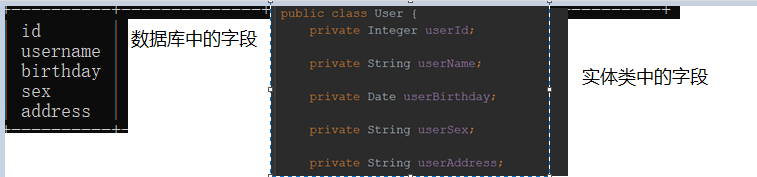
解决办法1
当我们查询的时候我们可以在映射文件mapper.xml中采取取别名的方式:
	 <select id="findAll" resultMap="cn.com.scitc.domian.User" >

       select id as userId,username as userName,birthday as userBirthday,sex as userSex,address as userAddress from user

    </select>

 <!--配置查询所有-->

    <select id="findAll" resultType="cn.com.scitc.domian.User" >

--       select id as userId,username as userName,birthday as userBirthday,sex as userSex,address as userAddress from user

          select * from user;

    </select>

    <!--save-->

    <insert id="saveUser" parameterType="cn.com.scitc.domian.User">

<!-- 配置插入操作后,获取插入数据的id  keyProperty实体类  keyColum是数据库的值 order什么时候操作-->

    <selectKey keyProperty="id" keyColumn="id" resultType="int" order="AFTER" >

        select last_insert_id()

    </selectKey>

        insert into user (username,birthday,sex,address) values (#{userName},#{userBirthday},#{userSex},#{userAddress});

    </insert>

    <!--update-->

    <update id="updateUser" parameterType="cn.com.scitc.domian.User">

        update user set username = #{userName},birthday=#{userBirthday},sex=#{userSex},address=#{userAddress} where id=#{id}

    </update>

<!--delete-->

    <delete id="deleteUser" parameterType="int">

        delete from user where id = #{id}

    </delete>

    <!--用id 查询一个  交代清楚返回的结果-->

    <select id="findById" parameterType="Integer" resultType="cn.com.scitc.domian.User">

        select * from user where id = #{userId}

    </select>

    <!--username模糊查询-->

    <select id="fingByName" parameterType="string" resultType="cn.com.scitc.domian.User">

        select * from user where username like #{userName}

    </select>
我们再看看接口和测试类
接口dao中
	public interface UserDao {

//    查询所有

//    @Select("select * from user")

    List<User> findAll();

//    save

    void saveUser(User user);

//    update

    void updateUser(User user);

//    delete

    void deleteUser(Integer userId);

//    查询一个

    User findById(Integer userId);

//    根据名称 模糊查询

    List<User> fingByName(String username);

}
实现类:
public class MybatisTest {

//    初始化值

    private InputStream in;

    private SqlSession sqlSession;

    private UserDao userDao;

//    在测试方法执行之前执行

    @Before

    public void init() throws Exception{

//        读取文件

        in = Resources.getResourceAsStream("mybatis-Config.xml");

        SqlSessionFactory factory = new SqlSessionFactoryBuilder().build(in);

        sqlSession = factory.openSession();

        userDao = sqlSession.getMapper(UserDao.class);

    }

    @After

    public void destory() throws Exception{

//        提交事务

        sqlSession.commit();

//        释放资源

        sqlSession.close();;

        in.close();

    }

    @Test

    public void testFindAll() throws Exception{

            List<User> users = userDao.findAll();

            for (User user : users){

                System.out.println("对象有:"+user);

            }

    }

//    saveTest

    @Test

    public void TestSave() {

        User user = new User();

        user.setUserName("modify 修改");

        user.setUserBirthday(new Date());

        System.out.println("保存方法之前"+user);

        user.setUserSex("男");

        user.setUserAddress("天津");

        userDao.saveUser(user);

        System.out.println("保存方法之后"+user);

    }

//    update

    @Test

    public void TestUpdate() {

        User user = new User();

        user.setUserId(5);

        user.setUserName("aa");

        user.setUserBirthday(new Date());

        user.setUserSex("男");

        user.setUserAddress("德阳");

        userDao.updateUser(user);

    }

    @Test

    public void TestDelete(){

        userDao.deleteUser(5);

    }

//    findById

    @Test

    public void findById(){

        User user = userDao.findById(3);

        System.out.println(user);

    }

//username模糊查询

    @Test

    public void TestFindByName(){

        List<User> users = userDao.fingByName("%李%");

//        List<User> users = userDao.fingByName("李四");

        for (User user:users){

            System.out.println(user);

        }

    }

    //查询总记录数

    @Test

    public void findTotal(){

        int count = userDao.findTotal();

        System.out.println(count);

    }

    //username模糊查询

    @Test

    public void TestQuery(){

        QueryVo queryVo = new QueryVo();

        User user = new User();

        user.setUserName("%李%");

        queryVo.setUser(user);

        List<User> userByVo = userDao.findUserByVo(queryVo);

        for (User u:userByVo){

            System.out.println(u);

        }

    }

}
解决办法2
配置查询结果的列名和实体类的属性名对应的关系
依然是映射文件
 <!--配置查询结果的列名 和实体类的属性名对应的关系-->

    <resultMap id="userMap" type="cn.com.scitc.domian.User">

        <!--主键字段对应名-->

        <id property="userId" column="id"></id>

        <!--非主键字段的对应 property是实体类严格区分大小写 column数据库字段严格按照数据库字段 -->

        <result property="userName" column="username"></result>

        <result property="userBirthday" column="birthday"></result>

        <result property="userSex" column="sex"></result>

        <result property="userAddress" column="address"></result>

    </resultMap>
我们在mapper.xml文件中配置这些配置的作用就是与数据库进行关联:
=注意
主键 :实体类的主键id一定要和数据库的主键id写对
property:是实体类严格区分大小写
column数据库字段严格按照数据库字段
配置好这些 我们就开始引用。
<!DOCTYPE mapper

        PUBLIC "-//mybatis.org//DTD Mapper 3.0//EN"

        "http://mybatis.org/dtd/mybatis-3-mapper.dtd">

<!--namespace dao权限类名===别名-->

<mapper namespace="cn.com.scitc.dao.UserDao">

    <!--配置查询结果的列名 和实体类的属性名对应的关系-->

    <resultMap id="userMap" type="cn.com.scitc.domian.User">

        <!--主键字段对应名-->

        <id property="userId" column="id"></id>

        <!--非主键字段的对应 property是实体类严格区分大小写 column数据库字段严格按照数据库字段 -->

        <result property="userName" column="username"></result>

        <result property="userBirthday" column="birthday"></result>

        <result property="userSex" column="sex"></result>

        <result property="userAddress" column="address"></result>

    </resultMap>

    <!--配置查询所有-->

    <select id="findAll" resultType="userMap" >

--       select id as userId,username as userName,birthday as userBirthday,sex as userSex,address as userAddress from user

          select * from user;

    </select>

    <!--save-->

    <insert id="saveUser" parameterType="userMap">

<!-- 配置插入操作后,获取插入数据的id  keyProperty实体类  keyColum是数据库的值 order什么时候操作-->

    <selectKey keyProperty="id" keyColumn="id" resultType="int" order="AFTER" >

        select last_insert_id()

    </selectKey>

        insert into user (username,birthday,sex,address) values (#{userName},#{userBirthday},#{userSex},#{userAddress});

    </insert>

    <!--update-->

    <update id="updateUser" parameterType="userMap">

        update user set username = #{userName},birthday=#{userBirthday},sex=#{userSex},address=#{userAddress} where id=#{id}

    </update>

<!--delete-->

    <delete id="deleteUser" parameterType="int">

        delete from user where id = #{id}

    </delete>

    <!--用id 查询一个  交代清楚返回的结果-->

    <select id="findById" parameterType="Integer" resultType="userMap">

        select * from user where id = #{userId}

    </select>

    <!--username模糊查询-->

    <select id="fingByName" parameterType="string" resultType="userMap">

        select * from user where username like #{userName}

    </select>

    <!--username模糊查询  第二种写法-->

    <!--<select id="fingByName" parameterType="string" resultType="cn.com.scitc.domian.User">-->

        <!--select *from user where username like '%${value}%'-->

    <!--</select>-->

    <!--获取用户总记录条数-->

    <select id="findTotal" resultType="int">

        select count(id) from user

    </select>

    <!--根据queryVo的条件查询用户-->

    <select id="findUserByVo" parameterType="cn.com.scitc.domian.QueryVo" resultType="UserMap">

          select * from user where username like #{user.userName}

    </select>

</mapper>
就是相当于把每一个要执行的sql语句的resultType的参数换成resultMap的值。
最后在进行测试就OK.。
解决mybatis实体类和数据库列名不匹配的两种办法的更多相关文章
- 阶段3 1.Mybatis_05.使用Mybatis完成CRUD_9 Mybatis中的返回值深入-解决实体类属性和数据库列名不对应的两种方式
sql语句里面起别名的方式 测试查询的方法 数据字段 都有值了. 配置查询接口列表和实体类属性名对应关系 id可以随便起名 主键的对应 再次测试,并没有封装成功 这是应为定义的对应关系并没有使用. 当 ...
- 实体类与数据库字段不匹配问题,java.sql.SQLSyntaxErrorException: Unknown column 'xxx' in 'field list'
控制台报错 ### Error querying database. Cause: java.sql.SQLSyntaxErrorException: Unknown column 'user_nam ...
- MyBatis系列二 之 数据库列名于程序实体类中字段名称不一致
MyBatis系列二 之 数据库列名于程序实体类中字段名称不一致 情景:当数据库中的列名与我们程序实体类中的字段名称不一致 使用ResultMap节点配置信息 在映射文件中 ...
- 解决SpringDataJpa实体类中属性顺序与数据库中生成字段顺序不一致的问题
一.在application.yml配置中添加数据库根据实体类自动创建数据库表的配置(这里数据库采用MySQL数据库) jpa: database: MYSQL show-sql: true #Hib ...
- 在Code First中使用Migrations对实体类和数据库做出变更
在Code First中使用Migrations对实体类和数据库做出变更,Mirgration包含一系列命令. 工具--库程序包管理器--程序包管理器控制台 运行命令:Enable-Migration ...
- ASP.NET Core EFCore 之DBFirst 自动创建实体类和数据库上下文
通过引用Nuget包添加实体类 运行 Install-Package Microsoft.EntityFrameworkCore.SqlServer 运行 Install-Package Micros ...
- Oracle数据库日期范围查询的两种实现方式
参考文档:http://database.51cto.com/art/201108/288058.htm Oracle数据库日期范围查询有两种方式:to_char方式和to_date方式,接下来我们通 ...
- Mybatis实体类属性与数据库字段不一致解决办法
例如:实体类 String userName 数据库:name 解决办法一: 通过给字段加别名,别名写成实体类属性一 eg:select name userName from student ...
- Mybatis——实体类属性名和数据库字段名不同时的解决方案
数据库的字段: 对应的实体类: 方案一: 在XML映射文件中使用的resultMap,优点:可以被重复使用. <resultMap id="BaseResultMap" ty ...
随机推荐
- JQuery 自定义属性取值 赋值
<span id="status_68" data-id="0" onclick="collection(68,false);" cl ...
- Mathtype安装与最简破解
1.MathType资源 链接: https://pan.baidu.com/s/1UapJCcfU7Me_rIWdAe5nfw 提取码: 1y9i 2.破解 我之前的30天试用期过了,没来得 ...
- RabbitMQ官方教程五 Topic(GOLANG语言实现)
在上一教程中,我们改进了日志记录系统. 我们没有使用只能进行虚拟广播的fanout交换器,而是使用直接交换器,并有可能选择性地接收日志. 尽管使用直接交换改进了我们的系统,但它仍然存在局限性-它不能基 ...
- CF1227D Optimal Subsequences
思路: 首先对于单个查询(k, p)来说,答案一定是a数组中的前k大数.如果第k大的数字有多个怎么办?取索引最小的若干个.所以我们只需对a数组按照值降序,索引升序排序即可. 多个查询怎么办?离线处理. ...
- mysql 5.7 停电导致无法启动、如何备份数据,重新安装mysql
用于记录服务器停电导致,mysql启动失败后,如何备份数据,重新安装mysql,主要分为数据备份,mysql重新安装. 1.mysql无法启动时,进行数据备份. 执行:systemctl start ...
- NGINX---一次阿里云宝塔开发flask经历
1.放行端口问题 不但需要在阿里云官网服务器控制台放行端口,还需要在宝塔里面放行端口 2.nginx 宝塔默认的用户是www 句法: user user [group]; 默认: 用户无人; 语境: ...
- nginx配置的记录
基本使用 语法规则: location [=|~|~*|^~] /uri/ { - } = 开头表示精确匹配 ^~ 开头表示uri以某个常规字符串开头,理解为匹配 url路径即可.nginx不对url ...
- Java的设计模式(7)— 生产者-消费者模式
生产者-消费者模式是一个经典的多线程设计模式,它为多线程间的协作提供了良好的解决方案.这个模式中,通常有两类线程,即若干个生产者线程和若干个消费者线程.生产者线程负责提交用户请求,消费者线程则负责具体 ...
- 关于python的一次性能调优过程
问题 这两天在公司帮老大写一个程序功能,要求抓取从elasticsearch和kibana服务器上返回的数据,统计所有hits的数据字段ret_code为0的hit,并计算其占有率等一些功能. 功能倒 ...
- Map、FlatMap 和 Reduce
Map 作用是生成一个新数组,遍历原数组,将每个元素拿出来做一些变换然后 append 到新的数组中. [1, 2, 3].map((v) => v + 1) // -> [2, 3, 4 ...