
iOS滤镜功能
一、iOS自带滤镜
1.CoreImage
使用苹果自带的CoreImage框架对图片进行处理,用CoreImage框架里的CIFilter对图片进行滤镜处理,
首先我们应该了解下CoreImage框架能够对图像进行那些处理和拥有哪些特效。
苹果给我们提供了将近200中滤镜效果
// 这里我们可以看到总共有多少种滤镜

 NSArray *filterNames = [CIFilter filterNamesInCategory:@"CICategoryBuiltIn"];
     NSLog(@"总共有%ld种滤镜效果:%@",filterNames.count,filterNames);

    //以一个具体分类中的滤镜信息

    NSArray* filters =  [CIFilter filterNamesInCategory:kCICategoryDistortionEffect];

    for (NSString* filterName in filters) {

        NSLog(@"filter name:%@",filterName);

        // 我们可以通过filterName创建对应的滤镜对象

        CIFilter* filter = [CIFilter filterWithName:filterName];

        NSDictionary* attributes = [filter attributes];

        // 获取属性键/值对(在这个字典中我们可以看到滤镜的属性以及对应的key)        NSLog(@"filter attributes:%@",attributes);

    }
然后我们还可以进入苹果iOS官方文档中具体看看效果到底是什么样子的Core Image Filter Reference
可以看到CoreImage中的CIFilter效果确实很多,分很多种类别,每个分类中又有多个效果
2.滤镜怎么实现
CoreImage框架提供三个API来实现滤镜效果
CIContext:核心API,来管理所有的图片处理操作。
CIFilter:过滤器,通过在创建CIFilter时需要传入不同的参数即可创建不同类型的过滤器。
CIImage:它代表 Core Image 过滤器处理的图片,CIFilter过滤器的输入图片,输出图片都由该CIImage代表。
CIContext:创建分三种方式,因为采用基于GPU的CIContext将可以获得更好的性能,因此,
一般建议创建基于GPU的CIContext,但基于GPU的CIContext对象无法跨应用访问,这个问题需要注意
 //1.创建基于CPU的CIContext对象

 self.context = [CIContext contextWithOptions:

    [NSDictionary dictionaryWithObject:[NSNumber numberWithBool:YES]

 forKey:kCIContextUseSoftwareRenderer]];

    //2.创建基于GPU的CIContext对象

 self.context = [CIContext contextWithOptions: nil];

    //3.创建基于OpenGL优化的CIContext对象,可获得实时性能

self.context = [CIContext contextWithEAGLContext:[[EAGLContext alloc] initWithAPI:kEAGLRenderingAPIOpenGLES2]];

// 将UIImage转换成CIImage

    CIImage *ciImage = [[CIImage alloc] initWithImage:[UIImage imageNamed:@"WechatIMG1.jpeg"]];

    // 创建滤镜

    CIFilter *filter = [CIFilter filterWithName:_dataSourse[indexPath.row]

                                  keysAndValues:kCIInputImageKey, ciImage, nil];

    [filter setDefaults];

    // 获取绘制上下文

    CIContext *context = [CIContext contextWithOptions:nil];

    // 渲染并输出CIImage

    CIImage *outputImage = [filter outputImage];

    // 创建CGImage句柄

    CGImageRef cgImage = [self.context createCGImage:outputImage

                                      fromRect:[outputImage extent]];

    imageview.image = [UIImage imageWithCGImage:cgImage];

    // 释放CGImage句柄

    CGImageRelease(cgImage);
二、GPUImage实现滤镜
1. GPUImage
GPUImage是现在做滤镜最主流的开源框架,没有之一。作者BradLarson基于openGL对图片处理单元进行封装,
提供出GPUImageFilter基类,配合shader,常用滤镜都拿下不是问题。
1.1、安装(请参考这个 https://www.jianshu.com/p/4d419a88ecce)
(1):首先下载GPUImagehttps://github.com/BradLarson/GPUImage
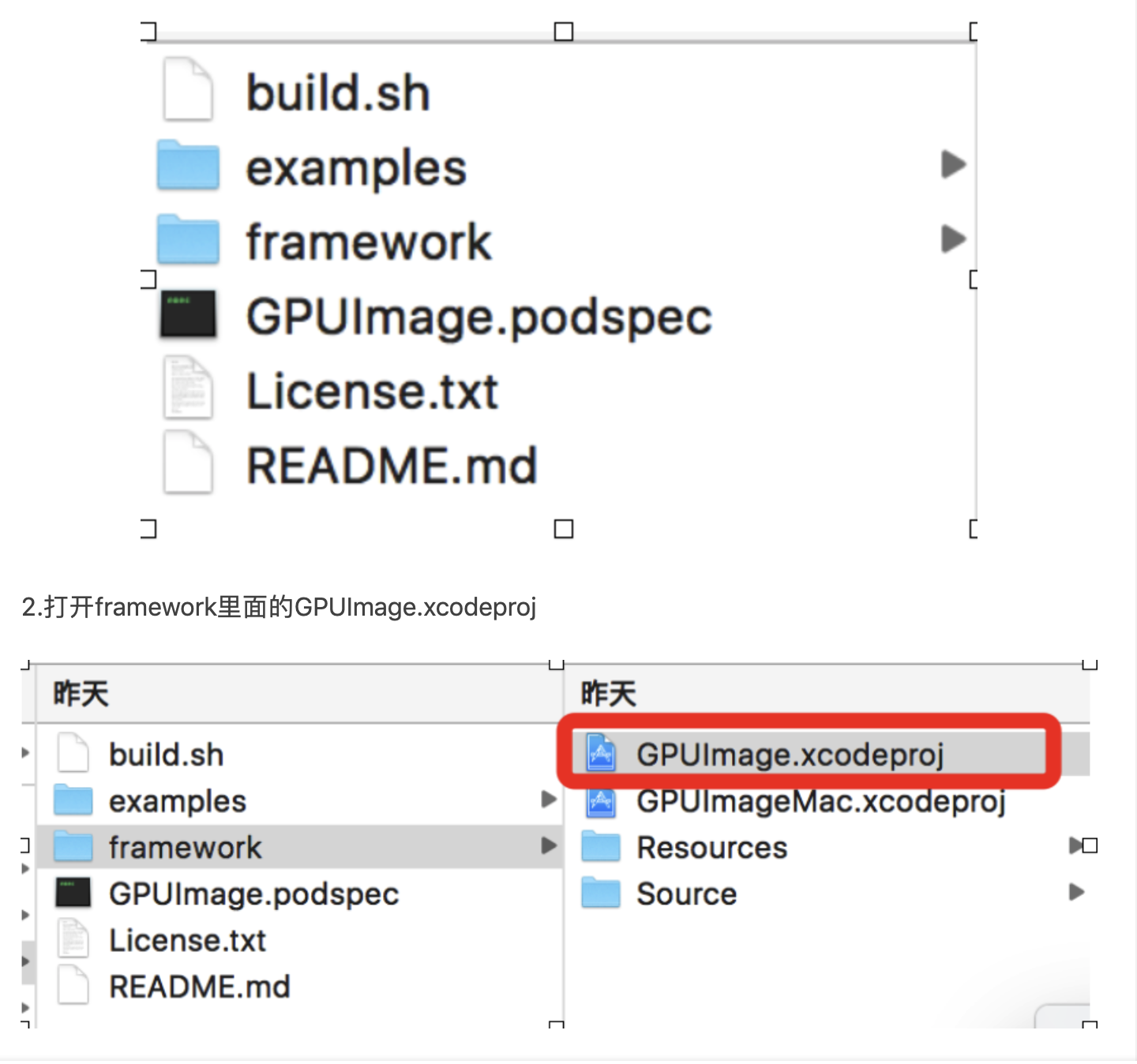
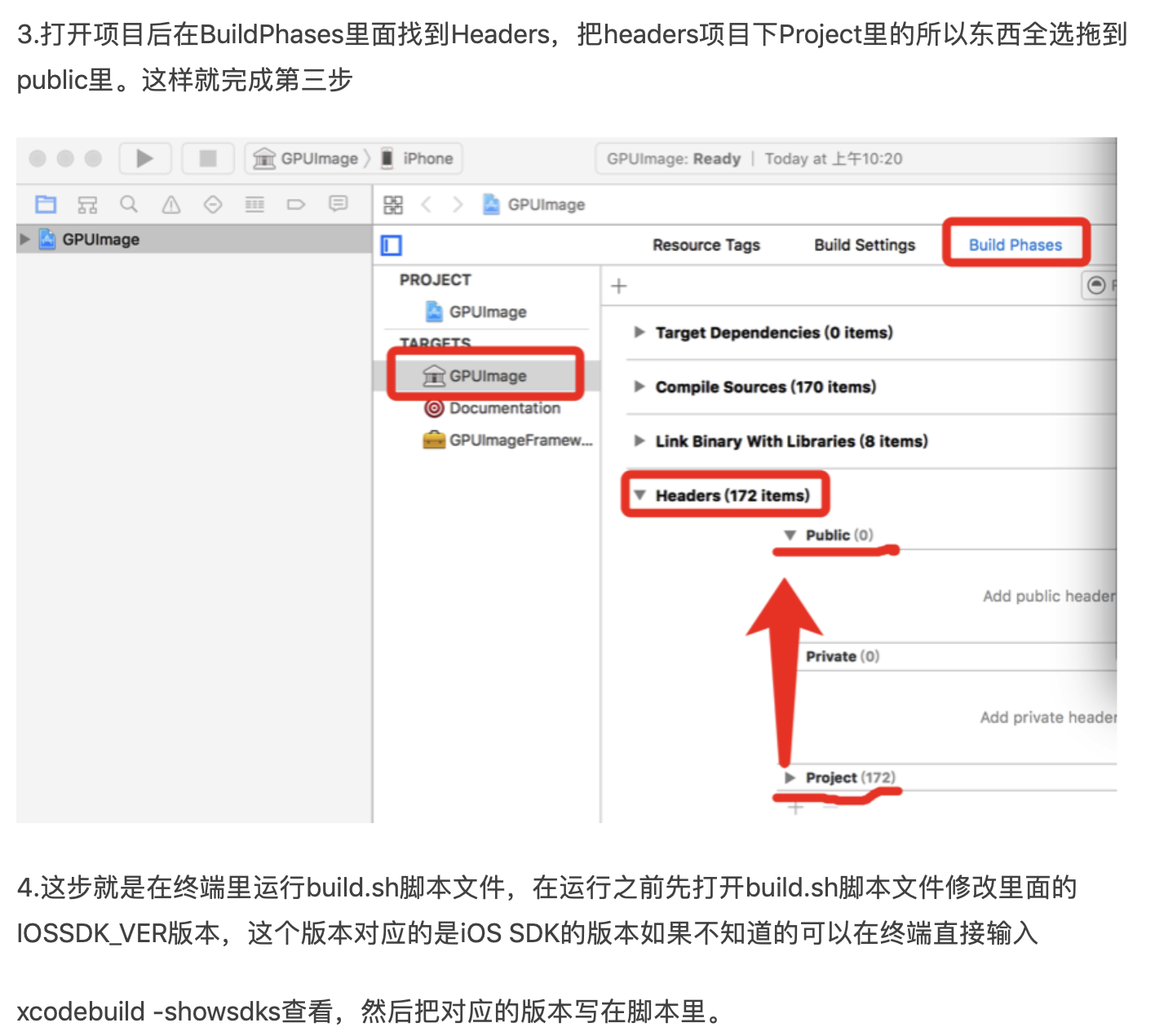
(2):解压后,在framework 目录下,打开 GPUImage.xcodeproj 工程
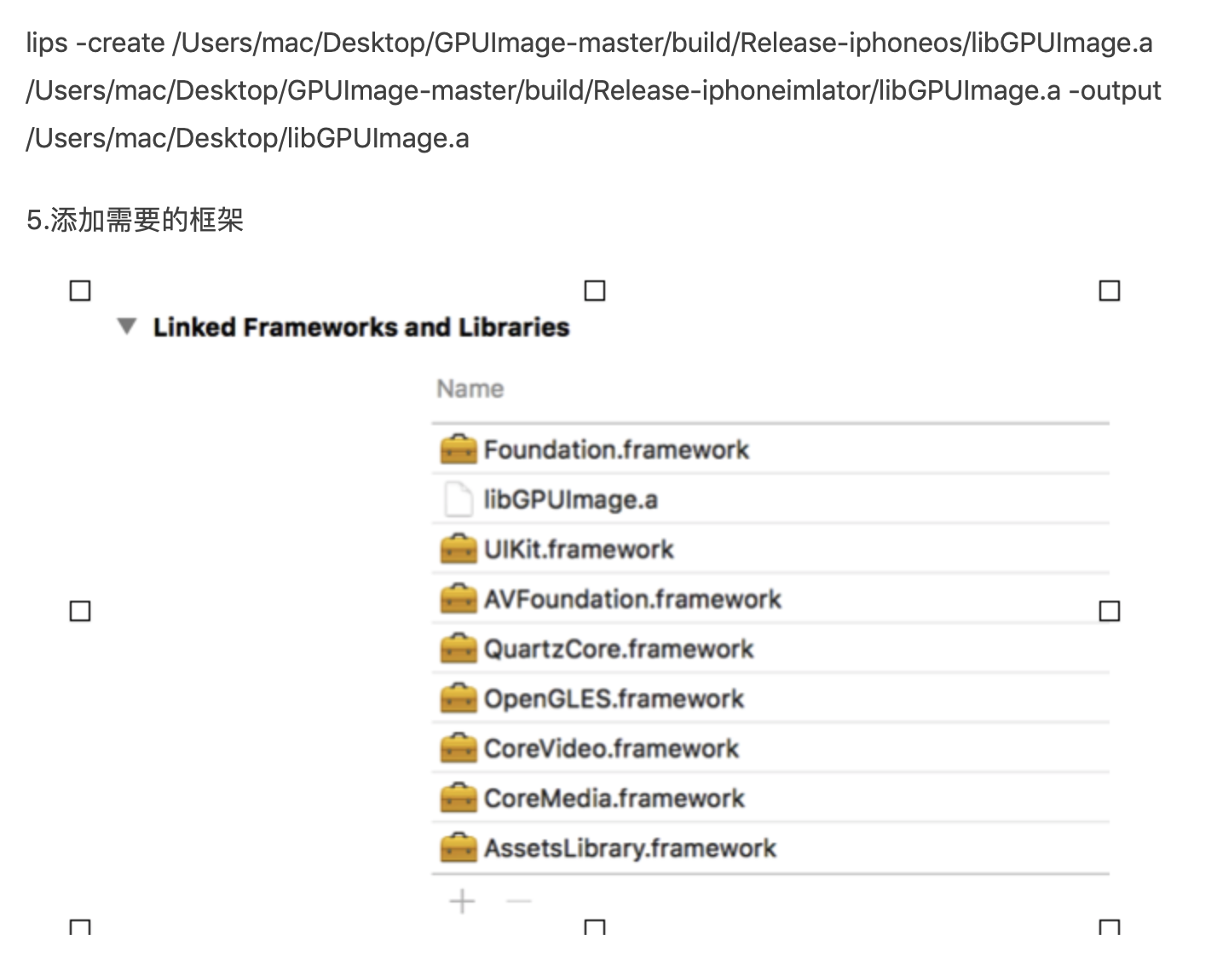
下载完成打开文件有件

2、GPUImage的使用
使用GPUImage自带的滤镜,GPUImage自带的滤镜有很多种这里举例一种
 GPUImageBrightnessFilter *disFilter = [[GPUImageBrightnessFilter alloc] init];

        //设置美白参数

        disFilter.brightness = 0.2;

        //设置要渲染的区域

        [disFilter forceProcessingAtSize:image.size];

        [disFilter useNextFrameForImageCapture];

        //获取数据源

        GPUImagePicture *stillImageSource = [[GPUImagePicture alloc]initWithImage:image];

        //添加上滤镜

        [stillImageSource addTarget:disFilter];

        //开始渲染

        [stillImageSource processImage];

        //获取渲染后的图片

        UIImage *newImage = [disFilter imageFromCurrentFramebuffer];

        return newImage;
另外就是根据纹理自定义滤镜来处理图片,纹理图片可有设计提供,另外纹理的叠加还需要研究
#import "GPUImageTwoInputFilter.h"

#import "GPUImage.h"

NS_ASSUME_NONNULL_BEGIN

@interface DhGPUImageQingXinFilter : GPUImageTwoInputFilter

@end

@interface GPUImageQingXinFilter : GPUImageFilterGroup

{

    GPUImagePicture *imageSource ;

    GPUImagePicture *imageSource2 ;

}

@end

NS_ASSUME_NONNULL_END
#import "DhGPUImageQingXinFilter.h"

#import "GPUImageLookupFilter.h"

#import "GPUImageFilter.h"

//自定义shader

NSString *const GPUImageQingXinFilterString = SHADER_STRING

(

 precision lowp float;

 varying highp vec2 textureCoordinate;

 uniform sampler2D inputImageTexture;

 uniform sampler2D inputImageTexture2;

 void main()

 {

     vec3 texel = texture2D(inputImageTexture, textureCoordinate).rgb;

     texel = vec3(

                  texture2D(inputImageTexture2, vec2(texel.r, .)).r,

                  texture2D(inputImageTexture2, vec2(texel.g, .)).g,

                  texture2D(inputImageTexture2, vec2(texel.b, .)).b);

     gl_FragColor = vec4(texel, 1.0);

 }

 );

@implementation DhGPUImageQingXinFilter

- (id)init;

{

    if (!(self = [super initWithFragmentShaderFromString:GPUImageQingXinFilterString]))

    {

        return nil;

    }

    return self;

}

@end

@implementation GPUImageQingXinFilter

- (id)init

{

    if (!(self = [super init]))

    {

        return nil;

    }

    //  清新

    UIImage *image2 = [UIImage imageNamed:@"camera_filter_overlay_map.png"];

    UIImage *image = [UIImage imageNamed:@"camera_filter_sierra_map"];

    imageSource = [[GPUImagePicture alloc] initWithImage:image];

    DhGPUImageQingXinFilter *filter = [[DhGPUImageQingXinFilter alloc] init];

    [self addFilter:filter];

    [imageSource addTarget:filter atTextureLocation:];

    [imageSource processImage];

    imageSource2 = [[GPUImagePicture alloc] initWithImage:image2];

    DhGPUImageQingXinFilter *filter2 = [[DhGPUImageQingXinFilter alloc] init];

    [filter addTarget:filter2];

    [imageSource2 addTarget:filter2];

    [imageSource2 processImage];

    [self addFilter:filter2];

    self.initialFilters = [NSArray arrayWithObjects:filter, nil];

    self.terminalFilter = filter;

    return self;

}

- (void)dealloc

{

#if !OS_OBJECT_USE_OBJC

    if (imageCaptureSemaphore != NULL)

    {

        dispatch_release(imageCaptureSemaphore);

    }

#endif

}

@end
iOS滤镜功能的更多相关文章
- iOS滤镜系列-滤镜开发概览
概述 滤镜最早的出现应该是应用在相机镜头前实现自然光过滤和调色的镜片,然而在软件开发中更多的指的是软件滤镜,是对镜头滤镜的模拟实现.当然这种方式更加方便快捷,缺点自然就是无法还原拍摄时的真实场景,例如 ...
- iOS Simulator功能介绍关于Xamarin IOS开发
iOS Simulator功能介绍关于Xamarin IOS开发 iOS Simulator功能介绍 在图1.38所示的运行效果中,所见到的类似于手机的模型就是iOS Simulator.在没有iPh ...
- 转载]IOS LBS功能详解[0](获取经纬度)[1](获取当前地理位置文本 )
原文地址:IOS LBS功能详解[0](获取经纬度)[1](获取当前地理位置文本作者:佐佐木小次郎 因为最近项目上要用有关LBS的功能.于是我便做一下预研. 一般说来LBS功能一般分为两块:一块是地理 ...
- iOS 添加功能引导图
iOS 添加功能引导图 首次安装app之后,打开app首页,有一张功能引导图,其实最简单的一种做法是,直接在这个首页上加一个蒙层图片. 在蒙层上用气泡显示文字注明功能介绍,这个蒙层图片,让你们的UI设 ...
- 利用OC对象的消息重定向forwardingTargetForSelector方法构建高扩展性的滤镜功能
在OC中,当像一个对象发送消息,而对象找到消息后,从它的类方法列表,父类方法列表,一直找到根类方法列表都没有找到与这个选择子对应的函数指针.那么这个对象就会触发消息转发机制. OC对象的继承链和isa ...
- IOS 封装功能和逻辑思想
在ios开发中,难免会用到helper的思想.这篇就简单讲解下关于helper的简单实用方法. 假设我们要做一个这样的界面: 会议分为四种情况: 未召开 正在召开 已结束 已取消 再看看逻辑关系: 编 ...
- iOS滤镜实现之LOMO(美图秀秀经典LOMO)
LOMO追求鲜艳色彩,随意.自由的态度,是一种经常使用的滤镜,今天介绍一下iOS 中LOMO滤镜的实现 首先它有3张输入图像 1.我们要处理的图像.即我们要应用LOMO滤镜的图像 2 3 在gpuim ...
- iOS手机功能汇总
开发中经常会调用手机功能,今天来汇总一下,若有不足欢迎大家指出,下面分别介绍如下功能 : 电话 短信 邮件 通讯录 定位 跳转应用 跳转App Store 打开其他文件 电话 调用电话有下图两种不同样 ...
- Android Animation学习 实现 IOS 滤镜退出动画
IOS的用户体验做的很好,其中一点很重要的地方就是动画效果. 最近在学习Android的Animation,简单实现了一个IOS相机滤镜退出的动画: 布局文件:activity_animation_d ...
随机推荐
- 一些有用的github收藏(持续更新中...)
1.facebook的c++开源库folly(Facebook open source library)介绍 https://github.com/facebook/folly 2.pprint 一个 ...
- 软件定义网络基础---SDN的核心思想
一:SDN包含的核心思想:解耦,抽象,可编程 二:解耦 (一)SDN网络解耦思想 解耦是指将控制平面和数据平面进行分离,主要为了解决传统网络中控制平面和数据平面在物理上紧耦合导致的问题 控制平面和数据 ...
- 【Java】分布式自增ID算法---雪花算法 (snowflake,Java版)
一般情况,实现全局唯一ID,有三种方案,分别是通过中间件方式.UUID.雪花算法. 方案一,通过中间件方式,可以是把数据库或者redis缓存作为媒介,从中间件获取ID.这种呢,优点是可以体现全局的递增 ...
- matlab基本函数inf, isempty, round, floor, fix
一起来学演化计算-matlab基本函数inf, isempty, round, floor ,fix 觉得有用的话,欢迎一起讨论相互学习~Follow Me inf matlab中 inf无穷大量+∞ ...
- 123457123457#0#-----com.tym.YuErBaiKeTYM--前拼后广--育儿百科
com.tym.YuErBaiKeTYM--前拼后广--育儿百科
- 《MySQL必知必会》学习笔记——第30章 改善性能
本章将付息与MySQL性能有关的某些要点. 30.1 改善性能 数据库管理员把他们生命中的相当一部分时间花在了调整.试验以改善DBMS性能之上.在诊断英勇的滞缓现象和性能问题时,性能不良的数据库(以及 ...
- openfoam耦合liggghts安装
本次安装基于新安装的ubuntu18.04LTS桌面版系统,用户名为ubuntu,此前未安装其他软件(进行了系统提醒的更新),安装时间为2019年9月. 安装前需确认需要安装的OpenFOAM版本,C ...
- autocomplete="off" 在新版chrome中不起作用
autocomplete="off" 在新版chrome中不起作用,还是自动填充了 用户名和密码,改为 autocomplete="new-password" ...
- python 线程队列PriorityQueue(优先队列)(37)
在 线程队列Queue / 线程队列LifoQueue 文章中分别介绍了先进先出队列Queue和先进后出队列LifoQueue,而今天给大家介绍的是最后一种:优先队列PriorityQueue,对队列 ...
- 使用speedtest-cli测量服务器带宽
使用speedtest-cli测量服务器带宽,这个是python写的工具,很方便,只需要在服务器端安装即可. 1.安装python-pip # yum install python-pip –y 2. ...