
Android第五次作业
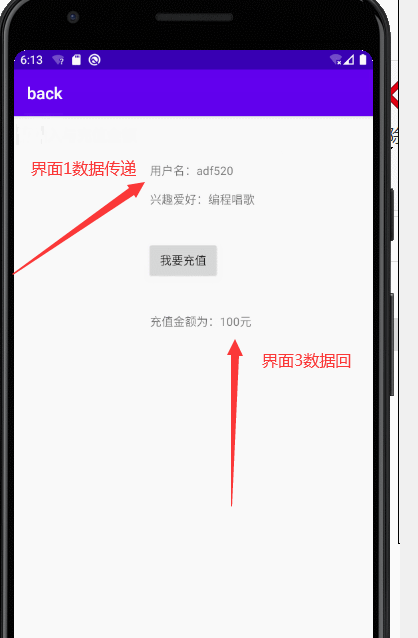
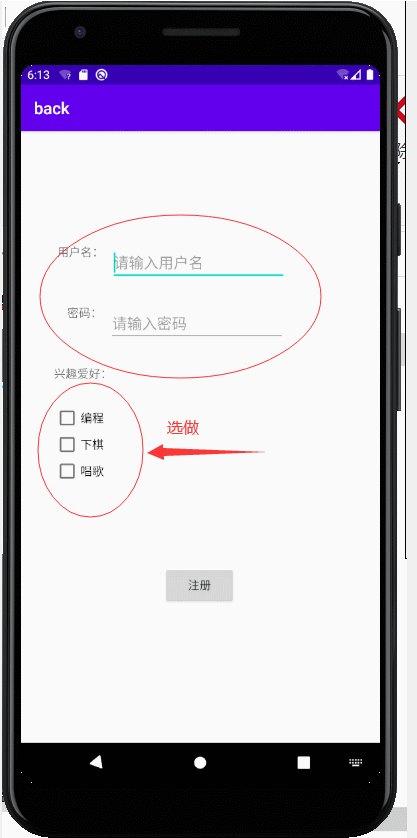
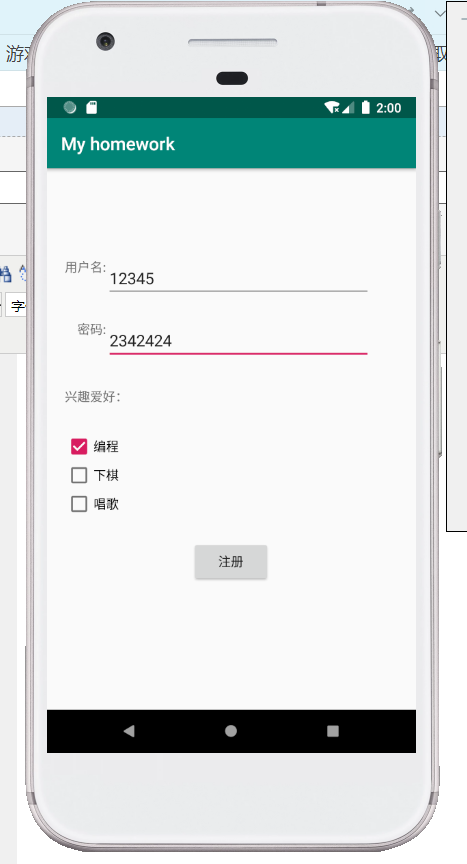
<?xml version="1.0" encoding="utf-8"?>

<RelativeLayout

    xmlns:android="http://schemas.android.com/apk/res/android"

    xmlns:app="http://schemas.android.com/apk/res-auto"

    xmlns:tools="http://schemas.android.com/tools"

    android:layout_width="match_parent"

    android:layout_height="match_parent"

    tools:context=".MainActivity">

    <TextView

        android:id="@+id/tv1"

        android:layout_width="wrap_content"

        android:layout_height="wrap_content"

        android:text="用户名:"

        android:layout_marginTop="100dp"

        android:layout_marginLeft="20dp"/>

    <EditText

        android:id="@+id/et1"

        android:layout_width="match_parent"

        android:layout_height="wrap_content"

        android:hint="请输入用户名:"

        android:layout_toRightOf="@+id/tv1"

        android:layout_alignTop="@id/tv1"

        android:layout_marginRight="50dp"/>

    <TextView

        android:id="@+id/tv2"

        android:layout_width="wrap_content"

        android:layout_height="wrap_content"

        android:text="密码:"

        android:layout_below="@+id/tv1"

        android:layout_marginTop="50dp"

        android:layout_alignRight="@+id/tv1"/>

    <EditText

        android:id="@+id/et2"

        android:layout_width="match_parent"

        android:layout_height="wrap_content"

        android:hint="请输入密码:"

        android:layout_toRightOf="@+id/tv2"

        android:layout_below="@+id/tv1"

        android:layout_alignTop="@id/tv2"

        android:layout_marginRight="50dp"/>

    <LinearLayout

        android:id="@+id/ll_1"

        android:layout_width="200dp"

        android:layout_height="200dp"

        android:layout_below="@+id/et2"

        android:orientation="vertical"

        android:layout_marginLeft="20dp"

        android:layout_marginTop="30dp">

        <TextView

            android:id="@+id/tv3"

            android:layout_width="wrap_content"

            android:layout_height="wrap_content"

            android:text="兴趣爱好:" />

        <CheckBox

            android:id="@+id/cb_1"

            android:layout_width="wrap_content"

            android:layout_height="wrap_content"

            android:text="编程"

            android:layout_marginTop="30dp"/>

        <CheckBox

            android:id="@+id/cb_2"

            android:layout_width="wrap_content"

            android:layout_height="wrap_content"

            android:text="下棋" />

        <CheckBox

            android:id="@+id/cb_3"

            android:layout_width="wrap_content"

            android:layout_height="wrap_content"

            android:text="唱歌" />

    </LinearLayout>

    <Button

        android:id="@+id/btn1"

        android:layout_width="wrap_content"

        android:layout_height="wrap_content"

        android:layout_centerHorizontal="true"

        android:layout_marginTop="200dp"

        android:layout_below="@+id/et2"

        android:onClick="click"

        android:text="注册" />

</RelativeLayout>
package com.example.myhomework;

import androidx.appcompat.app.AppCompatActivity;

import android.content.Intent;

import android.os.Bundle;

import android.view.View;

import android.widget.CheckBox;

import android.widget.CompoundButton;

import android.widget.EditText;

public class MainActivity extends AppCompatActivity implements CompoundButton.OnCheckedChangeListener {

    String s1="",s2="",s3="";

    @Override

    protected void onCreate(Bundle savedInstanceState) {

        super.onCreate(savedInstanceState);

        setContentView(R.layout.activity_main);

        CheckBox cb1=(CheckBox)findViewById(R.id.cb_1);

        CheckBox cb2=(CheckBox)findViewById(R.id.cb_2);

        CheckBox cb3=(CheckBox)findViewById(R.id.cb_3);

        cb1.setOnCheckedChangeListener(this);

        cb2.setOnCheckedChangeListener(this);

        cb3.setOnCheckedChangeListener(this);

    }

    public void click(View view){

        Intent intent=new Intent();

        intent.setClass(MainActivity.this,SecondActivity.class);

        String name=((EditText)(findViewById(R.id.et1))).getText().toString();

        String account=name;

        String text=s1+" "+s2+" "+s3;

        intent.putExtra("account",account);

        intent.putExtra("text",text);

        startActivity(intent);

    }

    @Override

    public void onCheckedChanged(CompoundButton cb, boolean isChecked) {

        // TODO Auto-generated method stub

        switch (cb.getId()) {

            case R.id.cb_1:

                if(isChecked)

                    s1+="编程";

                else s1="";

                break;

            case R.id.cb_2:

                if(isChecked)

                    s2+="下棋";

                else s2="";

                break;

            case R.id.cb_3:

                if(isChecked)

                    s3+="唱歌";

                else s3="";

                break;

            default:

                break;

        }

    }

    @Override

    public void onPointerCaptureChanged(boolean hasCapture) {

    }

}
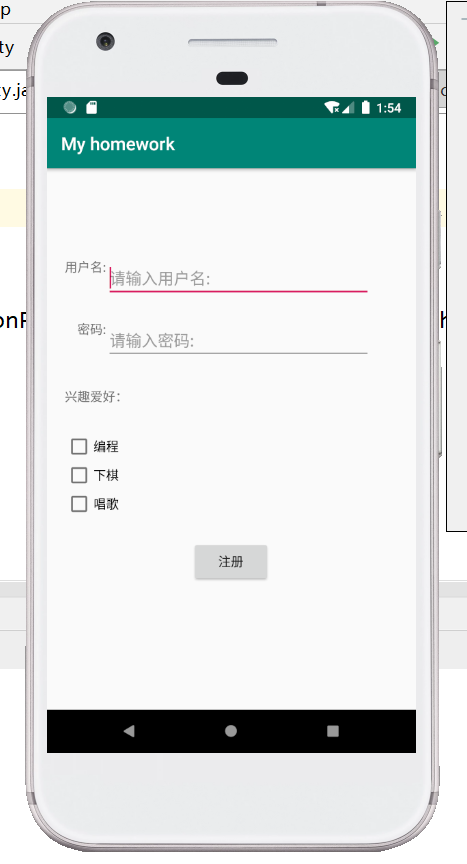
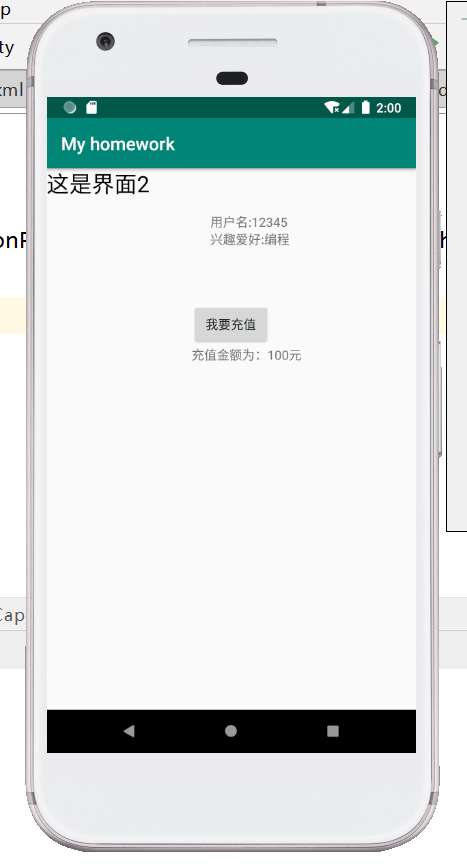
<?xml version="1.0" encoding="utf-8"?>

<RelativeLayout

    xmlns:android="http://schemas.android.com/apk/res/android"

    xmlns:app="http://schemas.android.com/apk/res-auto"

    xmlns:tools="http://schemas.android.com/tools"

    android:layout_width="match_parent"

    android:layout_height="match_parent"

    tools:context=".SecondActivity">

    <TextView

        android:id="@+id/tv_1"

        android:layout_width="wrap_content"

        android:layout_height="wrap_content"

        android:text="这是界面2"

        android:textSize="25sp"

        android:textColor="#000000"/>

    <TextView

        android:id="@+id/tv_2"

        android:layout_width="wrap_content"

        android:layout_height="wrap_content"

        android:layout_centerHorizontal="true"

        android:layout_marginTop="50dp"

        android:text="用户名:" />

    <TextView

        android:id="@+id/tv_3"

        android:layout_width="wrap_content"

        android:layout_height="wrap_content"

        android:layout_toRightOf="@id/tv_2"

        android:layout_alignTop="@id/tv_2"

        android:text="" />

    <TextView

        android:id="@+id/tv_4"

        android:layout_width="wrap_content"

        android:layout_height="wrap_content"

        android:layout_below="@id/tv_2"

        android:layout_alignLeft="@id/tv_2"

        android:text="兴趣爱好:" />

    <TextView

        android:id="@+id/tv_5"

        android:layout_width="wrap_content"

        android:layout_height="wrap_content"

        android:layout_toRightOf="@id/tv_4"

        android:layout_alignTop="@id/tv_4"

        android:text="" />

    <Button

        android:id="@+id/btn_1"

        android:layout_width="wrap_content"

        android:layout_height="wrap_content"

        android:layout_centerHorizontal="true"

        android:layout_marginTop="150dp"

        android:text="我要充值"/>

    <TextView

        android:id="@+id/tv1"

        android:layout_width="wrap_content"

        android:layout_height="wrap_content"

        android:layout_gravity="center"

        android:layout_below="@id/btn_1"

        android:layout_alignLeft="@id/btn_1"/>

</RelativeLayout>
package com.example.myhomework;

import androidx.appcompat.app.AppCompatActivity;

import android.content.Intent;

import android.os.Bundle;

import android.view.View;

import android.widget.TextView;

public class SecondActivity extends AppCompatActivity implements View.OnClickListener {

    @Override

    protected void onCreate(Bundle savedInstanceState) {

        super.onCreate(savedInstanceState);

        setContentView(R.layout.activity_second);

        Intent intent1 = getIntent();

        String name = intent1.getStringExtra("account");

        ((TextView) (findViewById(R.id.tv_3))).setText(name);

        Intent intent2 = getIntent();

        String text = intent2.getStringExtra("text");

        ((TextView) (findViewById(R.id.tv_5))).setText(text);

        findViewById(R.id.btn_1).setOnClickListener(this);

    }

    @Override

    public void onClick(View view) {

        Intent intent = new Intent(this,ThirdActivity.class);

        startActivityForResult(intent,1);

    }

    @Override

    protected void onActivityResult(int requestCode, int resultCode, Intent data) {

        super.onActivityResult(requestCode, resultCode, data);

        if(requestCode==1&&resultCode==2){

            String pay=data.getStringExtra("pay");

            ((TextView)(findViewById(R.id.tv1))).setText(pay);

        }

    }

}
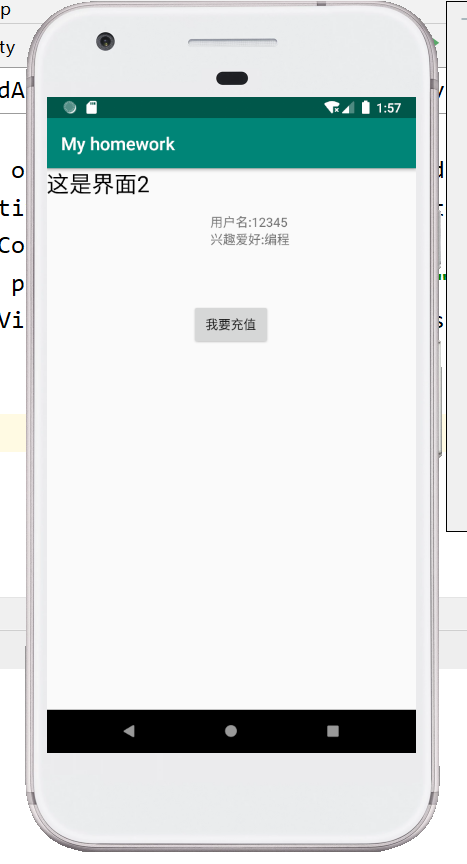
<?xml version="1.0" encoding="utf-8"?>

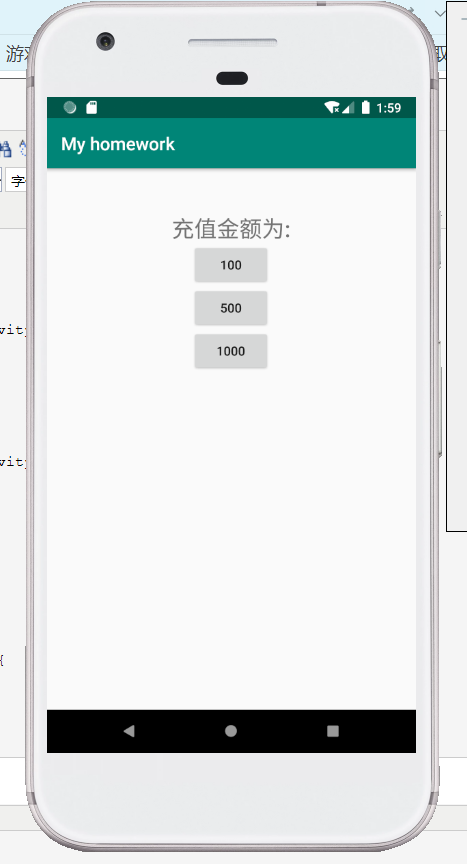
<LinearLayout

    xmlns:android="http://schemas.android.com/apk/res/android"

    xmlns:app="http://schemas.android.com/apk/res-auto"

    xmlns:tools="http://schemas.android.com/tools"

    android:layout_width="match_parent"

    android:layout_height="match_parent"

    tools:context=".ThirdActivity"

    android:orientation="vertical">

    <TextView

        android:id="@+id/tv_6"

        android:layout_width="wrap_content"

        android:layout_height="wrap_content"

        android:text="充值金额为:"

        android:textSize="25sp"

        android:layout_marginTop="50dp"

        android:layout_gravity="center"/>

    <Button

        android:id="@+id/bt_1"

        android:layout_width="wrap_content"

        android:layout_height="wrap_content"

        android:text="100"

        android:layout_gravity="center"/>

    <Button

        android:id="@+id/bt_2"

        android:layout_width="wrap_content"

        android:layout_height="wrap_content"

        android:text="500"

        android:layout_gravity="center"/>

    <Button

        android:id="@+id/bt_3"

        android:layout_width="wrap_content"

        android:layout_height="wrap_content"

        android:text="1000"

        android:layout_gravity="center"/>

</LinearLayout>
package com.example.myhomework;

import androidx.appcompat.app.AppCompatActivity;

import android.content.Intent;

import android.os.Bundle;

import android.view.View;

public class ThirdActivity extends AppCompatActivity implements View.OnClickListener {

    @Override

    protected void onCreate(Bundle savedInstanceState) {

        super.onCreate(savedInstanceState);

        setContentView(R.layout.activity_third);

        findViewById(R.id.bt_1).setOnClickListener(this);

        findViewById(R.id.bt_2).setOnClickListener(this);

        findViewById(R.id.bt_3).setOnClickListener(this);

    }

    @Override

    public void onClick(View view) {

        switch (view.getId()) {

            case R.id.bt_1:

                Intent intent1 = new Intent(this, SecondActivity.class);

                intent1.putExtra("pay", "充值金额为:100元");

                setResult(2, intent1);

                finish();

                break;

            case R.id.bt_2:

                Intent intent2 = new Intent(this, SecondActivity.class);

                intent2.putExtra("pay", "充值金额为:500元");

                setResult(2, intent2);

                finish();

                break;

            case R.id.bt_3:

                Intent intent3 = new Intent(this, SecondActivity.class);

                intent3.putExtra("pay", "充值金额为:1000元");

                setResult(2, intent3);

                finish();

                break;

        }

    }

    @Override

    public void onPointerCaptureChanged(boolean hasCapture) {

    }

}
Android第五次作业的更多相关文章
- Android第五六周作业
1.返回键实现对话框弹出是否退出应用程序 package com.example.zuoye1; import androidx.appcompat.app.AlertDialog; import a ...
- 17秋 软件工程 团队第五次作业 Alpha Scrum1
题目:团队作业--Alpha冲刺 17秋 软件工程 团队第五次作业 Alpha Scrum1 各个成员在 Alpha 阶段认领的任务 伟航:督促和监督团队进度,协调组内合作 港晨:APP前端页面编写: ...
- 17秋 软件工程 团队第五次作业 Alpha Scrum2
17秋 软件工程 团队第五次作业 Alpha Scrum2 今日完成的任务 杰麟:Java后端的学习: 世强:登录和注册接口编写: 港晨:完成数据库表的设计: 树民.陈翔:完成超级管理员后端框架. 其 ...
- 17秋 软件工程 团队第五次作业 Alpha Scrum3
17秋 软件工程 团队第五次作业 Alpha Scrum3 今日完成的任务 杰麟:java后端学习: 世强:Android的部门基础信息模块的信息显示和对接后台: 港晨:后台管理登陆界面ui设计: 树 ...
- 17秋 软件工程 团队第五次作业 Alpha Scrum4
17秋 软件工程 团队第五次作业 Alpha Scrum4 今日完成的任务 世强:部门基础信息模块数据更新.部门审核提交: 港晨:设计编写登录界面的一部分: 树民:学习python基本语法.flask ...
- 17秋 软件工程 团队第五次作业 Alpha Scrum5
17秋 软件工程 团队第五次作业 Alpha Scrum5 今日完成的任务 世强:消息通知管理列表页界面编写,下拉加载效果: 港晨:编写登录界面: 树民: 伟航:学习了flask_restful框架的 ...
- 17秋 软件工程 团队第五次作业 Alpha Scrum10
17秋 软件工程 团队第五次作业 Alpha Scrum10 今日完成的任务 世强:Android客户端成员列表完善.APP前端子部门和活动中心界面与数据交互: 港晨:Web前端主页的接口对接: 树民 ...
- 耿丹CS16-2班第五次作业汇总
Deadline: 2016-10-26 23:59 作业内容 实验4-1 求1到20的阶乘的和,其中求阶乘用函数完成. 实验4-2 写一个判素数的函数,在主函数输入一个整数,输出其是否是素数的信息. ...
- C 语言学习 第五次作业总结
第五次作业,主要学习和复习的是几种循环结构的使用. 在前一次的课堂上,同学们已经学习了分支语句的使用.分支语句和循环语句配合使用,就可以写出更多的,逻辑功能丰富的代码了. 逻辑功能的丰富,也意味着学习 ...
- C语言第五次作业——循环结构
C语言程序设计第五次作业--循环结构(1) (一)改错题 输出华氏摄氏温度转换表:输入两个整数lower和upper,输出一张华氏摄氏温度转换表,华氏温度的取值范围是{lower,upper},每次增 ...
随机推荐
- 缺省源&一些常用的码头
#include <bits/stdc++.h> #define N 1000010 #define M 2000010 #define pii pair<int,int> # ...
- 京东云开发者|软件架构可视化及C4模型:架构设计不仅仅是UML
软件系统架构设计的目标不在于设计本身,而在于架构设计意图的传达.图形化有助于在团队间进行高效的信息同步,但不同的图形化方式需要语义一致性和效率间实现平衡.C4模型通过不同的抽象层级来表达系统的静态结构 ...
- 本地文件上传Gitee
0.对于小白来说,我再细讲一下 一.下载git 下载细节参考博客 二.Git配置 点击桌面的图标,进入Git Bash Here 1.配置自己的用户名和邮箱 git config --global u ...
- C#设置picturebox滚动条来实现查看大图片
要给PictureBox添加滚动条需要以下步骤: (1)将picturebox放在panel上: ( 2)将panel的AutoScroll设置为ture: (3)将picturebo ...
- Feign 实现 GET 方法传递 POJO
Feign 实现 GET 方法传递 POJO 作者:Grey 原文地址: 博客园:Feign 实现 GET 方法传递 POJO CSDN:Feign 实现 GET 方法传递 POJO 需求 Sprin ...
- 【OpenStack云平台】搭建openstack云平台
1. 系统镜像 安装运行环境系统要求为CentOS7.5,内核版本不低于3.10. CentOS-7.5-x86_64-DVD-1804.iso Chinaskill_Cloud_iaas.iso 2 ...
- day01-计算机的本质
计算机的本质 计算机又称为"电脑": 通电的大脑 意味着我们人类希望计算机通电之后可以跟人脑一样思考问题.解决问题 计算机存储数据的本质 计算机是基于电工作,而电信号只有高低电平两 ...
- 关于deepin-wine或wine设置PATH环境变量的方法
前言 更改wine中PATH变量主要是为了能在 cmd输入一些命令而已,这里你可能会问怎么用cmd? deepin-wine cmd 这样就进入了cmd,而设置PATH 环境变量不能像windows一 ...
- 多表查询、Navicat软件、PyMySQL模块
目录 多表查询.Navicat软件.PyMySQL模块 一.多表查询的两种方法 1.准备工作 2.第一种:连表操作 3.第二种:子查询 总结与结论: 二.多表查询练习题 1.课堂多表查询练习题 2.以 ...
- Python异步协程(asyncio详解)
续上篇讲解yield from博客,上篇链接:https://www.cnblogs.com/Red-Sun/p/16889182.html PS:本博客是个人笔记分享,不需要扫码加群或必须关注什么的 ...