
Simple scatter method in 2d picture(Qt)
Result:
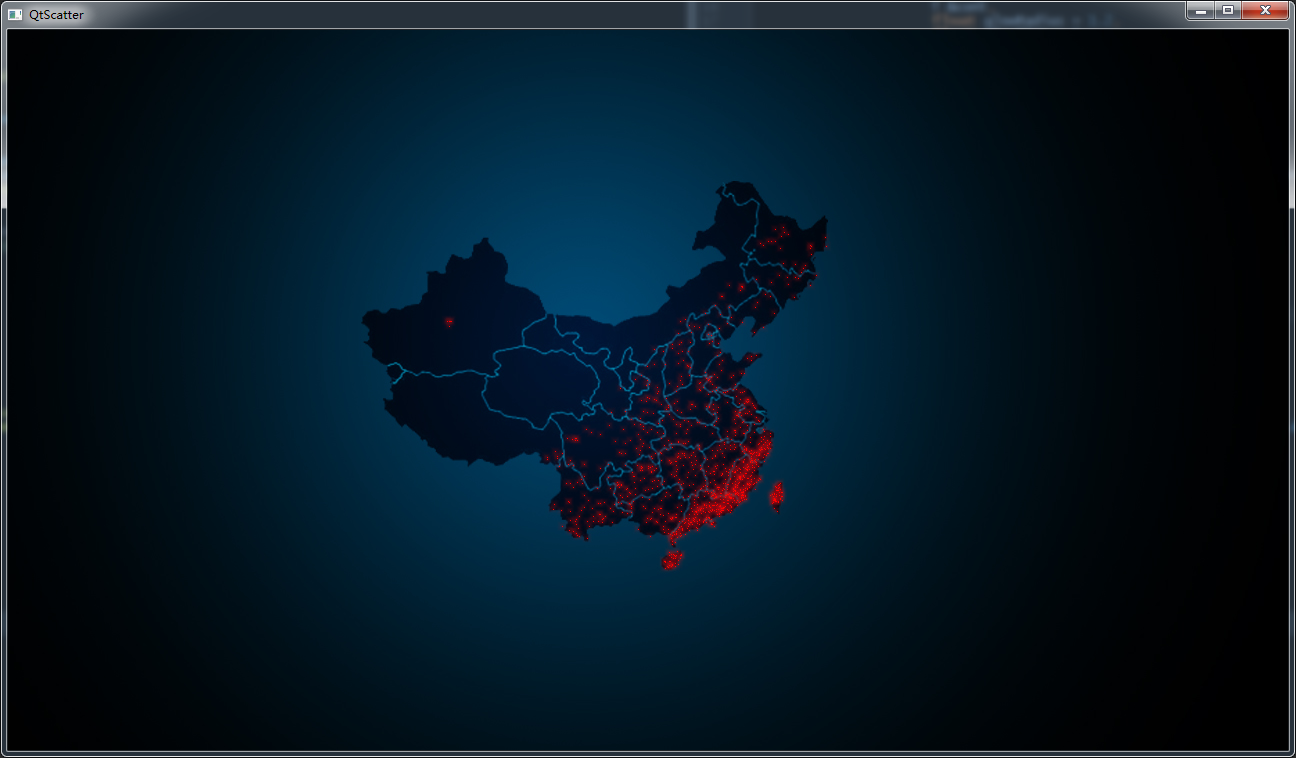
grayMap:

MathTools:
//

// Created by Administrator on 2017/8/17.

//

#ifndef QTSCATTER_MATHTOOLS_H

#define QTSCATTER_MATHTOOLS_H

#include <string>

#include <vector>

#include <iostream>

#include <sstream>

using namespace std;

namespace TopVertex

{

    class GLY_MATH

    {

    public:

        template<typename T>

        static T min(T a, T b) {

            if (a > b) {

                return b;

            } else {

                return a;

            }

        }

        template<typename T>

        static T max(T a, T b) {

            if (a > b) {

                return a;

            } else {

                return b;

            }

        }

        template<typename T>

        static bool zero_compare(T a, double tol = 0.00001) {

            return a >= -tol && a <= tol;

        }

        // DO NOT USE THIS FIT TO FIT VECTOR VALUE

        template<typename T>

        static T fit(T var, T omin, T omax, T nmin, T nmax) {

            T d = omax - omin;

            if (zero_compare(d)) {

                return (nmin + nmax) * 0.5;

            }

            if (omin < omax) {

                if (var < omin) return nmin;

                if (var > omax) return nmax;

            } else {

                if (var < omax) return nmax;

                if (var > omin) return nmin;

            }

            return nmin + (nmax - nmin) * (var - omin) / d;

        }

        //return -1 to 1

        template<typename T>

        static T fit_negate(T var, T omin, T omax) {

            return fit(var, omin, omax, -1.0, 1.0);

        }

        //string split

        static std::vector<std::string> split_string(std::string &inputString, char &split_char) {

            std::stringstream ss(inputString);

            std::string sub_str;

            std::vector<std::string> sp_strPath;

            sp_strPath.clear();

            while (getline(ss, sub_str, split_char)) {

                sp_strPath.push_back(sub_str);

            }

            return sp_strPath;

        }

        //value to string

        template<typename T>

        // T must be a value int/float/double

        static std::string value_to_str(T &value) {

            std::ostringstream os;

            os << value;

            return os.str();

        }

        static int wang_inthash(int key) {

            // From http://www.concentric.net/~Ttwang/tech/inthash.htm

            key += ~(key << );

            key ^= (key >> );

            key += (key << );

            key ^= (key >> );

            key += ~(key << );

            key ^= (key >> );

            return key;

        }

        static int fastRandomInt(int seed) {

            int nseed = seed * +0XFFFFFFF;

            return wang_inthash(nseed);

        }

        static float fastRandom01(int seed)

        {

            return float(fastRandomInt(seed) % ) / 1000000.0f;

        }

    };

}

#endif //QTSCATTER_MATHTOOLS_H
MathTools
点位移类,用于后续动画
//

// Created by Administrator on 2017/8/18.

//

#ifndef QTSCATTER_POINTMOTION_H

#define QTSCATTER_POINTMOTION_H

namespace TopVertex

{

    // our default motion

    template <typename T>

    class PolicyMotion

    {

    public:

        template <typename addVal>

        static void advect(T &point,const addVal &val,int loopId = )

        {

            // not implement

        }

    };

    // per step motion

    template <typename opType=int,

            template <typename> class Policy = PolicyMotion>

    class Motion

    {

    public:

        template <typename T>

        static void advect_motion(T begin, T end,float time)

        {

            int loopId = ;

            while(begin!= end)

            {

                Policy<opType>::advect(*begin,time,loopId);

                begin++;

                loopId++;

            }

        }

    };

}

#endif //QTSCATTER_POINTMOTION_H
PointMotion.h
QImage分析像素:
//

// Created by Administrator on 2017/8/17.

//

#ifndef QTSCATTER_IMAGEPARSE_H

#define QTSCATTER_IMAGEPARSE_H

#include <QImage>

#include <QString>

#include <QPointF>

#include <QVector>

#include <QDebug>

#include <vector>

namespace TopVertex

{

    class ImageParse

    {

    public:

        enum PARSETYPE{UNIFORM=0x00,STEP=0x01};

        ImageParse() = default;

        explicit ImageParse(const QString &path);

        ImageParse(const QString &path,const int &ScatterNum);

        // parse image to data

        void parse(PARSETYPE parseFlag=UNIFORM);

        // our pixels positions

        std::vector<QPointF> &getParsePixelsPos();

        // load image

        inline void loadImage(const QString &path) {

            if(!mImage.load(path))

                qDebug() << "Image load " << path << " error";

        }

        // set scatter num

        inline void setScatterNum(int pts) {

            mScatterNum = pts;

        }

        // get image

        QImage &getImage(){return mImage;}

    private:

        // Store image to parse

        QImage mImage;

        void parseUniform();

        void parseStep();

    private:

        // store our data in here

        std::vector<QPointF> mPixelsPos;

        // read Image path

        QString mImagePath;

        // scatter counts

        int mScatterNum;

    };

}

#endif //QTSCATTER_IMAGEPARSE_H
ImageParse.h
//

// Created by Administrator on 2017/8/17.

//

#include "ImageParse.h"

#include <QDebug>

#include <QColor>

#include <algorithm>

#include "MathTools.h"

#include "PointMotion.h"

// some function move points

namespace TopVertex

{

    // our default motion

    template <typename T>

    class randomMotion

    {

    public:

        template <typename addVal>

        static void advect(T &point,const addVal &val,int loopId)

        {

            auto rd01   = GLY_MATH::fastRandom01(loopId+);

            auto fitvar = GLY_MATH::fit<float>(rd01,,,-,); // random move 1 pixel pos

            point.rx() += fitvar*;

            point.ry() += fitvar*;

        }

    };

}

// some function move points

using namespace TopVertex;

ImageParse::ImageParse(const QString &path):

        mImagePath(path),

        mScatterNum(){

    loadImage(path);

}

ImageParse::ImageParse(const QString &path,const int &ScatterNum):

        mImagePath(path),

        mScatterNum(ScatterNum){

    loadImage(path);

}

std::vector<QPointF> & ImageParse::getParsePixelsPos()

{

    return mPixelsPos;

}

void ImageParse::parse(PARSETYPE parseFlag)

{

    if(parseFlag == UNIFORM)

        parseUniform();

    else

        parseStep();

}

template <typename T>

static void RandomSelectByCount(int count, T &cont, T &desCont)

{

    for(int k = ;k<count;k++)

    {

        auto rd01 = GLY_MATH::fastRandom01(k);

        auto numChoice = abs(int(rd01 * cont.size())-) ;

        desCont.emplace_back(cont[numChoice]);

    }

}

void ImageParse::parseUniform() {

    qDebug() << "w/h:"<<mImage.width() << " "<< mImage.height() ;

    auto wdt = mImage.width();

    auto hdt = mImage.height();

    vector<QPointF> storePos;

    for(int ht =  ; ht < hdt; ht ++)

    {

        for(int wt = ; wt< wdt ; wt ++)

        {

            QColor rgb = QColor(mImage.pixel(wt,ht));

            if (rgb.red()<=)

                continue;

            storePos.emplace_back(QPointF(wt,ht));

        }

    }

    RandomSelectByCount(mScatterNum,storePos,mPixelsPos);

    Motion<QPointF,randomMotion>::advect_motion(mPixelsPos.begin(),mPixelsPos.end(),0.0);

}

void ImageParse::parseStep()

{

    auto wdt = mImage.width();

    auto hdt = mImage.height();

    int count_10_50   = floor(mScatterNum * 0.10);

    int count_50_100  = floor(mScatterNum * 0.15);

    int count_100_200 = floor(mScatterNum * 0.35);

    int count_200_255 = floor(mScatterNum * 0.45);

    qDebug() << "10-50   " << count_10_50;

    qDebug() << "50-100  " << count_50_100;

    qDebug() << "100-200 " << count_100_200;

    qDebug() << "200-255 " << count_200_255;

    vector<QPointF> part1;

    vector<QPointF> part2;

    vector<QPointF> part3;

    vector<QPointF> part4;

    for(int ht =  ; ht < hdt; ht ++)

    {

        for (int wt = ; wt < wdt; wt++)

        {

            QColor rgb = QColor(mImage.pixel(wt, ht));

            if (rgb.red() <= )

                continue;

            if(rgb.red() >= && rgb.red()<)

            {

                part1.emplace_back(QPointF(wt,ht));

            }

            if(rgb.red() >= && rgb.red()<)

            {

                part2.emplace_back(QPointF(wt,ht));

            }

            if(rgb.red() >= && rgb.red()<)

            {

                part3.emplace_back(QPointF(wt,ht));

            }

            if(rgb.red() >= && rgb.red()<=)

            {

                part4.emplace_back(QPointF(wt,ht));

            }

        }

    }

    RandomSelectByCount(count_10_50, part1, mPixelsPos);

    RandomSelectByCount(count_50_100, part2, mPixelsPos);

    RandomSelectByCount(count_100_200, part3, mPixelsPos);

    RandomSelectByCount(count_200_255, part4, mPixelsPos);

    // random move points

    Motion<QPointF,randomMotion>::advect_motion(mPixelsPos.begin(),mPixelsPos.end(),0.0);

}
ImageParse.cpp
显示窗口:
//

// Created by Administrator on 2017/8/17.

//

#ifndef QTSCATTER_VIDEOWIDGET_H

#define QTSCATTER_VIDEOWIDGET_H

#include <QWidget>

#include "ImageParse.h"

#include <QResizeEvent>

namespace  TopVertex

{

    class VideoWidget:public QWidget

    {

        Q_OBJECT

    public:

        explicit VideoWidget(QWidget *parent = nullptr):QWidget(parent)

        {

            resize(,);

            setMinimumSize(QSize(,));

            mImageParse.loadImage("./gray4.jpg");

            mImageParse.setScatterNum();

            mImageParse.parse(ImageParse::STEP);

            // mainwindow background picture

            mBgImage.load("./dp.jpg");

            mInitW = width();

            mInitH = height();

        }

    private:

        ImageParse mImageParse;

        int mInitW;

        int mInitH;

        QImage mBgImage;

    protected:

        void paintEvent(QPaintEvent *e) override ;

        void resizeEvent(QResizeEvent *e) override;

    };

}

#endif //QTSCATTER_VIDEOWIDGET_H
VideoWidget.h
//

// Created by Administrator on 2017/8/17.

//

#include "VideoWidget.h"

#include <algorithm>

#include "MathTools.h"

using namespace TopVertex;

#include <QPainter>

using namespace std;

template <typename T>

static void paintGlow(QPainter &painter,

                      QPen &pen,

                      T &cont,

                      float glowRadius = 1.2,

                      float glowTint = ,

                      int maxSample=)

{

    for(int i=;i<maxSample;i++)

    {

        auto alpha = (maxSample-i) * glowTint;

        pen.setColor(QColor(,,,alpha));

        pen.setWidthF(i * glowRadius);

        painter.setPen(pen);

        auto iter = cont.begin();

        for_each(iter,cont.end(),[&painter](const QPointF&pf){painter.drawPoint(pf);});

    }

}

void VideoWidget::paintEvent(QPaintEvent *e)

{

    QPainter painter(this);

    painter.drawImage(this->rect(),mBgImage);

    painter.setRenderHint(QPainter::HighQualityAntialiasing);

    QPen pen(QColor(,,,));

    pen.setWidthF(1.0);

    painter.setBrush(Qt::blue);

    painter.setPen(pen);

    auto &pos = mImageParse.getParsePixelsPos();

    auto iter = pos.begin();

    for_each(iter,pos.end(),[&painter](const QPointF&pf){painter.drawPoint(pf);});

    paintGlow(painter,pen,mImageParse.getParsePixelsPos());

}

void VideoWidget::resizeEvent(QResizeEvent *e)

{

    // orig image width height

    auto iw = mInitW;

    auto ih = mInitH;

    // current width and height

    auto ww = this->width();

    auto wh = this->height();

    auto &pos = mImageParse.getParsePixelsPos();

    auto iter = pos.begin();

    auto resize = [&ww,&wh,&iw,&ih](QPointF&pf)

    {

        auto newx = GLY_MATH::fit<float>(float(pf.x()),,iw,,ww);

        auto newy = GLY_MATH::fit<float>(float(pf.y()),,ih,,wh);

        pf.rx() = newx;

        pf.ry() = newy;

    };

    for_each(iter,pos.end(),resize);

    mInitW = width();

    mInitH = height();

}
VideoWidget.cpp
main.cpp
#include <QApplication>

#include "ImageParse.h"

#include <QDebug>

#include "VideoWidget.h"

using namespace TopVertex;

int main(int argc, char *argv[])

{

    QApplication a(argc, argv);

    VideoWidget w;

    w.show();

    return a.exec();

}
Simple scatter method in 2d picture(Qt)的更多相关文章
- 卡尔曼滤波—Simple Kalman Filter for 2D tracking with OpenCV
之前有关卡尔曼滤波的例子都比较简单,只能用于简单的理解卡尔曼滤波的基本步骤.现在让我们来看看卡尔曼滤波在实际中到底能做些什么吧.这里有一个使用卡尔曼滤波在窗口内跟踪鼠标移动的例子,原作者主页:http ...
- 2D Rotated Rectangle Collision
Introduction While working on a project for school, I found it necessary to perform a collision chec ...
- Image Processing and Analysis_15_Image Registration:HAIRIS: A Method for Automatic Image Registration Through Histogram-Based Image Segmentation——2011
此主要讨论图像处理与分析.虽然计算机视觉部分的有些内容比如特 征提取等也可以归结到图像分析中来,但鉴于它们与计算机视觉的紧密联系,以 及它们的出处,没有把它们纳入到图像处理与分析中来.同样,这里面也有 ...
- Core Java Volume I — 4.5. Method Parameters
4.5. Method ParametersLet us review the computer science terms that describe how parameters can be p ...
- 《Qt 实战一二三》
简介 "我们来自Qt分享&&交流,我们来自Qt Quick分享&&交流",不管你是笑了,还是笑了,反正我们是认真的.我们就是要找寻一种Hold不住的 ...
- 动态linq表达式新方法,Dynamic LINQ Extension Method
Remember those old posts on Dynamic LINQ? You are probably aware that Microsoft has made its impleme ...
- JNI加载Native Library 以及 跨线程和Qt通信
Part1 Java Native Interface-JNI-JAVA本地调用 JNI标准是Java平台的一部分, 允许Java代码和其他语言进行交互; 开始实现-> Step 1) 编写Ja ...
- Really simple SSH proxy (SOCKS5)
原文: https://thomashunter.name/blog/really-simple-ssh-proxy-socks5/ SOCKS5 is a simple, eloquent meth ...
- qt quick中qml编程语言
Qt QML 入门 — 使用C++定义QML类型 发表于 2013 年 3 月 11 日 注册C++类 注册可实例化的类型 注册不实例化的QML类型 附带属性 注册C++类 注册可实例化的类型 如 ...
随机推荐
- bzoj2004 矩阵快速幂优化状压dp
https://www.lydsy.com/JudgeOnline/problem.php?id=2004 以前只会状压dp和矩阵快速幂dp,没想到一道题还能组合起来一起用,算法竞赛真是奥妙重重 小Z ...
- kubernetes1.5.2 dashboard配置
镜像:https://hub.daocloud.io/#!/repos/f8919a2c-2540-424e-8758-d23cc76b6d80 启动Kubernetes集群 配置Kubernetes ...
- FastDFS 分布式文件系统部署实战及基本使用
FastDFS 分布式文件系统部署实战及基本使用 作者:尹正杰 版权声明:原创作品,谢绝转载!否则将追究法律责任. FastDFS是一个开源的高性能分布式文件系统.它的主要功能包括:文件存储,文件同步 ...
- my live boadband
id_boadband tel: 02511931324 ¥1600 包2年,10MB/S =100Mb,2018.12.1 ~ 2020.12.1 end
- Windows-kms
系统下载 Windows 长期服务版 Windows 10 Enterprise LTSC 2019 (x64) - DVD (Chinese-Simplified) 文件名 cn_windows_1 ...
- 【坑】zsh和oh-my-zsh卸载后导致无法登陆
apt-get remove zsh 然后断开终端,就再也连不上了,崩溃啊! 以下登陆为www用户登陆 各种找,到这里 https://www.cnblogs.com/EasonJim/p/78630 ...
- openstack服务启动之nova-compute
在openstack中,消息的传递一共有两种方式,分别是:服务之间的传递调用Restful api,服务中模块之间的传递使用消息队列.每一个模块在启动是都会启动消息队列,等待队列中的有消息到来.所以模 ...
- 064、Weave网络结构分析(2019-04-04 周四)
参考https://www.cnblogs.com/CloudMan6/p/7482035.html Weave网络使用之前需要执行 eval $(weave env) ,其作用是将后续的doc ...
- [Android] Android 常见第三方库汇总地址
Android 常见第三方库汇总地址 https://github.com/wasabeef/awesome-android-libraries List of Android Libraries T ...
- python要点
1.数据类型 字符串: ''或""表示单行,写三对符合表示多行, r'这种写法转义符不生效' 布尔值:True, False 空值: None 类型转换 print ), ), b ...