
Scrapy 爬取动态页面
目前绝大多数的网站的页面都是冬天页面,动态页面中的部分内容是浏览器运行页面中的JavaScript 脚本动态生成的,爬取相对比较困难
先来看一个很简单的动态页面的例子,在浏览器中打开 http://quotes.toscrape.com/js,显示如下:
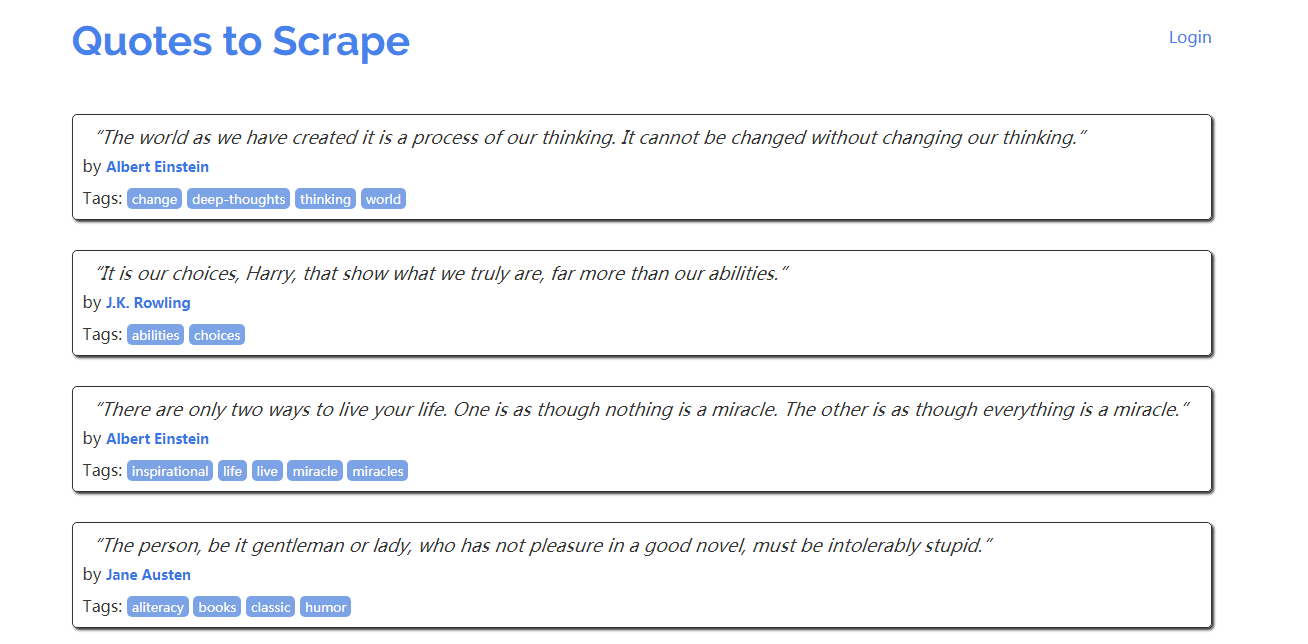
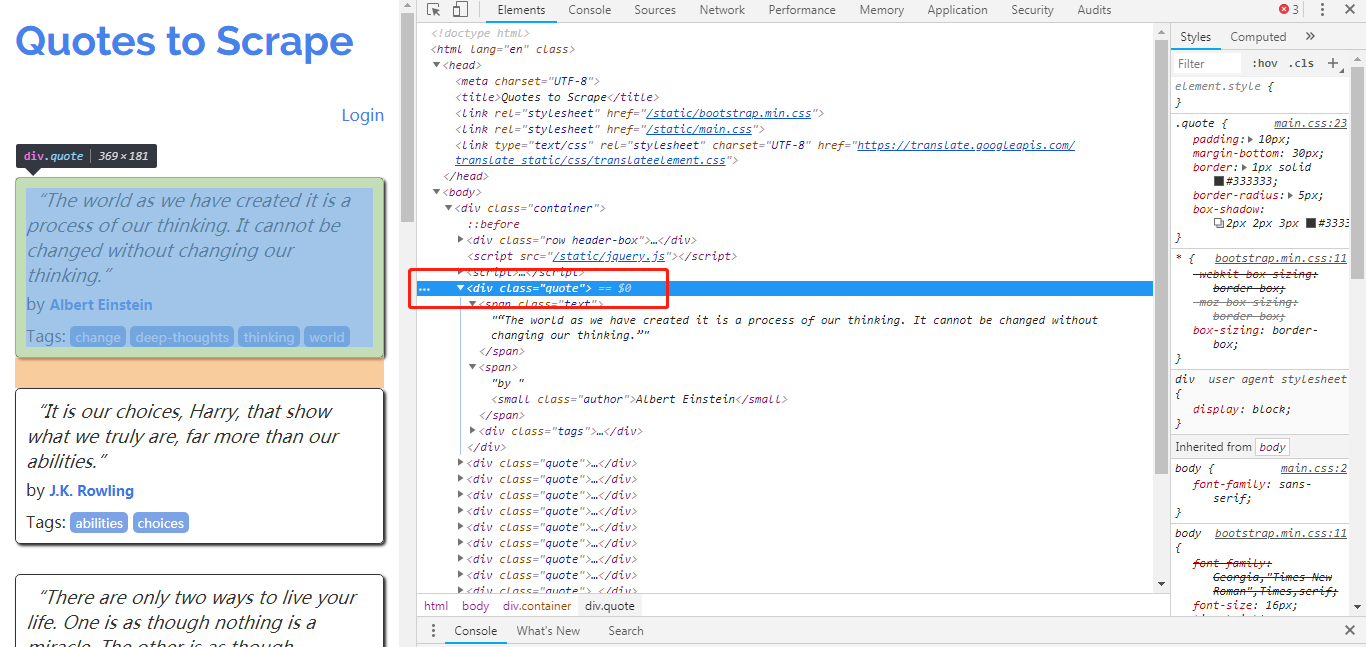
页面总有十条名人名言,每一条都包含在<div class = "quote">元素中,现在我们在 Scrapy shell中尝试爬取页面中的名人名言:
$ scrapy shell http://quotes.toscrape.com/js/

...

>>> response.css(''div.quote)

[]
从结果可以看出,爬取失败了,在页面中没有找到任何包含名人名言的 <div class = 'quote'>元素。这些 <div class = 'qoute'>就是动态内容,从服务器下载的页面中并不包含他们(多以我们爬去失败),浏览器执行了页面中的一段 JavaScript 代码后,他们才被生成出来。
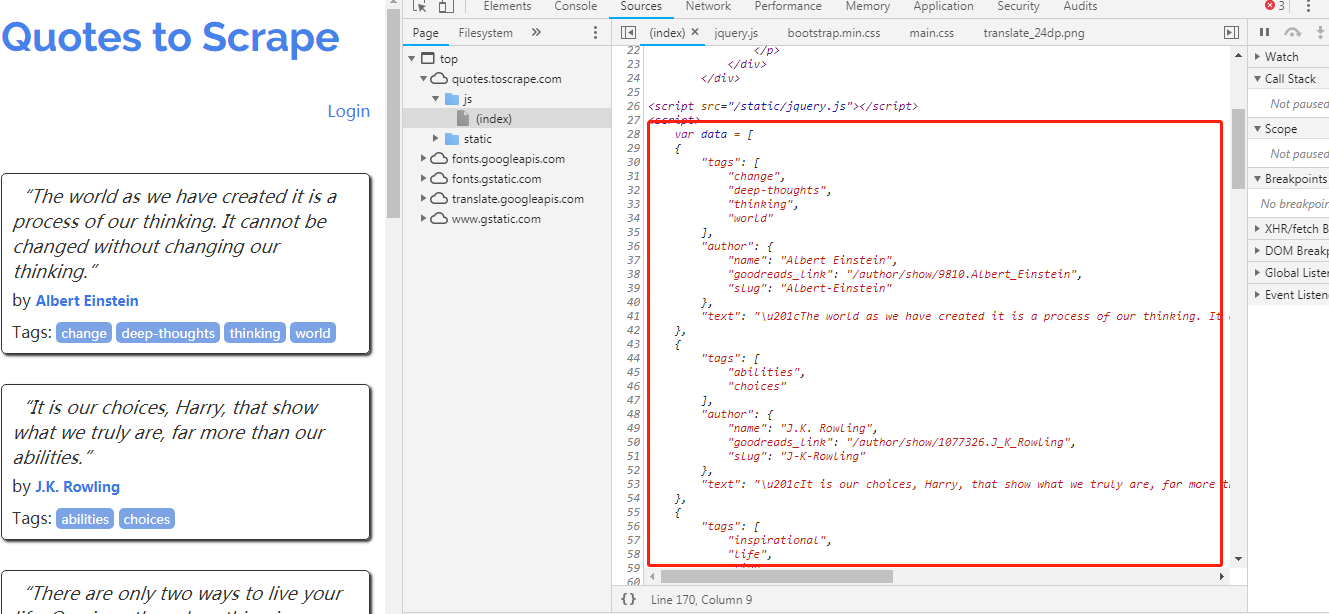
图中的 JavaScript 代码如下:
 var data = [

    {

        "tags": [

            "change",

            "deep-thoughts",

            "thinking",

            "world"

        ],

        "author": {

            "name": "Albert Einstein",

            "goodreads_link": "/author/show/9810.Albert_Einstein",

            "slug": "Albert-Einstein"

        },

        "text": "\u201cThe world as we have created it is a process of our thinking. It cannot be changed without changing our thinking.\u201d"

    },

    {

        "tags": [

            "abilities",

            "choices"

        ],

        "author": {

            "name": "J.K. Rowling",

            "goodreads_link": "/author/show/1077326.J_K_Rowling",

            "slug": "J-K-Rowling"

        },

        "text": "\u201cIt is our choices, Harry, that show what we truly are, far more than our abilities.\u201d"

    },

    {

        "tags": [

            "inspirational",

            "life",

            "live",

            "miracle",

            "miracles"

        ],

        "author": {

            "name": "Albert Einstein",

            "goodreads_link": "/author/show/9810.Albert_Einstein",

            "slug": "Albert-Einstein"

        },

        "text": "\u201cThere are only two ways to live your life. One is as though nothing is a miracle. The other is as though everything is a miracle.\u201d"

    },

    {

        "tags": [

            "aliteracy",

            "books",

            "classic",

            "humor"

        ],

        "author": {

            "name": "Jane Austen",

            "goodreads_link": "/author/show/1265.Jane_Austen",

            "slug": "Jane-Austen"

        },

        "text": "\u201cThe person, be it gentleman or lady, who has not pleasure in a good novel, must be intolerably stupid.\u201d"

    },

    {

        "tags": [

            "be-yourself",

            "inspirational"

        ],

        "author": {

            "name": "Marilyn Monroe",

            "goodreads_link": "/author/show/82952.Marilyn_Monroe",

            "slug": "Marilyn-Monroe"

        },

        "text": "\u201cImperfection is beauty, madness is genius and it's better to be absolutely ridiculous than absolutely boring.\u201d"

    },

    {

        "tags": [

            "adulthood",

            "success",

            "value"

        ],

        "author": {

            "name": "Albert Einstein",

            "goodreads_link": "/author/show/9810.Albert_Einstein",

            "slug": "Albert-Einstein"

        },

        "text": "\u201cTry not to become a man of success. Rather become a man of value.\u201d"

    },

    {

        "tags": [

            "life",

            "love"

        ],

        "author": {

            "name": "Andr\u00e9 Gide",

            "goodreads_link": "/author/show/7617.Andr_Gide",

            "slug": "Andre-Gide"

        },

        "text": "\u201cIt is better to be hated for what you are than to be loved for what you are not.\u201d"

    },

    {

        "tags": [

            "edison",

            "failure",

            "inspirational",

            "paraphrased"

        ],

        "author": {

            "name": "Thomas A. Edison",

            "goodreads_link": "/author/show/3091287.Thomas_A_Edison",

            "slug": "Thomas-A-Edison"

        },

        "text": "\u201cI have not failed. I've just found 10,000 ways that won't work.\u201d"

    },

    {

        "tags": [

            "misattributed-eleanor-roosevelt"

        ],

        "author": {

            "name": "Eleanor Roosevelt",

            "goodreads_link": "/author/show/44566.Eleanor_Roosevelt",

            "slug": "Eleanor-Roosevelt"

        },

        "text": "\u201cA woman is like a tea bag; you never know how strong it is until it's in hot water.\u201d"

    },

    {

        "tags": [

            "humor",

            "obvious",

            "simile"

        ],

        "author": {

            "name": "Steve Martin",

            "goodreads_link": "/author/show/7103.Steve_Martin",

            "slug": "Steve-Martin"

        },

        "text": "\u201cA day without sunshine is like, you know, night.\u201d"

    }

];

    for (var i in data) {

        var d = data[i];

        var tags = $.map(d['tags'], function(t) {

            return "<a class='tag'>" + t + "</a>";

        }).join(" ");

        document.write("<div class='quote'><span class='text'>" + d['text'] + "</span><span>by <small class='author'>" + d['author']['name'] + "</small></span><div class='tags'>Tags: " + tags + "</div></div>");

        }
阅读代码可以了解页面中动态生成的细节,所有名人名言信息被保存在数组 data 中,最后的 for 循环迭代 data 中的每项信息,使用 document。write 生成每条名人名言对应的 <div class = ‘quote’>元素。
上面是动态页面中最简单的一个例子,数据被应编码到 JavaScript 代码中, 实际中更常见的是JavaScript 通过 HTTP 请求跟网站动态交互获取数据(AJAX),然后使用数据更新 HTMML 页面。爬取此类动态网页需要先执行页面使用 JavaScript 渲染引擎页面,咋进行爬取。
Scrapy 爬取动态页面的更多相关文章
- Scrapy爬取静态页面
Scrapy爬取静态页面 安装Scrapy框架: Scrapy是python下一个非常有用的一个爬虫框架 Pycharm下: 搜索Scrapy库添加进项目即可 终端下: #python2 sudo p ...
- scrapy爬取动态分页内容
1.任务定义: 爬取某动态分页页面中所有子话题的内容. 所谓"动态分页":是指通过javascript(简称"js")点击实现翻页,很多时候翻页后的页面地址ur ...
- Python 爬虫实例(8)—— 爬取 动态页面
今天使用python 和selenium爬取动态数据,主要是通过不停的更新页面,实现数据的爬取,要爬取的数据如下图 源代码: #-*-coding:utf-8-*- import time from ...
- scrapy爬取相似页面及回调爬取问题(以慕课网为例)
以爬取慕课网数据为例 慕课网的数据很简单,就是通过get方式获取的 连接地址为https://www.imooc.com/course/list?page=2 根据page参数来分页
- selenium自动化测试爬取动态页面大全
目录 一:浏览器信息测试 二:查找结点 三:测试动作 四:获取节点信息 五:切换子页面Frame 六,延时请求 七:前进和后退 八:Cookies 八:选项卡处理 九:捕获异常 这里之讲解用法,安 ...
- selenium+phantomjs爬取动态页面数据
1.安装selenium pip/pip3 install selenium 注意依赖关系 2.phantomjs for windows 下载地址:http://phantomjs.org/down ...
- scrapy(四): 爬取二级页面的内容
scrapy爬取二级页面的内容 1.定义数据结构item.py文件 # -*- coding: utf-8 -*- ''' field: item.py ''' # Define here the m ...
- 【图文详解】scrapy爬虫与动态页面——爬取拉勾网职位信息(2)
上次挖了一个坑,今天终于填上了,还记得之前我们做的拉勾爬虫吗?那时我们实现了一页的爬取,今天让我们再接再厉,实现多页爬取,顺便实现职位和公司的关键词搜索功能. 之前的内容就不再介绍了,不熟悉的请一定要 ...
- Scrapy 框架 使用 selenium 爬取动态加载内容
使用 selenium 爬取动态加载内容 开启中间件 DOWNLOADER_MIDDLEWARES = { 'wangyiPro.middlewares.WangyiproDownloaderMidd ...
随机推荐
- Angular 调用百度地图API接口
Angular 调用百度地图API接口 参考原文:https://blog.csdn.net/yuyinghua0302/article/details/80624274 下面简单介绍一下如何在Ang ...
- UVA 10795 A Different Task(模拟)
题目链接:https://vjudge.net/problem/UVA-10795 一道比较有思维含量的一道题: 注意一种分治的思想和“除了柱子x和柱子y之外的那个柱子”编号的问题. 首先在初始局面和 ...
- Ubuntu18.04安装Vim-plug与YCM
由于个人强迫症的原因,之前的ycm是通过vundle来管理的,这次想更新一下ycm发现问题太多,于是就重新装了个Ubuntu虚拟机,用vim-plug来进行管理ycm及其他插件. 首先要换一下Ubun ...
- shell脚本自学之路
阿里云大学教学https://edu.aliyun.com/course/155/ 运行 chmod +x xx.sh ./xx.sh 基本语法:echo 输出 $赋值 特殊变量: $* 变量的使 ...
- springboot整合cache报错org.springframework.cache.ehcache.EhCacheCacheManager cannot be cast to net.sf.ehcache.CacheManager
原来的代码 private static CacheManager cacheManager = SpringContextHolder.getBean("cacheManager" ...
- TensorFlow:使用inception-v3实现各种图像识别
程序来自博客: # https://www.cnblogs.com/felixwang2/p/9190740.html上面这个博客是一些列的,所以可以从前往后逐一练习. # https://www.c ...
- 【JavaScript基础#1】
" 目录 #. 概述 1. ECMAScript与JavaScript的关系 2. ECMAScript版本历史 3. 简单总结 #. 用法 1. 引入方式 2. 规范 3. 变量声明 ...
- vue中,实现锚点定位及跳转(url不发生变化)
<div class="footer" @click="returnTop"> methods:{ returnTop:function(){ do ...
- ASP.NET Core搭建多层网站架构【1-项目结构分层建立】
2020/01/26, ASP.NET Core 3.1, VS2019 摘要:基于ASP.NET Core 3.1 WebApi搭建后端多层网站架构[1-项目结构分层建立] 文章目录 此分支项目代码 ...
- js中this,箭头函数和普通函数
四种基本用法 1. 一般方法中,this代指全局对象 window 2. 作为对象方法调用,this代指当前对象 3. 作为构造函数调用,this 指代new 出的对象 function test() ...