
Scrapy项目_苏宁图书信息
苏宁图书(https://book.suning.com/)
目标:
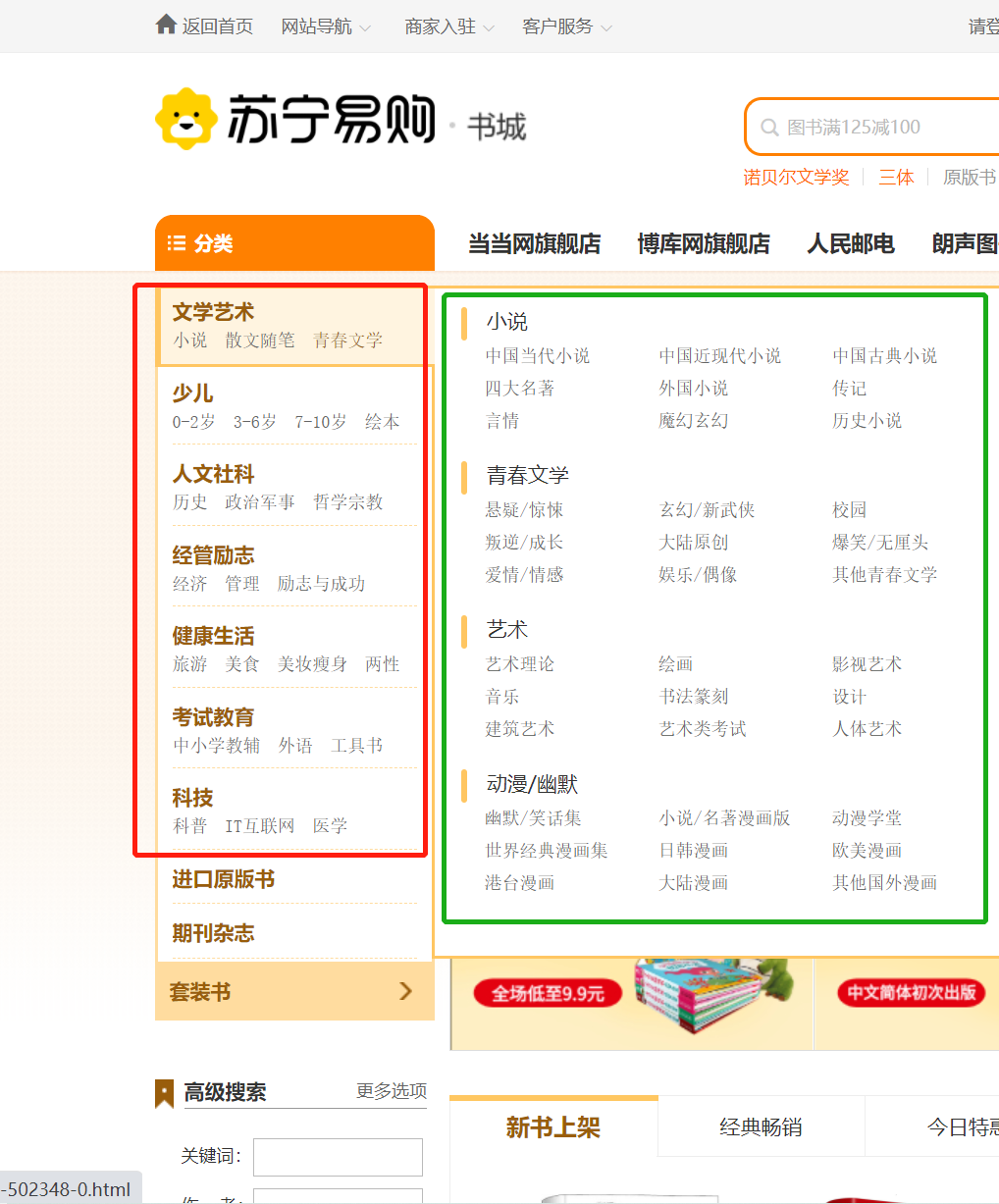
1、图书一级分类
2、图书二级分类
3、图书三级分类
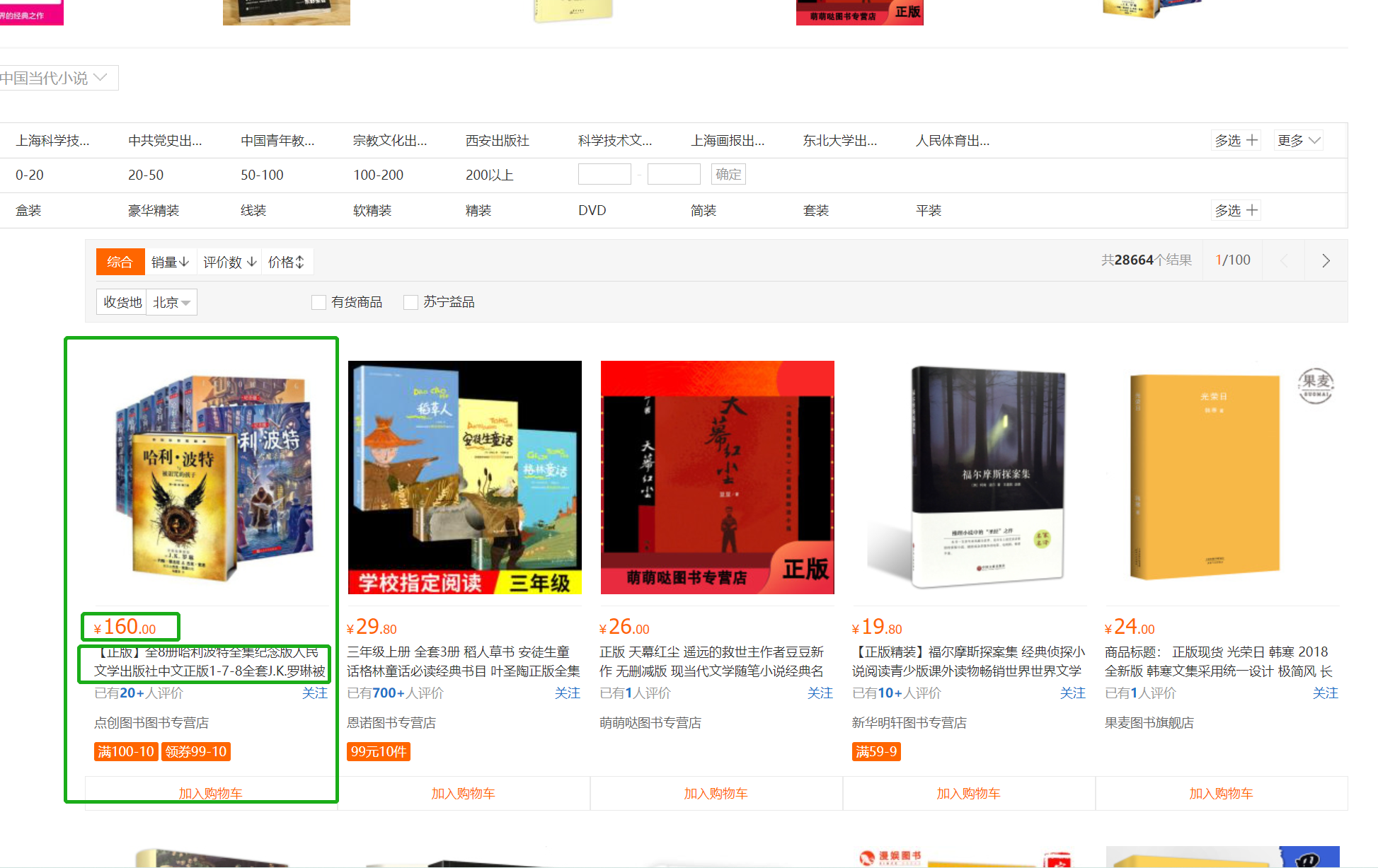
4、图书名字
5、图书作者
6、图书价格
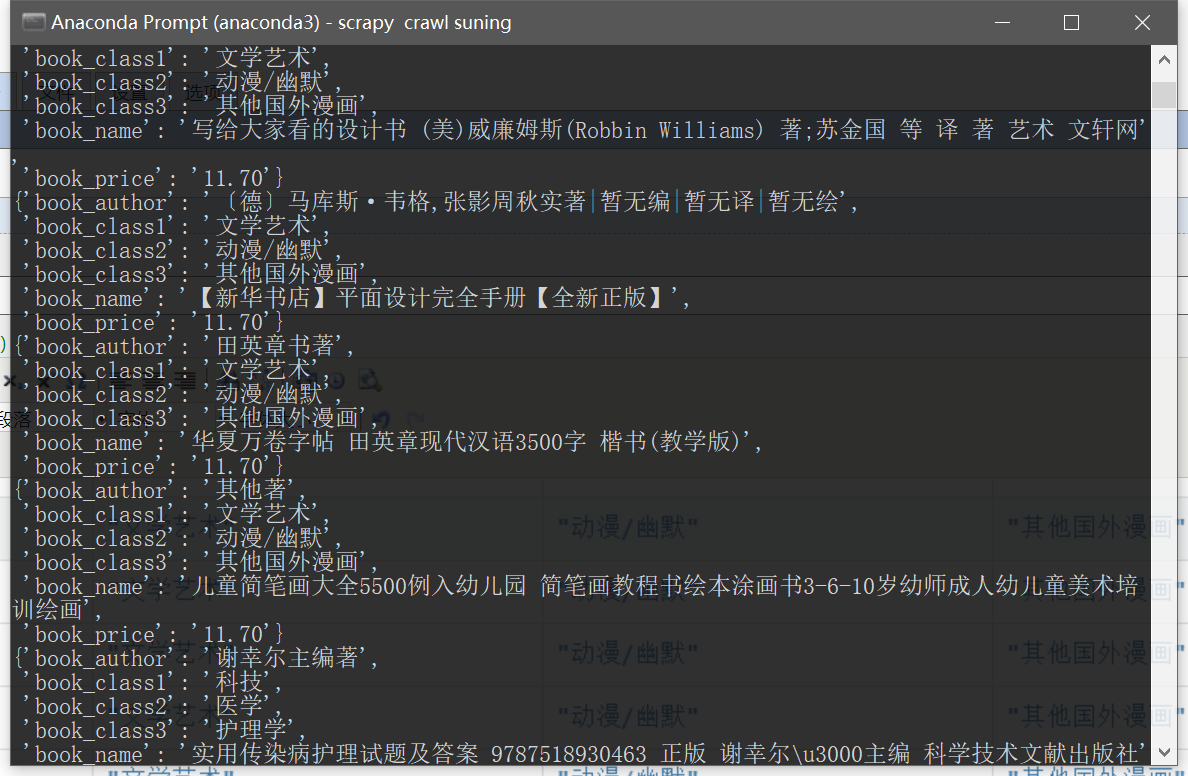
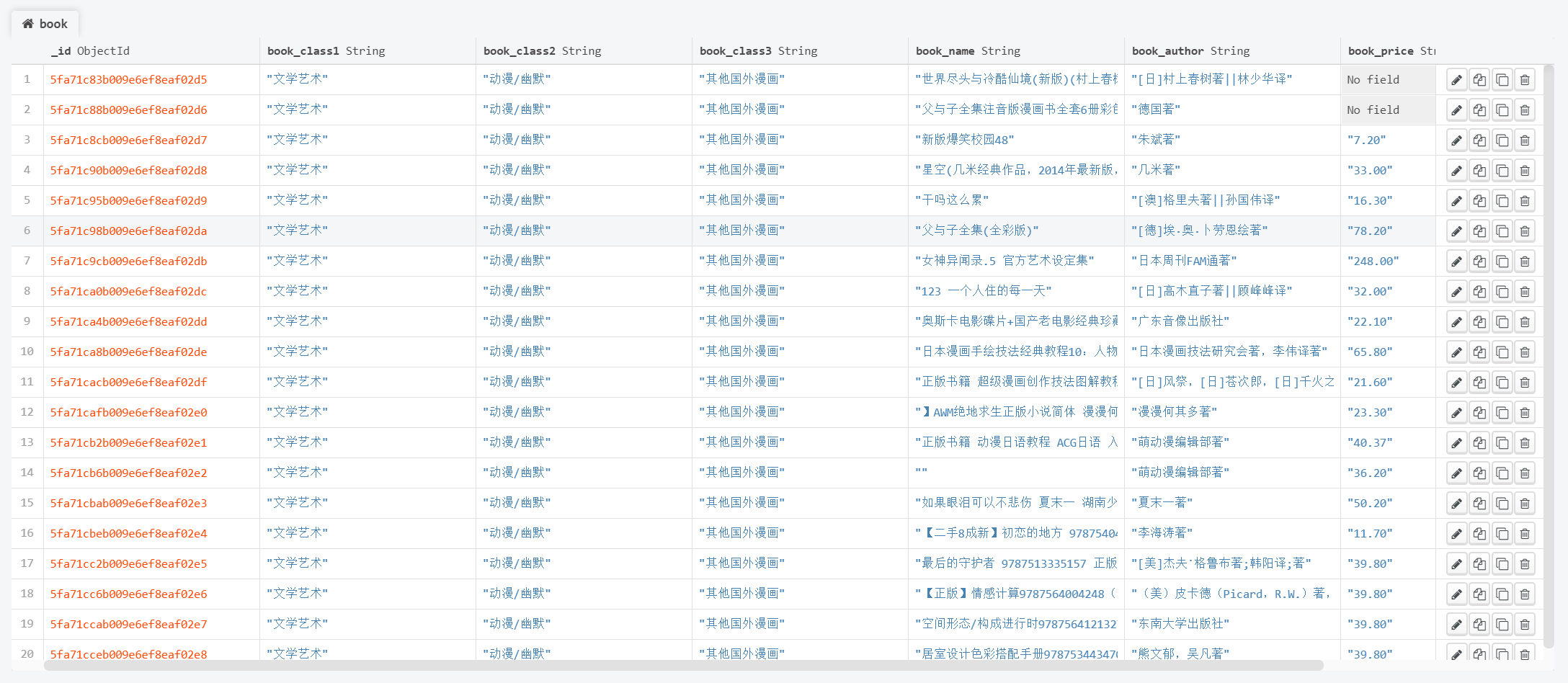
7、通过Scrapy获取以上数据并存储在MongoDB中
步骤:
1、创建项目
2、编写爬虫
- 发送主页请求,获取响应
- 利用xpath提取一级、二级、三级分类的名称和三级分类对应的图书列表页url
- 对图书列表页发送请求,获取响应
- 利用xpath提取图书的名称、价格信息以及下一页url
3、运行爬虫,保存数据
问题:
1、价格信息的获取,测试发现价格信息不在请求的列表页中。通过抓包确定了价格信息所在的URL,并且该URL随着网页的滚动动态生成,
于是通过对比多个URL,并尝试不断精简,最终发现规律:
url = "https://ds.suning.com/ds/generalForTile/{ }_-010-2-{ }-1--".format(prdid, shopid)
prdid, shopid可以在列表页中提取得到,进而构造出每本图书的价格地址
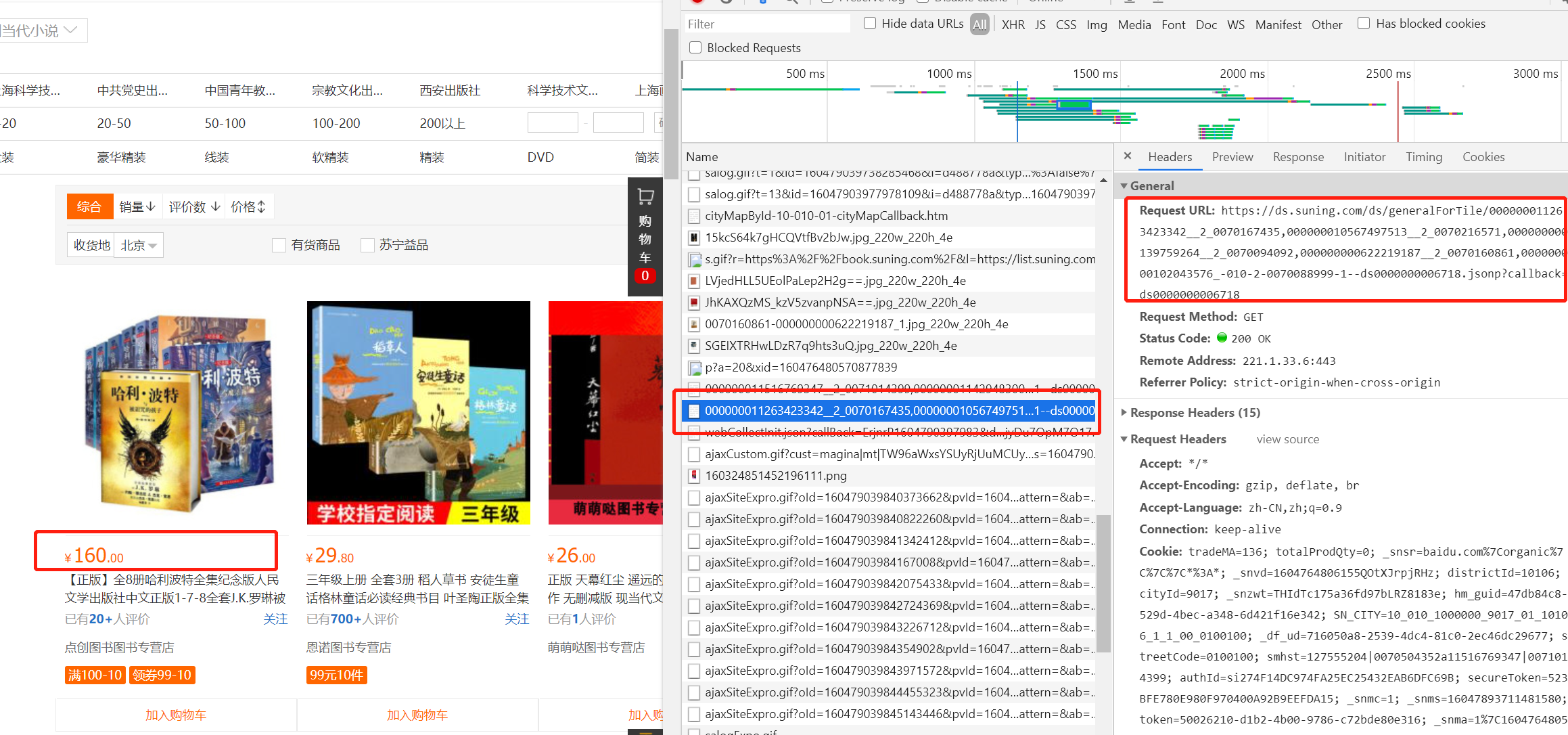
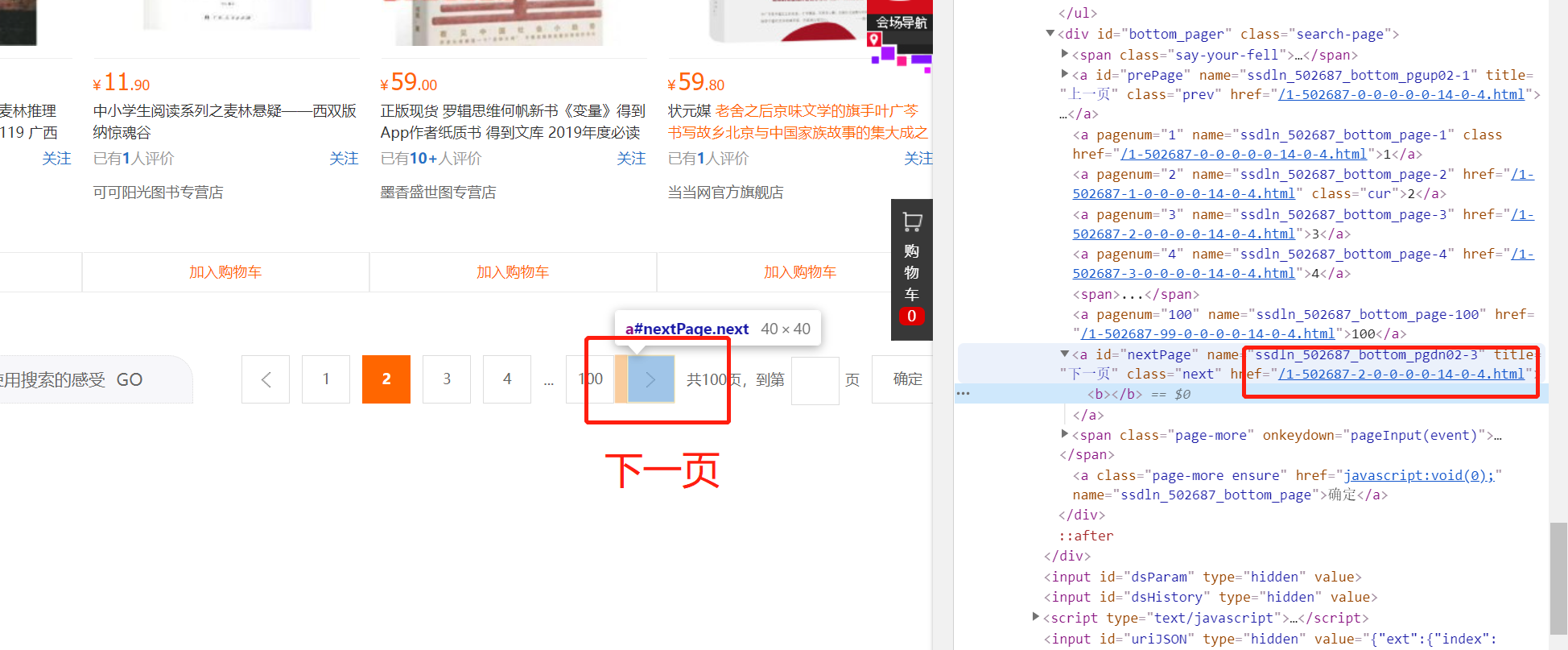
2、列表页下一页URL,通过判断每一页是否有“下一页”这个标志进行翻页循环
代码:
- item.py
import scrapy

class BookItem(scrapy.Item):

    book_class1 = scrapy.Field()

    book_class2 = scrapy.Field()

    book_class3 = scrapy.Field()

    book_name = scrapy.Field()

    book_author = scrapy.Field()

    book_price = scrapy.Field()
- setting.py
BOT_NAME = 'book'

SPIDER_MODULES = ['book.spiders']

NEWSPIDER_MODULE = 'book.spiders'

LOG_LEVEL = "WARNING"

# Crawl responsibly by identifying yourself (and your website) on the user-agent

USER_AGENT = 'Mozilla/5.0 (Windows NT 10.0; Win64; x64) AppleWebKit/537.36 (KHTML, like Gecko) Chrome/86.0.4240.111 Safari/537.36'

# Obey robots.txt rules

ROBOTSTXT_OBEY = True

# Configure maximum concurrent requests performed by Scrapy (default: 16)

#CONCURRENT_REQUESTS = 32

# Configure a delay for requests for the same website (default: 0)

# See https://docs.scrapy.org/en/latest/topics/settings.html#download-delay

# See also autothrottle settings and docs

DOWNLOAD_DELAY = 3

# The download delay setting will honor only one of:

#CONCURRENT_REQUESTS_PER_DOMAIN = 16

#CONCURRENT_REQUESTS_PER_IP = 16

# Disable cookies (enabled by default)

#COOKIES_ENABLED = False

# Disable Telnet Console (enabled by default)

#TELNETCONSOLE_ENABLED = False

# Override the default request headers:

#DEFAULT_REQUEST_HEADERS = {

#   'Accept': 'text/html,application/xhtml+xml,application/xml;q=0.9,*/*;q=0.8',

#   'Accept-Language': 'en',

#}

# Enable or disable spider middlewares

# See https://docs.scrapy.org/en/latest/topics/spider-middleware.html

#SPIDER_MIDDLEWARES = {

#    'book.middlewares.BookSpiderMiddleware': 543,

#}

# Enable or disable downloader middlewares

# See https://docs.scrapy.org/en/latest/topics/downloader-middleware.html

#DOWNLOADER_MIDDLEWARES = {

#    'book.middlewares.BookDownloaderMiddleware': 543,

#}

# Enable or disable extensions

# See https://docs.scrapy.org/en/latest/topics/extensions.html

#EXTENSIONS = {

#    'scrapy.extensions.telnet.TelnetConsole': None,

#}

# Configure item pipelines

# See https://docs.scrapy.org/en/latest/topics/item-pipeline.html

ITEM_PIPELINES = {

   'book.pipelines.BookPipeline': 300,

}

# Enable and configure the AutoThrottle extension (disabled by default)

# See https://docs.scrapy.org/en/latest/topics/autothrottle.html

#AUTOTHROTTLE_ENABLED = True

# The initial download delay

#AUTOTHROTTLE_START_DELAY = 5

# The maximum download delay to be set in case of high latencies

#AUTOTHROTTLE_MAX_DELAY = 60

# The average number of requests Scrapy should be sending in parallel to

# each remote server

#AUTOTHROTTLE_TARGET_CONCURRENCY = 1.0

# Enable showing throttling stats for every response received:

#AUTOTHROTTLE_DEBUG = False

# Enable and configure HTTP caching (disabled by default)

# See https://docs.scrapy.org/en/latest/topics/downloader-middleware.html#httpcache-middleware-settings

#HTTPCACHE_ENABLED = True

#HTTPCACHE_EXPIRATION_SECS = 0

#HTTPCACHE_DIR = 'httpcache'

#HTTPCACHE_IGNORE_HTTP_CODES = []

#HTTPCACHE_STORAGE = 'scrapy.extensions.httpcache.FilesystemCacheStorage'

# MONGODB 主机名

MONGODB_HOST = "127.0.0.1"

# MONGODB 端口号

MONGODB_PORT = 27017

# 数据库名称

MONGODB_DBNAME = "book"

# 存放数据的表名称

MONGODB_SHEETNAME = "book"
- pipeline.py
from itemadapter import ItemAdapter

import pymongo

from scrapy.utils.project import get_project_settings

settings = get_project_settings()

class BookPipeline:

    def __init__(self):

        host = settings["MONGODB_HOST"]

        port = settings["MONGODB_PORT"]

        dbname = settings["MONGODB_DBNAME"]

        sheetname = settings["MONGODB_SHEETNAME"]

        # 创建MONGODB数据库链接

        client = pymongo.MongoClient(host=host, port=port)

        # 指定数据库

        mydb = client[dbname]

        # 存放数据的数据库表名

        self.post = mydb[sheetname]

    def process_item(self, item, spider):

        data = dict(item)

        self.post.insert(data)

        print(item)

        return item
- spider.py
import scrapy

from book.items import BookItem

import re

import json

class SuningSpider(scrapy.Spider):

    name = 'suning'

    allowed_domains = ['suning.com']

    start_urls = ['https://book.suning.com/']

    def parse(self, response):

        class1_list = response.xpath("//div[@class='menu-item'][position()<8]")

        loc2 = "//div[@class='menu-sub'][{}]/div[@class='submenu-left']/p"  # 二级分类定位

        loc3 = "//div[@class='menu-sub'][{}]/div[@class='submenu-left']/ul/li"  # 三级分类定位

        for class1 in class1_list:

            item = BookItem()

            item["book_class1"] = class1.xpath(".//h3/a/text()").extract_first()  # 一级分类

            for class2 in response.xpath(loc2.format(class1_list.index(class1) + 1)):

                item["book_class2"] = class2.xpath("./a/text()").extract_first()  # 二级分类

                for class3 in response.xpath(loc3.format(class1_list.index(class1) + 1)):

                    item["book_class3"] = class3.xpath("./a/text()").extract_first()  # 三级分类

                    book_list_href = class3.xpath("./a/@href").extract_first()  # 图书列表页url

                    yield scrapy.Request(book_list_href, callback=self.parse_book_list, meta={"item": item})

    # 图书列表页请求方法

    def parse_book_list(self, response):

        # 通过meta参数实现item的传递

        item = response.meta["item"]

        book_list = response.xpath("//div[@class='img-block']/a")

        for book in book_list:

            prdid = eval(book.xpath("./@sa-data").extract_first())["prdid"]

            shopid = eval(book.xpath("./@sa-data").extract_first())["shopid"]

            # 构建价格信息所在的url

            book_price_url = "https://ds.suning.com/ds/generalForTile/{}_-010-2-{}-1--".format(prdid, shopid)

            # 图书详情页URL

            book_href = "https:" + book.xpath("./@href").extract_first()

            yield scrapy.Request(book_price_url, callback=self.parse_book_price, meta={"item": item})

            yield scrapy.Request(book_href, callback=self.parse_book_detail, meta={"item": item})

        # 下一页URL

        next_url_tmp = response.xpath("//a[@title='下一页']/@href").extract_first()

        if next_url_tmp is not None:

            next_url = "https://list.suning.com" + next_url_tmp

            yield scrapy.Request(next_url, callback=self.parse_book_list)

    # 图书价格获取方法

    def parse_book_price(self, response):

        item = response.meta["item"]

        item["book_price"] = json.loads(response.text)["rs"][0]["price"]

    # 图书详情页处理方法

    def parse_book_detail(self, response):

        item = response.meta["item"]

        # 图书名字

        item["book_name"] = "".join(response.xpath("//div[@class='proinfo-title']/h1/text()").extract()).strip()

        # 图书作者

        author = response.xpath("//li[@class='pb-item']/text()").extract_first()

        # 图书作者信息字符串处理

        if author is not None:

            item["book_author"] = re.sub(r"\n|\t|\s", "", author)

        yield item
Scrapy项目_苏宁图书信息的更多相关文章
- Scrapy项目 - 实现豆瓣 Top250 电影信息爬取的爬虫设计
通过使Scrapy框架,掌握如何使用Twisted异步网络框架来处理网络通讯的问题,进行数据挖掘和对web站点页面提取结构化数据,可以加快我们的下载速度,也可深入接触各种中间件接口,灵活的完成各种需求 ...
- Scrapy项目 - 实现斗鱼直播网站信息爬取的爬虫设计
要求编写的程序可爬取斗鱼直播网站上的直播信息,如:房间数,直播类别和人气等.熟悉掌握基本的网页和url分析,同时能灵活使用Xmind工具对Python爬虫程序(网络爬虫)流程图进行分析. 一.项目 ...
- Scrapy项目_阳光热线问政平台
目的: 爬取阳光热线问政平台问题中每个帖子的标题.详情URL.详情内容.图片以及发布时间 步骤: 1.创建爬虫项目 1 scrapy startproject yangguang 2 cd yangg ...
- pycharm创建scrapy项目教程及遇到的坑
最近学习scrapy爬虫框架,在使用pycharm安装scrapy类库及创建scrapy项目时花费了好长的时间,遇到各种坑,根据网上的各种教程,花费了一晚上的时间,终于成功,其中也踩了一些坑,现在整理 ...
- scrapy(一)--Pycharm创建scrapy项目
1.环境 操作系统:windows10. python版本:python3.6,Anaconda(将Anaconda3\Scripts;路径添加到环境变量Path中) pycharm:pycharm2 ...
- scrapy爬虫--苏宁图书
实现业务逻辑如下: 1. 创建scrapy项目,并生成 爬虫2. 在suning.py中实现Schedul 和 Spider业务逻辑3. 修改start_urls为正确的初始请求地址4. 构造pars ...
- scrapy(一)建立一个scrapy项目
本项目实现了获取stack overflow的问题,语言使用python,框架scrapy框架,选取mongoDB作为持久化数据库,redis做为数据缓存 项目源码可以参考我的github:https ...
- Python爬虫Scrapy(二)_入门案例
本章将从案例开始介绍python scrapy框架,更多内容请参考:python学习指南 入门案例 学习目标 创建一个Scrapy项目 定义提取的结构化数据(Item) 编写爬取网站的Spider并提 ...
- 利用 Scrapy 爬取知乎用户信息
思路:通过获取知乎某个大V的关注列表和被关注列表,查看该大V和其关注用户和被关注用户的详细信息,然后通过层层递归调用,实现获取关注用户和被关注用户的关注列表和被关注列表,最终实现获取大量用户信息. 一 ...
随机推荐
- Web漏洞扫描-AppScan
Web漏洞扫描-AppScan 一.AppScan简述 二.功能及特点 一.AppScan简述 IBM Security AppScan是一个适合安全专家的Web应用程序和Web服务渗透测试解决方案. ...
- acid解释
原子性A:一个事务内部的所有操作都是不可分割的,这叫原子性.一致性C:事务内部的所有操作要么都成功,要么都失败.隔离性I:事务与事务之间永远不相见.持久性D:就是说数据最终是落到磁盘永久保存的.
- Elasticsearch 之 Filter 与 Query 有啥不同?
今天来了解下 Elasticsearch(以下简称 ES) 中的 Query 和 Filter. 在 ES 中,提供了 Query 和 Filter 两种搜索: Query Context:会对搜索进 ...
- HDU-6148 Valley Number (数位DP)
当一个数字,从左到右依次看过去数字没有出现先递增接着递减的"山峰"现象,就被称作 Valley Number.它可以递增,也可以递减,还可以先递减再递增.在递增或递减的过程中可以出 ...
- Codeforces Round #627 (Div. 3) F - Maximum White Subtree(深度优先搜索)
题意: n 个点 n - 1 条边的树,问每个点所在所有子树中白黑点数目的最大差. 思路: 白点先由下至上汇集,后由上至下分并. #include <bits/stdc++.h> usin ...
- Codeforces Round #648 (Div. 2) B. Trouble Sort
一开始读错题了...想当然地认为只能相邻元素交换...(然后换了两种写法WA了4发,5分钟切A的优势荡然无存) 题目链接:https://codeforces.com/contest/1365/pro ...
- poj 1696 极角排序(解题报告)
#include<iostream> #include<cmath> #include<algorithm> using namespace std; double ...
- hdu 6822 Paperfolding 规律+排列组合+逆元
题意: 给你一片纸,你可以对它进行四种操作,分别是向上.向下.向左.向右对折.把对折之后的纸片横向剪开,再纵向剪开(十字架剪开) 问你你能剪出来的纸片的期望个数 题解(参考:https://blog. ...
- 安装python的selenium库和驱动
对于使用selenium来进行python爬虫操作可以简化好多操作,它实际上的运行就是通过打开一个浏览器来一步一步的按照你的代码来执行 如果安装过python编译器后应该pip工具也是有的,验证pyt ...
- Codeforces Round #681 (Div. 2, based on VK Cup 2019-2020 - Final) D. Extreme Subtraction (贪心)
题意:有一个长度为\(n\)的序列,可以任意取\(k(1\le k\le n)\),对序列前\(k\)项或者后\(k\)减\(1\),可以进行任意次操作,问是否可以使所有元素都变成\(0\). 题解: ...