
Javascript轮播 支持平滑和渐隐两种效果




接下来,我们来大致说下整个轮播的思路:
一、先来看简单的,移动的,先上来一个图----移动效果图:
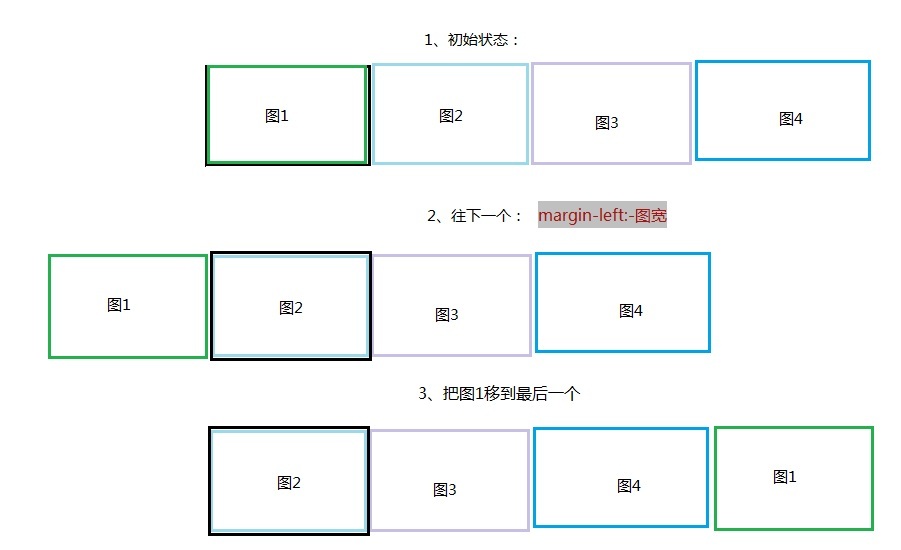
说明:
基本原则就是顺序是按照当前显示的为基准:如当前为2,那么顺序就是2,3,4,1;如当前为3,那么顺序就是3,4,1,2。以此类推。
整个移动划分为三种:1、下一个 2、上一个 3、任意个
1、下一个:margin-left:-图宽;然后将“图1”移到最后一个位置

   next: function () {

            var oThis = this;

            var firstItem = oThis.itemArray.shift();

            oThis.itemArray.push(firstItem);

            rotatePrivate.clealNvActive.call(oThis, oThis.itemArray[0].index);

            //移动wrap到第二个元素

            oThis.wrap.animate({ marginLeft: -oThis.itemW }, {

                duration: oThis.actionTime,

                easing: 'easeInOutQuint',

                complete: function () {

                    //第一元素移到最后

                    oThis.wrap.append(firstItem.item);

                    oThis.wrap.css('margin-left', 0);

                    rotatePrivate.timeRun.call(oThis);

                }

            });

        },
2、上一个:将最后一个(图4)移到第一个,设置margin-left:-图宽,然后动作设置成margin-left:0
  pre: function () {

            var oThis = this;

            //找到最后一张,并移到第一张

            var lastItem = oThis.itemArray.pop();

            oThis.wrap.prepend(lastItem.item);

            oThis.wrap.css('margin-left', -oThis.itemW);

            rotatePrivate.clealNvActive.call(oThis, lastItem.index);

            oThis.wrap.animate({ marginLeft: 0 }, {

                duration: oThis.actionTime,

                easing: 'easeInOutQuint',

                complete: function () {

                    //变化数组

                    oThis.itemArray.splice(0, 0, lastItem);

                    rotatePrivate.timeRun.call(oThis);

                }

            });

        },
3、任意个:先判断向前移,还是向后移动,然后根据基本原则就是顺序是按照当前显示的为基准,从新排列顺序。
curstom: function (i) {

            var oThis = this;

            var customItem = null;

            for (var h in oThis.itemArray) {

                if (oThis.itemArray[h].index == i) {

                    customItem = oThis.itemArray[h];

                    break;

                }

            }

            var firstItem = oThis.itemArray[0];

            //在活动的后面

            if (customItem.index > firstItem.index) {

                //把curstomItem移到后面

                firstItem.item.after(customItem.item);

                rotatePrivate.clealNvActive.call(oThis, customItem.index);

                //foucus move to curstomitem

                oThis.wrap.animate({ marginLeft: -oThis.itemW }, {

                    duration: oThis.actionTime,

                    complete: function () {

                        //sort by customitem

                        rotatePrivate.sortItem.call(oThis, customItem);

                        oThis.wrap.css('margin-left', 0);

                        rotatePrivate.timeRun.call(oThis);

                    }

                });

            } else {

                //把curstomItem移到当前的前面,并margin-left -itemWidth

                firstItem.item.before(customItem.item);

                oThis.wrap.css('margin-left', -oThis.itemW);

                rotatePrivate.clealNvActive.call(oThis, customItem.index);

                //foucus move to curstomitem

                oThis.wrap.animate({ marginLeft: 0 }, {

                    duration: oThis.actionTime,

                    complete: function () {

                        //sort by customitem

                        rotatePrivate.sortItem.call(oThis, customItem);

                        rotatePrivate.timeRun.call(oThis);

                    }

                });

            }

        }
二、再来看渐隐轮播效果
这个在原来的效果上,唯一比较有亮点的就是“渐隐如何不让图片白一下”?
图1 图2 图3 图4
图1克隆
图2 图3 图4 图1
我采用clone了一张当前,并设置position: absolute;这样当当前这样的opacity变为0时,底下的图2就显示出来,这样就不那么生硬了。
    next: function () {

            var oThis = this;

            var firstItem = oThis.itemArray.shift();

            oThis.itemArray.push(firstItem);

            //将第一个clone一个,覆在上面

            var firstClone = firstItem.item.clone();

            firstClone.addClass('rotate-trans');

            firstClone.removeClass('rotate-item');

            oThis.wrap.append(firstClone);

            //first ele move to last

            oThis.wrap.append(firstItem.item);

            var secondItem = oThis.itemArray[0];

            rotatePrivate.clealNvActive.call(oThis, secondItem.index);

            firstClone.animate({ opacity: 0 }, {

                duration: oThis.actionTime,

                complete: function () {

                    //移走clone

                    firstClone.remove();

                    rotatePrivate.timeRun.call(oThis);

                }

            });

        },
Javascript轮播 支持平滑和渐隐两种效果的更多相关文章
- Javascript轮播 支持平滑和渐隐两种效果(可以只有两张图)
先上两种轮播效果:渐隐和移动 效果一:渐隐 1 2 3 4 效果二:移动 1 2 3 4 接下来,我们来大致说下整个轮播的思路: 一.先来看简单的,移动的,先上来一个图----移动效果图: 说明: ...
- Javscript轮播 支持平滑和渐隐两种效果(可以只有两张图)
原文:Javscript轮播 支持平滑和渐隐两种效果(可以只有两张图) 先上两种轮播效果:渐隐和移动 效果一:渐隐 1 2 3 4 效果二:移动 1 2 3 4 接下来,我们来大致说下整个轮播的思 ...
- 练习:javascript轮播图效果
javascript轮播自动播放切换滑过停止,上一页/下一页 <!DOCTYPE html> <html lang="en"> <head> & ...
- nginx将http升级到https并且同时支持http和https两种请求、http自动转向https
1.http升级到https 1.1.检查 Nginx 是否支持 SSL /usr/local/nginx/sbin/nginx -V configure arguments中是否有--with-ht ...
- 【Nginx】将http升级到https并且同时支持http和https两种请求
一.如何将http升级到https 需要满足下面三个: 1.域名 2.nginx 3.SSL证书 一般第三方证书颁发机构下发的证书是收费的,一年好几千. 1) 从腾讯云申请免费的SSL证 ...
- WPF技术触屏上的应用系列(四): 3D效果图片播放器(图片立体轮放、图片立体轮播、图片倒影立体滚动)效果实现
原文:WPF技术触屏上的应用系列(四): 3D效果图片播放器(图片立体轮放.图片立体轮播.图片倒影立体滚动)效果实现 去年某客户单位要做个大屏触屏应用,要对档案资源进行展示之用.客户端是Window7 ...
- JavaScript 轮播图
这是我自己做的一个轮播图,大家可以看看 ,我还没进行优化.有改进的地方可以私聊 布局什么的你们自己搞定吧 <div class="slider" id="circl ...
- 让boostrap的图片轮播支持滑动效果
因为最近开发的项目涉及到移动设备上的 HTML5 开发,其中需要实现轮播效果. 然后最快捷的方式,你知道的(Bootstrap),然后原生的 Bootstrap 的 carousel.js 插件并没有 ...
- JavaScript轮播图
需求: 鼠标移动到下标页码时,也转换到相对应的图片: 多张图片可以自动轮播: 鼠标移动至图片时,停止自动轮播: 可以手动左右调节: <!DOCTYPE html> <html lan ...
随机推荐
- hdu 4465 概率称号
http://acm.hdu.edu.cn/showproblem.php?pid=4465 第一直觉概率DP但很快被否定,发现只有一个简单的二项分布,但感情的表达,没有对生命和死亡的例子.然后找到准 ...
- uva 10635 Prince and Princess(LCS成问题LIS问题O(nlogn))
标题效果:有两个长度p+1和q+1该序列.的各种元素的每个序列不是相互同.并1~n^2之间的整数.个序列的第一个元素均为1. 求出A和B的最长公共子序列长度. 分析:本题是LCS问题,可是p*q< ...
- php学习之道:mysql SELECT FOUND_ROWS()与COUNT(*)使用方法差别
在mysql中 FOUND_ROWS()与COUNT(*)都能够统计记录.假设都一样为什么会有两个这种函数呢.以下我来介绍SELECT FOUND_ROWS()与COUNT(*)使用方法差别 SELE ...
- Cordic 算法的原理介绍
cordic 算法知道正弦和余弦值,求反正切,即角度. 采用用不断的旋转求出对应的正弦余弦值,是一种近似求解发. 旋转的角度很讲求,每次旋转的角度必须使得 正切值近似等于 1/(2^N).旋转的目的是 ...
- CentOS安装KVM步骤虚拟机,绝对实用!
KVM(Kernel-based Virtual Machine)速记.这是rhel5.4最新的虚拟化技术启动,现在只支持红帽64位rhel5.4在执行KVM,硬件必须支持同一时间VT技术,网上找 ...
- 很酷的CSS3仿Facebook登录表单
原文:很酷的CSS3仿Facebook登录表单 今天看到一款很不错的CSS3登录表单,外观是仿Facebook的登录表单,还挺不错的,另外也支持简单的表单输入框验证.下图是表单的效果图: 我们也可以在 ...
- android 性能測试iozone篇
一:简单介绍 iozone是一个文件系统的benchmark工具, 用于測试不同的操作系统中文件系统的读写性能, 能够測试下面13种模式 0=write/rewrite 1=read/re-read ...
- 深入理解ASP.NET MVC Day1
深入理解ASP.NET MVC ASP.NET vs MVC vs WebForms 许多ASP.NET开发人员开始接触MVC认为MVC与ASP.NET完全没有关系,是一个全新的Web开发,事实上 ...
- MSMQ-发送消息到远程专用队列 实例
目录 一:MSMQ的一些理论上的知识 二:队列类型(Queue Type) 三:安装消息队列 四:在C#中Messagequeue class 五:MSMQ-发送消息到远程专用队列 六:例子 一. ...
- (c#)SKYPE API项目总结(一)
原文:(c#)SKYPE API项目总结(一) 这个项目的需求:SKYPE软件文字聊天同步翻译,并将翻译后的内容会发送给对方,将对方发给自己的话翻译成自己语种.功能见图: ...