
Javascript轮播 支持平滑和渐隐两种效果(可以只有两张图)




接下来,我们来大致说下整个轮播的思路:
一、先来看简单的,移动的,先上来一个图----移动效果图:
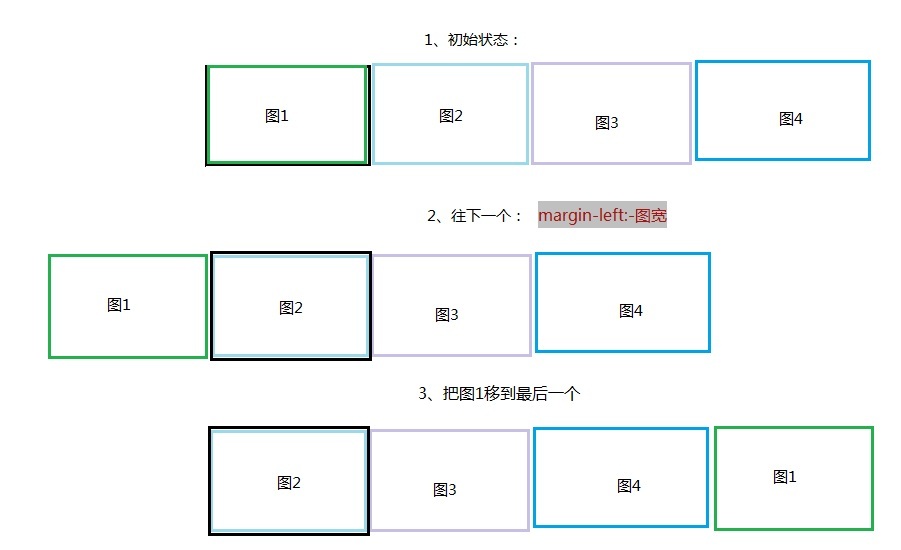
说明:
基本原则就是顺序是按照当前显示的为基准:如当前为2,那么顺序就是2,3,4,1;如当前为3,那么顺序就是3,4,1,2。以此类推。
整个移动划分为三种:1、下一个 2、上一个 3、任意个
1、下一个:margin-left:-图宽;然后将“图1”移到最后一个位置
   next: function () {

            var oThis = this;

            var firstItem = oThis.itemArray.shift();

            oThis.itemArray.push(firstItem);

            rotatePrivate.clealNvActive.call(oThis, oThis.itemArray[0].index);

            //移动wrap到第二个元素

            oThis.wrap.animate({ marginLeft: -oThis.itemW }, {

                duration: oThis.actionTime,

                easing: 'easeInOutQuint',

                complete: function () {

                    //第一元素移到最后

                    oThis.wrap.append(firstItem.item);

                    oThis.wrap.css('margin-left', 0);

                    rotatePrivate.timeRun.call(oThis);

                }

            });

        },
2、上一个:将最后一个(图4)移到第一个,设置margin-left:-图宽,然后动作设置成margin-left:0
  pre: function () {

            var oThis = this;

            //找到最后一张,并移到第一张

            var lastItem = oThis.itemArray.pop();

            oThis.wrap.prepend(lastItem.item);

            oThis.wrap.css('margin-left', -oThis.itemW);

            rotatePrivate.clealNvActive.call(oThis, lastItem.index);

            oThis.wrap.animate({ marginLeft: 0 }, {

                duration: oThis.actionTime,

                easing: 'easeInOutQuint',

                complete: function () {

                    //变化数组

                    oThis.itemArray.splice(0, 0, lastItem);

                    rotatePrivate.timeRun.call(oThis);

                }

            });

        },
3、任意个:先判断向前移,还是向后移动,然后根据基本原则就是顺序是按照当前显示的为基准,从新排列顺序。
curstom: function (i) {

            var oThis = this;

            var customItem = null;

            for (var h in oThis.itemArray) {

                if (oThis.itemArray[h].index == i) {

                    customItem = oThis.itemArray[h];

                    break;

                }

            }

            var firstItem = oThis.itemArray[0];

            //在活动的后面

            if (customItem.index > firstItem.index) {

                //把curstomItem移到后面

                firstItem.item.after(customItem.item);

                rotatePrivate.clealNvActive.call(oThis, customItem.index);

                //foucus move to curstomitem

                oThis.wrap.animate({ marginLeft: -oThis.itemW }, {

                    duration: oThis.actionTime,

                    complete: function () {

                        //sort by customitem

                        rotatePrivate.sortItem.call(oThis, customItem);

                        oThis.wrap.css('margin-left', 0);

                        rotatePrivate.timeRun.call(oThis);

                    }

                });

            } else {

                //把curstomItem移到当前的前面,并margin-left -itemWidth

                firstItem.item.before(customItem.item);

                oThis.wrap.css('margin-left', -oThis.itemW);

                rotatePrivate.clealNvActive.call(oThis, customItem.index);

                //foucus move to curstomitem

                oThis.wrap.animate({ marginLeft: 0 }, {

                    duration: oThis.actionTime,

                    complete: function () {

                        //sort by customitem

                        rotatePrivate.sortItem.call(oThis, customItem);

                        rotatePrivate.timeRun.call(oThis);

                    }

                });

            }

        }
二、再来看渐隐轮播效果
这个在原来的效果上,唯一比较有亮点的就是“渐隐如何不让图片白一下”?
图1 图2 图3 图4
图1克隆
图2 图3 图4 图1
我采用clone了一张当前,并设置position: absolute;这样当当前这样的opacity变为0时,底下的图2就显示出来,这样就不那么生硬了。
    next: function () {

            var oThis = this;

            var firstItem = oThis.itemArray.shift();

            oThis.itemArray.push(firstItem);

            //将第一个clone一个,覆在上面

            var firstClone = firstItem.item.clone();

            firstClone.addClass('rotate-trans');

            firstClone.removeClass('rotate-item');

            oThis.wrap.append(firstClone);

            //first ele move to last

            oThis.wrap.append(firstItem.item);

            var secondItem = oThis.itemArray[0];

            rotatePrivate.clealNvActive.call(oThis, secondItem.index);

            firstClone.animate({ opacity: 0 }, {

                duration: oThis.actionTime,

                complete: function () {

                    //移走clone

                    firstClone.remove();

                    rotatePrivate.timeRun.call(oThis);

                }

            });

        },
相关代码:Rotate.rar
Javascript轮播 支持平滑和渐隐两种效果(可以只有两张图)的更多相关文章
- Javascript轮播 支持平滑和渐隐两种效果
Javascript轮播 支持平滑和渐隐两种效果 先上两种轮播效果:渐隐和移动 效果一:渐隐 1 2 3 4 效果二:移动 1 2 3 4 接下来,我们来大致说下整个轮播的思路: 一.先来看简单的 ...
- Javscript轮播 支持平滑和渐隐两种效果(可以只有两张图)
原文:Javscript轮播 支持平滑和渐隐两种效果(可以只有两张图) 先上两种轮播效果:渐隐和移动 效果一:渐隐 1 2 3 4 效果二:移动 1 2 3 4 接下来,我们来大致说下整个轮播的思 ...
- 练习:javascript轮播图效果
javascript轮播自动播放切换滑过停止,上一页/下一页 <!DOCTYPE html> <html lang="en"> <head> & ...
- WPF技术触屏上的应用系列(四): 3D效果图片播放器(图片立体轮放、图片立体轮播、图片倒影立体滚动)效果实现
原文:WPF技术触屏上的应用系列(四): 3D效果图片播放器(图片立体轮放.图片立体轮播.图片倒影立体滚动)效果实现 去年某客户单位要做个大屏触屏应用,要对档案资源进行展示之用.客户端是Window7 ...
- .NET环境下导出Excel表格的两种方式和导入两种类型的Excel表格
一.导出Excel表格的两种方式,其中两种方式指的是导出XML数据类型的Excel(即保存的时候可以只需要修改扩展名为.xls)和真正的Excel这两种. using System; using Sy ...
- JavaScript 轮播图
这是我自己做的一个轮播图,大家可以看看 ,我还没进行优化.有改进的地方可以私聊 布局什么的你们自己搞定吧 <div class="slider" id="circl ...
- 让boostrap的图片轮播支持滑动效果
因为最近开发的项目涉及到移动设备上的 HTML5 开发,其中需要实现轮播效果. 然后最快捷的方式,你知道的(Bootstrap),然后原生的 Bootstrap 的 carousel.js 插件并没有 ...
- JavaScript轮播图
需求: 鼠标移动到下标页码时,也转换到相对应的图片: 多张图片可以自动轮播: 鼠标移动至图片时,停止自动轮播: 可以手动左右调节: <!DOCTYPE html> <html lan ...
- 超详细的原生JavaScript轮播图(幻灯片)的制作
本次轮播图的制作主要分为3个部分,分别是:设置定时器自动轮播:点击左右切换按钮轮播:下方点击按钮轮播.具体实现步骤如下: (效果图) html部分代码如下: <div class="s ...
随机推荐
- [经验] Win7减肥攻略(删文件不删功能、简化优化系统不简优化性能)
[经验] Win7减肥攻略(删文件不删功能.简化优化系统不简优化性能) ☆心梦无痕☆ 发表于 2014-1-24 11:15:04 https://www.itsk.com/thread-316471 ...
- `UnityEditor.EditorUtility' does not contain a definition for `GetMiniThumbnail'
I got the following errors with Untiy 4.0f7error CS0117: `UnityEditor.EditorUtility' does not contai ...
- AES,RSA对称加密和非对称加密
1.关于RSA加密机制:是非对称加密方式,两个钥,公钥和私钥,公钥用于加密数据,可以分享给其他用户,私钥可以用于解密用公钥加密的数据,关于安全问题是公钥泄露不会影响安全问题,公钥与私钥是一一对应的关系 ...
- 空格用法
记录一下,空格的转义字符分为如下几种:平时一般用的是 1. &160#;不断行的空白(1个字符宽度)2. &8194#;半个空白(1个字符宽度)3. &8195#;一个空 ...
- html文件里引入文件html文件
导入通用的代码除了使用php外 iframe在很多界面使用起来比较方便 比如说要写导航 在好几个界面都要用这个导航 可以用iframe引用 实例:这个header.html是我写的一个导航界面 在in ...
- MEF的学习笔记
为什么要使用MEF 在商业应用软件开发过程中,对于各个软件项目,都需要建立相应的系统框架,为了更好的规范系统的开发,提高生产效率,应该在公司级别制定相应的API标准.这些API标准将站在系统架构层次, ...
- vb.net 网络图片
https://msdn.microsoft.com/zh-cn/library/ms251715(VS.80).aspx
- checkbox的check事件
<input type="checkbox" id="NameFlag" name="originalName" onClick=&q ...
- "Couldn't communicate with a helper application" in Xcode 7
解决方案 xcrun git config --global user.email you@yourdomain.com xcrun git config --global user.name &qu ...
- deepin linux字体渲染(转)
<?xml version='1.0'?> <!DOCTYPE fontconfig SYSTEM 'fonts.dtd'> <fontconfig> <ma ...