
[转]The Best Plugins for Sublime Text
Source: http://ipestov.com/the-best-plugins-for-sublime-text/
Good day, everyone! I tried to collect the best ST plugins, which really allows to improve your workflow. I searched many sites and here's what I did.
WebInspector
Amazing tool for debagging JavaScript, the full-fledged inspector of a code for Sublime. Features: breakpoints for project stored in user settings with absolute paths, console, debugger steps and breakpoints, stack trace. All this works with a bang! And still there is Fireplay from Mozilla, which allows to be connected to Firefox Developer tools and the simplest debagger JSHint.
Emmet
One of the most popular plugins for editors. Emmet, a former Zen Coding is also one of the most efficient methods of increasing the productivity of web developers. After pressing on the Tab key Emmet converts a simple shortening in volume code snippets for HTML and CSS. Also, I want to mention Hayaku - a collection of convenient abbreviation for cascading style sheets.
Video with the best techniques from the author of the project:
Git
The essence of this plugin is clear from the name - the opportunity to work with Git directly in your favorite editor. This way of working with Git will allow you to save a lot of time. First: you don't have to constantly switch between the Sublime and the terminal. Secondly: there is a good tag auto-complete, and instead of git add-A, it is enough to write add. Thirdly: there are such things as Quick commit, witch one quickcommand adds all changes and commit them.
If from Git you only need a opportunity of take content from remote repositories, then I recomend a Nettuts+ Fetch.
There is Glue, that displays at the bottom the small window, where you can write on the Shell. Due to this, now in your editor will be available not only Git...
GitGutter & Modific
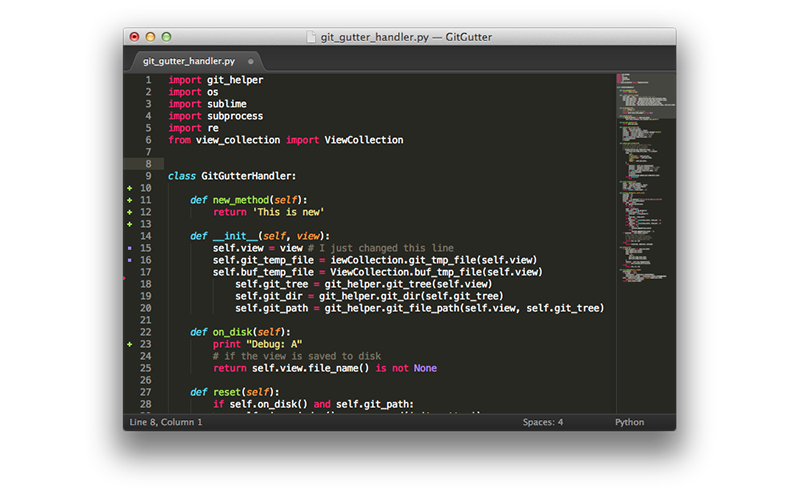
These plugins highlights the rows changed by the last commit, in other words diff tools in real-time.
EditorConfig
 EditorConfig helps developers define and maintain consistent coding styles between different editors and IDEs. The EditorConfig project consists of a file format for defining coding styles and a collection of text editor plugins that enable editors to read the file format and adhere to defined styles. Example of .editorconfig file:
# top-most EditorConfig file

root = true

# Unix-style newlines with a newline ending every file

[*]

end_of_line = lf

insert_final_newline = true

# 4 space indentation

[*.py]

indent_style = space

indent_size = 4

# Tab indentation (no size specified)

[*.js]

indent_style = tab

# Indentation override for all JS under lib directory

[lib/**.js]

indent_style = space

indent_size = 2

# Matches the exact files either package.json or .travis.yml

[{package.json,.travis.yml}]

indent_style = space

indent_size = 2
Sublimall
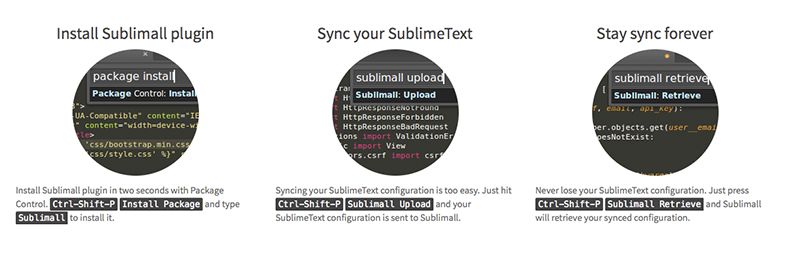
Neat plugin, which synchronizes all the configurations (settings, plugins, open files, etc) between your Sublime Text editors. Everything is free, you only need to create an account. A simpler alternative is BufferScroll.
AllAutocomplete
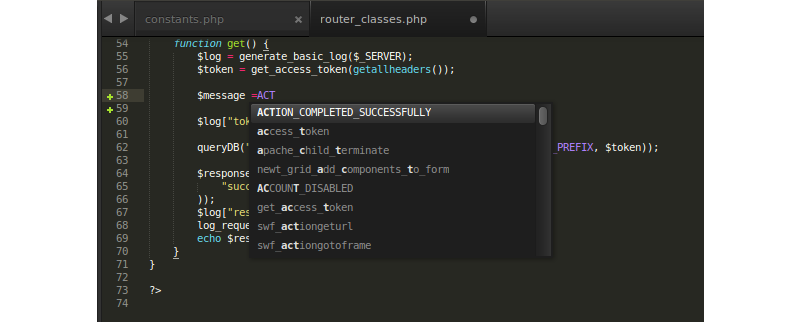
Classic autocomple in Sublime Text only works with the current file. AllAutocomplete searches in all files open in the current window, which greatly simplifies the development process. Also there is a CodeIntel, which embodies the features of the IDE and brings "Code Intelligence" for a number of languages: JavaScript, Mason, XBL, XUL, RHTML, SCSS, Python, HTML, Ruby, Python3, XML, Sass, XSLT, Django, HTML5, Perl, CSS, Twig, Less, Smarty, Node.js, Tcl, TemplateToolkit, PHP.
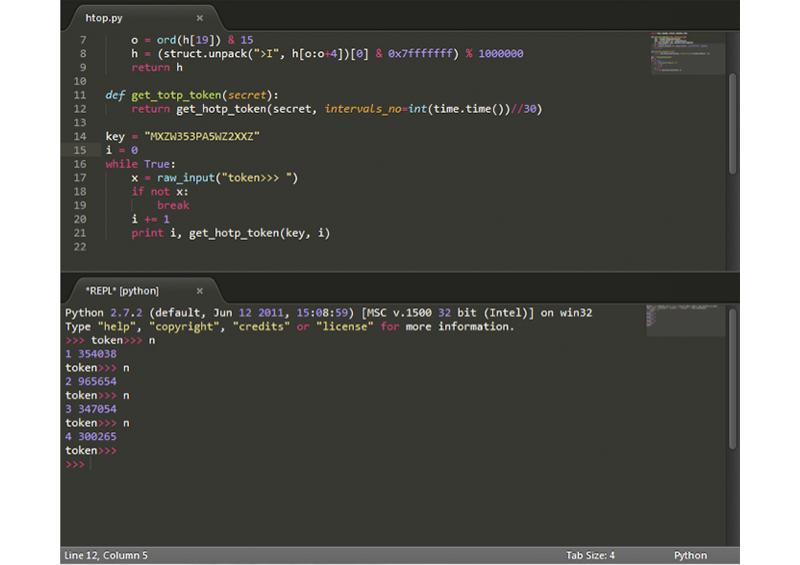
SublimeREPL
Probably, one of the most useful plugins for developers. SublimeREPL directly in the editor run an interpreter for a whole lot of languages: Clojure, CoffeeScript, F#, Groovy, Haskell, Lua, MozRepl, NodeJS, Python, R, Ruby, Scala, shell.
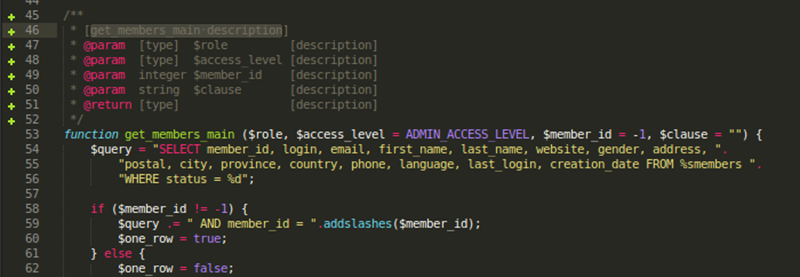
DocBlockr
DocBlockr will become for you an effective tool for documenting code. After entering the /** and pressing the Tab key, the plugin automatically will parse any function and will prepare the appropriate template.
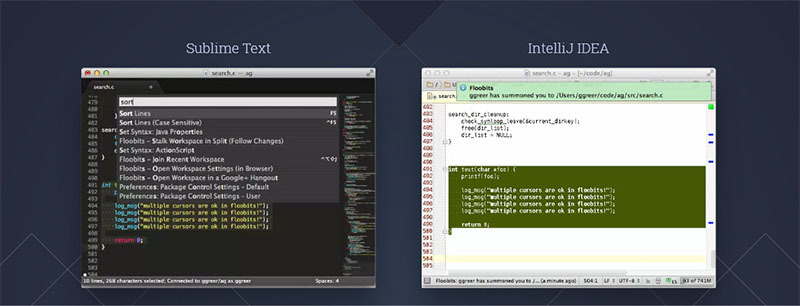
Floobits
Terrific extension for SublimeText, Vim, Emacs, IntelliJ IDEA, which allows developers to collaborate on code, and from different editors.
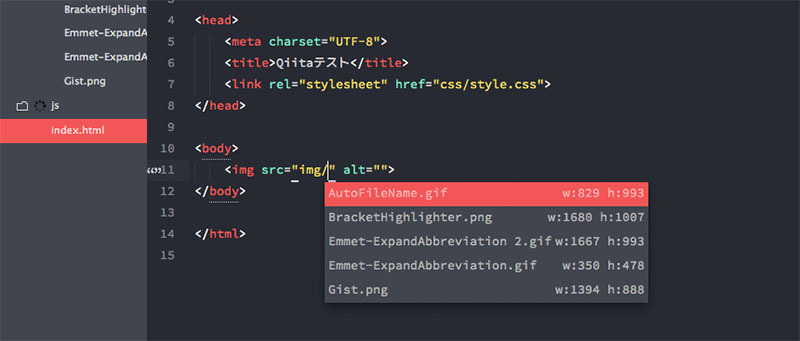
AutoFileName
Autocomplete path to files - is very convenient. Without wasting words.
ColorPicker
Usually, when we need a color palette we used to use Photoshop or Gimp. But full color picker can be available directly in your editor - Ctrl/Cmd + Shift + C. And there're a wonderful GutterColor and ColorHighlighter, that simplify orientation in the color codes: 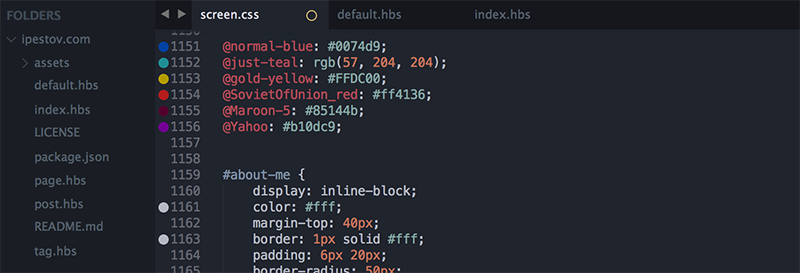
PlainTasks
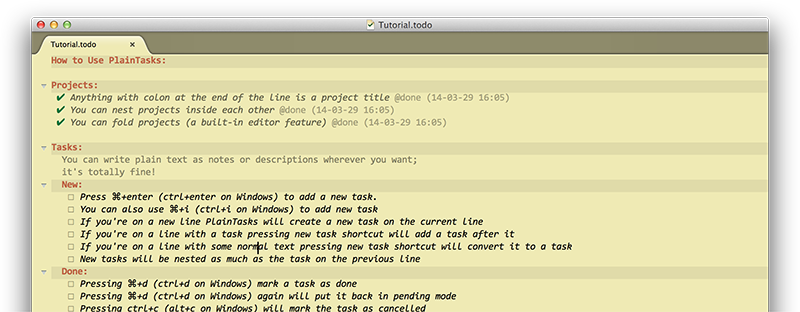
Brilliant todo-list! All tasks are stored in files, so it's very convenient to bind tasks with appropriate project. The ability to create projects, assign tags, set the date. Competent user interface and shortcuts.
MarkdownEditing
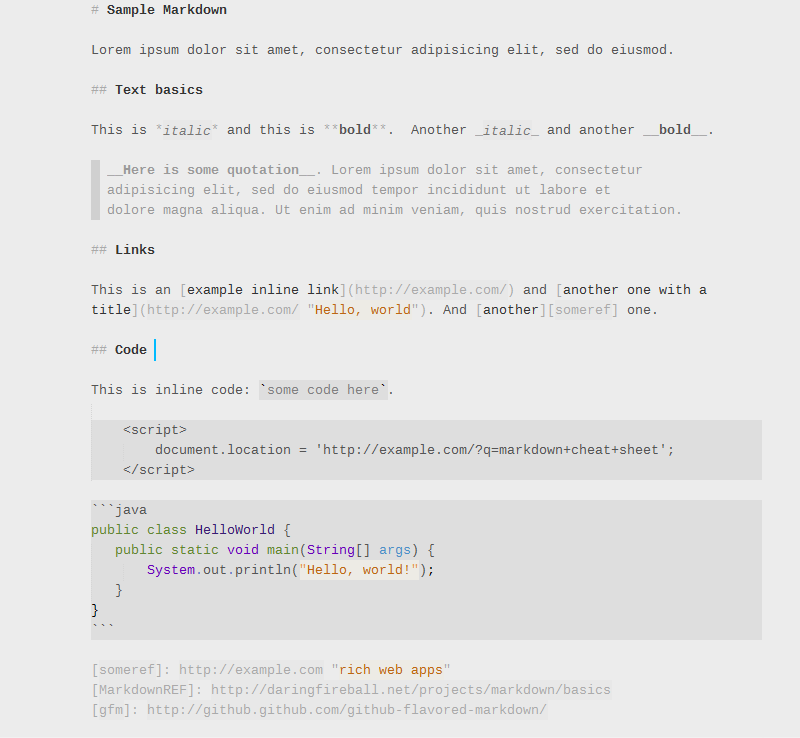
Perhaps, the best plugin for work with Markdown: syntax highlight, abbreviations, autocomplete, color schemes, etc. As an alternative solution, you can try MarkdownPreview.
Finally
- Sublime SFTP
- CTags - CTags support fo Sublime.
- SideBarEnhancement - many additional features of the context menu in the sidebar.
- ActualVim - Vim in Sublime - two favorite editors in one.
- SublimeLinter - Inline lint highlighting for C/C++, Java, Python, PHP, JS, HTML, CSS, etc.
- CSScomb - CSS coding style formatter.
- FixMyJS, Jsfmt and JsFormat - JS/JSON coding style formatters.
- AStyleFormatter - C/C++/C#/Java coding style formatters.
- SVG-Snippets - set of custom SVG snippets.
- Inc-Dec-Value - increase / decrease of numbers, dates, hex color values, etc.
- Trailing Spaces - highlight trailing spaces and delete them in a flash.
- Alignment - dead-simple alignment of multi-line selections and multiple selections for author of Package Control.
- Placeholders - collection of snippets with text, images, list, table, etc.
- ApplySyntax - detect syntax on fly.
- StylToken - allows to highlight certain pieces of text with different colors (similar to notepad++ "Style token" functionality).
- EasyMotion - quickly jump to any character in the visible area of the active view.
- ZenTabs and AdvancedNewFile - improve default tabs appearance and file creation.
- EncodingHelper - guess encoding of files, show in status bar, convert to UTF-8 from a variete of encodings.
- Gist - synchronize GitHub Gist with Sublime (ST2).
- Clipboard History (ST2) - keep a history of your clipboard items.
- Themes and color schemes:
- Soda
- Spacegray
- Flatland
- Tomorrow
- Base 16
- Solarized
- Predawn
- For all other preferences exist Color Schemes and Сolorsublime.
* In some repository indicates that the plugin is written under ST2, but I checked all and much of them use myself under ST3.
* I would not describe the number of plug-ins that perform actions on formatting, compilation, optimization, because I deeply believe that this is a task for Grunt, Gulp, Prepros or CodeKit.
[转]The Best Plugins for Sublime Text的更多相关文章
- Sublime Text 3 Install Markdown Preview Plugins
Sublime Text 3 Install Markdown Preview Plugins. [TOC] 前言 什么是Markdown Markdown是一种可以使用普通文本编辑器编写的标记语言, ...
- Sublime text 入门学习资源篇及其基本使用方法
Sublime text 学习资源篇 史上最性感的编辑器-sublimetext,插件, 学习资源 官网 http://www.sublimetext.com/ 插件 https://packagec ...
- Sublime Text:学习资源篇
官网 http://www.sublimetext.com/ 插件 https://packagecontrol.io 教程 Sublime Text 全程指南 Sublime Text 2 入门及技 ...
- 【转】3 Essential Sublime Text Plugins for Node & JavaScript Developers
原文转自:http://scottksmith.com/blog/2014/09/29/3-essential-sublime-text-plugins-for-node-and-javascript ...
- Essential Sublime Text Plugins
Essential Sublime Text Plugins Add some killer tools to your arsenal. View them all at /repo/sublime ...
- sublime text plugins
Sublime Text 插件,HTML+CSS+JAVASCRIPT+JSON快速格式化: htmlpretty 快捷键:Ctrl+Shift+H Essential Sublime Text 2 ...
- Sublime Text 2配置文件详解
Sublime Text 2是那种让人会一眼就爱上的编辑器,不仅GUI让人眼前一亮,功能更是没的说,拓展性目前来说也完全够用了,网上介绍软件的文章和推荐插件的文章也不少,而且很不错,大家可以去找找自己 ...
- 开发者最常用的 8 款 Sublime Text 3 插件
转载于:http://www.itxuexiwang.com/a/liunxjishu/2016/0228/177.html?1456925631Sublime Text作为一个尽为人知的代码编辑器, ...
- Sublime Text插件:HTML-CSS-JS Prettify
该插件依赖到nodejs环境 1.安装 在Sublime Text中,按下Ctrl+Shift+P调出命令面板; 输入install 调出 Install Package 选项并回车; 输入prett ...
随机推荐
- BST(Binary Search Tree)
原文链接:http://blog.csdn.net/jarily/article/details/8679280 /****************************************** ...
- CodeForces 14 E - Camels && D - Two Paths
D - Two paths 仅仅想到了一个o(n^2)的解法. 首先枚举删除一条边,必定得到两棵独立的树.计算两棵树的直径.保留最大乘积. 首先两条路不相交,则必定能够分到两棵子树中,由于要乘积最大, ...
- Lucene.Net简介和分词
Lucene.net站内搜索—2.Lucene.Net简介和分词 2015-03-24 23:10 by 邹琼俊, 118 阅读, 1 评论, 收藏, 编辑 Lucene.Net简介 Lucene.N ...
- Android安卓安全审计mobiseclab
关于安卓上的app分析,有非常多的本地化软件能够胜任, 只是,今天给大家介绍一款在线的安全审计,恶意软件(android app)检測和分析工具,mobiseclab, 由于看到国内对此工具的介绍比較 ...
- iOS--Swift开发中的单例设计模式
最近在开发一个小的应用,遇到了一些Objective-c上面常用的单例模式,但是swift上面还是有一定区别的,反复倒来倒去发现不能按常理(正常的oc to swift的方式)出牌,因此搜索了一些帖子 ...
- Sqlserver2008安装部署文档
Sqlserver2008部署文档 注意事项: 如果你要安装的是64位的服务器,并且是新机器.那么请注意,你需要首先需要给64系统安装一个.net framework,如果已经安装此功能,请略过这一步 ...
- Mongodb操作之查询(循序渐进对比SQL语句)
工具推荐:Robomongo,可自行百度寻找下载源,个人比较推荐这个工具,相比较mongoVUE则更加灵活. 集合简单查询方法 mongodb语法:db.collection.find() //co ...
- 安卓CTS官方文档之兼容性测试套件简介-attach
官方英文文档原文:https://source.android.com/compatibility/cts-intro.html Compatibility Test Suite 兼容性测试套件 H ...
- 5. SQL Server数据库性能监控 - 当前请求
原文:5. SQL Server数据库性能监控 - 当前请求 对于在线运行的系统,当前数据库性能监控,通常监视以下几点: (1) 是否有阻塞 (Blocking); (2) 是否有等待 (Waitin ...
- windows tcp端口映射或端口转发
windows tcp端口映射或端口转发 windows内部有一个叫netsh的玩意,可以把tcp端口进行映射或转发,可惜不支持udp.举个例子:一台windows有一个80端口,对外可以访问.另有一 ...