
【ASP.NET Web API教程】3.4 HttpClient消息处理器
原文:【ASP.NET Web API教程】3.4 HttpClient消息处理器
注:本文是【ASP.NET Web API系列教程】的一部分,如果您是第一次看本博客文章,请先看前面的内容。
3.4 HttpClient Message Handlers
3.4 HttpClient消息处理器
本文引自:http://www.asp.net/web-api/overview/web-api-clients/httpclient-message-handlers
By Mike Wasson | October 1, 2012
作者:Mike Wasson | 日期:2012-10-1
A message handler is a class that receives an HTTP request and returns an HTTP response.
消息处理器是一个接收HTTP请求并返回HTTP响应的类。
Typically, a series of message handlers are chained together. The first handler receives an HTTP request, does some processing, and gives the request to the next handler. At some point, the response is created and goes back up the chain. This pattern is called a delegating handler.
典型地,一系列消息处理器会链接在一起。第一个处理器接收HTTP请求,进行某些处理,将此请求传给下一个处理器。在处理链的某个点上创建响应,并进行回溯。这种模式称为委托(delegating)处理器(如图3-7所示)。
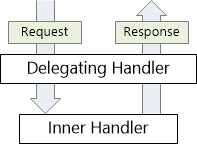
图3-7. 消息处理链及委托处理器
On the client side, the HttpClient class uses a message handler to process requests. The default handler is HttpClientHandler, which sends the request over the network and gets the response from the server. You can insert custom message handlers into the client pipeline:
在客户端,HttpClient类使用消息处理器处理请求。默认的处理器是HttpClientHandler,它在网络上发送请求,并从服务器获取响应。你可以把自定义消息处理器插入到这种客户端管线之中(如图3-8所示)。
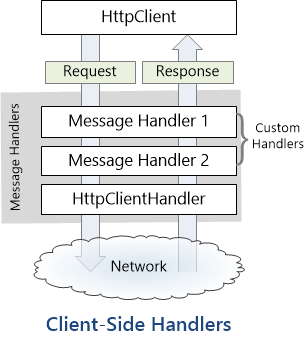
图3-8. 消息处理管线
ASP.NET Web API also uses message handlers on the server side. For more information, see HTTP Message Handlers.
ASP.NET Web API也使用服务器端的消息处理器,更多信息参阅“HTTP消息处理器”(本系列教程第5.1小节 — 译者注)。
Custom Message Handlers
自定义消息处理器
To write a custom message handler, derive from System.Net.Http.DelegatingHandler and override the SendAsync method. Here is the method signature:
要编写自定义消息处理器,需从System.Net.Http.DelegatingHandler进行派生,并重写SendAsync方法。以下是该方法的签名:
Task<HttpResponseMessage> SendAsync(

    HttpRequestMessage request, CancellationToken cancellationToken);
The method takes an HttpRequestMessage as input and asynchronously returns an HttpResponseMessage. A typical implementation does the following:
该方法以HttpRequestMessage作为输入,并异步地返回一个HttpResponseMessage。一种典型的实现(流程)如下:
- Process the request message.
处理请求消息。 - Call base.SendAsync to send the request to the inner handler.
调用base.SendAsync将请求发送给内部处理器。 - The inner handler returns a response message. (This step is asynchronous.)
内部处理器返回一条响应消息。(这一步是异步的。) - Process the response and return it to the caller.
处理响应,并把它返回给客户端。
The following example shows a message handler that adds a custom header to the outgoing request:
以下示例展示了一个消息处理器,它把一个自定义报头添加到输出请求:
class MessageHandler1 : DelegatingHandler

{

    private int _count = 0;

    protected override Task<HttpResponseMessage> SendAsync(

        HttpRequestMessage request, System.Threading.CancellationToken cancellationToken)

    {

        _count++;

        request.Headers.Add("X-Custom-Header", _count.ToString());

        return base.SendAsync(request, cancellationToken);

    }

}
The call to base.SendAsync is asynchronous. If the handler does any work after this call, use the await keyword to resume execution after the method completes. The following example shows a handler that logs error codes. The logging itself is not very interesting, but the example shows how to get at the response inside the handler.
对base.SendAsync的调用是异步的。如果处理器在调用之后还要做一些工作,需使用await关键字,以便在方法完成之后继续执行。以下示例展示了一个对错误码进行日志的处理器。如何进行日志没多大关系,但此例展示了如何得到处理器内部的响应。
class LoggingHandler : DelegatingHandler

{

    StreamWriter _writer;

    public LoggingHandler(Stream stream)

    {

        _writer = new StreamWriter(stream);

    }

    protected override async Task<HttpResponseMessage> SendAsync(

        HttpRequestMessage request, System.Threading.CancellationToken cancellationToken)

    {

        var response = await base.SendAsync(request, cancellationToken);

        if (!response.IsSuccessStatusCode)

        {

            _writer.WriteLine("{0}\t{1}\t{2}", request.RequestUri,

                (int)response.StatusCode, response.Headers.Date);

        }

        return response;

    }

    protected override void Dispose(bool disposing)

    {

        if (disposing)

        {

            _writer.Dispose();

        }

        base.Dispose(disposing);

    }

}
Adding Message Handlers to the Client Pipeline
将消息处理器添加到客户端管线
To add custom handlers to HttpClient, use the HttpClientFactory.Create method:
要将自定义处理器添加到HttpClient,需使用HttpClientFactory.Create方法:
HttpClient client = HttpClientFactory.Create(new Handler1(), new Handler2(), new Handler3());
Message handlers are called in the order that you pass them into the Create method. Because handlers are nested, the response message travels in the other direction. That is, the last handler is the first to get the response message.
消息处理器是按照把它们传递给Create方法中的顺序来调用的。因此处理器是内嵌的,响应消息以反方向传递。即,最后一个处理器首先得到响应消息。
看完此文如果觉得有所收获,恳请给个推荐
【ASP.NET Web API教程】3.4 HttpClient消息处理器的更多相关文章
- 【ASP.NET Web API教程】3.2 通过.NET客户端调用Web API(C#)
原文:[ASP.NET Web API教程]3.2 通过.NET客户端调用Web API(C#) 注:本文是[ASP.NET Web API系列教程]的一部分,如果您是第一次看本博客文章,请先看前面的 ...
- 【ASP.NET Web API教程】3 Web API客户端
原文:[ASP.NET Web API教程]3 Web API客户端 Chapter 3: Web API Clients 第3章 Web API客户端 本文引自:http://www.asp.net ...
- 【ASP.NET Web API教程】5.4 ASP.NET Web API批处理器
原文:[ASP.NET Web API教程]5.4 ASP.NET Web API批处理器 注:本文是[ASP.NET Web API系列教程]的一部分,如果您是第一次看本系列教程,请先看前面的内容. ...
- 【ASP.NET Web API教程】5.1 HTTP消息处理器
原文:[ASP.NET Web API教程]5.1 HTTP消息处理器 注:本文是[ASP.NET Web API系列教程]的一部分,如果您是第一次看本系列教程,请先看前面的内容. 5.1 HTTP ...
- 【ASP.NET Web API教程】3.3 通过WPF应用程序调用Web API(C#)
原文:[ASP.NET Web API教程]3.3 通过WPF应用程序调用Web API(C#) 注:本文是[ASP.NET Web API系列教程]的一部分,如果您是第一次看本博客文章,请先看前面的 ...
- 【ASP.NET Web API教程】2.4 创建Web API的帮助页面
原文:[ASP.NET Web API教程]2.4 创建Web API的帮助页面 注:本文是[ASP.NET Web API系列教程]的一部分,如果您是第一次看本博客文章,请先看前面的内容. 2.4 ...
- 【ASP.NET Web API教程】2.3.7 创建首页
原文:[ASP.NET Web API教程]2.3.7 创建首页 注:本文是[ASP.NET Web API系列教程]的一部分,如果您是第一次看本博客文章,请先看前面的内容. Part 7: Crea ...
- 【ASP.NET Web API教程】2.3.6 创建产品和订单控制器
原文:[ASP.NET Web API教程]2.3.6 创建产品和订单控制器 注:本文是[ASP.NET Web API系列教程]的一部分,如果您是第一次看本博客文章,请先看前面的内容. Part 6 ...
- 【ASP.NET Web API教程】2.3.5 用Knockout.js创建动态UI
原文:[ASP.NET Web API教程]2.3.5 用Knockout.js创建动态UI 注:本文是[ASP.NET Web API系列教程]的一部分,如果您是第一次看本博客文章,请先看前面的内容 ...
随机推荐
- C++中的智能指针(auto_ptr)
实际上auto_ptr 仅仅是C++标准库提供的一个类模板,它与传统的new/delete控制内存相比有一定优势.使用它不必每次都手动调用delete去释放内存.当然有利也有弊,也不是全然完美的. 本 ...
- 基于SOAP的xml网络交互心得
感谢小二同学将遇到的问题分享给我们,再此给以掌声.如果看不懂下面文章的建议查找一下HTTP协议的文艺,对HTTP协议要有个概念. XML网络交互心得 目录 一. xml解析 1.根路径下 2. ...
- C#文件上传和文件下载
#region 文件上传 private void UpLoadFile(string fileName, string fileNamePath, string uriString) { ); if ...
- (解决tomcat端口被占用的问题)create[8005]java.net.BindException: Address already in use: JVM_Bind
create[8005]java.net.BindException: Address already in use: JVM_Bind”,原来是Tomcat8005端口被其他进程占用,8005端口是 ...
- java--实例成员 & 静态成员
class run{ static String str1 = "静态变量"; String str2 = "非静态变量"; public static voi ...
- [ASP.NET]以iTextSharp手绘表格并产生PDF下载
原文 [ASP.NET]以iTextSharp手繪表格並產生PDF下載 大家使用iTextSharp的機緣都不太一樣, 由於單位Crystal Report的License數量有限主管要我去找一個免費 ...
- 【JSP】JSP与oracle数据库交互案例
************************************************************************ ****原文:blog.csdn.net/clark_ ...
- JAVA EE 项目经常使用知识 之AJAX技术实现select下拉列表联动的两种使用方法(让你真正理解ajax)
ajax 下拉列表联动的使用方法. ajax的定义: AJAX 是一种用于创建高速动态网页的技术. 通过在后台与server进行少量数据交换,AJAX 能够使网页实现异步更新.这意味着能够在不又一次载 ...
- ORACLE11.2.0 SQLPLUS 报 error while loading shared libraries
相应的环境平台: OS: Linux TEST11G 2.6.18-8.el5 #1 SMP Fri Jan 26 14:15:21 EST 2007 i686 i686 i386 GNU/Linux ...
- Maven项目红色叹号+JavaWeb: 报错信息The superclass "javax.servlet.http.HttpServlet" was not found on the Java B
昨天写的关于解决JavaWeb: 报错信息The superclass "javax.servlet.http.HttpServlet" was not found on the ...