
仿iOS底部弹出popUpWindow
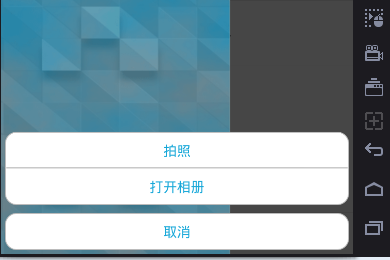
上面为弹出来的效果
popUpWindow布局:
<?xml version="1.0" encoding="utf-8"?>

<LinearLayout xmlns:android="http://schemas.android.com/apk/res/android"

    android:layout_width="match_parent"

    android:layout_height="wrap_content"

    android:padding="5dp"

    android:orientation="vertical">

    <LinearLayout

        android:padding="2dp"

        android:layout_width="match_parent"

        android:layout_height="match_parent"

        android:gravity="center_horizontal"

        android:background="@drawable/popwindow_bg"//使用shape画出圆角矩形,边框为为灰色,背景为白色。颜色不要再线性布局中设置,也会掩盖圆角矩形。

        android:orientation="vertical">

        <TextView

            android:id="@+id/takePhoto"

            style="@style/bottom_pop_textview"//宽不能设为match_parent,否则外层的圆角矩形会被遮盖。

            android:text="拍照"

            />

        <TextView

            android:layout_width="match_parent"

            android:layout_height="1dp"

            android:background="@android:color/darker_gray"

            />

        <TextView

            android:id="@+id/openPhotos"

            style="@style/bottom_pop_textview"

            android:layout_marginTop="1dp"

            android:text="打开相册"

            />

    </LinearLayout>

    <LinearLayout

        android:padding="2dp"

        android:layout_width="match_parent"

        android:layout_height="match_parent"

        android:gravity="center_horizontal"

        android:layout_marginTop="10dp"

        android:background="@drawable/popwindow_bg"//使用shape画出圆角矩形,边框为为灰色,背景为白色。

        android:orientation="vertical">

        <TextView

            android:id="@+id/cancel"

            style="@style/bottom_pop_textview"

            android:text="取消"

            />

    </LinearLayout>

</LinearLayout>
shape画出圆角矩形 代码:
<?xml version="1.0" encoding="utf-8"?>

<shape xmlns:android="http://schemas.android.com/apk/res/android"

    android:shape="rectangle"

    >

    <stroke android:width="1dip" android:color="#ffbbbbbb"/>

    <corners android:topLeftRadius="15dip"

        android:topRightRadius="15dip"

        android:bottomLeftRadius="15dip"

        android:bottomRightRadius="15dip" />

    <solid android:color="@android:color/white"/>

</shape>
从底部弹出popupwindow:
/**

     * 从底部弹出popupwindow

     */

    private void showBottomPop(View parent) {

        final View popView = View.inflate(getActivity(), R.layout.bottom_pop_layout, null);

        showAnimation(popView);//开启动画

        PopupWindow mPopWindow = new PopupWindow(popView, LinearLayout.LayoutParams.MATCH_PARENT, LinearLayout.LayoutParams.WRAP_CONTENT);

        clickPopItem(popView, mPopWindow);//条目的点击

        mPopWindow.setBackgroundDrawable(new ColorDrawable(Color.TRANSPARENT));

        mPopWindow.showAtLocation(parent,

                Gravity.BOTTOM | Gravity.CENTER_HORIZONTAL, 0, 0);

        mPopWindow.setOutsideTouchable(true);

        mPopWindow.setFocusable(true);

        mPopWindow.update();

        // 设置背景颜色变暗

        WindowManager.LayoutParams lp = activity.getWindow().getAttributes();

        lp.alpha = 0.7f;

        getActivity().getWindow().setAttributes(lp);

        mPopWindow.setOnDismissListener(new PopupWindow.OnDismissListener() {

            @Override

            public void onDismiss() {

                WindowManager.LayoutParams lp = activity.getWindow().getAttributes();

                lp.alpha = 1f;

                getActivity().getWindow().setAttributes(lp);

            }

        });

    }
弹出的动画:
/**

     * 给popupwindow添加动画

     *

     * @param popView

     */

    private void showAnimation(View popView) {

        AnimationSet animationSet = new AnimationSet(false);

        AlphaAnimation alphaAnimation = new AlphaAnimation(0f, 1.0f);

        alphaAnimation.setDuration(300);

        TranslateAnimation translateAnimation = new TranslateAnimation(

                Animation.RELATIVE_TO_SELF, 0f, Animation.RELATIVE_TO_SELF, 0f,

                Animation.RELATIVE_TO_SELF, 1f, Animation.RELATIVE_TO_SELF, 0f

        );

        translateAnimation.setDuration(300);

        animationSet.addAnimation(alphaAnimation);

        animationSet.addAnimation(translateAnimation);

        popView.startAnimation(animationSet);

    }
仿iOS底部弹出popUpWindow的更多相关文章
- Android仿IOS底部弹出选择菜单ActionSheet
使用Dialog的实现方式,解决原ActionSheet使用Fragment实现而出现的部分手机取消按钮被遮盖的问题 java部分代码: import android.app.Dialog; impo ...
- Android仿ios底部弹出框效果
准备: public class ActionSheet { public interface OnActionSheetSelected { void onClick(int whichButton ...
- PopupWindowFromBottom 从底部弹出popupwindow
自定义PopupWindowFromBottom public class PopupWindowFromBottom extends PopupWindow { public PopupWindow ...
- 转 android 从底部弹出一个popuwindow,渐入渐出效果。我这里是用在购物车需要选择购买选项的操作。
最近要改客户端,需要实现一个从底部弹出的popuwindow,像我这种渣渣android技术,能整出popuwindow但是整不出动画,百度之,记录一下. 从下面这个地址转的 http://blog. ...
- 通用的popupwindow底部弹出框
前段时间做项目的时候,有几个底部弹出框,当时因为忙着赶进度所有就单独写了好几个popupwindow.后来就想着怎么实现一个通用的PopupWindow工具类 就是在要用到的时候创建该工具类的对象,并 ...
- h5页面ios键盘弹出收起后页面底部留白问题
<input placeholder="验证码" type="tel" v-model="verify" maxlength=&quo ...
- 仿QQ空间根据位置弹出PopupWindow显示更多操作效果
我们打开QQ空间的时候有个箭头按钮点击之后弹出PopupWindow会根据位置的变化显示在箭头的上方还是下方,比普通的PopupWindow弹在屏幕中间显示好看的多. 先看QQ空间效果图: ...
- PopupWindow底部弹出
说明:从屏幕底部弹出PopupWindow,有弹出隐藏动画效果.背景设置透明度. 效果图如下: 1.MainActivity.java 显示popwindow,宽高跟屏幕大小一样,设置一个透明度背 ...
- Android项目实战(十七):QQ空间实现(二)—— 分享功能 / 弹出PopupWindow
这是一张QQ空间说说详情的截图. 分析: .点击右上角三个点的图标,在界面底部弹出一个区域,这个区域有一些按钮提供给我们操作 .当该区域出现的时候,详情界面便灰了,也说成透明度变化了 .当任意选了一个 ...
随机推荐
- cocos2dx 3.x(捕鱼达人炮台角度换算)
// // GameScence.hpp // NotesDamo // // Created by apple on 16/10/23. // // #ifndef GameScence_hpp # ...
- "provider: 命名管道提供程序, error: 40 - 无法打开到 SQL Server 的连接"错误的解决方法
这个错误主要有以下几个原因造成: 1. 错误的连接字符串:例如数据源的实例名称“\"错误写成"/"了 2.Named Pipes(NP)没有启动 其他原因,详见:http ...
- iOS 黑屏
1. 首先看操作系统是否有很多Bug 9.0.2 的系统不稳定. http://tech.163.com/15/1020/05/B6BL6PML000915BD.html
- 成员变量NSString类型指针的属性为什么用copy(属性)
创建一个分类Person设置属性@property(nonatomic,strong) NSString * name; 在- (void)viewDidLoad 中打印测试 name的属性是stro ...
- 继承Prototype实现语句不能写在动态原型法中的理解
阅读javascript高级编程中, 对动态原型法中写Prototype继承父类对象的不可行的现象,不甚理解. 书上说是技术原因,如下有问题代码: 但是把protype语句移到构造函数后面,就OK,如 ...
- ZooKeeper -- 分布式开源协调服务
ZooKeeper是一个为分布式应用所设计的开源协调服务,适用于大型的分布式系统,可以提供统一命名服务.状态同步服务.集群管理.分布式应用配置项的管理等服务.ZooKeeper支持Java和C两种编程 ...
- Compile Sources 和 Copy Bundle Resources的区别
Compile Sources主要存放.m文件 Copy Bundle Resources 主要存放xib plist bundle js 文件
- PostgreSQL Replication之第十二章 与Postgres-XC一起工作(7)
12.7 处理故障转移和删除节点 在本节中,我们将看看故障切换如何处理.我们还将看看如何使用安全可靠的方法添加节点到Postgres-XC设置以及如何从Postgres-XC设置删除节点. 12.7. ...
- keil 编译的一些错误
以前使用的是MDK4.5 但是没有stm32F3的元器件,果断的使用了4.6版本了.但是编译之后出现这样错误:linking....\Obj\prj.axf: Warning: L6373W: lib ...
- 序列变换(hdu5248)
序列变换 Time Limit: 4000/2000 MS (Java/Others) Memory Limit: 32768/32768 K (Java/Others)Total Submis ...