
iOS 实现Tabbarcontroller中间自定义样式 最简单的方法
先上图:
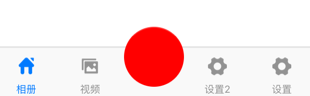
如果我们要实现中间按钮自定义样式,方法应该蛮多,这里介绍一种最简单的。
1、创建类继承:UITabBarController,如下代码都是写在该类的 .m文件里
2、定义最中间的自定义样式,写在viewDidLoad里
    UIButton *btn = [[UIButton alloc] init];

    btn.layer.cornerRadius = 30;

    btn.layer.masksToBounds = YES;

    btn.backgroundColor = [UIColor redColor];

    btn.frame = CGRectMake(0, 0, 60, 60);

    CGPoint center = self.tabBar.center;

    center.y=center.y-15;

    btn.center = center;

    [self.view addSubview:btn];

    [btn addTarget:self action:@selector(hhhCLick) forControlEvents:UIControlEventTouchUpInside];
这里解释一下:
我们获取当前tabbar的center点,然后自定义一个按钮,给予自己想要的样式,然后add上去。
这里要注意一点,这里用的自定义按钮,没有用系统tabbarItem,所以最后setViewController的时候要留出位置。
完整代码如下:
- (void)viewDidLoad {

    [super viewDidLoad];

    // Do any additional setup after loading the view.

    HomeViewController *home = [[HomeViewController alloc] init];

    UINavigationController *homeNav = [[UINavigationController alloc] initWithRootViewController:home];

    home.title = @"相册";

    home.navigationItem.title = @"相册";

    home.tabBarItem.image = [[UIImage imageNamed:@"home"] imageWithRenderingMode:UIImageRenderingModeAutomatic];

    home.tabBarItem.selectedImage = [[UIImage imageNamed:@"home_selected"] imageWithRenderingMode:UIImageRenderingModeAutomatic];

    VideoViewController *pic = [[VideoViewController alloc] init];

    UINavigationController *picNav = [[UINavigationController alloc] initWithRootViewController:pic];

    pic.title = @"视频";

    pic.navigationItem.title = @"视频";

    pic.tabBarItem.image = [[UIImage imageNamed:@"picture"] imageWithRenderingMode:UIImageRenderingModeAutomatic];

    pic.tabBarItem.selectedImage = [[UIImage imageNamed:@"picture_selected"] imageWithRenderingMode:UIImageRenderingModeAutomatic];

    SeetingViewController *setting = [[SeetingViewController alloc] init];

    UINavigationController *setNav = [[UINavigationController alloc] initWithRootViewController:setting];

    setting.tabBarItem.title = @"设置";

    setting.navigationItem.title = @"设置";

    setting.tabBarItem.image = [[UIImage imageNamed:@"setting"] imageWithRenderingMode:UIImageRenderingModeAutomatic];

    setting.tabBarItem.selectedImage = [[UIImage imageNamed:@"setting_selected"] imageWithRenderingMode:UIImageRenderingModeAutomatic];

    SeetingViewController *setting222 = [[SeetingViewController alloc] init];

    UINavigationController *setNav222 = [[UINavigationController alloc] initWithRootViewController:setting222];

    setting222.tabBarItem.title = @"设置2";

    setting222.navigationItem.title = @"设置2";

    setting222.tabBarItem.image = [[UIImage imageNamed:@"setting"] imageWithRenderingMode:UIImageRenderingModeAutomatic];

    setting222.tabBarItem.selectedImage = [[UIImage imageNamed:@"setting_selected"] imageWithRenderingMode:UIImageRenderingModeAutomatic];

    NSMutableArray *arry = [[NSMutableArray alloc] init];

    [arry addObject:homeNav];

    [arry addObject:picNav];

    [arry addObject:[UIViewController new]];

    [arry addObject:setNav222];

    [arry addObject:setNav];

    [self setViewControllers:arry animated:YES];

    //-----------这里是自定义样式按钮-----------

    UIButton *btn = [[UIButton alloc] init];

    btn.layer.cornerRadius = 30;

    btn.layer.masksToBounds = YES;

    btn.backgroundColor = [UIColor redColor];

    btn.frame = CGRectMake(0, 0, 60, 60);

    CGPoint center = self.tabBar.center;

    center.y=center.y-15;

    btn.center = center;

    [self.view addSubview:btn];

    [btn addTarget:self action:@selector(hhhCLick) forControlEvents:UIControlEventTouchUpInside];

}
点击按钮事件,自己可以Modal到新控制器。
-(void)hhhCLick{

    SeetingViewController *setting111 = [[SeetingViewController alloc] init];

    UINavigationController *setNav111 = [[UINavigationController alloc] initWithRootViewController:setting111];

    setting111.tabBarItem.title = @"";

    setting111.navigationItem.title = @"设置1";

    [self presentViewController:setNav111 animated:YES completion:nil];

}
iOS 实现Tabbarcontroller中间自定义样式 最简单的方法的更多相关文章
- iOS 中使用 XIB 自定义cell 的两种方法 以及 编译出现常见 的错误 ++++(xcode6.0之后)
一. 注册cell 1.创建自定义cell并勾选 xib :(勾选xib就会自动生成与cell文件关联的xib) 2.在 tableViewController里注册自定义Cell (或者遵守tabl ...
- vue点击时动态改变样式 ------- 最简单的方法
vue点击时动态改变样式 template中 <li :class="{ active:index==isActive }" @click="changeValue ...
- iOS 中使用 XIB 自定义cell的两种方法以及编译出现常见 的错误 (xcode6.0之后)
一. 注册cell 1.创建自定义cell并勾选 xib :(勾选xib就会自动生成与cell文件关联的xib) 2.在 tableViewController里注册自定义Cell (或者遵守tabl ...
- 移动端ios下H5的:active样式失效的解决方法
在body上绑定一个touchstart事件,空函数就行: document.body.addEventListener('touchstart', function(){}, false) 或者在b ...
- Yii2 ActiveForm表单自定义样式
实例: <?php $form = ActiveForm::begin([ 'fieldConfig' => [ 'template' => '<div class=" ...
- Dialog详解(包括进度条、PopupWindow、自定义view、自定义样式的对话框)
Dialog详解(包括进度条.PopupWindow.自定义view.自定义样式的对话框) Android中提供了多种对话框,在实际应用中我们可能会需要修改这些已有的对话框.本实例就是从实际出发, ...
- 超详细的Xcode代码格式化教程,可自定义样式。
超详细的Xcode代码格式化教程,可自定义样式. 为什么要格式化代码 当团队内有多人开发的时候,每个人写的代码格式都有自己的喜好,也可能会忙着写代码而忽略了格式的问题.在之前,我们可能会写完代码后,再 ...
- [置顶]
bootstrap自定义样式-bootstrap侧边导航栏的实现
前言 bootstrap自带的响应式导航栏是向下滑动的,有时满足不了个性化的需求,需要做一个类似于android drawerLayout 侧滑的菜单,这就是我要实现的bootstrap自定义侧滑菜单 ...
- Expo大作战(十二)--expo中的自定义样式Custom font,以及expo中的路由Route&Navigation
简要:本系列文章讲会对expo进行全面的介绍,本人从2017年6月份接触expo以来,对expo的研究断断续续,一路走来将近10个月,废话不多说,接下来你看到内容,讲全部来与官网 我猜去全部机翻+个人 ...
随机推荐
- 第 28 章 CSS3 多列布局
学习要点: 1.早期多列问题 2.属性及版本 3.属性解释 主讲教师:李炎恢 本章主要探讨 HTML5 中 CSS3 提供的多列布局,通过多列布局我们方便的创建流体的多列布局. 一.早期多列问题 我们 ...
- python tornado websocket 多聊天室(返回消息给部分连接者)
python tornado 构建多个聊天室, 多个聊天室之间相互独立, 实现服务器端将消息返回给相应的部分客户端! chatHome.py // 服务器端, 渲染主页 --> 聊天室建立web ...
- CentOS 6.5 搭建 LAMP 环境
目录 第一步: 安装和配置Apache服务器 第二步: 设置.绑定站点目录文件 第三步: 安装MYSQL数据库 第四步: 安装PHP环境 总结 >>Begin: 第一步: 安装和配置Apa ...
- windows下命令行打jar包方法
注意:系统必须装了java并且配置好了java环境变量. 事先必须编译好需要打jar的class.(eclipse一般在bin,maven构建的在target/classes) 进入cmd,输入ja ...
- 初识Spring框架
一.Ioc 1)概念:Ioc(Inversion Of Control)控制反转,也被称为依赖注入DI(Dependency Injection),是面向对象编程的一种思想. 2)作用:用来减低程序代 ...
- JavaScript强化教程 -- cocosjs场景切换
场景切换 在main.js,将StartScene作为我们初始化运行的场景,代码如下: cc.LoaderScene.preload(g_resources, function () { cc.dir ...
- 【代码笔记】iOS-读取一段文字
一,效果图. 二,工程图. 三,代码. RootViewController.m #import "RootViewController.h" @interface RootVie ...
- 【原】Mac下统计任意文件夹中代码行数的工具——cloc
这里介绍一个Mac系统统计代码行数的工具cloc. 1.首先,安装homebrew,已安装的请跳过. 打开终端工具Terminal,输入下列命令.过程中会让你按RETURN键以及输入mac桌面密码,按 ...
- 【原】iOS设计模式之:建造者模式Builder Pattern,用于改进初始化参数
本文主要讨论一下iOS中的Builder Pattern.与网上很多版本不同,本文不去长篇大论地解释建造者模式的概念,那些东西太虚了.设计模式这种东西是为了解决实际问题的,不能为了设计模式而设计模式, ...
- android 加载自定义图片并在图片上绘图
来源:毕设 关键词:Bitmap Canvas //毕设中需要自定义室内地图,并且在地图上绘制轨迹 //此处是一个测试Demo,实现图片的加载和记录手指在屏幕上的运动轨迹 图片的载入 使用系统提供的内 ...