
20、Scaffold属性 BottomNavigationBar 自定义底部导航
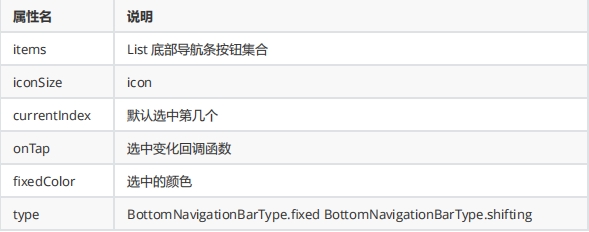
BottomNavigationBar 常见的属性
BottomNavigationBar 底部菜单选中
class MyFlutter1 extends StatefulWidget {

  const MyFlutter1({super.key});

  @override

  State<MyFlutter1> createState() => _MyFlutter1State();

}

class _MyFlutter1State extends State<MyFlutter1> {

  int _currentIndex =0;

  @override

  Widget build(BuildContext context) {

    return Scaffold(

      appBar: AppBar(title: const Text("这是导航栏")),

      bottomNavigationBar: BottomNavigationBar(

       currentIndex: _currentIndex,  //默认选中第几个

       iconSize: 35,
       type:BottomNavigationBarType.fixed, //如果底部有4个或者4个以上的进行选择
       fixedColor: const Color.fromARGB(255, 54, 244, 171), //选中的颜色

       onTap: (index){   //选中变化回调函数

         print("监听$index");

         setState(() {

            _currentIndex = index;

         });

       },

       items: const [

        BottomNavigationBarItem(icon: Icon(Icons.home), label: "首页"),

        BottomNavigationBarItem(icon: Icon(Icons.timeline), label: "时间"),

        BottomNavigationBarItem(icon: Icon(Icons.my_library_add), label: "我的"),

      ]),

      body: const Center(

          child: Column(

        mainAxisAlignment: MainAxisAlignment.center,

        children: [],

      )),

    );

  }

}
BottomNavigationBar 底部菜单选中 换页面内容
class MyFlutter1 extends StatefulWidget {

  const MyFlutter1({super.key});

  @override

  State<MyFlutter1> createState() => _MyFlutter1State();

}

class _MyFlutter1State extends State<MyFlutter1> {

  int _currentIndex =0;

  final List<Widget> _pages = [

    const HomePage(),

    const TimePag(),

    const myHome()

  ];

  @override

  Widget build(BuildContext context) {

    return Scaffold(

      appBar: AppBar(title: const Text("这是导航栏")),

      bottomNavigationBar: BottomNavigationBar(

       currentIndex: _currentIndex,  //默认选中第几个

       fixedColor: const Color.fromARGB(255, 54, 244, 171), //选中的颜色
unselectedItemColor: Colors.grey, // 设置未选中按钮的颜色为灰色 onTap: (index){ //选中变化回调函数 print("监听$index"); setState(() { _currentIndex = index; }); },
       items: const [

        BottomNavigationBarItem(icon: Icon(Icons.home), label: "首页"),

        BottomNavigationBarItem(icon: Icon(Icons.timeline), label: "时间"),

        BottomNavigationBarItem(icon: Icon(Icons.my_library_add), label: "我的"),

      ]),

      body: _pages[_currentIndex],

    );

  }

}
20、Scaffold属性 BottomNavigationBar 自定义底部导航的更多相关文章
- 15 Flutter BottomNavigationBar自定义底部导航条 以及实现页面切换 以及模块化
效果: /** * Flutter BottomNavigationBar 自定义底部导航条.以及实现页面切换: * BottomNavigationBar是底部导航条,可以让我们定义底部Tab ...
- BottomNavigationBar 自定义 底部导航条
在flutter中,BottomNavigationBar 是底部导航条,可以让我们定义底部 Tab 切换,bottomNavigationBar是 Scaffold 组件的参数. BottomNav ...
- tab 切换 和 BottomNavigationBar 自定义 底部导航条
BottomNavigationBar 组件 BottomNavigationBar 是底部导航条,可以让我们定义底部 Tab 切换,bottomNavigationBar是 Scaffold ...
- BottomNavigationBar 自定义 底部导航条、以及实现页面切换
一.Flutter BottomNavigationBar 组件 BottomNavigationBar 是底部导航条,可以让我们定义底部 Tab 切换,bottomNavigationBar是 Sc ...
- 【Flutter】容器类组件之Scaffold、TabBar、底部导航
前言 一个完整的路由页可能会包含导航栏.抽屉菜单(Drawer)以及底部Tab导航菜单等.Flutter Material组件库提供了一些现成的组件来减少开发任务.Scaffold是一个路由页的骨架, ...
- 微信小程序-自定义底部导航
代码地址如下:http://www.demodashi.com/demo/14258.html 一.前期准备工作 软件环境:微信开发者工具 官方下载地址:https://mp.weixin.qq.co ...
- 微信小程序自定义底部导航栏组件+跳转
微信小程序本来封装有底部导航栏,但对于想自定义样式和方法的开发者来说,这并不是很好. 参考链接:https://github.com/ljybill/miniprogram-utils/tree/ma ...
- uniapp 小程序实现自定义底部导航栏(tarbar)
在小程序开发中,默认底部导航栏很难满足实际需求,好在官方给出了自定义形式,效果如下: 话不多说,直接上代码 1.组件 custom-tarbar.vue文件 <template> < ...
- 自定义底部导航栏(tabBar)
前言如果大家用过微信提供的tabBar就会发现,他的tabBar有很大的局限性.暂且不说样式局限性了,他提供的app.json配置文件中没有function.这也就意味着使用它提供的这个组件,你只能用 ...
- 小程序 mpvue自定义底部导航栏
1.在compontents新建文件放入 <template> <section class="tabBar-wrap"> <article clas ...
随机推荐
- Elasticsearch 6.8.6
mac;centos;unix; 下载 wget https://artifacts.elastic.co/downloads/elasticsearch/elasticsearch-6.8.6. ...
- CF1746F Kazaee
prologue 数组范围一定要看好了开,不然容易我一样,调试调了一页多. 还有就是不要傻乎乎地只跑一次和哈希,因为和哈希(从下面地佬的题解中才知道)它其实算作是一种 trick(类比SA(Stimu ...
- 【Unity3D】动态路径特效
1 前言 本文通过导航系统(NavMeshAgent)和线段渲染器(LineRenderer)实现了角色走迷宫和绘制路径功能,同时实现动态路径特效. 导航系统的介绍详见博客:导航系统.分离路面 ...
- linux- 挂载本地iso,配置本地yum
------------------------------------ 关于centos8安装vm-tools: workstation部署centos8之后,不需要单独安装vm-tools,系统已 ...
- Chiplet解决芯片技术发展瓶颈
这是IC男奋斗史的第38篇原创 本文1776字,预计阅读4分钟. Chiplet封装是什么 介绍Chiplet前,先说下SOC.Chiplet和SOC是两个相互对立的概念,刚好可以用来互为参照. SO ...
- docker 仓库-Harbor
docker 仓库之分布式 Harbor: Harbor 是一个用于存储和分发docker镜像的企业级Registry服务器,由于Vmware 开源,其通过添加一些企业必须的功能特性,例如安全.标识和 ...
- video.js 视频
http://www.cnblogs.com/lechenging/p/3858181.html
- [Python急救站]文本进度条
完游戏的朋友们,是不是看到那种加载加载进度条,感觉特别不错呢,所以今天就来看看文本进度条怎么做. 1.基本的多行文本进度条 import time scale = 10 # 变量scale表示输出进度 ...
- Doxygen 的学习
https://dongzhixiao.blog.csdn.net/article/details/52190696 来自转载
- python列表删除元素之del,pop()和remove()
del函数 如果知道要删除元素在列表中的位置,可以使用del语句: list_1 = ['one', 'two', 'three'] print(list_1) del list_1[0] print ...