
Salesforce LWC学习(四十六) 自定义Datatable实现cell onclick功能
本篇参考:https://developer.salesforce.com/docs/component-library/bundle/lightning-datatable
背景:我们有时会有这种类似的需求,显示Account列表,Account列除了需要显示Account信息,还需要显示其他的内容,比如当前Account有多少Opportunity,有多少Contact数量。点击数量信息,可以显示详细的信息。 这种需求就需要datatable的某个单元格允许点击,点击以后进行某些逻辑,比如popup。因为标准的datatable无法实现功能,仅支持 onrowaction,所以我们继承LightningDatatable来自定义。
步骤如下:
1. 继承 LightningDatatable,创建template;
2. template中通过a标签,添加 onclick事件;
3. 针对onclick的handler,通过事件/广播方式传递给上层组件,从而上层事件来处理。(dispatchEvent测试以后发现不可用,所以demo中以message channel作为最终的呈现)
具体实施
filterChange.messageChannel-meta.xml: 设置message channel以及创建需要的变量,不同的需求有不同的变量,可以基于自己的需求来看。
<?xml version="1.0" encoding="UTF-8"?>

<LightningMessageChannel xmlns="http://soap.sforce.com/2006/04/metadata">

    <isExposed>true</isExposed>

    <lightningMessageFields>

        <description>Record Id</description>

        <fieldName>dataId</fieldName>

    </lightningMessageFields>

    <lightningMessageFields>

        <description>Record Type</description>

        <fieldName>dataType</fieldName>

    </lightningMessageFields>

    <masterLabel>Filters Change Message Channel</masterLabel>

</LightningMessageChannel>
datatableWithClick.js: 用于继承LightningDatatable,设置自定义type:clickrow,template通过 onclickRow.html来操作。
import { LightningElement, track, wire } from 'lwc';

import LightningDatatable from 'lightning/datatable';

import onclickRow from './onclickRow.html';

export default class datatableWithClick extends LightningDatatable {

    static customTypes = {

        clickrow: {

            template: onclickRow

        }

    };

}
onclickRow.html: 和datatableWithClick在同一个目录下,UI通过datatable-click-template来渲染,并且将参数值传递给param
<template>

    <c-datatable-click-template

        param={value}

        >

    </c-datatable-click-template>

</template>
datatableClickTemplate.html:a标签显示内容,然后设置 onclick事件
<template>

    <a onclick={handleClickAction}>{label}</a>

</template>
datatableClickTemplate.js: 这里通过传递的value通过指定的格式来拆分,我们这里通过分号,实际可以基于自己的需求来弄。当点击以后,通过message channel发布事件
import { LightningElement, track, wire,api } from 'lwc';

import { publish, MessageContext } from 'lightning/messageService';

import FILTERSCHANGEMC from '@salesforce/messageChannel/filterChange__c';

export default class datatableClickTemplate extends LightningElement {

    @wire(MessageContext)

    messageContext;

    @track label;

    @track recordId;

    @track type;

    @api set param(value) {

        console.log(value);

        if(value && value.includes(';')) {

            this.label = value.split(';')[0];

            this.recordId = value.split(';')[1];

            this.type = value.split(';')[2];

        }

    }

    get param() {

        return label;

    }

    handleClickAction(event) {

        const filters = {

            dataId: this.recordId,

            dataType: this.type

        };

        publish(this.messageContext, FILTERSCHANGEMC, filters);

    }

}
datatableSample.html: 调用 datatableWithClick组件
<template>

    <c-datatable-with-click

            data={data}

            columns={columns}

            key-field="id">

    </c-datatable-with-click>

</template>
datatableSample.js: 设置初始值以及订阅发布的广播,订阅后执行handleFilterChange方法。
import { LightningElement,wire } from 'lwc';

import {

    subscribe,

    unsubscribe,

    MessageContext

} from 'lightning/messageService';

import FILTERSCHANGEMC from '@salesforce/messageChannel/filterChange__c';

const columns = [

     {label: 'Account name', fieldName: 'accountName', type: 'text'},

     {

      type: "clickrow",

      fieldName: "numberOfOppty",

      label: "Opportunity Count"

    }

];

const data = [{

                    id: 'a',

                    accountName: 'Cloudhub',

                    numberOfOppty: '2;a;testRecordType'

                },

                {

                    id: 'b',

                    accountName: 'Quip',

                    numberOfOppty: '5;b;testOtherRT'

                }];

export default class datatableSample extends LightningElement {

    data = data;

    columns = columns;

    @wire(MessageContext)

    messageContext;

    connectedCallback() {

        this.subscription = subscribe(

          this.messageContext,

          FILTERSCHANGEMC,

          (message) => {

              this.handleFilterChange(message);

          }

        );

    }

  disconnectedCallback() {

      unsubscribe(this.subscription);

      this.subscription = null;

  }

  handleFilterChange(filters) {

    console.log('execute');

    console.log(filters.dataId);

    console.log(filters.dataType);

  }

}
效果展示:
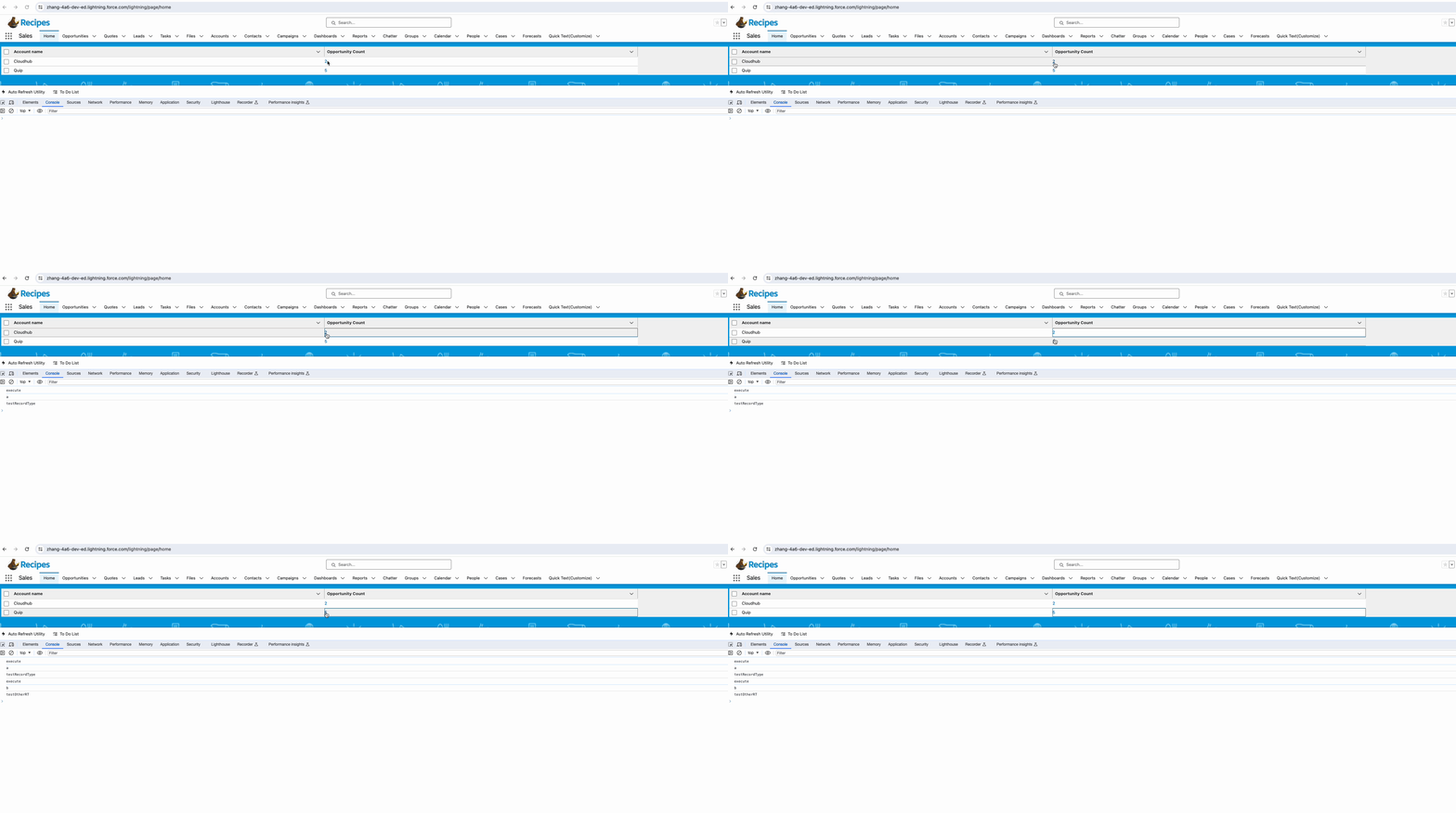
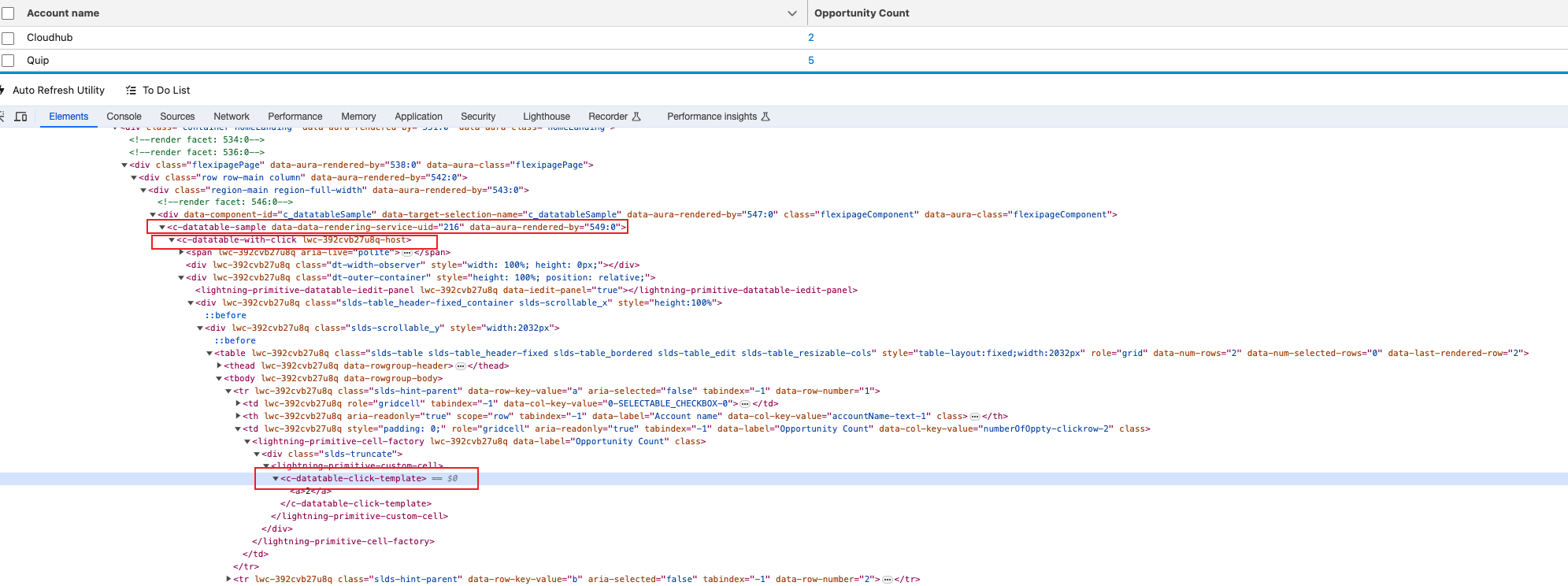
系统渲染的元素如下图所示,demo中使用的message channel,如果使用dispatchEvent,即使设置了bubble等于true, datatable-sample仍然无法handle,没有进行深入研究。
总结:篇中通过继承LightningDatatable实现了cell click的效果从而进行了更好的扩展。篇中有错误地方欢迎指出,有不懂欢迎留言。
Salesforce LWC学习(四十六) 自定义Datatable实现cell onclick功能的更多相关文章
- Salesforce LWC学习(四十) dynamic interaction 浅入浅出
本篇参考: Configure a Component for Dynamic Interactions in the Lightning App Builder - Salesforce Light ...
- Salesforce LWC学习(四十二) getRecordNotifyChange已弃用
本篇参考: https://developer.salesforce.com/docs/component-library/documentation/en/lwc/lwc.reference_get ...
- Salesforce LWC学习(二十六) 简单知识总结篇三
首先本篇感谢长源edward老哥的大力帮助. 背景:我们在前端开发的时候,经常会用到输入框,并且对这个输入框设置 required或者其他的验证,当不满足条件时使用自定义的UI或者使用标准的 inpu ...
- Salesforce LWC学习(三十六) Quick Action 支持选择 LWC了
本篇参考: https://developer.salesforce.com/docs/component-library/documentation/en/lwc/lwc.use_quick_act ...
- Salesforce LWC学习(四十) datatable的dynamic action的小坑浅谈
本篇参考:https://developer.salesforce.com/docs/component-library/bundle/lightning-datatable/documentatio ...
- Salesforce LWC学习(三十九) lwc下quick action的recordId的问题和解决方案
本篇参考: https://developer.salesforce.com/docs/component-library/bundle/force:hasRecordId/documentation ...
- Salesforce LWC学习(三十) lwc superbadge项目实现
本篇参考:https://trailhead.salesforce.com/content/learn/superbadges/superbadge_lwc_specialist 我们做lwc的学习时 ...
- Java开发学习(四十六)----MyBatisPlus新增语句之id生成策略控制及其简化配置
在前面有一篇博客:Java开发学习(四十一)----MyBatisPlus标准数据层(增删查改分页)开发,我们在新增的时候留了一个问题,就是新增成功后,主键ID是一个很长串的内容. 我们更想要的是按照 ...
- Salesforce LWC学习(二十四) Array.sort 浅谈
本篇参考:https://developer.mozilla.org/zh-CN/docs/Web/JavaScript/Reference/Global_Objects/Array/sort sal ...
- Salesforce LWC学习(三十四) 如何更改标准组件的相关属性信息
本篇参考: https://www.cnblogs.com/zero-zyq/p/14548676.html https://www.lightningdesignsystem.com/platfor ...
随机推荐
- docker网络 bridge 与overlay 模式
转载请注明出处: 1.bridge网络模式 工作原理: 在Bridge模式中,Docker通过创建一个虚拟网络桥接器(bridge)将容器连接到主机上的物理网络接口.每个容器都会被分配一个IP地址, ...
- 混合开发模式是否可以在App备案制度下突围
网站 ICP 备案已施行了很久,我们也非常清楚必须在进行 ICP 备案后,网站才能在大陆范围合法运营,并且用户可以通过域名正常访问网站. 但是月初出了新规,明年起,国内的 App 也要像网站一样进行备 ...
- [TSG开发日志](一)软件基础框架
目录 前言 说明 框架 TSG_Framework 一.底层信号机制 TSG_Caller 二.参数类型声明 TSG_Params 三.设备类声明 TSG_Device 四.设备配置文件控制 TSG_ ...
- WPF学习:Slider — 冒泡显示值
想做一个下图所示的Slider,以冒泡的方式显示其Value值,该怎么做呢? 功能要求,当鼠标放在滑块上的时候,冒"泡"显示值:当滑块移动的时候,"泡"跟随移动 ...
- 内网DNS解析☞dnsmasq
内网DNS解析☞dnsmasq 目录 内网DNS解析☞dnsmasq 简介: 安装dnsmasq 问题: 1.怎么让172.30.1.* 与172.30.2.* 两个网段能互相访问? 2.firewa ...
- HTML一键打包IPA(苹果IOS应用)工具 网站打包 APP
工具简介 HTML一键打包IPA(苹果应用)工具可以把本地HTML项目或者网站打包为一个苹果应用IPA文件,无需编写任何代码,支持在苹果设备上安装运行. 该软件已经被GDB苹果网页一键打包工具取代,详 ...
- 【目标检测】Fast R-CNN算法实现
一.前言 2014年,Ross Girshick提出RCNN,成为目标检测领域的开山之作.一年后,借鉴空间金字塔池化思想,Ross Girshick推出设计更为巧妙的Fast RCNN(https:/ ...
- 2023-09-23:用go语言,假设每一次获得随机数的时候,这个数字大于100的概率是P。 尝试N次,其中大于100的次数在A次~B次之间的概率是多少? 0 < P < 1, P是double类型,
2023-09-23:用go语言,假设每一次获得随机数的时候,这个数字大于100的概率是P. 尝试N次,其中大于100的次数在A次~B次之间的概率是多少? 0 < P < 1, P是dou ...
- 一个关于 i++ 和 ++i 的面试题打趴了所有人
前言 都说大城市现在不好找工作,可小城市却也不好招人. 我们公司招了挺久都没招到,主管感到有些心累. 我提了点建议,是不是面试问的太深了,在这种小城市,能干活就行. 他说自己问的面试题都很浅显,如果答 ...
- 圆角android
资源地址 <shape xmlns:android="http://schemas.android.com/apk/res/android"> <solid an ...