
使用ensp搭建路由拓扑,并使用ospf协议实现网络互通实操
转载请注明出处:
1.使用ENSP 搭建如下拓扑:

数据准备
为完成此配置例,需准备如下的数据:
|
设备 |
Router ID |
Process ID |
IP地址 |
|
DeviceA |
1.1.1.1 |
1 |
区域0:192.168.0.0/24 区域1:192.168.1.0/24 |
|
DeviceB |
2.2.2.2 |
1 |
区域0:192.168.0.0/24 区域2:192.168.2.0/24 |
|
DeviceC |
3.3.3.3 |
1 |
区域1:192.168.1.0/24、172.16.1.0/24 |
|
DeviceD |
4.4.4.4 |
1 |
区域2:192.168.2.0/24、172.17.1.0/24 |
|
DeviceE |
5.5.5.5 |
1 |
区域1:172.16.1.0/24 |
|
DeviceF |
6.6.6.6 |
1 |
区域2:172.17.1.0/24 |
2.配置ospf
DeviceA配置如下:
<Huawei>display current-configuration configuration ospf

#

ospf 1

 area 0.0.0.0

  network 192.168.0.0 0.0.0.255

 area 0.0.0.1

  network 192.168.1.0 0.0.0.255

#

return

<Huawei>display current-configuration interface Ethernet 0/0/1

#

interface Ethernet0/0/1

 ip address 192.168.1.1 255.255.255.0

#

return

<Huawei>display current-configuration interface Ethernet 0/0/0

#

interface Ethernet0/0/0

 ip address 192.168.0.1 255.255.255.0

#

return

<Huawei>
DeviceB 配置:
<Huawei>display current-configuration configuration ospf

#

ospf 1

 area 0.0.0.0

  network 192.168.0.0 0.0.0.255

 area 0.0.0.2

  network 192.168.2.0 0.0.0.255

#

return

<Huawei>display current-configuration interface Ethernet 0/0/0

#

interface Ethernet0/0/0

 ip address 192.168.0.2 255.255.255.0

#

return

<Huawei>display current-configuration interface Ethernet 0/0/1

#

interface Ethernet0/0/1

 ip address 192.168.2.1 255.255.255.0

#

return

<Huawei>
DeviceC 配置:
<Huawei>display current-configuration configuration ospf

#

ospf 1

 area 0.0.0.1

  network 192.168.1.0 0.0.0.255

  network 172.16.1.0 0.0.0.255

#

return

<Huawei>display current-configuration interface Ethernet 0/0/0

#

interface Ethernet0/0/0

 ip address 192.168.1.2 255.255.255.0

#

return

<Huawei>display current-configuration interface Ethernet 0/0/1

#

interface Ethernet0/0/1

 ip address 172.16.1.1 255.255.255.0

#

return

<Huawei>
DeviceD配置如下:
<Huawei>display current-configuration configuration ospf

#

ospf 1

 area 0.0.0.2

  network 192.168.2.0 0.0.0.255

  network 172.17.1.0 0.0.0.255

#

return

<Huawei>display current-configuration interface Ethernet 0/0/0

#

interface Ethernet0/0/0

 ip address 192.168.2.2 255.255.255.0

#

return

<Huawei>display current-configuration interface Ethernet 0/0/1

#

interface Ethernet0/0/1

 ip address 172.17.1.1 255.255.255.0

#

return

<Huawei>
DeviceE配置如下:
<Huawei>display current-configuration configuration ospf

#

ospf 1

 area 0.0.0.1

  network 172.16.1.0 0.0.0.255

#

return

<Huawei>display current-configuration interface Ethernet 0/0/0

#

interface Ethernet0/0/0

 ip address 172.16.1.2 255.255.255.0

#

return

<Huawei>
DeviceF配置如下:
<Huawei>display current-configuration configuration ospf

#

ospf 1

 area 0.0.0.2

  network 172.17.1.0 0.0.0.255

#

return

<Huawei>

<Huawei>display current-configuration interface Ethernet 0/0/0

#

interface Ethernet0/0/0

 ip address 172.17.1.2 255.255.255.0

#

return

<Huawei>

<Huawei>
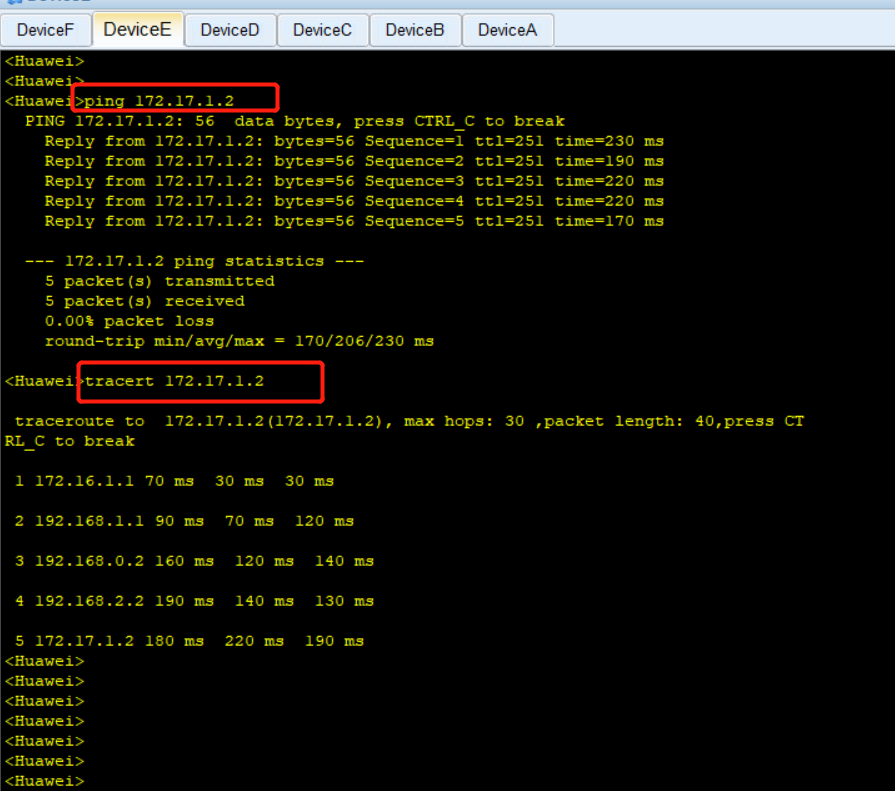
3.验证网络是否打通:
在 DeviceE 设备上ping 另一个边缘区域的DeviceF,并跟踪过程:
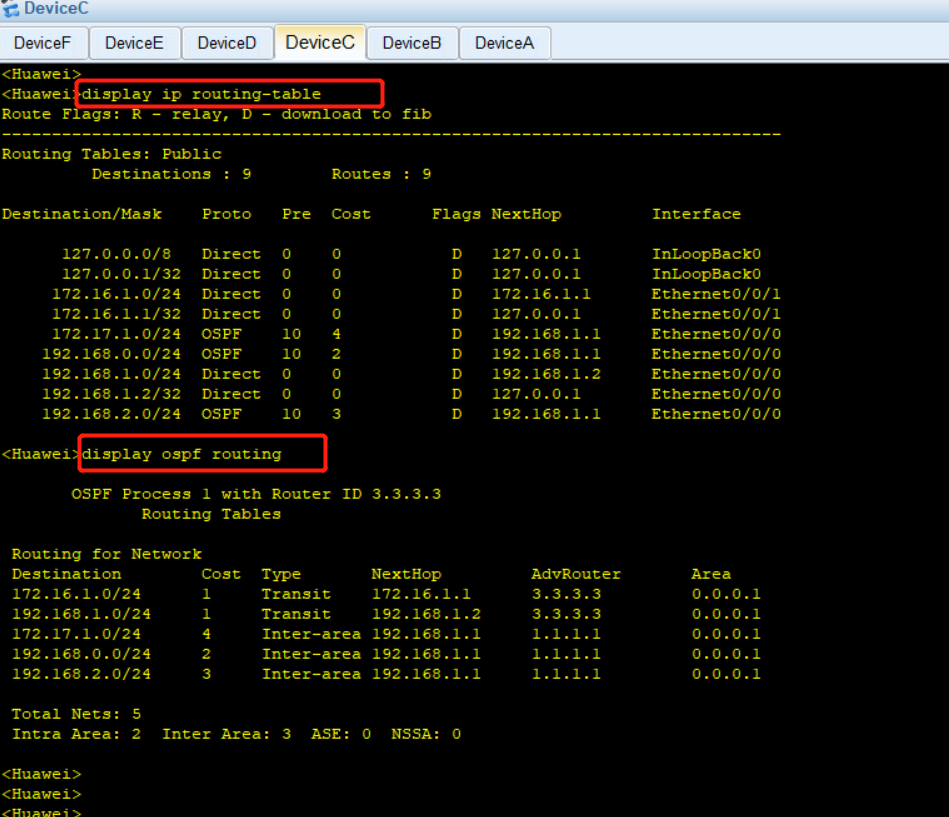
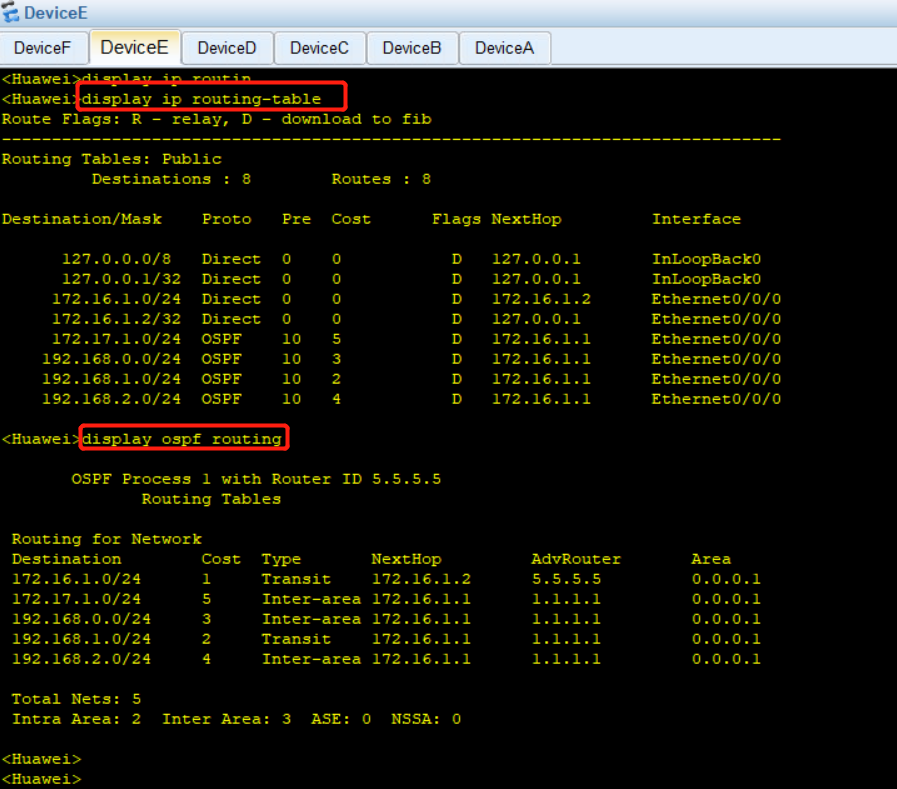
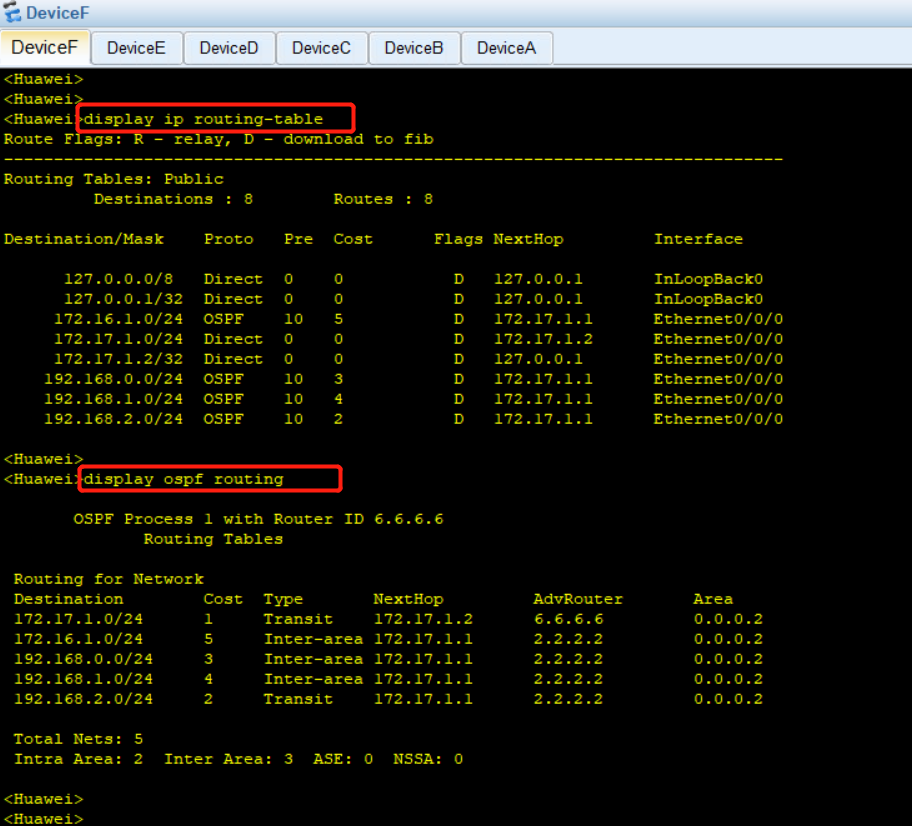
4.分别查看每个设备上的路由和ospf路由:
DeviceA 的路由表和ospf 路由表:

DeviceB 的路由表和ospf 路由表:

DeviceC 的路由表和ospf 路由表:
DeviceD 的路由表和ospf 路由表:

DeviceE 的路由表和ospf 路由表:
DeviceF 的路由表和ospf 路由表:
使用ensp搭建路由拓扑,并使用ospf协议实现网络互通实操的更多相关文章
- 动态选路、RIP协议&&OSPF协议详解
动态选路.RIP协议&&OSPF协议详解 概念 当相邻路由器之间进行通信,以告知对方每个路由器当前所连接的网络,这时就出现了动态选路.路由器之间必须采用选路协议进行通信,这样的选路协议 ...
- 学习总结---OSPF协议
总结: 1.ospf协议报文不会泛洪扩散,而是逐级路由器处理后,再从所有ospf启用端口发送出去,也就是说,只能从邻居接收到ospf报文,报文的源ip是邻居的ip地址,目的ip是组播ip. 2.开启o ...
- OSPF协议总结
总结: 1.ospf协议报文不会泛洪扩散,而是逐级路由器处理后,再从所有ospf启用端口发送出去,也就是说,只能从邻居接收到ospf报文,报文的源ip是邻居的ip地址,目的ip是组播ip. 2.开启o ...
- 路由器配置——OSPF协议(2)
一.实验目的:使用OSPF协议达到全网互通的效果 二.拓扑图 三.具体步骤配置 (1)R1路由器配置 Router>enableRouter#configure terminalEnter co ...
- 路由器配置——OSPF协议(1)
一.实验目的:用OSPF协议使全网互通 二.拓扑图 三.具体步骤配置 (1)R1路由器配置 Router>enableRouter#configure terminalEnter configu ...
- 利用 VMWare 搭建随机拓扑网络
这篇文章是计算机网络上机实验课的作业. 实验任务:利用 VMWare 搭建一个由 5 个主机组成的随机拓扑的网络.要求该网络中至少有 2 个子网,两个路由器 .实验的网络拓扑图如下: 网络中有两个路由 ...
- 静态路由、RIP、OSPF、BGP
主要内容包含以下四点:(1)静态路由 (2)动态路由 (3)生成树 (4)VLAN 1. 什么是静态路由? 答:静态路由是管理人员手动配置和管理的路由 2. 静态路由由那些优点? 答:配置简单 ...
- H3C路由器配置——动态路由OSPF协议
一.介绍 1.OSPF协议介绍 (1).OSPF(Open Shortest Path First,开放最短路径优先)路由协议是用于网际协议(IP)网络的链路状态路由协议.是一个被各厂商设备广泛支持的 ...
- eNSP——静态路由的基本配置
原理: 静态路由是指用户或网络管理员手工配置的路由信息.当网络的拓扑结构或链路状态发生改变时,需要网络管理人员手工修改静态路由信息. 相比于动态路由协议,静态路由无需频繁地交换各自的路由表,配置简单, ...
- OSPF协议学习以及路由器配置
OSPF协议学习以及路由器配置 1.实验任务 2,使用eNsp搭建网络拓扑 3.配置路由IP ps:要使用GE(3层口),2层口(E口)需要先配置Vlan才能配置IP地址 4.配置路由器R1的ospf ...
随机推荐
- 前端Vue加载中页面动画弹跳动画loading
前端Vue加载中页面动画弹跳动画loading, 下载完整代码请访问uni-app插件市场址:https://ext.dcloud.net.cn/plugin?id=13091 效果图如下: 使用方法 ...
- OAuth2.0andmultifactorauthentication:Howtocreateasecure
目录 1. 引言 2. 技术原理及概念 2.1. 基本概念解释 2.2. 技术原理介绍 2.3. 相关技术比较 3. 实现步骤与流程 3.1. 准备工作:环境配置与依赖安装 随着数字化时代的到来,人们 ...
- 【WALT】scale_exec_time() 代码详解
@ 目录 [WALT]scale_exec_time() 代码详解 代码展示 代码逻辑: 为什么归一化? ⑴ 将 CPU cycles 转换为 CPU 当前频率 ⑵ 归一化 delta [WALT]s ...
- 微信小程序 - WXML 模板语法
[黑马程序员前端微信小程序开发教程,微信小程序从基础到发布全流程_企业级商城实战(含uni-app项目多端部署)] https://www.bilibili.com/video/BV1834y1676 ...
- Navicat 连接Oracle ORA-28547: connection to server failed, probable Oracle Net admin error
Navicat 连接 Oracle 报 ORA-03135: connection lost contact ORA-28547: connection to server failed, proba ...
- [HUBUCTF 2022 新生赛]simple_RE
[HUBUCTF 2022 新生赛]simple_RE 查壳,64位 找main函数,F5查看伪代码,简单分析一下 int __cdecl main(int argc, const char **ar ...
- 基于 Spark 的物流企业数据仓库 的设计与实现
1.设计和实现了一种基于 Spark 的分布式 ETL 系统,包括利用 Spark 抽取.转换清洗和加载数据的具体过程. 2.设计和实现了基于 Spark 的物流企业数据仓库,包括物流企业数据仓库的分 ...
- springboot整合mqtt 消费端
用到的工具: EMQX , mqttx , idea 工具使用都很简单,自己看看就能会. 订阅端config代码: package com.example.demo.config; import lo ...
- webpack是如何处理css/less资源的呢
上一篇文章 体验了webpack的打包过程,其中js文件不需要我们手动配置就可以成功解析,可其它类型的文件,比如css.less呢? css-loader 首先,创建一个空文件夹,通过 npm ini ...
- 【解惑】介绍三大数据库的with语句的写法及使用场景
WITH 子句通常被称为 "Common Table Expressions"(CTE),俗称内存临时表,当使用 WITH 语句时,应注意具体的数据库版本和支持情况.以下是对 My ...