
跟我一起做一个vue的小项目(一)
项目架子
npm install --global vue-cli

vue init webpack travel

cd travel/

npm run dev
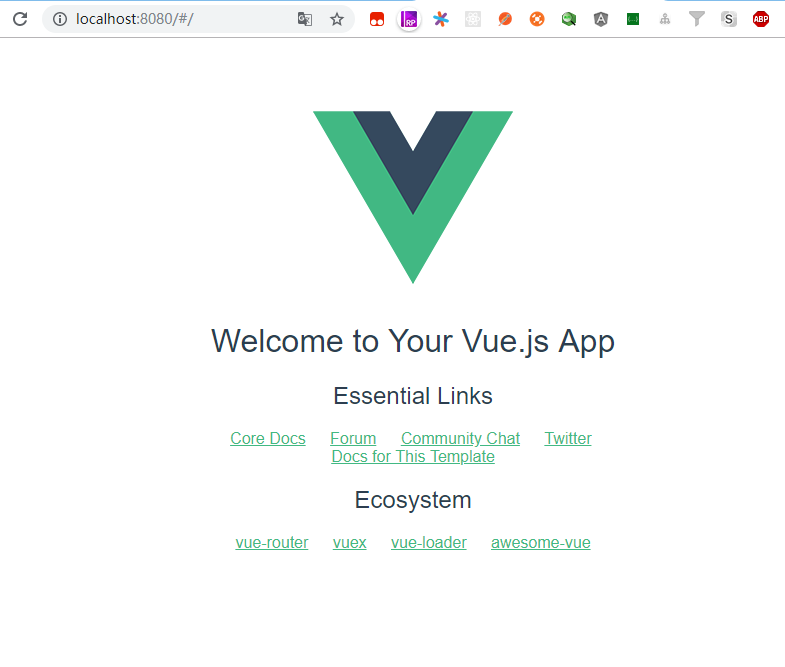
运行效果
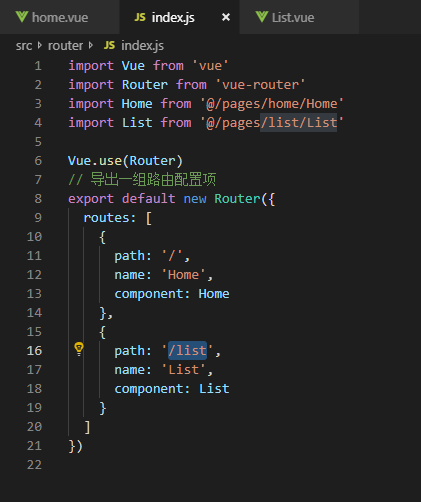
添加home页及其路由,添加list页及其路由
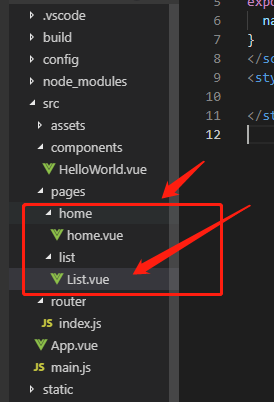

移动端项目配置项完善
<meta name="viewport" content="width=device-width,initial-scale=1.0,minimum-scale=1.0,maximum-scale=1.0,user-scalable=no">
解决一像素问题
//border.css

@charset "utf-8";

.border,

.border-top,

.border-right,

.border-bottom,

.border-left,

.border-topbottom,

.border-rightleft,

.border-topleft,

.border-rightbottom,

.border-topright,

.border-bottomleft {

    position: relative;

}

.border::before,

.border-top::before,

.border-right::before,

.border-bottom::before,

.border-left::before,

.border-topbottom::before,

.border-topbottom::after,

.border-rightleft::before,

.border-rightleft::after,

.border-topleft::before,

.border-topleft::after,

.border-rightbottom::before,

.border-rightbottom::after,

.border-topright::before,

.border-topright::after,

.border-bottomleft::before,

.border-bottomleft::after {

    content: "\0020";

    overflow: hidden;

    position: absolute;

}

/* border

 * 因,边框是由伪元素区域遮盖在父级

 * 故,子级若有交互,需要对子级设置

 * 定位 及 z轴

 */

.border::before {

    box-sizing: border-box;

    top: 0;

    left: 0;

    height: 100%;

    width: 100%;

    border: 1px solid #eaeaea;

    transform-origin: 0 0;

}

.border-top::before,

.border-bottom::before,

.border-topbottom::before,

.border-topbottom::after,

.border-topleft::before,

.border-rightbottom::after,

.border-topright::before,

.border-bottomleft::before {

    left: 0;

    width: 100%;

    height: 1px;

}

.border-right::before,

.border-left::before,

.border-rightleft::before,

.border-rightleft::after,

.border-topleft::after,

.border-rightbottom::before,

.border-topright::after,

.border-bottomleft::after {

    top: 0;

    width: 1px;

    height: 100%;

}

.border-top::before,

.border-topbottom::before,

.border-topleft::before,

.border-topright::before {

    border-top: 1px solid #eaeaea;

    transform-origin: 0 0;

}

.border-right::before,

.border-rightbottom::before,

.border-rightleft::before,

.border-topright::after {

    border-right: 1px solid #eaeaea;

    transform-origin: 100% 0;

}

.border-bottom::before,

.border-topbottom::after,

.border-rightbottom::after,

.border-bottomleft::before {

    border-bottom: 1px solid #eaeaea;

    transform-origin: 0 100%;

}

.border-left::before,

.border-topleft::after,

.border-rightleft::after,

.border-bottomleft::after {

    border-left: 1px solid #eaeaea;

    transform-origin: 0 0;

}

.border-top::before,

.border-topbottom::before,

.border-topleft::before,

.border-topright::before {

    top: 0;

}

.border-right::before,

.border-rightleft::after,

.border-rightbottom::before,

.border-topright::after {

    right: 0;

}

.border-bottom::before,

.border-topbottom::after,

.border-rightbottom::after,

.border-bottomleft::after {

    bottom: 0;

}

.border-left::before,

.border-rightleft::before,

.border-topleft::after,

.border-bottomleft::before {

    left: 0;

}

@media (max--moz-device-pixel-ratio: 1.49), (-webkit-max-device-pixel-ratio: 1.49), (max-device-pixel-ratio: 1.49), (max-resolution: 143dpi), (max-resolution: 1.49dppx) {

    /* 默认值,无需重置 */

}

@media (min--moz-device-pixel-ratio: 1.5) and (max--moz-device-pixel-ratio: 2.49), (-webkit-min-device-pixel-ratio: 1.5) and (-webkit-max-device-pixel-ratio: 2.49), (min-device-pixel-ratio: 1.5) and (max-device-pixel-ratio: 2.49), (min-resolution: 144dpi) and (max-resolution: 239dpi), (min-resolution: 1.5dppx) and (max-resolution: 2.49dppx) {

    .border::before {

        width: 200%;

        height: 200%;

        transform: scale(.5);

    }

    .border-top::before,

    .border-bottom::before,

    .border-topbottom::before,

    .border-topbottom::after,

    .border-topleft::before,

    .border-rightbottom::after,

    .border-topright::before,

    .border-bottomleft::before {

        transform: scaleY(.5);

    }

    .border-right::before,

    .border-left::before,

    .border-rightleft::before,

    .border-rightleft::after,

    .border-topleft::after,

    .border-rightbottom::before,

    .border-topright::after,

    .border-bottomleft::after {

        transform: scaleX(.5);

    }

}

@media (min--moz-device-pixel-ratio: 2.5), (-webkit-min-device-pixel-ratio: 2.5), (min-device-pixel-ratio: 2.5), (min-resolution: 240dpi), (min-resolution: 2.5dppx) {

    .border::before {

        width: 300%;

        height: 300%;

        transform: scale(.33333);

    }

    .border-top::before,

    .border-bottom::before,

    .border-topbottom::before,

    .border-topbottom::after,

    .border-topleft::before,

    .border-rightbottom::after,

    .border-topright::before,

    .border-bottomleft::before {

        transform: scaleY(.33333);

    }

    .border-right::before,

    .border-left::before,

    .border-rightleft::before,

    .border-rightleft::after,

    .border-topleft::after,

    .border-rightbottom::before,

    .border-topright::after,

    .border-bottomleft::after {

        transform: scaleX(.33333);

    }

}
 //移动端30秒点击延迟问题

npm install fastclick --save

//在main.js中添加

FastClick.attach(document.body)

安装stylus
npm install stylus --save

npm install stylus-loader --save
未完,待续。。。
跟我一起做一个vue的小项目(一)的更多相关文章
- 跟我一起做一个vue的小项目(二)
这个vue项目是紧跟着之前的项目跟我一起做一个vue的小项目(一)来的. 我继续后面的开发(写的比较粗糙,边学边记录) 下图是header头部的样式 header组件内容如下 //header.vue ...
- 跟我一起做一个vue的小项目(八)
接下来我们进行的是城市选择页面的路由配置 添加city.vue,使其点击城市,然后跳转到city页面 //router.js import Vue from 'vue' import Router f ...
- 跟我一起做一个vue的小项目(七)
先看下我们所做项目的效果 这些数据都是我们在data中定义的,不是从后端数据中请求的.那么 接下来我们使用axios渲染数据 npm install axios --save 每个组件里面的数据都不相 ...
- 跟我一起做一个vue的小项目(五)
接下来我们要做的是热门推荐页面,我们写一个推荐组件 使用的方法也是前端data中的数据渲染到页面上面,这里对文字过长取省略号的方法不成功使用了一个小技巧 使用了min-width:0 我们来看完整的代 ...
- 跟我一起做一个vue的小项目(APPvue2.5完结篇)
先放一下这个完结项目的整体效果 下面跟我我一起进行下面项目的进行吧~~~ 接下来我们进行的是实现header的渐隐渐显效果,并且点击返回要回到首页 我们先看效果 在处理详情页向下移动过程中,heade ...
- 跟我一起做一个vue的小项目(四)
接下来我们进行的是轮播页面下面的导航页的开发 我们需要的是实现轮播页下面的图标,并且实现轮播效果 这个话,其实基本思路先是渲染出小图标,然后,我们要对页数进行判断,如果图标的个数展示的就是8个,那个这 ...
- 跟我一起做一个vue的小项目(十一)
接下来我们进行的是详情页动态路由及banner布局 先看页面的效果 下面是代码部分 <template> <div> <div class="banner&qu ...
- 跟我一起做一个vue的小项目(十)
接下来我们对城市列表页面进行优化,除了对数据优化,也会进行节流处理 //src\pages\city\components\Alphabet.vue <template> <ul c ...
- 跟我一起做一个vue的小项目(三)
接下来我们进行轮播的开发 安装插件,选用2.6.7的稳定版本 npm install vue-awesome-swiper@2.6.7 --save 根据其github上面的用法,我们在全局引用,在m ...
- 跟我一起做一个vue的小项目(九)
接下来我们进行的就是城市列表页面数据额动态渲染. 也是在mock数据,进行动态渲染 //city.json { "ret": true, "data":{ &q ...
随机推荐
- mui.fire()用法
作用: mui.fire() 可以触发目标窗口的自定义事件 mui.fire( 目标窗口的webview , '自定义事件名' ,{参数列表}:) 目标窗口监听这个自定义事件 window.addEv ...
- Java 使用JDBC连接MySQL
// 这学期本来不打算深入学习Java的,课上的小项目也就随便写了一个简单计算器和扫雷游戏就糊弄过去.可是我们的Eliza老师偏偏什么都讲了,考虑到期末也会涉及到JDBC的内容,前些天试着学习一番. ...
- [原创]Java调用PageOffice给Word中的Table赋值
Word中的table操作需要借助数据区域(DataRegion)实现的,要求数据区域完整的包含了整个Table的内容,这样才可以通过数据区域控制和操作table.因此,要想使用table,则必须在w ...
- JSON高亮格式化页面显示
高亮CSS定义: <style type="text/css"> pre {outline: 1px solid #ccc; padding: 5px; margin: ...
- 第12章 SQL联接
第12章 SQL联接 关系数据库的3个支柱:选择.投影和联接. 两种基本的连接同等联接和非同等联接. 源表和目标表有相同的名称的列,就可以在他们之间执行自然联接,而无需指定连接列. 自然join us ...
- sprignboot 中thymeleaf和freemarker 都存在时,默认选择哪个
我们 无聊的时候想到,freemarker和thymeleaf都是springboot默认支持的模板,当这2个同时存在并有相同名字的时候,springboot会默认选择哪个模板来显示呢 ? 所以今天我 ...
- MySQL的高可用实现方案之mysql-mmm
一.环境简述 1.工作逻辑图 2.MySQL-MMM优缺点 优点:高可用性,扩展性好,出现故障自动切换,对于主主同步,在同一时间只提供一台数据库写操作,保证的数据的一致性. 缺点:Monitor节点是 ...
- 前端在本地启动服务预览html页面
在开发移动端项目时浏览器里出来的效果往往到真机上和预想的有出入,在开发过程中知道了一个可以在本地自己启动一个服务器在手机预览的办法. 1.首先在终端安装http. npm i http-server ...
- Vue 本地代理 纯前端技术解决跨域
vue-axios获取数据很多小伙伴都会使用,但如果前后端分离且后台没设置跨域许可,那要怎样才能解决跨域问题? 常用方法有几种: 通过jsonp跨域 通过修改document.domain来跨子域 使 ...
- (转)AngularJS中使用的表单验证
原文 http://www.cnblogs.com/woshinidezhu/p/Form-validation-with-AngularJS.html 客户端表单验证是AngularJS里面最酷的 ...