
吴裕雄 python 神经网络——TensorFlow 输入文件队列
import tensorflow as tf

def _int64_feature(value):

    return tf.train.Feature(int64_list=tf.train.Int64List(value=[value]))

num_shards = 2

instances_per_shard = 2

for i in range(num_shards):

    filename = ('E:\\temp\\data.tfrecords-%.5d-of-%.5d' % (i, num_shards))

    # 将Example结构写入TFRecord文件。

    writer = tf.python_io.TFRecordWriter(filename)

    for j in range(instances_per_shard):

    # Example结构仅包含当前样例属于第几个文件以及是当前文件的第几个样本。

        example = tf.train.Example(features=tf.train.Features(feature={

            'i': _int64_feature(i),

            'j': _int64_feature(j)}))

        writer.write(example.SerializeToString())

    writer.close()

files = tf.train.match_filenames_once("E:\\temp\\data.tfrecords-*")

filename_queue = tf.train.string_input_producer(files, shuffle=False)

reader = tf.TFRecordReader()

_, serialized_example = reader.read(filename_queue)

features = tf.parse_single_example(

      serialized_example,

      features={

          'i': tf.FixedLenFeature([], tf.int64),

          'j': tf.FixedLenFeature([], tf.int64),

      })

with tf.Session() as sess:

    sess.run([tf.global_variables_initializer(), tf.local_variables_initializer()])

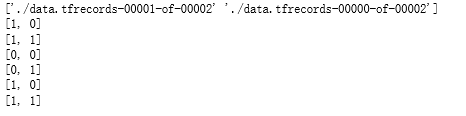
    print(sess.run(files))

    coord = tf.train.Coordinator()

    threads = tf.train.start_queue_runners(sess=sess, coord=coord)

    for i in range(6):

        print(sess.run([features['i'], features['j']]))

    coord.request_stop()

    coord.join(threads)
example, label = features['i'], features['j']

batch_size = 2

capacity = 1000 + 3 * batch_size

example_batch, label_batch = tf.train.batch([example, label], batch_size=batch_size, capacity=capacity)

with tf.Session() as sess:

    tf.global_variables_initializer().run()

    tf.local_variables_initializer().run()

    coord = tf.train.Coordinator()

    threads = tf.train.start_queue_runners(sess=sess, coord=coord)

    for i in range(3):

        cur_example_batch, cur_label_batch = sess.run([example_batch, label_batch])

        print(cur_example_batch, cur_label_batch)

    coord.request_stop()

    coord.join(threads)

吴裕雄 python 神经网络——TensorFlow 输入文件队列的更多相关文章
- 吴裕雄 python 神经网络——TensorFlow 多线程队列操作
import tensorflow as tf queue = tf.FIFOQueue(100,"float") enqueue_op = queue.enqueue([tf.r ...
- 吴裕雄 python 神经网络——TensorFlow 队列操作
import tensorflow as tf q = tf.FIFOQueue(2, "int32") init = q.enqueue_many(([0, 10],)) x = ...
- 吴裕雄 python 神经网络——TensorFlow 循环神经网络处理MNIST手写数字数据集
#加载TF并导入数据集 import tensorflow as tf from tensorflow.contrib import rnn from tensorflow.examples.tuto ...
- 吴裕雄 python 神经网络——TensorFlow 使用卷积神经网络训练和预测MNIST手写数据集
import tensorflow as tf import numpy as np from tensorflow.examples.tutorials.mnist import input_dat ...
- 吴裕雄 python 神经网络——TensorFlow 训练过程的可视化 TensorBoard的应用
#训练过程的可视化 ,TensorBoard的应用 #导入模块并下载数据集 import tensorflow as tf from tensorflow.examples.tutorials.mni ...
- 吴裕雄 python 神经网络——TensorFlow实现搭建基础神经网络
import numpy as np import tensorflow as tf import matplotlib.pyplot as plt def add_layer(inputs, in_ ...
- 吴裕雄 python 神经网络——TensorFlow图片预处理调整图片
import numpy as np import tensorflow as tf import matplotlib.pyplot as plt def distort_color(image, ...
- 吴裕雄 python 神经网络TensorFlow实现LeNet模型处理手写数字识别MNIST数据集
import tensorflow as tf tf.reset_default_graph() # 配置神经网络的参数 INPUT_NODE = 784 OUTPUT_NODE = 10 IMAGE ...
- 吴裕雄 python 神经网络——TensorFlow pb文件保存方法
import tensorflow as tf from tensorflow.python.framework import graph_util v1 = tf.Variable(tf.const ...
随机推荐
- Jenkins Pipeline waitForQualityGate pending 超时
请参考链接:http://www.iotxing.com/2019/06/12/258/jenkins-pipeline-waitforqualitygate%E8%B6%85%E6%97%B6/ 主 ...
- Go_CSP并发模型
go语言的最大两个亮点,一个是goroutine,一个就是chan了.二者合体的典型应用CSP,基本就是大家认可的并行开发神器,简化了并行程序的开发难度,我们来看一下CSP. 11.1.CSP是什么 ...
- 服务端捡起或丢弃指定物品ID触发详解
传奇服务端捡起或丢弃指定物品ID触发详解: @PickUpItemsX X是物品数据库中对应的IDX@DropItemsX X是物品数据库中对应的IDX@H.PickUpItemsX X是物品数据库中 ...
- vue 无法热替换/热更新
参考了小伙伴的解决办法: 1.https://blog.csdn.net/win7583362/article/details/65443291 虽然我并不是用对方的方法解决的. 依然还是建议大家打开 ...
- C#中数据类型char*,const char*和string的三者转换
C#中数据类型char*,const char*和string的三者转换: . const char* 和string 转换 () const char*转换为 string,直接赋值即可. EX: ...
- arcgis中的Join(合并连接)和Relate(关联连接)
arcgis中的Join(合并连接)和Relate(关联连接) 一.区别 1.连接关系不一样. Relate(关联连接)方式连接的两个表之间的记录可以是“一对一”.“多对一”.“一对多”的关系 Joi ...
- google插件跨域含用户请求WebApi解决的方案
问题描述: google插件跨域请求WebApi相关解决方案 1.ajax解决含登录用户信息 $.ajax({ url: url, type: "POST", timeout: 6 ...
- (matlab)自定义图像(matlab)
clc;clear all;A=[0 230 255 60 30 100];A=uint8(A);imshow(A,'InitialMagnification','fit') 如图: clc;clea ...
- Java - 判断字符串是否是回文
首先,回文是指类似于“12345”,“abcdcba”的形式,即正念和反念都是一样的字符串 判断字符串是否是回文,这边介绍3种办法 将字符串翻转,判断翻转后的字符串和原字符串是否相等 public s ...
- XSS常见攻击与防御
XSS攻击全称跨站脚本攻击,是为不和层叠样式表(Cascading Style Sheets, CSS)的缩写混淆,故将跨站脚本攻击缩写为XSS,XSS是一种在web应用中的计算机安全漏洞,它允许恶意 ...