
C#画图之饼图
        public JsonResult DrawPie()

        {

            // 预置颜色

            List<Color> colors = new List<Color>()

            {

                Color.FromArgb(,,),

                Color.FromArgb(,,),

                Color.FromArgb(,,),

                Color.FromArgb(,,),

                Color.FromArgb(,,),

                Color.FromArgb(,,),

                Color.FromArgb(,,),

                Color.FromArgb(,,),

                Color.FromArgb(,,)

            };

            #region 允许配置项

            //定义宽高  只定义宽度即可

            int height = , width = height;

            //边缘位置留白

            int margin_top = ;

            int margin_right = ;

            int margin_bottom = ;

            int margin_left = ;

            //文字大小,单位:px

            int fontsize = ;

            // 扇区名称预留的位置  颜色框20,与文字间隙5,文字80,距离折线图10,需要包含边缘留白

            int lineNameWidth =  - margin_right;

            #endregion

            #region 数据

            //最大数量/总数量

            int totalCount = ;

            string[] pieNameData = new string[] { "第一个", "第二个", "第三个", "第四个", "第五个" };

            int[] pieData = new int[] { , , , ,  };

            totalCount = pieData.Sum();

            #endregion

            //单位转换对象

            Spire.Pdf.Graphics.PdfUnitConvertor unitCvtr = new Spire.Pdf.Graphics.PdfUnitConvertor();

            //生成图像对象

            Bitmap image = new Bitmap(width + margin_left + margin_right + lineNameWidth, height + margin_top + margin_bottom);

            //创建画布

            Graphics g = Graphics.FromImage(image);

            //消除锯齿

            g.SmoothingMode = SmoothingMode.AntiAlias;

            //质量

            g.InterpolationMode = InterpolationMode.HighQualityBicubic;

            g.CompositingQuality = CompositingQuality.HighQuality;

            //黑色画笔--文字颜色

            Brush blackBrush = new SolidBrush(Color.FromArgb(, , , ));

            Pen blackPen = new Pen(blackBrush, );

            //填充区域内容--背景

            g.FillRectangle(Brushes.WhiteSmoke, , , width + margin_left + margin_right + lineNameWidth, height + margin_top + margin_bottom);

            //文字样式

            Font font = new Font("宋体", unitCvtr.ConvertUnits(fontsize, Spire.Pdf.Graphics.PdfGraphicsUnit.Pixel, Spire.Pdf.Graphics.PdfGraphicsUnit.Point));

            float tempAngle = ;

            for (int i = ; i < pieData.Length; i++)

            {

                Color tempColor = colors[i];

                //文字内容

                StringFormat format = new StringFormat();

                //format.Alignment = StringAlignment.Far; //居中

                //format.FormatFlags = StringFormatFlags.DirectionVertical;

                //画笔

                SolidBrush brush = new SolidBrush(tempColor);

                Pen pen = new Pen(brush, );

                // 折线名称处理

                // 颜色块

                Rectangle rectangle = new Rectangle(margin_left + width + , margin_top + i * , , );

                g.FillRectangle(brush, rectangle);

                // 文字

                RectangleF txtRec = new RectangleF(margin_left + width +  + , margin_top + i *  + , , );

                string txt = pieNameData[i].ToString() + "(" + Math.Round((pieData[i] / Convert.ToDouble(totalCount) * ), ).ToString() + "%)";

                g.DrawString(txt, font, blackBrush, txtRec, format);

                /************************

                 * 开始画饼图

                 ************************/

                //饼图

                int radius = (height > width ? width : height);

                Rectangle rec = new Rectangle(margin_left, margin_top, radius, radius);

                if (i < pieData.Length - )

                {

                    float angle = Convert.ToInt32(pieData[i] / Convert.ToDouble(totalCount) * );

                    g.FillPie(brush, rec, tempAngle, angle);

                    tempAngle += angle;

                }

                else

                {

                    //防止计算误差导致不足360或者超过360

                    float angle =  - tempAngle;

                    g.FillPie(brush, rec, tempAngle, angle);

                }

            }

            string relativePath = @"\draw-image\" + DateTime.Now.ToString("yyyyMMddHHmmssfff") + ".jpg";

            string path = Server.MapPath(relativePath);

            image.Save(path, System.Drawing.Imaging.ImageFormat.Jpeg);

            //return relativePath;

            return Json(relativePath, JsonRequestBehavior.AllowGet);

        }
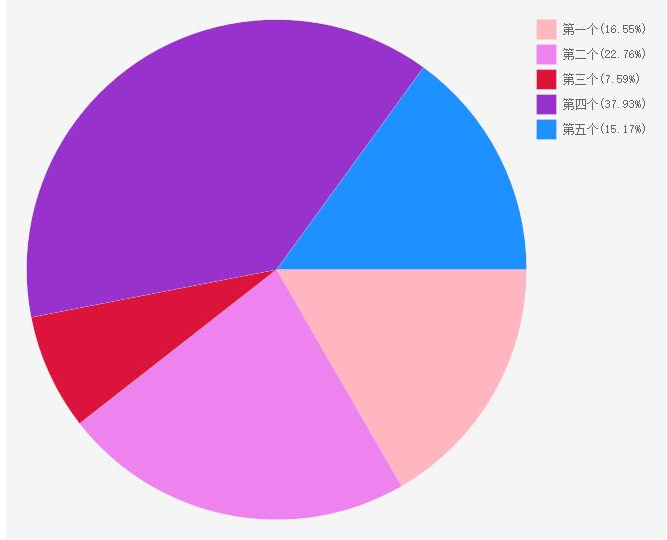
示例图
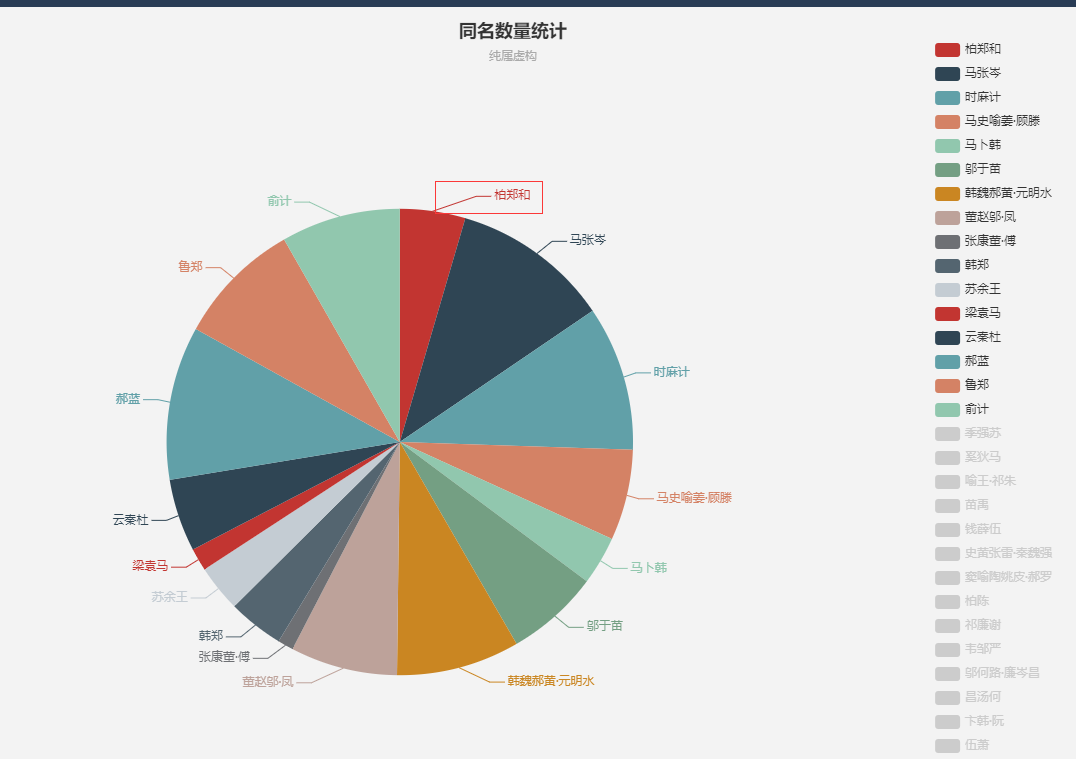
那种带把,把的末尾带文字的图,不会算啊,哪个会算的,有幸看到了能不能告诉我怎么算啊,跪谢!!!
带把的饼图(不会算的饼图)如下:
C#画图之饼图的更多相关文章
- 使用C#画图(饼图折线图)
public PlaceHolder PlaceHolder1; //显示图像的控件 各个图像的类别名称如下: PictureType 图形种类 5 chChartTypeBarCl ...
- python操作Excel、openpyxl 之图表,折线图、饼图、柱状图等
一.准备 需要模块: from openpyxl.workbook import Workbook from openpyxl.chart import Series,LineChart, Refer ...
- [C#]画图全攻略(饼图与柱状图)(转)
http://blog.chinaunix.net/uid-15481846-id-2769484.html 首先建立一个c#的类库. 打开vs.net,建立一个名为Insight_cs.WebC ...
- 画图前端:mermaid。时序图/类图/甘特图/流程图/状态图/饼图。类似工具:Typora
文档 https://mermaidjs.github.io/#/ cdn https://www.bootcdn.cn/mermaid/ 在线编辑 https://mermaidjs.github. ...
- (Vue中)cehart在同一个dom上画图图切换时饼图有折线图的坐标系
网上都是别人转载的,下面是转载的代码,在Vue中根本不适用 var echartrunningstate = null; if (echartrunningstate && echar ...
- python画图—黑板客老师课程学习
1.介绍 把每个图都看作一个对象,图中的每一个部分也是对象.——所有的一切都是对象. 工具——ipython notebook 是python里边用的最多的2D&3D的会图库,开源免费库,使用 ...
- html5实现饼图和线图-我们到底能走多远系列(34)
我们到底能走多远系列(34) 扯淡: 送给各位一段话: 人生是一个不断做加法的过程 从赤条条无牵无挂的来 到学会荣辱羞耻 礼仪规范 再到赚取世间的名声 财富 地位 ...
- (转)浅谈HTML5与css3画饼图!
神马系饼图? 饼图,大家都应该熟知,在统计数据对比方面,几乎处处用到.如cnzz的统计饼图 从饼图中,很形象地展示了访问者地区的分布,以扇形为块的方式拼成一个大圆. 都使用什么方法实现 目前众多站点制 ...
- 利用python进行折线图,直方图和饼图的绘制
我用10个国家某年的GDP来绘图,数据如下: labels = ['USA', 'China', 'India', 'Japan', 'Germany', 'Russia', 'Brazil', ...
随机推荐
- Nginx-入门(源码编译安装http://nginx.org/en/download.html)
比较早的时候 web主要经典组合--->LAMP 近几年---->nginx后来居上--->LNMP=LEMP Nginx = Engine x Nginx和Apache 都是 ...
- MySQL Router单点隐患通过Keepalived实现
目录 一.介绍 二.环境准备 三.安装步骤 3.1下载软件包,解压 3.2源码安装 3.3配置keepalived 3.4修改keepalived配置文件 3.5启动keepalived 3.6查看V ...
- AcWing 785.快速排序
AcWing 785.快速排序题解 题目描述 给定你一个长度为n的整数数列. 请你使用快速排序对这个数列按照从小到大进行排序. 并将排好序的数列按顺序输出. 输入格式 输入共两行,第一行包含整数 n. ...
- 微服务之docker(二)
一.SpringCloud/SpringBoot整合docker 使用docker的maven组建构建springboot应用(官方文档:https://spring.io/guides/gs/spr ...
- LinearLayout里面的空间居中对齐
<?xml version="1.0" encoding="utf-8"?> <LinearLayout xmlns:android=&quo ...
- MySQL初次安装配置及修改密码
安装前的准备工作: 下载完后,我们将 zip 包解压到相应的目录,这里我将解压后的文件夹放在 C:\mysql-8.0.11 下. 接下来我们需要配置下 MySQL 的配置文件 打开刚刚解压的文件夹 ...
- supervisor管理tomcat
操作目的:用supervisor工具管理tomcat服务 配置环境,安装服务,以及多实例 脚本编辑: 前提 机器的opt目录下必须有jdk-8u131-linux-x64_.rpm 以及apache- ...
- 设计模式——Adapter Pattern 适配器模式
我第一次接触设计模式,选取了四大类型里面的结构型,这类型的特点是关注类&对象之间的组合(使用继承),我从中选取适配器模式来具体学习. 一.适配器模式(Adapter Pattern)定义: 适 ...
- 【译文连载】 理解Istio服务网格(第一章 概述)
书籍英文版下载链接为 https://developers.redhat.com/books/introducing-istio-service-mesh-microservices/,作者 Burr ...
- 《C# GDI+ 破境之道》:第一境 GDI+基础 —— 第一节:画直线
今天正式开一本新书,<C# GDI+ 破镜之道>,同样是破镜之道系列丛书的一分子. 关于GDI+呢,官方的解释是这样的: GDI+ 是 Microsoft Windows 操作系统的窗体子 ...