
C#画图之饼图
        public JsonResult DrawPie()

        {

            // 预置颜色

            List<Color> colors = new List<Color>()

            {

                Color.FromArgb(,,),

                Color.FromArgb(,,),

                Color.FromArgb(,,),

                Color.FromArgb(,,),

                Color.FromArgb(,,),

                Color.FromArgb(,,),

                Color.FromArgb(,,),

                Color.FromArgb(,,),

                Color.FromArgb(,,)

            };

            #region 允许配置项

            //定义宽高  只定义宽度即可

            int height = , width = height;

            //边缘位置留白

            int margin_top = ;

            int margin_right = ;

            int margin_bottom = ;

            int margin_left = ;

            //文字大小,单位:px

            int fontsize = ;

            // 扇区名称预留的位置  颜色框20,与文字间隙5,文字80,距离折线图10,需要包含边缘留白

            int lineNameWidth =  - margin_right;

            #endregion

            #region 数据

            //最大数量/总数量

            int totalCount = ;

            string[] pieNameData = new string[] { "第一个", "第二个", "第三个", "第四个", "第五个" };

            int[] pieData = new int[] { , , , ,  };

            totalCount = pieData.Sum();

            #endregion

            //单位转换对象

            Spire.Pdf.Graphics.PdfUnitConvertor unitCvtr = new Spire.Pdf.Graphics.PdfUnitConvertor();

            //生成图像对象

            Bitmap image = new Bitmap(width + margin_left + margin_right + lineNameWidth, height + margin_top + margin_bottom);

            //创建画布

            Graphics g = Graphics.FromImage(image);

            //消除锯齿

            g.SmoothingMode = SmoothingMode.AntiAlias;

            //质量

            g.InterpolationMode = InterpolationMode.HighQualityBicubic;

            g.CompositingQuality = CompositingQuality.HighQuality;

            //黑色画笔--文字颜色

            Brush blackBrush = new SolidBrush(Color.FromArgb(, , , ));

            Pen blackPen = new Pen(blackBrush, );

            //填充区域内容--背景

            g.FillRectangle(Brushes.WhiteSmoke, , , width + margin_left + margin_right + lineNameWidth, height + margin_top + margin_bottom);

            //文字样式

            Font font = new Font("宋体", unitCvtr.ConvertUnits(fontsize, Spire.Pdf.Graphics.PdfGraphicsUnit.Pixel, Spire.Pdf.Graphics.PdfGraphicsUnit.Point));

            float tempAngle = ;

            for (int i = ; i < pieData.Length; i++)

            {

                Color tempColor = colors[i];

                //文字内容

                StringFormat format = new StringFormat();

                //format.Alignment = StringAlignment.Far; //居中

                //format.FormatFlags = StringFormatFlags.DirectionVertical;

                //画笔

                SolidBrush brush = new SolidBrush(tempColor);

                Pen pen = new Pen(brush, );

                // 折线名称处理

                // 颜色块

                Rectangle rectangle = new Rectangle(margin_left + width + , margin_top + i * , , );

                g.FillRectangle(brush, rectangle);

                // 文字

                RectangleF txtRec = new RectangleF(margin_left + width +  + , margin_top + i *  + , , );

                string txt = pieNameData[i].ToString() + "(" + Math.Round((pieData[i] / Convert.ToDouble(totalCount) * ), ).ToString() + "%)";

                g.DrawString(txt, font, blackBrush, txtRec, format);

                /************************

                 * 开始画饼图

                 ************************/

                //饼图

                int radius = (height > width ? width : height);

                Rectangle rec = new Rectangle(margin_left, margin_top, radius, radius);

                if (i < pieData.Length - )

                {

                    float angle = Convert.ToInt32(pieData[i] / Convert.ToDouble(totalCount) * );

                    g.FillPie(brush, rec, tempAngle, angle);

                    tempAngle += angle;

                }

                else

                {

                    //防止计算误差导致不足360或者超过360

                    float angle =  - tempAngle;

                    g.FillPie(brush, rec, tempAngle, angle);

                }

            }

            string relativePath = @"\draw-image\" + DateTime.Now.ToString("yyyyMMddHHmmssfff") + ".jpg";

            string path = Server.MapPath(relativePath);

            image.Save(path, System.Drawing.Imaging.ImageFormat.Jpeg);

            //return relativePath;

            return Json(relativePath, JsonRequestBehavior.AllowGet);

        }
示例图
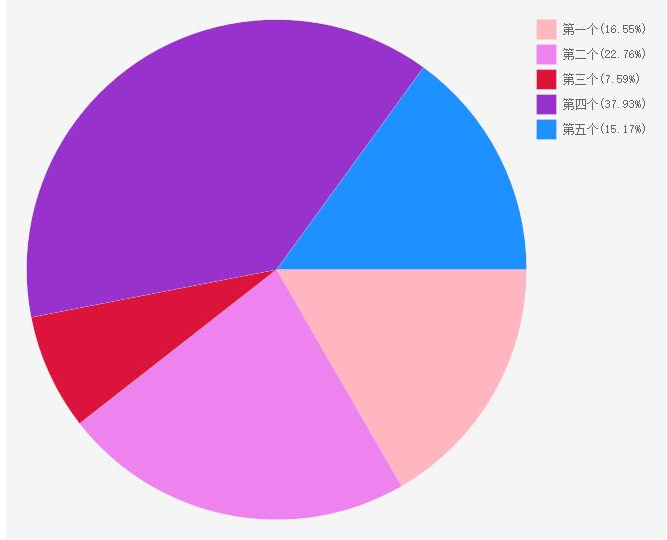
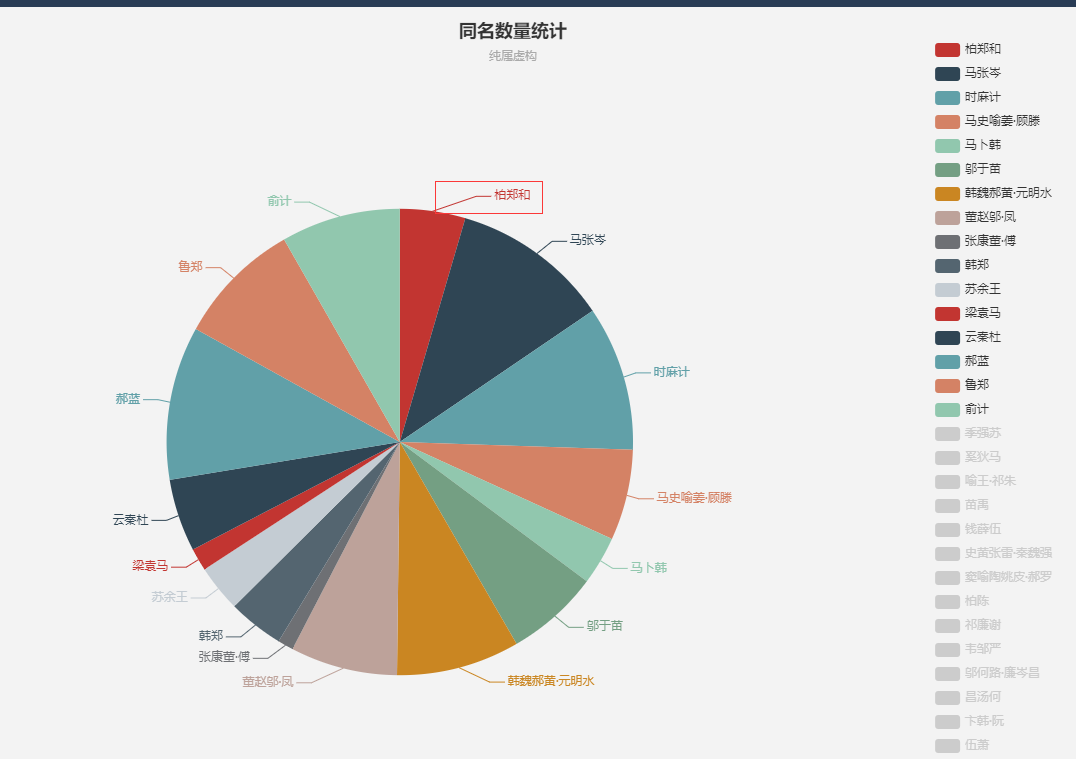
那种带把,把的末尾带文字的图,不会算啊,哪个会算的,有幸看到了能不能告诉我怎么算啊,跪谢!!!
带把的饼图(不会算的饼图)如下:
C#画图之饼图的更多相关文章
- 使用C#画图(饼图折线图)
public PlaceHolder PlaceHolder1; //显示图像的控件 各个图像的类别名称如下: PictureType 图形种类 5 chChartTypeBarCl ...
- python操作Excel、openpyxl 之图表,折线图、饼图、柱状图等
一.准备 需要模块: from openpyxl.workbook import Workbook from openpyxl.chart import Series,LineChart, Refer ...
- [C#]画图全攻略(饼图与柱状图)(转)
http://blog.chinaunix.net/uid-15481846-id-2769484.html 首先建立一个c#的类库. 打开vs.net,建立一个名为Insight_cs.WebC ...
- 画图前端:mermaid。时序图/类图/甘特图/流程图/状态图/饼图。类似工具:Typora
文档 https://mermaidjs.github.io/#/ cdn https://www.bootcdn.cn/mermaid/ 在线编辑 https://mermaidjs.github. ...
- (Vue中)cehart在同一个dom上画图图切换时饼图有折线图的坐标系
网上都是别人转载的,下面是转载的代码,在Vue中根本不适用 var echartrunningstate = null; if (echartrunningstate && echar ...
- python画图—黑板客老师课程学习
1.介绍 把每个图都看作一个对象,图中的每一个部分也是对象.——所有的一切都是对象. 工具——ipython notebook 是python里边用的最多的2D&3D的会图库,开源免费库,使用 ...
- html5实现饼图和线图-我们到底能走多远系列(34)
我们到底能走多远系列(34) 扯淡: 送给各位一段话: 人生是一个不断做加法的过程 从赤条条无牵无挂的来 到学会荣辱羞耻 礼仪规范 再到赚取世间的名声 财富 地位 ...
- (转)浅谈HTML5与css3画饼图!
神马系饼图? 饼图,大家都应该熟知,在统计数据对比方面,几乎处处用到.如cnzz的统计饼图 从饼图中,很形象地展示了访问者地区的分布,以扇形为块的方式拼成一个大圆. 都使用什么方法实现 目前众多站点制 ...
- 利用python进行折线图,直方图和饼图的绘制
我用10个国家某年的GDP来绘图,数据如下: labels = ['USA', 'China', 'India', 'Japan', 'Germany', 'Russia', 'Brazil', ...
随机推荐
- P4语言环境安装(一)前端编译器p4c、后端编译器p4c-bm2-ss
这个P4安装环境是在2020-2-8安装的,安装环境卡了我好几天,把遇到的问题记录下来,有需要的同学可以参考一下,要是说错了或者有问题的话,评论或mail:guidoahead@163.com联系我都 ...
- FFMPEG学习----打印视频信息
FFMPEG学习资料少之又少,在此推荐雷神的博客: http://blog.csdn.net/leixiaohua1020 在这里,我们把打印视频里的相关信息作为学习FFMPEG的 Hello Wor ...
- Codeforces_845
A.排序,比较中间两个大小. #include<bits/stdc++.h> using namespace std; ]; int main() { ios::sync_with_std ...
- 题解 bzoj3688【折线统计】
考虑 \(dp\) . 首先把所有节点按 \(x\) 从小到大排序是很有必要的. 记 f[i][j][0] 表示满足以第 \(i\) 个节点做折线结尾,选取的点集 \(S\) 满足 \(f(S)=j\ ...
- SpingBoot错误信息处理及原理
SpringBoot错误信息处理机制 在一个web项目中,总需要对一些错误进行界面或者json数据返回,已实现更好的用户体验,SpringBoot中提供了对于错误处理的自动配置 ErrorMvcAut ...
- vs 搭配 Linux 开发
这是一篇翻译,为什么突然想翻译文章了呢,因为很多大佬们都说英语对程序员还是挺重要的,毕竟互联网的最新技术基本都在歪果仁那边,如果英语不好,不会看国外的文档的话,将会错失接触第一手资料的机会,失去很多先 ...
- 腾讯云Centos服务器部署问题
在Centos7上部署Tomcat过程 下载并安装JDK 下载并部署Tomcat 打开Centos中对应的端口(默认80) 这几步操作很清楚,但首次使用Centos7时遇到了一个问题,外网无法访问服务 ...
- The Divide and Conquer Approach - 归并排序
The divide and conquer approach - 归并排序 归并排序所应用的理论思想叫做分治法. 分治法的思想是: 将问题分解为若干个规模较小,并且类似于原问题的子问题, 然后递归( ...
- 来看看你对Python变量理解到位了没有
变量是编程的基础概念,Python 的变量也看似很简单,但是如果理解不当,生搬硬套,可能会遇到一些麻烦. 下面用 10 个代码示例展示 Python 的 变量 本质. 以下内容有对应的 视频 手把手详 ...
- pytorch之 CNN
# library # standard library import os # third-party library import torch import torch.nn as nn impo ...