
创建jsp文件时报错,"javax.servlet.http.HttpServlet" was not found on the Java)
原因:
创建jsp文件的步骤如下:
出现"javax.servlet.http.HttpServlet" was not found on the Java) 报错信息就是因为没有进行步骤2
(步骤2在创建servlet时无需选择)

解决方案:
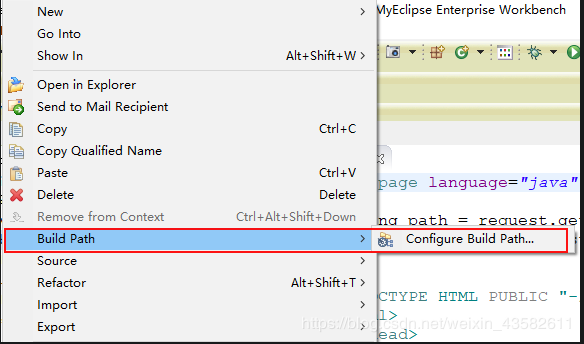
点击项目名,鼠标右击,build path ——>configure build path
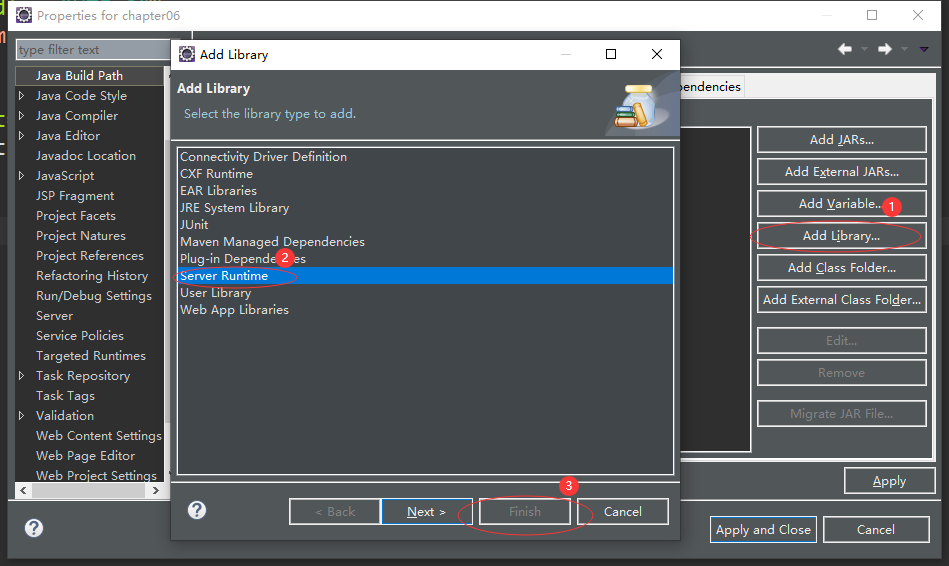
选择add libary——> server runtime
创建jsp文件时报错,"javax.servlet.http.HttpServlet" was not found on the Java)的更多相关文章
- web项目jsp出现The superclass javax.servlet.http.HttpServlet was not found on the Java Build Path错误
原因是Javaweb工程类中没有添加Tomcat运行时相关类导致. 解决方式如下:出错的文件---->>build path---->>config build path--- ...
- eclipse中web工程新建jsp文件报错:The superclass "javax.servlet.http.HttpServlet" was not found on the Java Build Path
web工程中新建jsp文件提示:The superclass "javax.servlet.http.HttpServlet" was not found on the Java ...
- 使用maven创建项目时报错The superclass "javax.servlet.http.HttpServlet" was not found on the Java Build Path
Description Resource Path Location Type The superclass "javax.servlet.http.HttpServlet" wa ...
- 如何解决JSP页面顶端报错 The superclass "javax.servlet.http.HttpServlet" was not found on the Java Build Path
题目有点长,昨天刚接触jsp,按照网上的教程安装完 tomcat 和 eclipse EE 之后,新建jsp文件却出现了如下报错: The superclass "javax.servlet ...
- JSP报错:The superclass "javax.servlet.http.HttpServlet" was not found on the Java Build Path
今天使用Eclipse+Maven建立了一个Javaweb工程,并在eclipse中配置了Web容器Jboss eap 6.2.新建jsp页面,添加一个简单 的Java类.可是,JSP页面顶端出现“红 ...
- eclipse 中新建文件报错The superclass "javax.servlet.http.HttpServlet" was not found on the Java Buil
在eclipse中新建文件报错错误提示如下: The superclass "javax.servlet.http.HttpServlet" was not found on th ...
- 新建jsp文件,The superclass "javax.servlet.http.HttpServlet" was not found on the Java Build Path错误解决方法
新建一个jsp文件后,有一个错误,The superclass "javax.servlet.http.HttpServlet" was not found on the Java ...
- java web(jsp)-The superclass "javax.servlet.http.HttpServlet" was not found on the Java Build Path
在静态项目上新建 jsp文件的时候,报错:The superclass "javax.servlet.http.HttpServlet" was not found on the ...
- 新建maven指定jdk版本-eclipse新建maven项目报错The superclass "javax.servlet.http.HttpServlet" was not found on the Java Build Path的解决方案
具体表现为: 使用Eclipse+Maven建立了一个Javaweb工程,JSP页面顶端出现“红色”的报错信息:The superclass "javax.servlet.http.Http ...
随机推荐
- Python | 面向对象中的名词总结
一.变量名称 (最前的序号表示将来用到的频繁程度) 5 全局变量: 1. 文件中出现的变量,不归属于函数及类:2.在函数用用global声明的变量 2 局部变量: 1.类的方法中没有self.,只能在 ...
- 16day 引号符号系列
'' 输出的信息,所见即所得 [root@oldboyedu oldboy]# echo 'oldboy $LANG $oldgirl' oldboy $LANG $oldgirl "&qu ...
- 20191225_Python构造函数知识以及相关注意事项
Python构造函数格式为__init__() 注:下划线为两个而不是一个 可以有无参构造 instance: class city: def printout(self,first,second): ...
- nginx配置访问黑名单-2
在Nginx服务器上屏蔽IP 1.查找要屏蔽的ip awk '{print $1}' nginx.access.log |sort |uniq -c|sort -n nginx.access.log ...
- 2019-2020-2 20174314王方正 《网络对抗》 Exp0 Kali安装
本博旨记录安装Kali的具体步骤. 一.Vmware的安装 略. 二.Vmware的配置 选择[文件]-[新建虚拟机]. 出现新建虚拟机导向,按照以下图示配置每一步.
- Modelsim, Debussy联合仿真Xilinx
http://wenku.baidu.com/view/8363d40003d8ce2f006623e9.html 另外一个博客 生成Xilinx库 先调用ISE的simulation librar ...
- ubuuntu截图
方法1: 按 print screen sysrq 方法2: 系统设置 选择键盘 选择快捷键窗口 选择截图 按照自己的习惯更改快捷键即可.
- mescroll.js简单的上拉加载、下拉刷新插件,带完整注释
声明:本插件模仿自mescroll.js,随手所作,仅以注释提供思路,只实现了部分效果,且没有考虑兼容,有兴趣的朋友随意一看.api大家可参考mescroll.js API汇总一文. demo:点我下 ...
- VIM - ex 命令行的窗口切换
1. 概述 操作 vim 同时编辑多个文件 约定 ctrl 使用按键 ctrl + w 时, 写作 ^W 思路 我记得这个由两个机制 ex 命令与缓冲区 分屏 2. 场景 文件 file1 file2 ...
- laravel Excel导入导出
1.简介 Laravel Excel 在 Laravel 5 中集成 PHPOffice 套件中的 PHPExcel,从而方便我们以优雅的.富有表现力的代码实现Excel/CSV文件的导入和导出. 该 ...