
如何解决JSP页面顶端报错 The superclass "javax.servlet.http.HttpServlet" was not found on the Java Build Path
题目有点长,昨天刚接触jsp,按照网上的教程安装完 tomcat 和 eclipse EE 之后,新建jsp文件却出现了如下报错:
The superclass "javax.servlet.http.HttpServlet" was not found on the Java Build Path
教程没有问题,传送门:http://www.runoob.com/jsp/jsp-setup.html
下面给出问题及解决方案:
1.报错内容:
The superclass "javax.servlet.http.HttpServlet" was not found on the Java Build Path

2. 解决方案:
在 Java Build Path 中添加 tomcat 的 library,具体步骤参考该页面:http://jingyan.baidu.com/article/f79b7cb34f40569144023ef9.html,图文并茂非常详细。
3.特殊情况:
如果以上方案不能解决问题,在 jsp 页面上仍然报错:The superclass "javax.servlet.http.HttpServlet" was not found on the Java Build Path
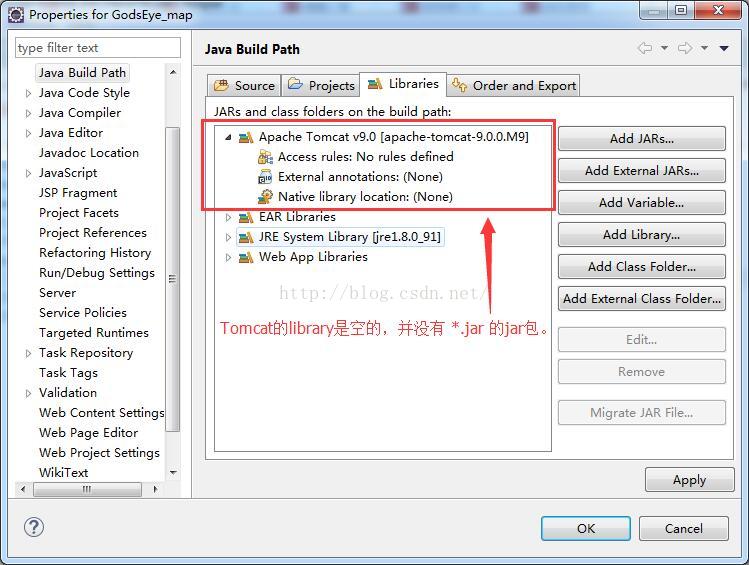
此时,我们就应该先来看一下,我们在 Java Build Path 中新添加的 library 是否如图下所示。(我安装的 tomcat 版本是 tomcat 9.0.0.M9)可以看到,Apache Tomcat v9.0 的 library 下是空的,并没有 jar 包,相当于系统并没有去 tomcat 的安装目录把 tomcat 的 lib 文件夹中的 *.jar 文件正确的添加进来。 So,只能我们自己手工导入了。
解决方案一:
因此,我们可以自己新建一个library,然后到 tomcat 的安装目录下把 tomcat 的 lib 文件夹中的 *.jar 文件全部添加进我们新建的 library 里。步骤如下。
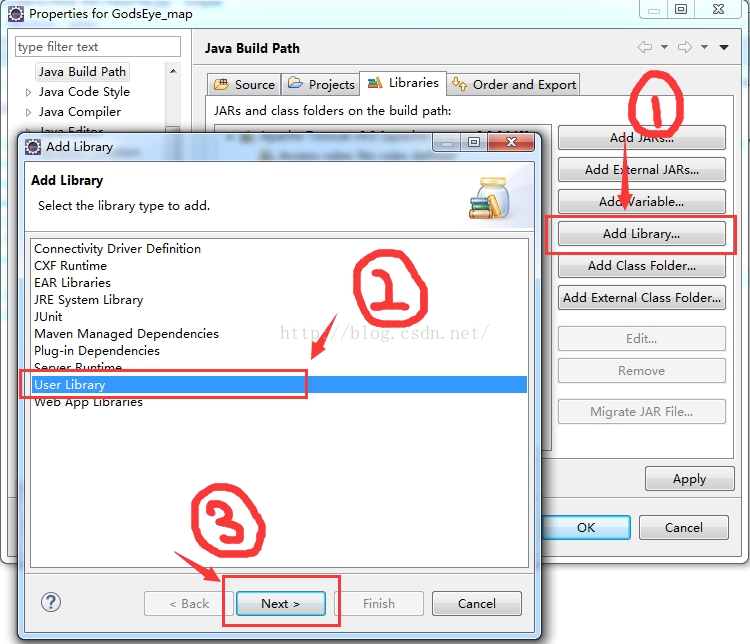
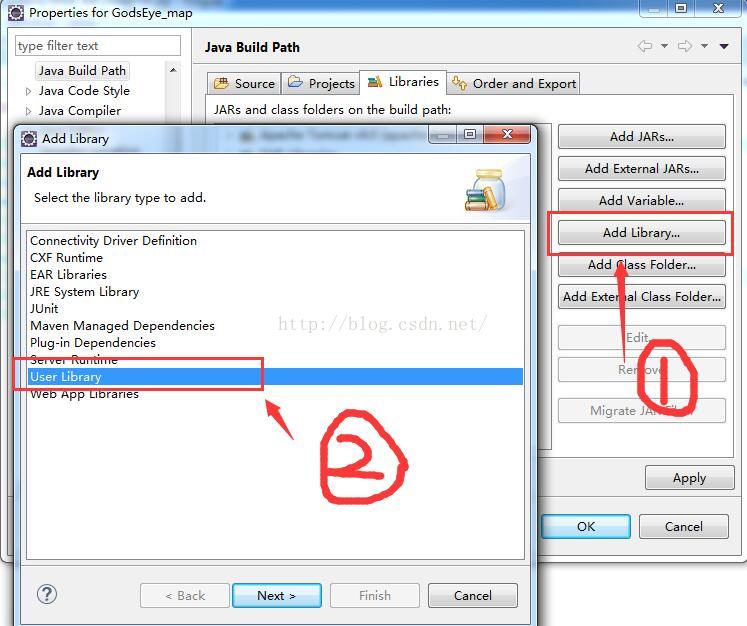
1)打开 Java Build Path,打开 Add Library,选择 User Library,点击 Next。
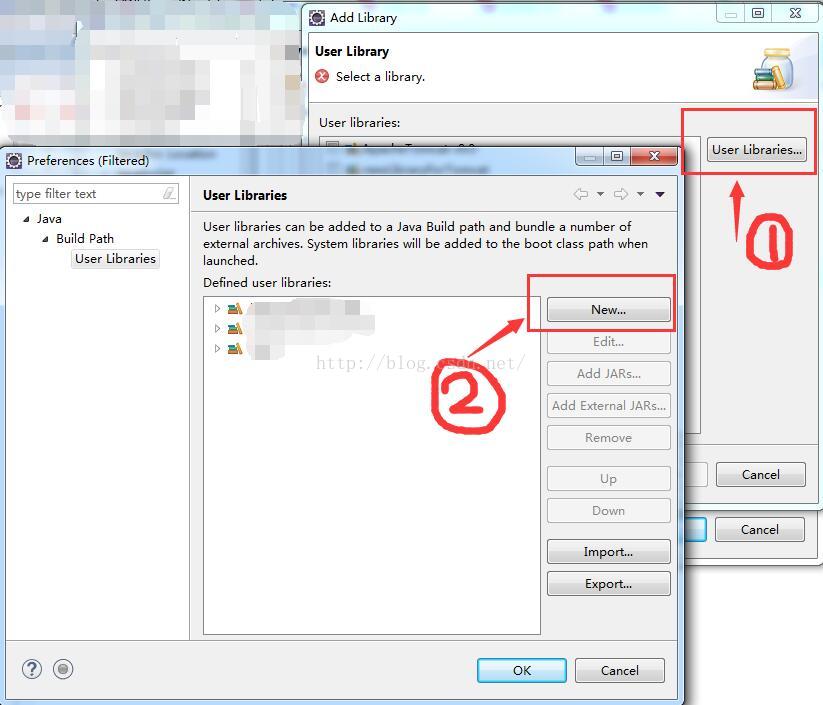
2)此时进入的页面,就是用户自己建立的 library 页面了。在 User libraries 列表,可以看到用户在之前建立的 library。 点击 User Libraries 按钮。接着点击 New 按钮,建立新的library。
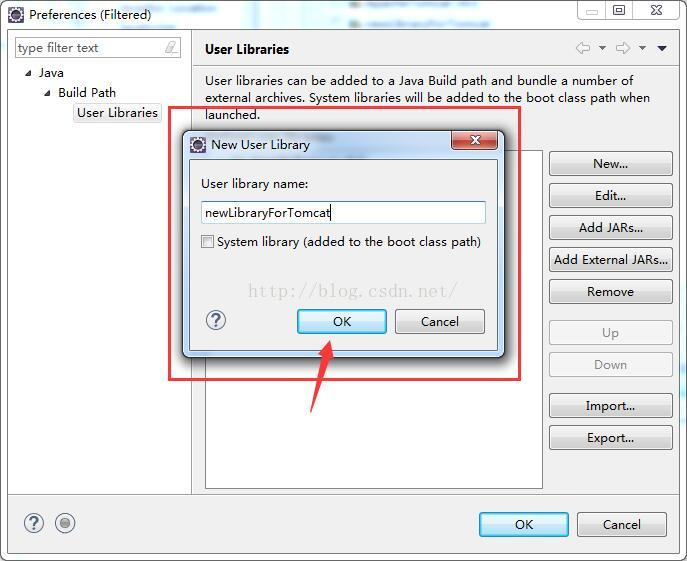
3)输入新 library 的名字:newLibraryForTomcat。点击 OK。
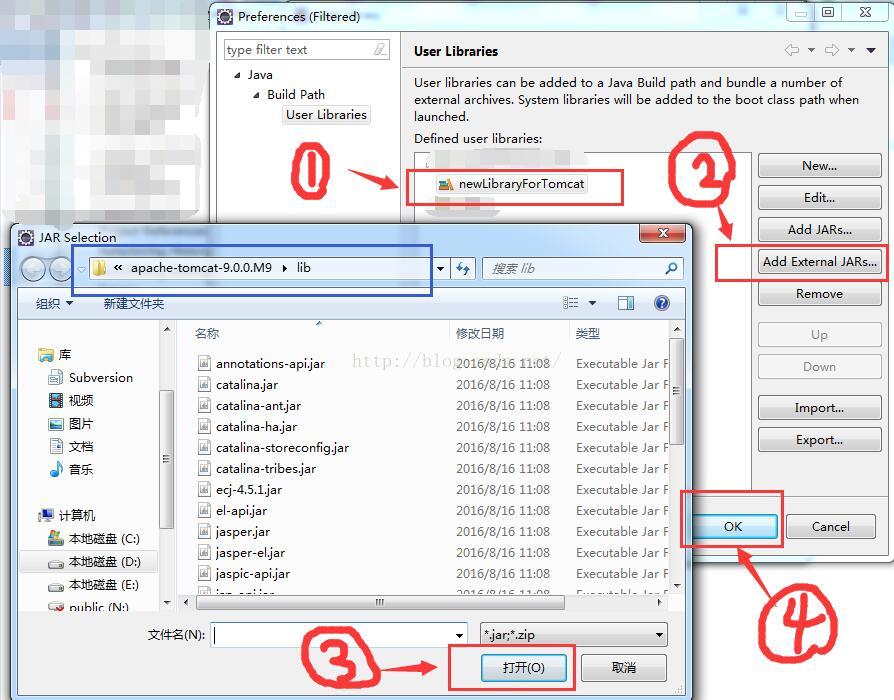
4)为 newLibraryForTomcat 配置 jar 包。①单击选中 newLibraryForTomcat ②单击 Add External JARs ,此时会弹出一个 JAR Selection 窗口,蓝色框所示是 我们安装的 tomcat 的 lib 的路径,在此路径下,使用 ctrl + A 选中所有 *.jar 文件 ③单击“打开”按钮 ④单击 OK 按钮。
此时,我们就新建了一个名为 newLibraryForTomcat 的 library。
5)接下来,我们就可以在 Java Build Path 的 Libraries 中添加我们的 newLibraryForTomcat。步骤如下 ① ② ③ ④。
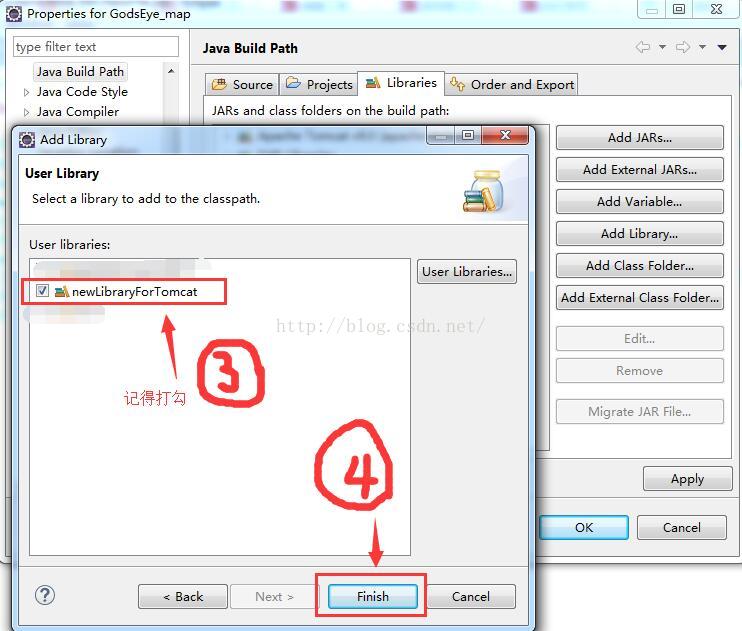
6)点击 OK 按钮。完成啦。
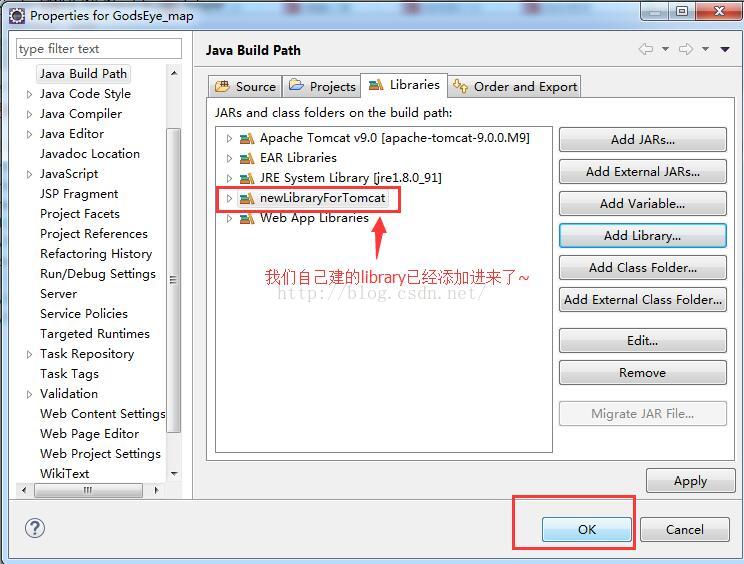
这时候再来看看我们的 jsp 文件,页面头部的报错已经消失了。

解决方案二
之前安装的 tomcat版本是 tomcat 9.0.0.M9。后来换了一个 tomcat 8,按照第二部分的解决方案,系统就自动地去 tomcat 的安装目录把 tomcat 的 lib 文件夹中的 *.jar 文件正确的添加进来了…… 对此我也表示疑惑。不知道自己是不是在安装 tomcat 9.0.0.M9 的时候出了问题。如果有了解的同学们……烦请指点我一下,不胜感激。
OVER
如何解决JSP页面顶端报错 The superclass "javax.servlet.http.HttpServlet" was not found on the Java Build Path的更多相关文章
- eclipse中web工程新建jsp文件报错:The superclass "javax.servlet.http.HttpServlet" was not found on the Java Build Path
web工程中新建jsp文件提示:The superclass "javax.servlet.http.HttpServlet" was not found on the Java ...
- 新建maven指定jdk版本-eclipse新建maven项目报错The superclass "javax.servlet.http.HttpServlet" was not found on the Java Build Path的解决方案
具体表现为: 使用Eclipse+Maven建立了一个Javaweb工程,JSP页面顶端出现“红色”的报错信息:The superclass "javax.servlet.http.Http ...
- 新建jsp报错“The superclass "javax.servlet.http.HttpServlet" was not found on the Java Build Path”
今天新建jsp文件时,就报错“Visual Page Editor has experimental support for Windows 64-bit”,然后刚好stackoverflow上面有这 ...
- [IDE - Eclipse] JSP报错:The superclass “javax.servlet.http.HttpServlet” was not found on the Java Build Path
是因为Eclipse的Web项目不自动引入相关jar包. Right Click on the Project ❯ Properties ❯ Project Facets. You would be ...
- 使用maven创建项目时报错The superclass "javax.servlet.http.HttpServlet" was not found on the Java Build Path
Description Resource Path Location Type The superclass "javax.servlet.http.HttpServlet" wa ...
- java web(jsp)-The superclass "javax.servlet.http.HttpServlet" was not found on the Java Build Path
在静态项目上新建 jsp文件的时候,报错:The superclass "javax.servlet.http.HttpServlet" was not found on the ...
- JSP报错:The superclass "javax.servlet.http.HttpServlet" was not found on the Java Build Path
今天使用Eclipse+Maven建立了一个Javaweb工程,并在eclipse中配置了Web容器Jboss eap 6.2.新建jsp页面,添加一个简单 的Java类.可是,JSP页面顶端出现“红 ...
- JavaWeb:报错信息The superclass "javax.servlet.http.HttpServlet" was not found on the Java Build Path
建立了一个Javaweb工程,并在eclipse中配置了Web容器Tomcat.新建的jsp页面,添加一个简单的Java类.可是,JSP页面顶端出现“红色”的报错信息:The superclass & ...
- Eclipse导入JavaWeb项目报错:The superclass "javax.servlet.http.HttpServlet" was not found on the Java Build Path
JavaWeb项目中写的JSP页面需要Web容器解析处理成HTML才能展示到前端浏览器,解析JSP需要Web容器.JSP页面顶端出现“红色”的报错信息:The superclass "jav ...
随机推荐
- #1 初识Python
前言 要说现在最时髦的编程语言是什么,那么一定是Python无疑了.让我们来一起来领略其风采吧! 一.Python介绍 Python的创始人为吉多·范罗苏姆(Guido van Rossum),被大家 ...
- Groovy学习笔记(1)读取CSV文件
本篇分享讲展示如何在Groovy中读取CSV文件. 我们要读取的CSV文件foo.csv的内容如下: Groovy代码如下: //import packages import java.i ...
- Java基础——正则表达式
一.什么是正则表达式 正则表达式,又称规则表达式.(英语:Regular Expression,在代码中常简写为regex.regexp或RE),计算机科学的一个概念.正则表通常被用来检索.替换那些符 ...
- 读书笔记 之《Thinking in Java》(对象、集合、异常)
一.前言 本来想看完书再整理下自己的笔记的,可是书才看了一半发现笔记有点多,有点乱,就先整理一份吧,顺便复习下前面的知识,之后的再补上. 真的感觉,看书是个好习惯啊,难怪人家说“书籍是人类进步的阶梯” ...
- Js调试中不得不知的Console
在js调试中,大部分的前端人员都是采用console.log()方法来打印出调试的数据,但是很多人都不知道console这个对象有很多很实在的方法,本文就来介绍一下这些方法的使用. 一.console ...
- Python知识点小记
类 设置类属性必须使用类对象,若使用实例对象设置,会重新创建一个和类属性同名的实例属性 类对象可调用 类方法&静态方法, 实例对象可调用 实例方法&类方法&静态方法; 类方法和 ...
- sql server: Graphs, Trees, Hierarchies and Recursive Queries
--------------------------------------------------------------------- -- Chapter 09 - Graphs, Trees, ...
- 【读书笔记】iOS-流式音频与Pandora Radio之路
复杂性是不可避免的,而且只会随时间增长,所以在增加特性时一定要为重构和代码简化留出时间.真正遇到问题这前先不要担心性能.iPhone非常强壮,你可能永远也不会遇到预想的性能问题. 能过互联网向一个设备 ...
- 我的Java之旅 第七课 JAVA WEB 会话管理
1.隐藏域 隐藏域其实不是Servlet/JSP的会话管理机制的内容,但它能实现简单的页面状态记录的效果. 2.Cookie Cookie类 setMaxAge() 设置有效期 ...
- 部署Redis(脚本安装)
部署Redis(脚本安装) #/bin/bash # DES:Redis Deploy # Author: will_xue # Email:linuxcto@aliyun.com # DATE : ...